Git-updater: Recommendations on updating plugins
I have a GitHub Plugin for WordPress successfully installed and active based on instructions by github-updater, but what is (are) the recommended approaches to update (or to pull) an existing plugin that has been installed already by github-updater? I'm looking over your documentation but can't find any specific steps.
Many thanks and I apologize in advance if I am overlooking on any of your instructions.
 blachawk
All 12 comments
If the plugin has the appropriate header it should be automatic.
Can you give me an example of a plugin and provide it’s headers?
 afragen
on 15 May 2018
afragen
on 15 May 2018
Sure thing, my IT Hub plugin can be viewed here. The only catch is that I just updated plugin to GitHub again after reading your instructions on adding the GitHub Plugin URI. (Sorry)
The header can be viewed here
In addition to your determination on an appropriate plugin header, If you also recommend me deleting the plugin from my WordPress site and getting it again now that the GitHub Plugin URI is available, I will do so.
blachawk
on 15 May 2018
On first glance the headers look OK but your version number doesn’t correspond to your release. This can cause an issue.
It is recommended to install plugins via GHU’s Install tab as it will correctly rename the directory. If downloaded and installed via Upload Plugin the directory is likely not correct and this can cause an inactivation the next time the plugin updates. This is because of the way GitHub downloads are formatted.
Have I answered your question?
afragen
on 15 May 2018
You can always use the branch switching in GHU to reinstall a plugin.
afragen
on 15 May 2018
Yes thank you very much. That has helped me out.
blachawk
on 15 May 2018
Great! Let me know if there’s anything else I can do.
afragen
on 15 May 2018
Good Morning @afragen I apologize for jumping to conclusions so soon on this request. I'm still having trouble with getting my plugin to automatically update when I push my changes to my remote repository.
Within my wordpress environment that my plugin is connected (screenshot below)
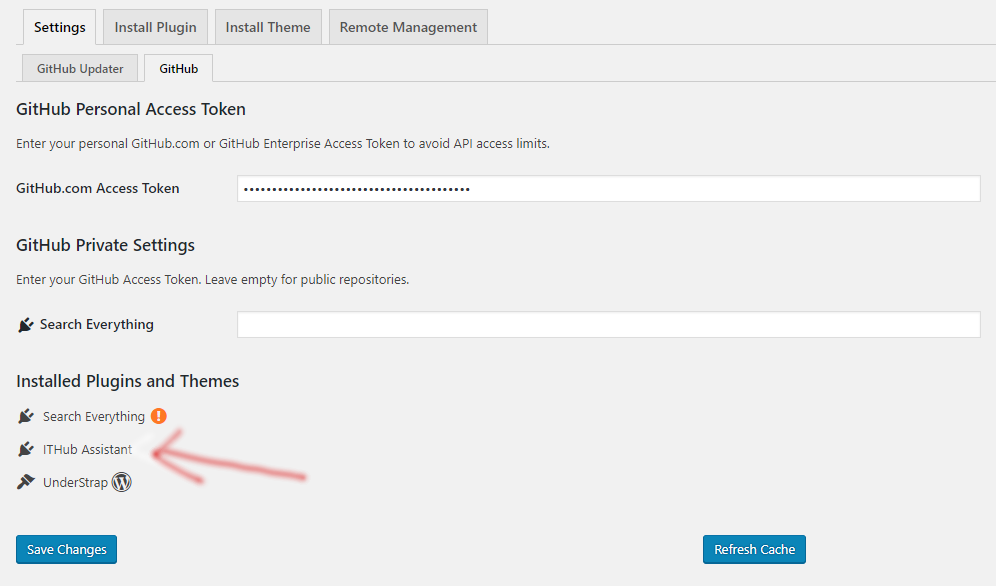
...And I am also using a token (which is probably unrelated). I also only have a single master branch.
Whenever I do a git push to my remote repository, my plugin on my development server is not automatically updating. Would you happen to know if there is anything more in your opinion that I should check based on my plugin header or repository settings?
Many thanks
blachawk
on 16 May 2018
I cache API requests for 12 hours. This can be overridden by using the Refresh Cache button.
The curious thing about the above image is that the GitHub Updater plugin is missing. Can you try using the branch switch to reinstall it?
Your plugin and repository setting appear correct.
afragen
on 16 May 2018
Yes you are correct. By enabling branch switching, I am now able to go my WordPress Plugins page, and re-click on my master branch to get it again.
But this is the message I get...
The update cannot be installed because we will be unable to copy some files. This is usually due to inconsistent file permissions. inc/assist_acf.php, inc/assist_attachments.php, inc/assist_editors.php, inc/assist_hooks.php, inc/assist_search.php, inc/enqueue_admin.php, inc/enqueue_front.php, inc/setup_menu_page.php, inc/setup_settings-options.php, inc/verify.php
So I did it again (while the plugin was deactivated) and it all worked. I believe I'm good now!
blachawk
on 16 May 2018
The above looks like a permissions issue on your server.
afragen
on 16 May 2018
yeah I will look into it and see, but I believe you have helped me reached my goal in this issue. Many thanks!
blachawk
on 16 May 2018
Related issues
 andruwa13
·
3Comments
andruwa13
·
3Comments
 klihelp
·
4Comments
klihelp
·
4Comments
 pnoeric
·
9Comments
pnoeric
·
9Comments
 warudin
·
7Comments
warudin
·
7Comments
 franzarmas
·
8Comments
franzarmas
·
8Comments