All 46 comments
There’s no reason it couldn’t work and I would be happy to help with a PR.
A quick look at the Gitea API would indicate all the necessary parts are present. Like Gogs, this is the only request I’ve ever had for integration and as such I can help, but it’s not a primary integration.
 afragen
on 18 Jan 2018
afragen
on 18 Jan 2018
I'll happily provide a pull request but I'm a bit overwhelmed. So what would be a good approach to add Gitea support?
- Add
src/GitHub_Updater/API/Gitea_API.phpsimilar toGitHub_API.phporGitlab_API.php - ...?
 marbetschar
on 22 Jan 2018
marbetschar
on 22 Jan 2018
@marbetschar I’m more than happy to help along the way. Especially as there are likely some other areas that I’ll need to edit. What I would like to see is src/GitHub_Updater/API/Gitea_API.php and yes it would likely be very similar to GitHub_API.php and GitLab_API.php.
When I get a chance I’ll add a branch to work from. Additionally it would be very helpful if you could enable me to have an account on your Gitea installation.
afragen
on 22 Jan 2018
I've sent you an invitation to a test instance.
marbetschar
on 22 Jan 2018
Is that the invite from Cloudron?
afragen
on 22 Jan 2018
exactly. cause Gitea runs on top of Cloudron there.
marbetschar
on 22 Jan 2018
OK, I’ll see what I can figure out there.
afragen
on 22 Jan 2018
How can we take the next in adding Gitea support?
marbetschar
on 21 Feb 2018
I have to apologize. My new day job has an hour plus commute and doesn’t allow me the same opportunity in front of my personal computer. Also some family issues have come up.
I haven’t forgotten.
afragen
on 21 Feb 2018
No worries, I absolutely understand. Maybe you can help by just pointing out the next steps and which plugin parts are involved and I'll try to get this done?
marbetschar
on 21 Feb 2018
@marbetschar I've updated the gitea branch with the current develop. I've made a number of fixes but still haven't signed on to Cloudtron to get an account.
Just to test before I create an account, do you have a test plugin and a read-only token you could send me for testing?
afragen
on 11 Mar 2018
@afragen
Gitea URL: https://dev.mandelkind.work
Gitea API Token: f7ec6678558c9d2cae26ebb5561f2fa91b883739
Repository via SSH: ssh://[email protected]:29418/marco/GitHubUpdaterTest.git
Repository via HTTPS: https://dev.mandelkind.work/marco/GitHubUpdaterTest.git
marbetschar
on 13 Mar 2018
Thanks. More bugs to fix now that I can proceed through the process. I’ll see what kind of progress I can make this weekend, but hoping to have something working and merge into develop.
afragen
on 13 Mar 2018
@marbetschar so I believe I have a correct download link but when I put it in a browser window I get the following login screen.
https://dev.mandelkind.work/marco/GitHubUpdaterTest/repository/archive.zip?ref=master&private_token=f7ec6678558c9d2cae26ebb5561f2fa91b883739


What should happen is the zip of the repository should download. Any thoughts?
afragen
on 14 Mar 2018
@afragen seems like you're forced to use the api endpoints in order to have the access token allow you to download the repo. Here's the endpoint I found which seems to work as expected:
https://dev.mandelkind.work/api/v1/repos/marco/GitHubUpdaterTest/archive/master.zip?access_token=f7ec6678558c9d2cae26ebb5561f2fa91b883739
Seen in the Swagger API configuration here:
https://github.com/go-gitea/gitea/blob/1a83581121a80c8deb8160e2d04905ab71768be3/public/swagger.v1.json#L997
marbetschar
on 14 Mar 2018
I've asked the Gitea folks to bring the api docs back up&running to make things easier:
https://github.com/go-gitea/gitea/issues/194#issuecomment-373328193
Seems like they are migrating to another cloud instance and therefore the usual source is not reachable for now.
marbetschar
on 15 Mar 2018
That is making it a bit difficult. I’ll create a login and see what I can do this weekend.
afragen
on 15 Mar 2018
So I have the remote install working but accessing the API to retrieve the raw file data doesn't work if the user isn't logged in. The response asks for a login.
curl "https://dev.mandelkind.work/afragen/test-gitea-plugin/raw/branch/master/test-gitea-plugin.php?access_token=2bdb2e6316050ef72d74627622b113a82d2db266"
The above works if I have been logged in. If I try a similar URI for your style.css I'm redirected to a login URL.
I'm stuck. I need a way to retrieve the raw file. FWIW that URI works when placed into a browser window if I've previously logged in to Gitea.
afragen
on 17 Mar 2018
Found the endpoint which is working without being logged in:
Have to digg a bit more to figure out how to pass the branch name.
marbetschar
on 17 Mar 2018
I'm making headway. BTW, your Gitea Theme URI should be
Gitea Theme URI: https://dev.mandelkind.work/marco/GitHubUpdaterTest
afragen
on 17 Mar 2018
Updated the Gitea Theme URI
marbetschar
on 17 Mar 2018
@afragen do you need to be able to query the branch at all? or does the provided endpoint do the job?
marbetschar
on 17 Mar 2018
@marbetschar I just pushed an update to the gitea branch. I think everything's working. 🤞
afragen
on 17 Mar 2018
@afragen do you need to be able to query the branch at all? or does the provided endpoint do the job?
Provided endpoint should do the job.
afragen
on 17 Mar 2018
@afragen awesome!! 😍 I‘ll give it a test drive today.
marbetschar
on 18 Mar 2018
Just uploaded GitHub Updater from the gitea branch to a test instance and installed my GitHubUpdaterTest Theme. But for some reason I can' set the Gitea Token from the UI because the elements do not show up. Any idea why?

marbetschar
on 18 Mar 2018
Update: I've installed the theme using the builtin WordPress Theme Upload. I now installed it again using the "Install Theme" in GitHub Updater and now the Gitea Tab shows up. Seems like there is some kind of error in detecting newly installed plugins or themes - don't know if this is related to the Gitea changes though.
marbetschar
on 18 Mar 2018
First off: I think we are quite there, thank you so much for your efforts on this!! I really appreciate. 👍
Here's what I've found, testing the whole process through. Hope this info is helpful to finalize the Gitea integration. From what I can tell GitHub Updater recognizes Updates in a Gitea Hosted Theme, but it seems there are some glitches left.
In the admin screen there are two fields for the token. A "Gitea Access Token" and a "Gitea Private Settings". Don't know what the difference is.

After I installed the Theme update, GitHub Updater still claims there's an update available but also shows the new version number which was installed:

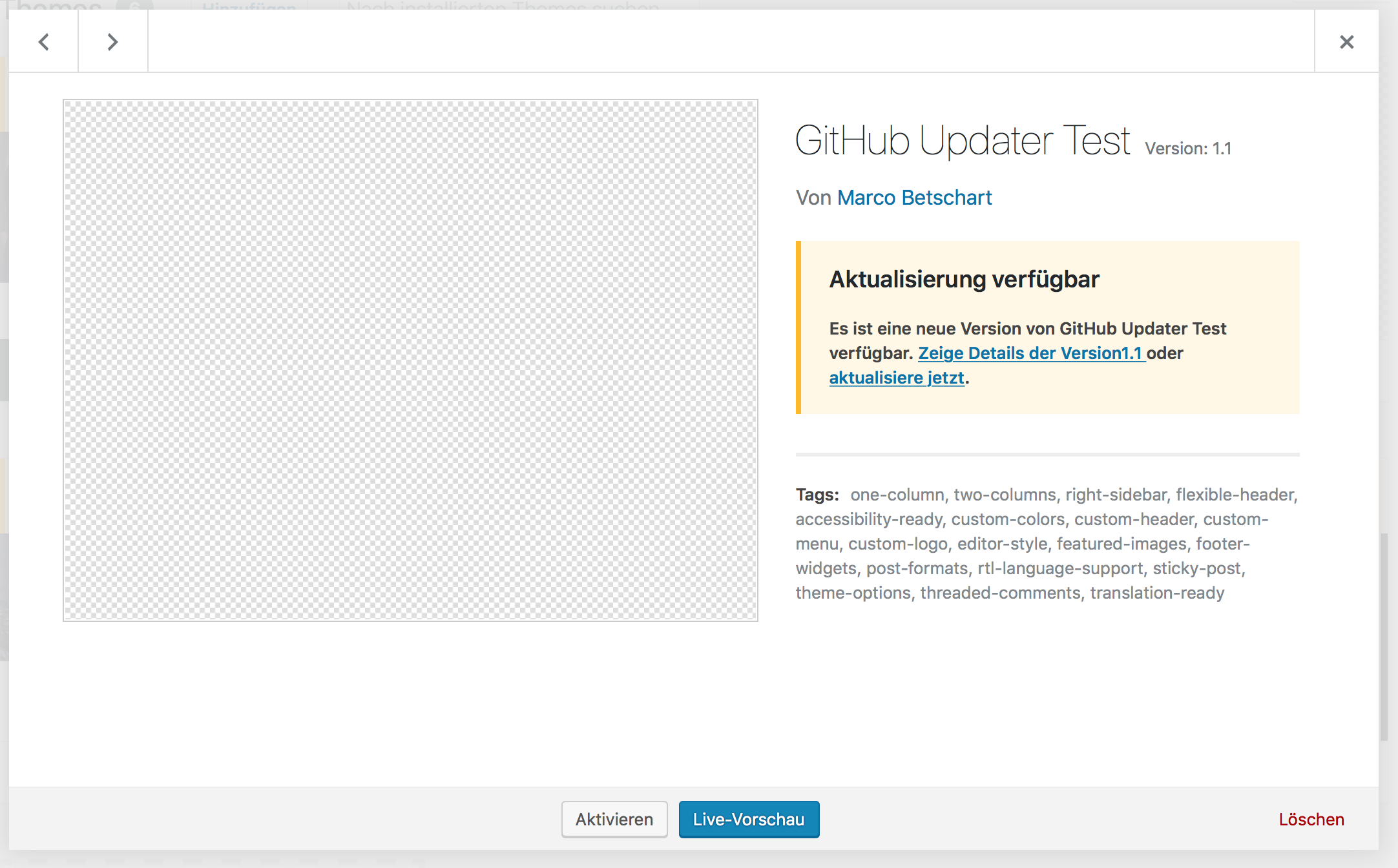
And if I edit the so-called-updated-theme using the WordPress editor, it shows me still the version 1.0:
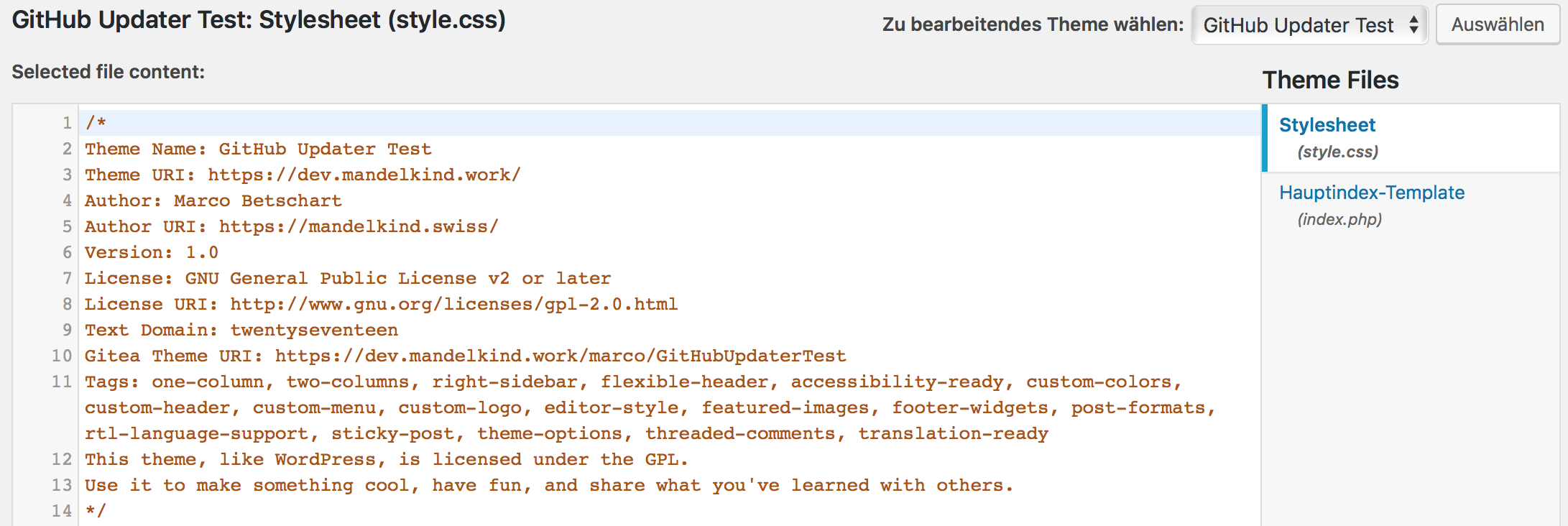
marbetschar
on 18 Mar 2018
It's possible you might be getting caught in some of my caching. If you select _Refresh Cache_ hopefully everything should look more normal. I cache the local plugin/theme headers for 30 minutes and the API calls for 12 hours. Using the refresh cache button clears both.
Themes are more picky than plugins. Sometimes if the theme isn't exactly named for the slug it doesn't show up in the list as WP has issues "seeing" it.
I too have seen where "updates" show for the same version. I can't really explain it but it does go away and updating does update/reinstall to the correct version.
The 2 areas for access tokens are because one allows for a site-wide token and one allows for a token associated with each repository. This allows you to have repositories from many users who only have to give you an access token. The access token only needs to be read-only. Also, once a site-wide token is set you don't need to add the token during the remote install process. If all your repos are from your account you can safely delete the individual tokens.
afragen
on 18 Mar 2018
I just pushed an update to fix some of the issues I discovered to show all the appropriate parts of the Gitea Settings page.
afragen
on 18 Mar 2018
@afragen in terms of the tokens: I was aware of the difference between the two tokens, was just confused by their different naming. One is an "Access Token" the other one has something in common with "Private Settings". This felt like it may be used for something else.
marbetschar
on 18 Mar 2018
If you have a better idea for naming now is the time. 😉
Private settings are for repos with tokens and are required for private repos that aren't in the user's own Gitea directory. Not sure I'm explaining it well. Sorry.
afragen
on 18 Mar 2018
What do you think about this naming?

As with GitLab this section can be a little confusing as even public repositories require an access token to read from the API.
afragen
on 18 Mar 2018
@afragen your changes are in the gitea branch and ready for testing, right?
marbetschar
on 19 Mar 2018
Absolutely, I need you to let me know what doesn’t work. If there are no big issues I’ll merge with develop and likely release a week or so after.
afragen
on 19 Mar 2018
HI @afragen,
In my tests I just stumbled across the following error:
Setup Theme...
Error: Parameter errors:
 unknown --gitea parameter
Did you mean '--gitlab'?
I got a setup script on my end which does the initial plugin/theme installation and configuration. This script uses GitHub Updater CLI commands to setup a custom theme, which now fails with the previous error if the theme is hosted on Gitea.
This is the command I'm trying to execute:
wp theme install-git https://url/to/my/theme --gitea
Oops, I thought I got all the wp-cli stuff fixed. I tested the update but missed the install. Thanks.
How’s it working for you otherwise?
afragen
on 23 Mar 2018
I've not yet had the chance to fully test the new branch, since we got quite a bunch of repos on our end to migrate from GitLab to Gitea. From what I've tested so far, GitHub Updater is able to successfully update installed themes.
That's why my approach as of now is to test the full migration path from start to end in order to ensure a smooth movement towards Gitea without breaking existing sites.
It'll be awesome if you can fix the install error. I'll keep on testing then 👍
marbetschar
on 23 Mar 2018
So I'm using the latest gitea branch and here's my test.
root@06fbed83f729:/# wp theme install-git https://dev.mandelkind.work/marco/GitHubUpdaterTest --gitea --token=f7ec6678558c9d2cae26ebb5561f2fa91b883739
Success: Theme 'GitHubUpdaterTest' installed.
It seems to work.
This is what I get for a public repo, though GHU may still have the token cached.
root@06fbed83f729:/# wp plugin install-git https://dev.mandelkind.work/afragen/test-gitea-plugin --gitea
Success: Plugin 'test-gitea-plugin' installed.
You might try adding the token to each command.
afragen
on 23 Mar 2018
So I've removed the prior theme and refreshed the cache and now I get an error.
Downloading installation package from https://dev.mandelkind.work/api/v1/repos/marco/GitHubUpdaterTest/archive/master.zip?access_token=f7ec6678558c9d2cae26ebb5561f2fa91b883739…

Download failed. cURL error 60: SSL certificate problem: unable to get local issuer certificate
I think there's an issue with SSL cert at dev.mandelkind.work
afragen
on 23 Mar 2018
It seems that the site is loading again and I get the following.
root@06fbed83f729:/# wp theme install-git https://dev.mandelkind.work/marco/GitHubUpdaterTest --gitea --token=f7ec6678558c9d2cae26ebb5561f2fa91b883739
Success: Theme 'GitHubUpdaterTest' installed.
@afragen oh men, this one totally goes on me: I forgot to update my script to use the Gitea branch. install-git --gitea is working fine now for the theme.
I keep on with testing 👍
marbetschar
on 24 Mar 2018
my tests were completely successful 🎉 - apart from some caching issues, were GitHub Updater shows an already installed update. But this disappears after some time.
That said, I encountered this kind of issue earlier already so my guess is, that this is not in any way related to the Gitea changes.
Can't wait to see the Gitea changes in the official release! 🎉👍🏼🎉
marbetschar
on 24 Mar 2018
Merged into develop. https://github.com/afragen/github-updater/commit/f7c900d9fdb3fe65331dcf3cdff6da006d3398ee
afragen
on 24 Mar 2018
@afragen any eta of a new stable release containing Gitea support?
marbetschar
on 3 Apr 2018
develop is stable to use but I’ll merge to master by the end of the week. Is it still working for you?
afragen
on 3 Apr 2018
Related issues
 PthPndr
·
11Comments
PthPndr
·
11Comments
 picasso
·
9Comments
picasso
·
9Comments
 soderlind
·
10Comments
soderlind
·
10Comments
 uturnr
·
14Comments
uturnr
·
14Comments
 NoWorries
·
5Comments
NoWorries
·
5Comments
Most helpful comment
What do you think about this naming?
As with GitLab this section can be a little confusing as even public repositories require an access token to read from the API.