Git-point: Strange behavior after logout
After clicking on "Sign out", a browser opens with a suggestion to exit GitHub, but why? For example, do I just want to exit the application, not from the GitHub account?
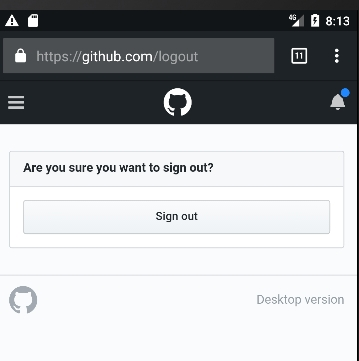
Just in that case, if I do not leave the account, ie. I just close the browser with a suggestion to sign out, and then again I log into the application, I will see the following:
| Events | Profile
| - | - |
|  |
| 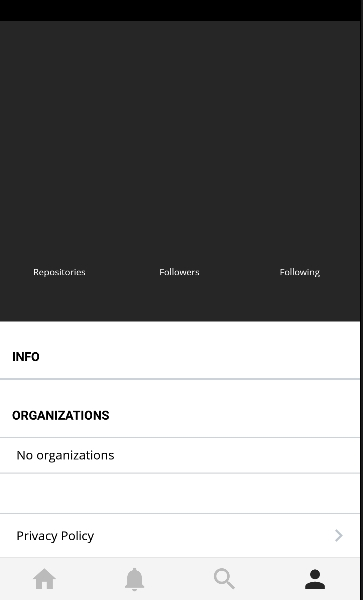
Although I should see the login screen? This is due to the fact that I did not leave the account on GitHub? It's strange, I think we need to consider this case, can this be fixed?
 lex111
All 12 comments
After clicking on "Sign out", a browser opens with a suggestion to exit GitHub, but why?
If you don't sign out from the browser, when you sign in again GitHub will use your caches credentials. That means you wouldn't be able to sign in as a different user. One idea for fixing this is clearing the cache/cookies in the WebView, but I'm not sure how that can be done.
 andrewda
on 29 Jul 2017
andrewda
on 29 Jul 2017
I know - it is strange and thanks for logging this as I was hoping to keep the discussion going.
So authentication in the app uses the OAuth web flow. User clicks sign in, is directed to GitHub on the browser where they need to type their user name and password and once that completes are redirected back to the app with an access token.
Now the first thing @RolfKoenders and I tried was when the user logs out, we just clear the access token from the persisted store and the user is taken back to the login screen which is perfect. However we noticed that when the user clicks sign in again - they're taken to the browser but because Safari (or Chrome/FIrefox if you're on Android) has the user's authentication information _cached_ so they don't have type their username and password again. This can be annoying if the user is trying to login with different credentials.
So as a workaround, this is what we did when the user clicks Log Out:
- Clear the access token from the persisted Redux store
- Open up the browser asking the user to sign out from there. When they do this, click
Doneand try logging in again - they'll have to reenter their username and password again which is what we want
 housseindjirdeh
on 29 Jul 2017
housseindjirdeh
on 29 Jul 2017
Yep just as @andrewda mentioned, if there's a way to clear cache/cookies that would be perfect. We're using React Native Safari View which is nicer than having an embedded WebView in the app _but_ I really don't know if it's possible to clear cookies/cache from within the app. And similarly - we'll need to find a solution for Android as well.
housseindjirdeh
on 29 Jul 2017
@andrewda @housseindjirdeh thanks for the detailed explanation! A difficult problem, but we need to look for solutions.
lex111
on 29 Jul 2017
Oh, the unpleasant thing I have now is: I sign out the application, got out also from the profile in the browser on GitHub, and when I try to go back to the application, it fails :(
At the same time, there was no logout from the application, i.e. the event screen is displayed, not the login screen.
I had to reinstall the application, it's annoying. However, in the emulator, there is no fall, everything works. Is it only in Android, or is it also in the iOS app?
lex111
on 4 Aug 2017
ping @housseindjirdeh
lex111
on 5 Aug 2017
Hmmmmmmm interesting. I've never noticed this in iOS but I actually haven't tried signing out on Android yet :O
Will give it a shot tomorrow in the emulator and let you know. _Definitely_ something we ned to correct if it's reproducible. Apologies you had to end up uninstalling the app and reinstalling as a workaround 😞
housseindjirdeh
on 6 Aug 2017
Just in the emulator there is no such :confused:
It is necessary to check on the real device, maybe this is just me such a problem.
lex111
on 6 Aug 2017
Oh really eh? Okay unfortunately I don't have the Android device I was using earlier today but should have it for testing in a few days. Will run through the sign out flow then but in the meantime - will appreciate if anyone with an Android device can try and reproduce this.
housseindjirdeh
on 6 Aug 2017
@housseindjirdeh I can try it maybe on my friends nexus 5x tomorrow to see what happens. Will let you know!
 RolfKoenders
on 6 Aug 2017
RolfKoenders
on 6 Aug 2017
Assigning this to me if no one objects. I think that #323 could help a lot here :)
 machour
on 13 Sep 2017
machour
on 13 Sep 2017
This is fixed by #323
machour
on 24 Sep 2017
Related issues
housseindjirdeh
·
5Comments
 cheshire137
·
3Comments
cheshire137
·
3Comments
 JayBizzle
·
4Comments
JayBizzle
·
4Comments
 Antoine38660
·
3Comments
machour
·
3Comments
Antoine38660
·
3Comments
machour
·
3Comments
Most helpful comment
@andrewda @housseindjirdeh thanks for the detailed explanation! A difficult problem, but we need to look for solutions.