Git-point: I have some organizations, but not appeared
There are no any organizations on ORGANIZATIONS section on my profile page. But I have some orgs.
It seems a bug? right?
 mingrammer
All 15 comments
I can reproduce this issue on my phone.
It seems like that failed in fetchAuthUserOrgs action.
Actually, I called the https://api.github.com/user/orgs API directly with the Authorization in header, it also responded me the empty array only.
Anyways, thanks for reporting this issue, and I'm still trying to figure out what happened.
 patw0929
on 17 Jul 2017
patw0929
on 17 Jul 2017
I just noticed this last night (funnily enough: the app on my device loads all my organizations just fine but when I run the app in the simulator now I don't see the GitPoint org 🤔 )
Thanks for opening this @mingrammer, weirdly enough you're right @patw0929 the API endpoint seems to be returning 2/3 of my organizations when I hit it directly and I'm not sure why either. Could be something on the server-side here.
 housseindjirdeh
on 17 Jul 2017
housseindjirdeh
on 17 Jul 2017
Guys, I guessed the secret! :satisfied:
- Go to this page https://github.com/settings/applications
- Click here:

- And we see this:
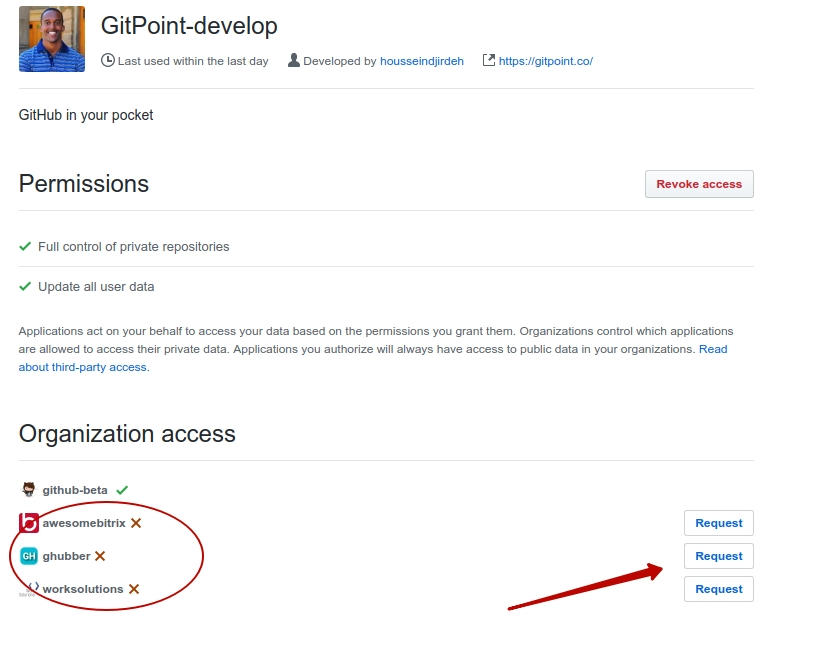
That's all. So that the ogranization is visible, you need to request permission! That's the whole secret. I only see the github-beta organization so only the request was made (although it seems it was originally, it does not matter).
Therefore, I propose to use fetchUserOrgs (instead of fetchAuthUserOrgs), which returns all the organizations regardless of the request. How are you? Will not we ask users to request access from all organizations? :smile:
P.S. With pleasure, I will fix this in PR.
 lex111
on 17 Jul 2017
lex111
on 17 Jul 2017
@lex111 You're right. Once I've approved the some organizations I own to, they appears on git-point app. As you said, they should change the method for fetching the all orgs from an user even without any requesting.
mingrammer
on 17 Jul 2017
@lex111 you're a wizard ✨ Thank you so much for finding out what it was so fast. That explains why I was seeing the organization with the GitPoint Oauth application in my device but not with GitPoint-Develop when booting the simulator :)
I think that would work perfectly - but my only concern is setting the organization visibility to private.

From the looks of it, that endpoint only returns public memberships 😞 . Give it a shot nonetheless if you like and let me know if you do: but I think it may be a necessary workaround to give all your organizations access to GitPoint.
Please let me know what you folks think ❤️
housseindjirdeh
on 17 Jul 2017
Also I notice that some organizations seemed to have automatically synced for me but others haven't and this may be an organization level security measure (maybe some organizations need you to first request access from them before integrating with a third party API?)
housseindjirdeh
on 17 Jul 2017
From the looks of it, that endpoint only returns public memberships
@housseindjirdeh private organizations will not be visible, if you do not set them public visibility (if we get them through fetchUserOrgs), do you mean it?
Also I notice that some organizations seemed to have automatically synced for me but others haven't and this may be an organization level security measure (maybe some organizations need you to first request access from them before integrating with a third party API?)
Perhaps I do not know for sure. Although it seems so automatically happened to github-beta organization.
lex111
on 17 Jul 2017
@housseindjirdeh
Also I notice that some organizations seemed to have automatically synced for me but others haven't and this may be an organization level security measure (maybe some organizations need you to first request access from them before integrating with a third party API?)
I believe what you're looking for is the third-party access setting which can be found at an organization's Settings > Third-party access. If access is restricted (I believe it is by default) then members have to request access. Administrators will always be allowed to grant access to any third-party app. If access is unrestricted, third-party access is automatically given to all apps that request it (i.e. no need to click "Grant Access"). So, for example, in @lex111's case, the github-beta organization has unrestricted third-party access.
(p.s. @lex111 how do I get in GitHub-Beta? :P)
 andrewda
on 17 Jul 2017
andrewda
on 17 Jul 2017
@andrewda thanks a million, it's all making sense now
@lex111 yep exactly - even if I set an organization of mine as private visibility, I would still like to see it in my profile page in the app (although other folks cannot see it) Does that make sense?
So with that specifically I don't see how we can work around the fact that users _may have_ to request access for some of their organizations based on their third party access. But please let me know if I'm wrong!
housseindjirdeh
on 17 Jul 2017
@housseindjirdeh now I understand, thanks for the clarification. At least I would list all public organizations to solve the current problem. Also, few will allow such a request:
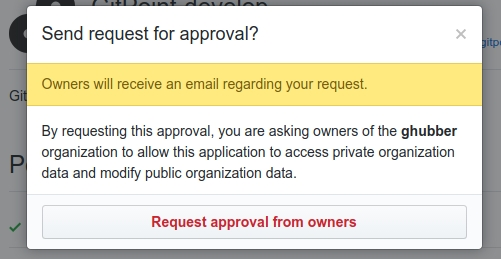
We can make two requests (fetchUserOrgs + fetchAuthUserOrgs), and then merge the organizations, then we seem to have a full list of organizations, but is it really necessary? Although if it concerns the page of a personal account (auth), can it be left as it is then? It's hard for me to decide this.
@andrewda earlier you could get through this link, now apparently not :/
lex111
on 17 Jul 2017
Yeah I was thinking the same thing - the thing is third party is restricted by default so I can see a lot of organizations requiring a request for approval.
Agreed we _could_ make two requests but again that's hoping that organization that requires third party approval is public (otherwise it still won't work).
What I think we can do is have a little message under the organizations section list in the authenticated profile screen with something like "Can't see all your organizations? You may have to request approval for them" with the bolded text linking them to https://github.com/settings/applications. What do you think @lex111 @mingrammer @andrewda? I personally think that's an acceptable workaround.
housseindjirdeh
on 17 Jul 2017
There are definitely some organizations that (understandably) don't want to have lots of enabled third-party apps for privacy reasons. So I don't think it's an all-encompassing solution, but it would work for most orgs.
I actually think the best way to go about this, though, is to make two requests (as @lex111 pointed out). The first request (getting all of your public organizations) would be what others see when visiting your profile and doesn't require any manual approval from the user. Then, if accessing your own profile, make a second OAuth request to get the remaining organizations with private membership. That would maximize the number of shown repositories with the least amount of effort from the user.
I also like your idea of having a "Can't see all your organizations" message. That would clear up any remaining confusion :smiley:
andrewda
on 17 Jul 2017
@housseindjirdeh @andrewda I agree with all of you.
But tell me please how to make two requests better? Do fetchAuthUserOrgs send a request to get all the public organization, and after in then promise merge the organizations with private membership and remove the duplicates?
lex111
on 18 Jul 2017
Fair enough that approach works with me. @lex111 yep so we have fetchUserOrgs that does what it should do. In fetchAuthUserOrgs, you can try using Promise.all to hit both endpoints, merge the two results removing duplicates (combination of Set and .map maybe?). This way the completion event will only dispatch after both calls are finished.
housseindjirdeh
on 18 Jul 2017
@housseindjirdeh thank you, I did, but it did not work out through Set, although the solution is probably not very good, I'll be glad if you write how it can be improved. There was one additional dependency, is it very bad?
lex111
on 18 Jul 2017
Related issues
housseindjirdeh
·
3Comments
 TautFlorian
·
4Comments
TautFlorian
·
4Comments
 JayBizzle
·
4Comments
JayBizzle
·
4Comments
 kamasheto
·
3Comments
housseindjirdeh
·
5Comments
kamasheto
·
3Comments
housseindjirdeh
·
5Comments
Most helpful comment
@housseindjirdeh
I believe what you're looking for is the third-party access setting which can be found at an organization's
Settings > Third-party access. If access is restricted (I believe it is by default) then members have to request access. Administrators will always be allowed to grant access to any third-party app. If access is unrestricted, third-party access is automatically given to all apps that request it (i.e. no need to click "Grant Access"). So, for example, in @lex111's case, thegithub-betaorganization has unrestricted third-party access.(p.s. @lex111 how do I get in GitHub-Beta? :P)