Git-credential-manager-for-windows: Popup asking for credentials
How can I get rid of this popup that shows every 15-45 seconds asking for my github credentials? Giving the credentials to this popup does not stop it from coming back.
 JohanTh
All 69 comments
@JohanTh that doesn't sound right. To prevent the dialog use git config --global credential.modalPrompt false, that'll drive the queries to the console.
There will remain, however, the fact that your credentials are not being cached correctly. To find out what is happening there, I recommend adding the following environment variables:
setx GIT_TRACE %userprofile%\git.log
setx GCM_TRACE %userprofile%\git.log
That'll log Git and Git Credential Manager events to the file at %userprofile%\git.log. You can then share the contents of that file and I can help you parse it for meaningful entries which help explain what is happening.
 whoisj
on 5 May 2017
whoisj
on 5 May 2017
Why does this popup even exist? What use-case is there for some focus-stealing modal incessantly nagging you while they're trying to work?
 joshnoe
on 10 May 2017
joshnoe
on 10 May 2017
What use-case is there for some focus-stealing modal incessantly nagging you while they're trying to work?
@joshnoe my gut feeling is some tool doing background work. We need more information to understand this behaviour - see #421 for an example of this.
 shiftkey
on 10 May 2017
shiftkey
on 10 May 2017
Why does this popup even exist? What use-case is there for some focus-stealing modal incessantly nagging you while they're trying to work?
The dialog appears in response to some application (likely git.exe) asking for credentials. The query format isn't complicated, but it also is fairly Git specific - so it's unlikely any thing else is invoking the dialog.
Why the dialog instead of asking at the command line? Good question! Well, I used to default to asking at the command line, but user feedback was the majority of users preferred to be asked via a dialog. Bowing to customer requests, I agreed and switched the default to the dialog - you can still have the GCM prompt you via command line if you set the correct Git config values and provide a TTY.
It does seem like you (@joshnoe) have got some process performing background Git based network operations in the background. Recently VS Code has been causing headaches for people with its rolling, background git-fetch nonsense. I recommend that you narrow down what is running git-fetch in a loop and then we can look at stopping the "focus-stealing modal incessantly nagging" thing.
whoisj
on 10 May 2017
I'm having a similar issue. GCM is failing to store the credentials, likely due to the credentials not validating. I believe this is caused by GCM not allowing for HTTP protocol and forcing HTTPS. We have an internal code manager server that only uses HTTP, however GCM is forcing it to HTTPS which is refused by the remote. As far as I can tell, there is no configuration option to change this behavior on a per-remote/domain basis.
 AaronZurawski
on 11 May 2017
AaronZurawski
on 11 May 2017
@AaronZurawski can you provide a trace so that I can see where this is happening?
As a note, use of basic authentication over HTTP is very dangerous - all credentials are sent in the clear, and there's no host validation allowing for very difficult to detect man-in-the-middle attacks.
whoisj
on 11 May 2017
@whoisj Yes, I'm aware of the security concerns with HTTP. This is a legacy internal-only server.
Trace can be found here: https://gist.github.com/AaronZurawski/cc494020e8fed8a8a13282e2dd7f2202
AaronZurawski
on 12 May 2017
Ah! GCM v1.8.1 - I do believe the HTTP->HTTPS issue might have been fixed in the v1.9.x series. I'd recommend retrying with that. I'll also make a point of setting up a test to validate that we do not change protocols mid-stream like that as well - unless the authority requires it (like GitHub, VSTS, and BitBucket do).
whoisj
on 12 May 2017
I was under the understanding that SourceTree would use the version of GCM that I had installed, however it appears that Atlassian has bundled a custom version that's based off of 1.8.1.
AaronZurawski
on 12 May 2017
I was under the understanding that SourceTree would use the version of GCM that I had installed, however it appears that Atlassian has bundled a custom version that's based off of 1.8.1.
@mminns / @foda is there a path for users to upgrade the version of the GCM SourceTree consumes?
whoisj
on 12 May 2017
In my case, SourceTree's (v2.0.20.1) userhosts file (in C:\Users\usernameAppData\LocalAtlassian\SourceTree) contained an entry (username, server address) to a remote we no longer used. Removing the dead entry stopped the dialog from reappearing over and over again.
 bobbytait
on 12 May 2017
bobbytait
on 12 May 2017
Similar to bobbytait's fix, mine was to remove a block of JSON from C:\Users\usernameAppData\LocalAtlassian\SourceTree\accounts.json
Specifically I had 2 sets of authentication credentials, the older one being a username based on a traditional short word, and the newer having a username based on an email address.
Old:
"BaseUrl": "https://bitbucket.org/",
"Protocol": "HTTPS"
New:
"BaseUrl": "https://id.atlassian.com/"
(no protocol mentioned)
I removed the old block of JSON and set the following:
"IsDefault": true
...for the user I'm keeping.
Perhaps simply removing entries in "userhosts" stops SourceTree from hunting for them, so that might still be the better way. But thought it worth mentioning that cleaning up the "accounts.json" seems to be a related solution.
 kdallas
on 9 Jun 2017
kdallas
on 9 Jun 2017
Happens constantly with Visual Studio code. Certainly not every 45 seconds, maybe once every hour or two for me.
 JeffJustJeff
on 9 Jun 2017
JeffJustJeff
on 9 Jun 2017
Can you check if the git remote url is using HTTP or HTTPS protocol?
Run git remote -v to see it.
 chai-jay
on 28 Jun 2017
chai-jay
on 28 Jun 2017
Apologies for the late response.
With respect to SourceTree. We will be replacing the forked 1.8.1 GCM in SourceTree with the latest 1.10.1 in an upcoming release, no Bitbucket support is included.
However in the meantime, SourceTree relies on its forked GCM being checked after the default version being used by the git install. So if you are using SourceTree with a System Git install, e.g. in c:\program files\ etc then simply installing the latest GCM should work as it will update the default GCM in the git install and that GCM will be queried first
 mminns
on 29 Jun 2017
mminns
on 29 Jun 2017
@JeffJustJeff VS Code indeed. Are they aware of this?
 godrose
on 3 Jul 2017
godrose
on 3 Jul 2017
This just started for me totally out of the blue - I'm not even aware that I updated anything (neither VS2017 nor SourceTree, to name the obvious suspects).
 hardcodet
on 7 Jul 2017
hardcodet
on 7 Jul 2017
I am facing this issue also, and can't seem to find a way around it.
 bot101
on 8 Jul 2017
bot101
on 8 Jul 2017
Out of interest, who with this problem is using the latest Windows 10 (v1703)? And was it an issue prior to the Creators Update? For my part, I don't recall having the issue in the previous version, although I can't be 100% certain since so many of these updates are incremental and unnoticed.
kdallas
on 10 Jul 2017
Can I ask whether the problems people are seeing are with Bitbucket, GitHub or a mixture and do you have a single account per host or are you using multiple accounts?
mminns
on 10 Jul 2017
@kdallas I'm using Windows 10 Enterprise edition Version 1607 (OS Build 14303.1358).
@mminns I'm seeing the issue when connecting to a repo on Stash. Before I connected to the Stash repo, I had existing Github credentials in my git config.
chai-jay
on 10 Jul 2017
@mminns One account at Bitbucket being prompted over and over again by VS Code (but Sourcetree is also installed, but not running right now).
 janpio
on 10 Jul 2017
janpio
on 10 Jul 2017
@mminns, I have bitbucket credentials in mine. Always asking me to log into bitbucket.
bot101
on 10 Jul 2017
Same issue here, I have Visual Studio Code installed.
 adison
on 13 Jul 2017
adison
on 13 Jul 2017
There seems to be a problem when authenticating Bitbucket by entering the email instead of the username.
The Bitbucket credentials dialog shown by GCM (in my case, launched by VSCode) asks for either username or email. Authenticating with email causes a crash in GCM, and makes the popup reappear every few minutes. Github may be the same, I haven't tried. Entering the wrong credentials fails as expected. Authenticating with username works fine.
This is an extract from my log file. Note that the authentication itself succeeded and the problem happened afterwards:
11:25:05.531648 run-command.c:369       trace: run_command: 'git credential-manager get'
11:25:05.564888 git.c:594               trace: exec: 'git-credential-manager' 'get'
11:25:05.564888 run-command.c:369       trace: run_command: 'git-credential-manager' 'get'
11:25:05.603016 ...\Common.cs:490       trace: [Main] git-credential-manager (v1.10.1) 'get'
11:25:05.660697 ...\Where.cs:232        trace: [FindGitInstallations] found 1 Git installation(s).
11:25:05.664607 ...Configuration.cs:405 trace: [LoadGitConfiguration] git All config read, 34 entries.
11:25:05.664607 ...\Where.cs:232        trace: [FindGitInstallations] found 1 Git installation(s).
11:25:05.665584 ...Configuration.cs:405 trace: [LoadGitConfiguration] git All config read, 34 entries.
11:25:05.683182 ...\Common.cs:74        trace: [CreateAuthentication] detecting authority type for 'https://bitbucket.org/'.
11:25:05.691003 ...uthentication.cs:139 trace: [GetAuthentication] not github.com, authentication creation aborted.
11:25:05.691981 ...uthentication.cs:260 trace: [GetAuthentication] authentication for Bitbucket created
11:25:05.691981 ...\Common.cs:150       trace: [CreateAuthentication] authority for 'https://bitbucket.org/'  is Bitbucket
11:25:05.740863 ...icationPrompts.cs:85 trace: [CredentialModalPrompt] prompting user for credentials.
11:25:29.935853 ...\Authority.cs:105    trace: [AcquireToken] server responded with OK.
11:25:29.935853 ...\Authority.cs:117    trace: [AcquireToken] authentication success: new password token created.
11:25:29.936830 ...uthentication.cs:300 trace: [InteractiveLogon] token acquisition succeeded
11:25:29.938786 ...uthentication.cs:229 trace: [SetCredentials] [email protected] at https://bitbucket.org/
11:25:29.950517 ...\Program.cs:422      trace: [Run] System.UriFormatException: actualUrl
   at Microsoft.Alm.Authentication.TargetUri..ctor(String actualUrl, String queryUrl, String proxyUrl)
   at Microsoft.Alm.Authentication.TargetUri.GetPerUserTargetUri(String username)
   at Atlassian.Bitbucket.Authentication.Authentication.SetCredentials(TargetUri targetUri, Credential credentials, String username)
   at Atlassian.Bitbucket.Authentication.Authentication.<InteractiveLogon>d__28.MoveNext()
--- End of stack trace from previous location where exception was thrown ---
   at System.Runtime.ExceptionServices.ExceptionDispatchInfo.Throw()
   at System.Runtime.CompilerServices.TaskAwaiter.HandleNonSuccessAndDebuggerNotification(Task task)
   at Atlassian.Bitbucket.Authentication.Authentication.<InteractiveLogon>d__27.MoveNext()
--- End of stack trace from previous location where exception was thrown ---
   at System.Runtime.ExceptionServices.ExceptionDispatchInfo.Throw()
   at System.Runtime.CompilerServices.TaskAwaiter.HandleNonSuccessAndDebuggerNotification(Task task)
   at Microsoft.Alm.Cli.CommonFunctions.<>c__DisplayClass9_5.<<QueryCredentials>b__5>d.MoveNext()
11:25:29.950517 ...\Common.cs:458       trace: [LogEvent] System.UriFormatException: actualUrl
   at Microsoft.Alm.Authentication.TargetUri..ctor(String actualUrl, String queryUrl, String proxyUrl)
   at Microsoft.Alm.Authentication.TargetUri.GetPerUserTargetUri(String username)
   at Atlassian.Bitbucket.Authentication.Authentication.SetCredentials(TargetUri targetUri, Credential credentials, String username)
   at Atlassian.Bitbucket.Authentication.Authentication.<InteractiveLogon>d__28.MoveNext()
--- End of stack trace from previous location where exception was thrown ---
   at System.Runtime.ExceptionServices.ExceptionDispatchInfo.Throw()
   at System.Runtime.CompilerServices.TaskAwaiter.HandleNonSuccessAndDebuggerNotification(Task task)
   at Atlassian.Bitbucket.Authentication.Authentication.<InteractiveLogon>d__27.MoveNext()
--- End of stack trace from previous location where exception was thrown ---
   at System.Runtime.ExceptionServices.ExceptionDispatchInfo.Throw()
   at System.Runtime.CompilerServices.TaskAwaiter.HandleNonSuccessAndDebuggerNotification(Task task)
   at Microsoft.Alm.Cli.CommonFunctions.<>c__DisplayClass9_5.<<QueryCredentials>b__5>d.MoveNext()
11:25:29.951495 ...\Program.cs:422      trace: [Run] fatal: UriFormatException encountered.
   actualUrl
11:25:29.986690 run-command.c:369       trace: run_command: 'c:\Program Files (x86)\Microsoft VS Code\resources\app\extensions\git\out\askpass.sh' 'Username for '\''https://bitbucket.org'\'': '
11:25:30.219368 run-command.c:369       trace: run_command: 'c:\Program Files (x86)\Microsoft VS Code\resources\app\extensions\git\out\askpass.sh' 'Password for '\''https://bitbucket.org'\'': '
11:25:30.574266 run-command.c:369       trace: run_command: 'git credential-manager erase'
11:25:30.615313 git.c:594               trace: exec: 'git-credential-manager' 'erase'
11:25:30.615313 run-command.c:369       trace: run_command: 'git-credential-manager' 'erase'
11:25:30.645639 ...\Common.cs:490       trace: [Main] git-credential-manager (v1.10.1) 'erase'
11:25:30.702323 ...\Where.cs:232        trace: [FindGitInstallations] found 1 Git installation(s).
11:25:30.706234 ...Configuration.cs:405 trace: [LoadGitConfiguration] git All config read, 34 entries.
11:25:30.707211 ...\Where.cs:232        trace: [FindGitInstallations] found 1 Git installation(s).
11:25:30.707211 ...Configuration.cs:405 trace: [LoadGitConfiguration] git All config read, 34 entries.
11:25:30.722854 ...\Common.cs:74        trace: [CreateAuthentication] detecting authority type for 'https://bitbucket.org/'.
11:25:30.729697 ...uthentication.cs:139 trace: [GetAuthentication] not github.com, authentication creation aborted.
11:25:30.730675 ...uthentication.cs:260 trace: [GetAuthentication] authentication for Bitbucket created
11:25:30.730675 ...\Common.cs:150       trace: [CreateAuthentication] authority for 'https://bitbucket.org/'  is Bitbucket
11:25:30.730675 ...\Common.cs:207       trace: [DeleteCredentials] deleting Bitbucket credentials for 'https://bitbucket.org/'.
11:25:30.732630 ...Authentication.cs:90 trace: [DeleteCredentials] Deleting Bitbucket Credentials for https://bitbucket.org/
 TheJare
on 13 Jul 2017
TheJare
on 13 Jul 2017
Yes it seems the Bitbucket.Authentication object isn't properly formatting the URI, or the TargetUri class isn't handling something correctly. 🤕
/CC @mminns
whoisj
on 13 Jul 2017
@whoisj that sounds about right but I only see the TargetUri error when using my email address in the dialog box. When I used my BitBucket user id, there was no error and my credentials were cached.
 CreativeNotice
on 19 Jul 2017
CreativeNotice
on 19 Jul 2017
This is really annoying. I uninstall it via apps & features. But it popups again and again. How can i get rid of this damn tool.
 omutas
on 20 Jul 2017
omutas
on 20 Jul 2017
What I did to stop this was to rename git-credentialsmanager.exe to something else. I just appended an x after manager. The only downside is that you'll have to input your repo password every time you push or pull. I'll leave it this way till it is fixed.
bot101
on 20 Jul 2017
This is really annoying. I uninstall it via apps & features. But it popups again and again. How can i get rid of this damn tool.
The tool ships with Git for Windows, and the bug appears to be in the Bitbucket authentication tooling. I'm hoping to see a fix from Atlassian in the hear future. /CC @foda
To disable the GCM, validate that it is registered in your git-config via git config --list --show-origin and look for credential.helper=manager. Once you find that, run git config --unset-all credential.manager
whoisj
on 20 Jul 2017
Hi @TheJare the logged error looks very like the issue reported here: https://github.com/Microsoft/Git-Credential-Manager-for-Windows/issues/440 . Are you still seeing the same issue in GCM 1.10.1?
Using GCM 1.10.1 I seem to be able to create and re-use credentials using email addresses as username against Bitbucket for both basic auth username/password and OAuth
cc: @CreativeNotice
mminns
on 20 Jul 2017
FWIW SourceTree 2.1.7.0 is in the process of being released. This bundles GCM 1.10.1 rather than the previous fork of 1.8.
https://downloads.atlassian.com/software/sourcetree/windows/ga/SourceTreeSetup-2.1.7.0.exe
This should help simplify the situation for SourceTree users.
(Unfortunately we seem to be suffering from a minor Squirrel.Windows bug which means its best to uninstall the previous version and then install this SourceTree update, we are working on an update, but forewarned is forearmed :) )
mminns
on 20 Jul 2017
@mminns You are right, I thought I had updated to 1.10.1 before reporting, but I guess I got distracted after downloading it and I was in fact still on 1.8.
However, 1.10.1 still seems to fail in the same way. VSCode git output:
fatal: UriFormatException encountered.
   actualUrl
Missing or invalid credentials.
terminal window inside VSCode:
C:\>git credential-manager version
Git Credential Manager for Windows version 1.10.1
So I'm assuming that the git and gcm installs seen by the vscode terminal are the same as seen by the vscode git plugin.
That said, after failing to auth the popup has not appeared again, so there was some improvement.
TheJare
on 20 Jul 2017
@TheJare What command is VSCode trying to run? Can you manually run the same command in he terminal inside or outside VSCode? What happens?
Is it possible VSCode has a local copy of git that hasn't got the GCM update? I don't know enough about VSCode's git functionality I'm afraid)
mminns
on 20 Jul 2017
Running git from the same vscode terminal that showed 1.10.1:
E:\dev\blah>git credential-manager version
Git Credential Manager for Windows version 1.10.1

E:\dev\blah>git fetch
Popup appears, I enter credentials with email for user, and
fatal: UriFormatException encountered.
   actualUrl
Username for 'https://bitbucket.org': [email protected]
Password for 'https://[email protected]@bitbucket.org':

E:\dev\blah>git fetch
Logon failed, use ctrl+c to cancel basic credential prompt.
Username for 'https://bitbucket.org': ^C
E:\dev\blah>
At the GCM dialog I entered the exact same credential (with email as user) which the command line alternative happily accepted afterwards. In the second git fetch run I clicked cancel button in the popup, which didn't trigger a crash in gcm but just a 'Logon failed' as you can see.
TheJare
on 20 Jul 2017
@TheJare OK thanks. Unfortunately at the moment I can't reproduce it, I used to see that in older GCM, but not in 1.10.1, can you post up to format of the remote url you are using?
mminns
on 20 Jul 2017
Sure, anything I can do to help. This?
E:\dev\blah>git remote -v
origin  https://bitbucket.org/TheJare/blah.git (fetch)
origin  https://bitbucket.org/TheJare/blah.git (push)
upstream        https://bitbucket.org/SomeoneElse/blah.git (fetch)
upstream        https://bitbucket.org/SomeoneElse/blah.git (push)
Oh I was also wrong, the popup keeps appearing repeatedly, but that's probably VSCode calling for it anyway.
TheJare
on 20 Jul 2017
Thanks,
Also can you sent Env Var GCM_TRACE = true, that turns on the trace output and try running a remote operation like a fetch and post up the output?
You might want to check there isn't anything sensitive but it should be OK
mminns
on 20 Jul 2017
23:50:25.800705 ...\Common.cs:490       trace: [Main] git-credential-manager (v1.10.1) 'get'
23:50:25.855745 ...\Where.cs:232        trace: [FindGitInstallations] found 1 Git installation(s).
23:50:25.859747 ...Configuration.cs:405 trace: [LoadGitConfiguration] git All config read, 56 entries.
23:50:25.859747 ...\Where.cs:232        trace: [FindGitInstallations] found 1 Git installation(s).
23:50:25.860748 ...Configuration.cs:405 trace: [LoadGitConfiguration] git All config read, 56 entries.
23:50:25.878760 ...\Common.cs:74        trace: [CreateAuthentication] detecting authority type for 'https://bitbucket.org/'.
23:50:25.885765 ...uthentication.cs:139 trace: [GetAuthentication] not github.com, authentication creation aborted.
23:50:25.893780 ...uthentication.cs:260 trace: [GetAuthentication] authentication for Bitbucket created
23:50:25.893780 ...\Common.cs:150       trace: [CreateAuthentication] authority for 'https://bitbucket.org/'  is Bitbucket
23:50:25.934817 ...icationPrompts.cs:85 trace: [CredentialModalPrompt] prompting user for credentials.
23:50:35.528125 ...\Authority.cs:105    trace: [AcquireToken] server responded with OK.
23:50:35.528125 ...\Authority.cs:117    trace: [AcquireToken] authentication success: new password token created.
23:50:35.532114 ...uthentication.cs:300 trace: [InteractiveLogon] token acquisition succeeded
23:50:35.534115 ...uthentication.cs:229 trace: [SetCredentials] [email protected] at https://bitbucket.org/
23:50:35.540121 ...\Program.cs:422      trace: [Run] System.UriFormatException: actualUrl
   at Microsoft.Alm.Authentication.TargetUri..ctor(String actualUrl, String queryUrl, String proxyUrl)
   at Microsoft.Alm.Authentication.TargetUri.GetPerUserTargetUri(String username)
   at Atlassian.Bitbucket.Authentication.Authentication.SetCredentials(TargetUri targetUri, Credential credentials, String username)
   at Atlassian.Bitbucket.Authentication.Authentication.<InteractiveLogon>d__28.MoveNext()
--- End of stack trace from previous location where exception was thrown ---
   at System.Runtime.ExceptionServices.ExceptionDispatchInfo.Throw()
   at System.Runtime.CompilerServices.TaskAwaiter.HandleNonSuccessAndDebuggerNotification(Task task)
   at Atlassian.Bitbucket.Authentication.Authentication.<InteractiveLogon>d__27.MoveNext()
--- End of stack trace from previous location where exception was thrown ---
   at System.Runtime.ExceptionServices.ExceptionDispatchInfo.Throw()
   at System.Runtime.CompilerServices.TaskAwaiter.HandleNonSuccessAndDebuggerNotification(Task task)
   at Microsoft.Alm.Cli.CommonFunctions.<>c__DisplayClass9_5.<<QueryCredentials>b__5>d.MoveNext()
23:50:35.540121 ...\Common.cs:458       trace: [LogEvent] System.UriFormatException: actualUrl
   at Microsoft.Alm.Authentication.TargetUri..ctor(String actualUrl, String queryUrl, String proxyUrl)
   at Microsoft.Alm.Authentication.TargetUri.GetPerUserTargetUri(String username)
   at Atlassian.Bitbucket.Authentication.Authentication.SetCredentials(TargetUri targetUri, Credential credentials, String username)
   at Atlassian.Bitbucket.Authentication.Authentication.<InteractiveLogon>d__28.MoveNext()
--- End of stack trace from previous location where exception was thrown ---
   at System.Runtime.ExceptionServices.ExceptionDispatchInfo.Throw()
   at System.Runtime.CompilerServices.TaskAwaiter.HandleNonSuccessAndDebuggerNotification(Task task)
   at Atlassian.Bitbucket.Authentication.Authentication.<InteractiveLogon>d__27.MoveNext()
--- End of stack trace from previous location where exception was thrown ---
   at System.Runtime.ExceptionServices.ExceptionDispatchInfo.Throw()
   at System.Runtime.CompilerServices.TaskAwaiter.HandleNonSuccessAndDebuggerNotification(Task task)
   at Microsoft.Alm.Cli.CommonFunctions.<>c__DisplayClass9_5.<<QueryCredentials>b__5>d.MoveNext()
23:50:35.543124 ...\Program.cs:422      trace: [Run] fatal: UriFormatException encountered.
   actualUrl
if I manually run
E:\dev\blah>git-credentials-manager get
protocol=https
host=bitbucket.com
the results are different. I get a different, more primitive-looking user/password dialog without bitbucket logo or anything, but authentication works:
23:54:26.548438 ...\Common.cs:490       trace: [Main] git-credential-manager (v1.10.1) 'get'
23:54:43.759524 ...\Where.cs:232        trace: [FindGitInstallations] found 1 Git installation(s).
23:54:43.763527 ...Configuration.cs:405 trace: [LoadGitConfiguration] git All config read, 56 entries.
23:54:43.765529 ...\Where.cs:232        trace: [FindGitInstallations] found 1 Git installation(s).
23:54:43.766529 ...Configuration.cs:405 trace: [LoadGitConfiguration] git All config read, 56 entries.
23:54:43.782529 ...\Common.cs:74        trace: [CreateAuthentication] detecting authority type for 'https://bitbucket.com/'.
23:54:43.789546 ...uthentication.cs:139 trace: [GetAuthentication] not github.com, authentication creation aborted.
23:54:43.790546 ...\Common.cs:169       trace: [CreateAuthentication] authority for 'https://bitbucket.com/' is basic with NTLM=Auto.
23:54:45.587031 ...uthentication.cs:132 trace: [AcquireCredentials] prompting user for credentials for 'https://bitbucket.com/'.
23:55:11.152186 ...\Dialog.cs:99        trace: [DisplayModal] successfully acquired credentials from user.
23:55:11.161211 ...seSecureStore.cs:210 trace: [WriteCredential] credentials for 'git:https://bitbucket.com' written to store.
23:55:11.162209 ...\Common.cs:520       trace: [QueryCredentials] credentials found.
if I repeat the command, it has correctly stored the user and password and doesn't prompt again. However, if I then run git fetch the cool-looking dialog pops up (so it doesn't use the credentials is has stored and retrieved 2 seconds ago) and fails as usual. I have checked and both dialogs correspond to processes running the same git-credentials-manager.exe file, which is 1.10.1 as show in the log. I'm not familiar enough with the credentials protocol to understand the different dialogs, how to trigger either one or why are they storing credentials differently.
TheJare
on 21 Jul 2017
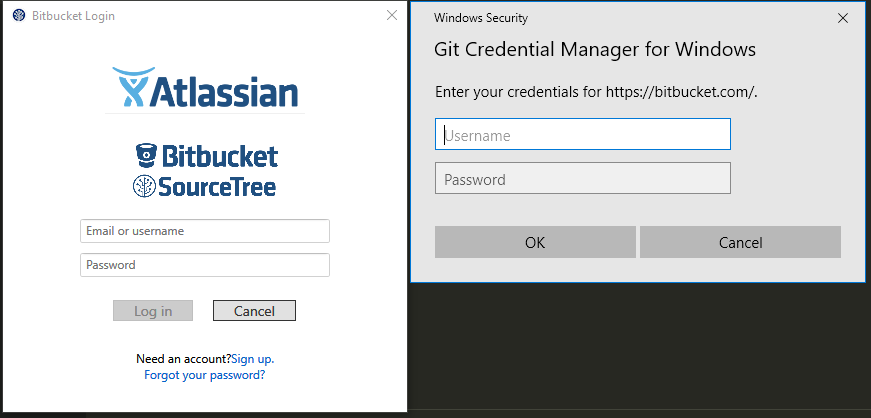
Dialogs I am refering to (you can guess which is which :))
TheJare
on 21 Jul 2017
You will get the grey dialog because you used bitbucket.com rather .org
mminns
on 21 Jul 2017
Ahh .org ok, that's what I was looking for in the code right now. Then I guess I will try to debug it locally and see what I find
TheJare
on 21 Jul 2017
The code for Bitbucket authority is not trying to convert the email into a username that can be used to compose typical repo URLs like https://bitbucket.org/username/repo.git Atlassian.Bitbucket.Authentication.Authority needs to capture the bitbucket API response in AcquireToken(), which is a json object with field "username" (actual username, not email). Then, Atlassian.Bitbucket.Authentication.Authentication inside InteractiveLogon() needs to forget about the provided username and start using the one Bitbucket has returned.
The simplest approach I guess is to turn the string in the Bitbucket token from "just the password" to a pair like "username:password".
inside Bitbucket.Authentication/Authority.AcquireToken():
                                        var responseText = await response.Content.ReadAsStringAsync();
                                        string realUsername = username;
                                        //Trace.WriteLine("authentication success: Response is " + responseText);
                                        Match tokenMatch;
                                        if ((tokenMatch = Regex.Match(responseText, @"\s*""username""\s*:\s*""([^""]+)""\s*", RegexOptions.Compiled | RegexOptions.CultureInvariant | RegexOptions.IgnoreCase)).Success
                                            && tokenMatch.Groups.Count > 1)
                                        {
                                            realUsername = tokenMatch.Groups[1].Value;
                                        }
                                        // Success with username/passord indicates 2FA is not on so
                                        // the 'token' is actually the password if we had a
                                        // successful call then the password is good.
                                        token = new Token(realUsername + ":" + password, TokenType.Personal);
and capture that value in the Authentication. Sorry I can't devote more time to this, hope at least pointed in the right direction.
TheJare
on 21 Jul 2017
Ah got it.
It only seems to fail when both of the following are true
- using a url without a uername, i.e.. https://bitbucket.org/slug/repo.git NOT https://[email protected]/slug/repo.git
- using an emails as username.
Email username with a url including a username works fine, as does a url without a username and a bitbucket username rather than an email.
Now I can reproduce it I can investigate
mminns
on 21 Jul 2017
I believe this PR fixes the issue https://github.com/Microsoft/Git-Credential-Manager-for-Windows/pull/464
Any input gratefully received.
mminns
on 21 Jul 2017
Resolved by #464
whoisj
on 21 Jul 2017
git config --global credential.modalAIDS false EZ
 cscawley
on 6 Aug 2017
cscawley
on 6 Aug 2017
Mine spams this dialog every time I leave VS Code open over night with multiple instances running. For example, this morning, I sat down to return to 4 microservice projects from last night, and there were 4 GitHub dialogs open. If I close them, they return within a couple seconds like some kind of wack-a-mole game.
It only seems to happen if I have multiple VS Code open, and it happens almost every time on multiple computers. I do not appear to have any git extensions.
 amackintosh
on 17 Aug 2017
amackintosh
on 17 Aug 2017
@amackintosh I recommend disabling VS Code auto-fetch. It know it's not a solution, but it's a viable work around for now (until VS Code can help resolve this issue).
whoisj
on 17 Aug 2017
It's been over a month since the last post about VS code and a solution to this problem, any solution? I tried git config --global credential.modalAIDS false but I am still seeing the popup. Please help it is seriously annoying.
 JNaeemGitonga
on 22 Sep 2017
JNaeemGitonga
on 22 Sep 2017
@PROB8 perhaps you could try the correct configuration entry?
git config --global credential.modalPrompt never, of if it is really bothering you: git config --global --unset credential.helper.
whoisj
on 22 Sep 2017
@whoisj Hey thanks for commenting so quickly, I tried the first one but still got the popups. will the second remove my login info? I don't want to screw anything up as for my actual git functionality.
JNaeemGitonga
on 22 Sep 2017
Another thing to check is that you're pointing to the right repository. I had changed the repo name on Github.com but not in my local config and that was part of the reason that caused this popup to occur.
 Robo-Rin
on 22 Sep 2017
Robo-Rin
on 22 Sep 2017
will the second remove my login info?
It would have. Hopefully the comment by @Hauuguu helped.
whoisj
on 23 Sep 2017
I got the pop-up with Code 1.17.2 after doing a git push to github from the VC Code integrated terminal. The push was successful, but some minutes later the popups started. At first I just dismissed them; later I gave up and entered my credentials. Neither stopped the popups. Finally I tried running an operation against github from a console window outside Code; this also gave the popup (which it never did before), but at least this time entering the user/password made it go away.
Editorialization: The dialog itself appears to be of Github origin rather than VS Code, but as a UI it is pretty bad. We have all been trained to inspect our browsers for lock icons, valid certificates etc before entering passwords. In this case a random window pops up asking for a user/password independent of any obvious triggering action and without any clear way to validate who is asking. (I'm not denying @whoisj's data, but I am totally boggled that "user feedback was the majority of users preferred to be asked via a dialog", given that it is git we are talking about!)
@whoisj : If it comes back, I will try the %EnvironInteractiveKey%=NEVER setting discussed in #504. Thanks!
 robertbcalhoun
on 1 Nov 2017
robertbcalhoun
on 1 Nov 2017
@robertbcalhoun the root issue here is VSCode is overly aggressive with performing background fetches on your behalf. When VSCode asks Git to fetch, Git asks the GCM for credentials. The GCM supplies those, then Git attempts to fetch but for some reason fails (fetching too frequently? network not ready? WiFi offline?) and Git instructs the GCM to delete the credentials.
Starting here, you'll get harassed until you supply credentials again. You can use the SET GCM_INTERACTIVE=NEVER or SET GCM_PRESERVE_CREDS=TRUE. Both should work-ish. Nothing will fully resolve the issue until either you've disabled VSCode background fetching or VSCode resolves their behavior bug.
whoisj
on 2 Nov 2017
Thanks, that is very helpful. I'll look into discussion on VSCode #26743 and VS Code #34684.
robertbcalhoun
on 2 Nov 2017
My Fix
Similar to others, I had an issue with SourceTree being installed and holding on to a bad password. Clearing the contents of the %appdata%/local/atlassian/sourcetree/passwd file, saving it, and restarting caused my credentials to finally be saved by the github login popup/SourceTree.
I also went through the other steps of clearing my stored credentials in Windows's Credential Manager, restarting, etc. None of those worked (at least individually) until I emptied the file mentioned above.
I'm on 2.4.7 of SourceTree, though I'm not sure if that auto-updated just today or not. Sometimes I install things and choose 'restart later,' then a month goes by...
My Problem
In addition to the popup, I was getting this error from git in the command line, which is now fixed:
fatal: HttpRequestException encountered.
An error occurred while sending the request.
Because the login failed, it requested me to input user name and password in the VS Code Terminal. That worked, but I didn't want to do that every time...
 ps2goat
on 22 Feb 2018
ps2goat
on 22 Feb 2018
Interesting - I have just started having this error.
Used a token to login but still does not stick.
Something has changed somewhere to break the git integration.
 chris-bragg-sift
on 23 Feb 2018
chris-bragg-sift
on 23 Feb 2018
@ps2goat @chris-bragg-sift the error might be related to GitHub disabling TLS 1.0 earlier today. Ensure you've updated your Git installation to 2.16.2, as it contains an up-to-date GCM (v1.14.0).
shiftkey
on 23 Feb 2018
@shiftkey top point... that has to be it. Many thanks.
* CONFIRMED - this has fixed everything.
chris-bragg-sift
on 23 Feb 2018
Still happens to me even after upgrading to 2.16.2. Tried everything from clearing app data to reinstalling and still the window pops up every 10 seconds.
 Sunrunner37
on 2 Mar 2018
Sunrunner37
on 2 Mar 2018
@Sunrunner37 is this using Git from the console? If so, please run where git and make sure the Git you're downloading and updating is the same Git that is executing.
If not Git from the console, which environment / GUI / IDE are you using?
whoisj
on 5 Mar 2018
For reasons I no longer recall, I had credential.usehttppath=true set globally. Unsetting this value fixed the issue for me.
 mm-jeremy
on 5 Apr 2018
mm-jeremy
on 5 Apr 2018
@bobbytait that worked like a charm.
 SamiHK
on 20 Aug 2018
SamiHK
on 20 Aug 2018
In my case, after trying everything, unchecking "Allow Sourctree to manage my credentials via the Git Credential Manager" in Tools -> Options --> Git made the job.
 sylvaincaillot
on 4 Oct 2018
sylvaincaillot
on 4 Oct 2018
why i am not getting the credential boxes in screen , it always pops me up only white screen with Title Signin your Account
 Nadeembhat
on 2 Apr 2019
Nadeembhat
on 2 Apr 2019
I'm so sad when I need to use Windows for work and not a mac.
 quantuminformation
on 17 Apr 2019
quantuminformation
on 17 Apr 2019
Related issues
 ranadeep-sharma
·
6Comments
ranadeep-sharma
·
6Comments
 eromoe
·
5Comments
eromoe
·
5Comments
 ClaraJaquet
·
7Comments
ClaraJaquet
·
7Comments
 petergerritsen
·
3Comments
petergerritsen
·
3Comments
 shivanand217
·
3Comments
shivanand217
·
3Comments
Most helpful comment
Why does this popup even exist? What use-case is there for some focus-stealing modal incessantly nagging you while they're trying to work?