Giraffe: BUG: HTTP Error 502.5 - Process Failure w/ Giraffe Template: `dotnet publish` & `dotnet run`
Steps to reproduce:
- Install template with:
dotnet new giraffe -lang F# - Build and publish with
dotnet publish(also tried:dotnet publish -c Release -r win10-x64) - Do
dotnet run - When you open your browser to the hosted port (by default:
localhost:1221you either see nothing or you see the exn below-- I had to clickViewin VS2017 to see this at all.)
HTTP Error 502.5 - Process Failure

Common causes of this issue:
The application process failed to start
The application process started but then stopped
The application process started but failed to listen on the configured port

Troubleshooting steps:
Check the system event log for error messages
Enable logging the application process’ stdout messages
Attach a debugger to the application process and inspect

For more information visit: https://go.microsoft.com/fwlink/?LinkID=808681
I have enabled log files and they are just empty but being created each time I run the app. I have tried specifying the full path to my Giraffe dll inside arguments property on the aspNetCore tag in my web.config. I also tried using the full path to my .exe as the processPath property on that aspNetCore tag. Same situation.
I also tried troubleshooting the tips here: https://docs.microsoft.com/en-us/aspnet/core/host-and-deploy/azure-iis-errors-reference?view=aspnetcore-2.1 but found nothing useful.
Let me know if I can provide any more information! I'll reference this ticket if I can fix and PR into the giraffe-template project. I'm working with Enrico Sada (@enricosada on Github) and he was able to reproduce this bug with me.
Gina
PS:
> dotnet --info
.NET Command Line Tools (2.1.104)

Product Information:
 Version:            2.1.104
 Commit SHA-1 hash:  48ec687460

Runtime Environment:
 OS Name:     Windows
 OS Version:  10.0.10586
 OS Platform: Windows
 RID:         win10-x64
 Base Path:   C:\Program Files\dotnet\sdk\2.1.104\

Microsoft .NET Core Shared Framework Host

  Version  : 2.0.6
  Build    : 74b1c703813c8910df5b96f304b0f2b78cdf194d
& using Giraffe (1.1)
 wiredsister
All 5 comments
@wiredsister I don't have an answer, but what happens if you do dotnet path-to-dll, where path-to-dll is the path to the win10 binary in the publish output?
 cartermp
on 7 May 2018
cartermp
on 7 May 2018
@wiredsister I don't get why you need to publish before running... Either you do dotnet run or dotnet publish & dotnet <name of dll> to run that thing.
What I'd you directly run it without publishing it.
 kunjee17
on 7 May 2018
kunjee17
on 7 May 2018
Thanks for your response @cartermp.
UPDATE: I'm an idiot
Fix:
- When building in VS2017 you cannot use IISExpress (this was pointed out by other users in #web on Fsharp Foundation Slack, but I wasn't really sure what I needed to do). For example:
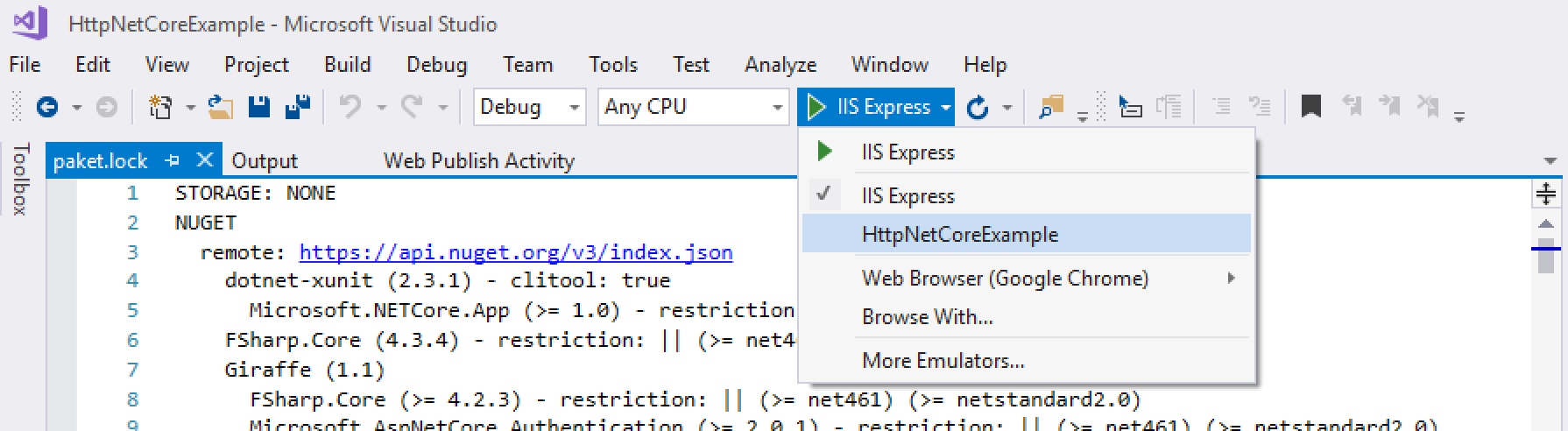
- When I tried to run via
dotnet publish&dotnet runit _was_ doing the right thing, I just mistakenly went to Chrome not inside my VM so the ports weren't mapped correctly. Derp
Closing out this ticket. Thanks everyone who helped:
@kunjee17 @cartermp @enricosada
wiredsister
on 7 May 2018
And I'm updating the README for giraffe-template. Anybody know why this project doesn't work with IIS Express? Just out of curiosity...
wiredsister
on 7 May 2018
And maybe I should update this README as well? You have a section for building in Visual Studio 2017, so it'd be appropriate to add there. I'll PR it and reference this...
wiredsister
on 7 May 2018
Related issues
 cpbotha
·
3Comments
cpbotha
·
3Comments
 dustinmoris
·
5Comments
dustinmoris
·
5Comments
 graforlock
·
5Comments
dustinmoris
·
7Comments
graforlock
·
5Comments
dustinmoris
·
7Comments
 rmunn
·
6Comments
rmunn
·
6Comments
Most helpful comment
Thanks for your response @cartermp.
UPDATE: I'm an idiot
Fix:
dotnet publish&dotnet runit _was_ doing the right thing, I just mistakenly went to Chrome not inside my VM so the ports weren't mapped correctly. DerpClosing out this ticket. Thanks everyone who helped:
@kunjee17 @cartermp @enricosada