Gino: object has no attribute 'first', when two users are connecting
- GINO version: 0.7.5
- Python version: 3.7.0
- asyncpg version: 0.17.0
- aiocontextvars version: none
- PostgreSQL version: 10.4
Description
I need to create row in table named 'users' every time when view runs in case of client connects to server.
I use asyncio.sleep(1.5) inside async with db.with_bind('...') for testing connections' asynchronous handling.
But when two or more clients connect to server at the same moment only one client connects to Gino meanwhile for others connections AttributeError raises in TraceLog. On the other hand, there is no problem in case of connection of only one client.
I expected all clients to connect to Gino with 1.5 seconds of waiting time at the same moment and all this separate GinoConnections to be processed together.
Please help me solve this problem, thanks.
What I Did
traceback
Error handling request
Traceback (most recent call last):
  File "/Users/mac/Documents/web/myapp/view.py", line 11, in index
    await User.create(name='jack', fullname='Jack Jones')
  File "/Users/mac/Documents/web/myapp/venv/lib/python3.7/site-packages/gino/crud.py", line 446, in _create_without_instance
    return await cls(**values)._create(bind=bind, timeout=timeout)
  File "/Users/mac/Documents/web/myapp/venv/lib/python3.7/site-packages/gino/crud.py", line 475, in _create
    row = await bind.first(q)
AttributeError: 'NoneType' object has no attribute 'first'

During handling of the above exception, another exception occurred:

Traceback (most recent call last):
  File "/Users/mac/Documents/web/myapp/venv/lib/python3.7/site-packages/aiohttp/web_protocol.py", line 378, in start
    resp = await self._request_handler(request)
  File "/Users/mac/Documents/web/myapp/venv/lib/python3.7/site-packages/aiohttp/web_app.py", line 341, in _handle
    resp = await handler(request)
  File "/Users/mac/Documents/web/myapp/view.py", line 12, in index
    print(await User.query.gino.all())
  File "/Users/mac/Documents/web/myapp/venv/lib/python3.7/site-packages/gino/api.py", line 183, in __aexit__
    await self._args[0].pop_bind().close()
AttributeError: 'NoneType' object has no attribute 'close'
model.py
import asyncio
from gino import Gino

db = Gino()

class User(db.Model):
    __tablename__ = 'users'

    id = db.Column(db.Integer, primary_key=True)
    name = db.Column(db.String)
    fullname = db.Column(db.String)

    def __init__(self, *args, **kwargs):
        super(User, self).__init__(*args, **kwargs)
view.py
from aiohttp import web
from model import User, db
import asyncio

routes = web.RouteTableDef()

@routes.get('/')
async def index(request):
    async with db.with_bind('postgresql://localhost/postgres') as engine:
        await asyncio.sleep(1.5)
        await User.create(name='jack', fullname='Jack Jones')
        print(await User.query.gino.all())
    with open('app.html') as f:
        return web.Response(text=f.read(), content_type='text/html')
app.py
#!/usr/bin/env python3
import asyncio
from aiohttp import web
from view import db
from view import routes
from wschannel import init_wschannel
import socketio

loop = asyncio.get_event_loop()

async def main():
    async with db.with_bind('postgresql://localhost/postgres') as engine:
        await db.gino.create_all()

loop.run_until_complete(main())


app = web.Application()

sio = socketio.AsyncServer(async_mode='aiohttp')
sio.attach(app)

init_wschannel(sio)

app.add_routes(routes)
app.router.add_static('/static', 'static')
main.py
from app import app
from aiohttp import web

if __name__ == '__main__':
    app['debug']=True
    web.run_app(app)
 toddbarry
All 11 comments
engine only needs to be initialized once, not for each request.
You can try to follow the example in https://github.com/fantix/gino/blob/master/tests/test_aiohttp.py. Docstring in gino.ext.aiohttp provides more detail if you're interested. BTW, this also provides convenient methods for models, get_or_404, first_or_404.
The problem of the provided source code is engine is cleaned up after the first request finished and the second request hasn't.
 wwwjfy
on 4 Aug 2018
wwwjfy
on 4 Aug 2018
wwwjfy, I'm having a problem with configuration importing. Whence in an example in 18th line the object config is taken?
toddbarry
on 5 Aug 2018
In your example, you can try to apply the diff
diff --git b/app.py a/app.py
index bf130b9..2852985 100644
--- b/app.py
+++ a/app.py
@@ -16,4 +16,6 @@ loop.run_until_complete(main())
 app = web.Application()

 app.add_routes(routes)
+app['config'] = {'dsn': 'postgresql://localhost/postgres'}
+db.init_app(app)
 app.router.add_static('/static', 'static')
diff --git b/model.py a/model.py
index d37b93f..7390336 100644
--- b/model.py
+++ a/model.py
@@ -1,5 +1,5 @@
 import asyncio
-from gino import Gino
+from gino.ext.aiohttp import Gino

 db = Gino()
diff --git b/view.py a/view.py
index 31716fe..a65600a 100644
--- b/view.py
+++ a/view.py
@@ -6,8 +6,7 @@ routes = web.RouteTableDef()

 @routes.get('/')
 async def index(request):
-    async with db.with_bind('postgresql://localhost/postgres') as engine:
-        await asyncio.sleep(1.5)
-        await User.create(name='jack', fullname='Jack Jones')
+    await asyncio.sleep(1.5)
+    await User.create(name='jack', fullname='Jack Jones')
     with open('app.html') as f:
         return web.Response(text=f.read(), content_type='text/html')
To answer your question, the Gino imported in model.py has some hooks installed on the app.
wwwjfy
on 5 Aug 2018
wwwjgy, thank you for helping!
But now there is a problem with connecting to the database. I'm getting an exception asyncpg.exceptions.InvalidAuthorizationSpecificationError: role "postgres" does not exist
I try to specify the role, but it does not help
app = web.Application()
app.add_routes(routes)
app['config'] = {'dsn': 'mac@postgresql://localhost/postgres'}
db.init_app(app)
app.router.add_static('/static', 'static')
Weird. It's using the same connection string in your previously provided example.
If you want to use another role, use postgresql://mac@localhost/postgres, i.e. put mac in front of host. The connection string format is postgresql://username:password@host:port/database
wwwjfy
on 5 Aug 2018
wwwjfy, I can not understand why this happens. But if I specify a role, the same exception raises in traceback :(
app = web.Application()
app.add_routes(routes)
app['config'] = {'dsn': 'postgresql://mac@localhost/postgres'}
db.init_app(app)
app.router.add_static('/static', 'static')
attaching the result of the command psql -l
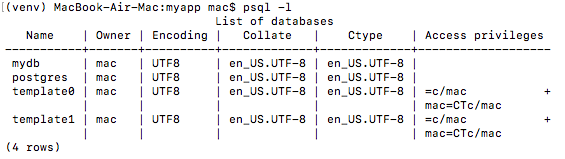
But if I use db.with_bind('...') i haven't problems with connection to database in case of wrong role
toddbarry
on 5 Aug 2018
Sorry, I just noticed the error is role "postgres" does not exist. If that's still the error message when you specify a role mac, try to run createuser -s postgres in shell or CREATE USER postgres SUPERUSER; in psql to create a user postgres.
wwwjfy
on 5 Aug 2018
wwwjfy, everything is working! Thank you very much for helping, but problem with exception role "postgres" does not exist is weird in my opinion
toddbarry
on 5 Aug 2018
Glad it works now. postgres must've been deleted accidentally somehow, usually this role wouldn't be touched.
wwwjfy
on 5 Aug 2018
Related issues
 neeraj-mindtickle
·
3Comments
neeraj-mindtickle
·
3Comments
 saeedghx68
·
4Comments
saeedghx68
·
4Comments
 willyhakim
·
4Comments
willyhakim
·
4Comments
 AmatanHead
·
5Comments
AmatanHead
·
5Comments
 bnopne
·
5Comments
bnopne
·
5Comments