Ghost: Members chart shows flat growth line for (GMT - X) timezones
Issue Summary
If the site's timezone is set to any value before GMT/UTC, i.e. ( GMT - X ) timezones, the members chart in Admin incorrectly shows flatline with total number of current members since the start of date range, which is not the correct representation.
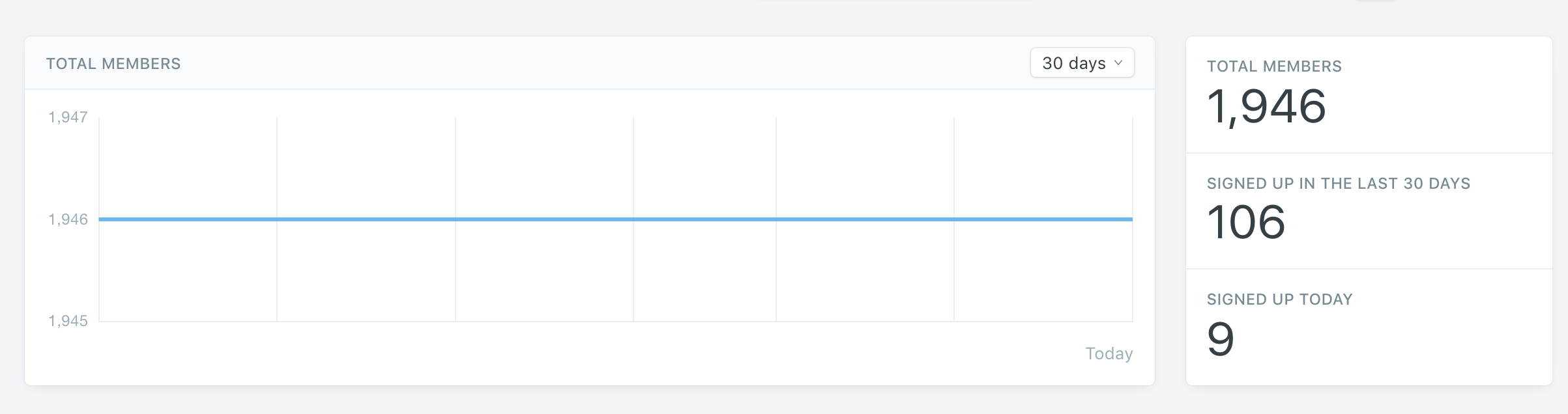
The 106 new members added in this date range should have been reflected in the chart correctly as growth instead of flat line.
To Reproduce
- Change the
Site timezoneto any (GMT - X) timezone inSettings -> Generalin Ghost Admin - Make sure you have new members added to site in the selected date range
- The members chart on top will incorrectly show a flat line since start of range, instead of upward curve on date new members were added in that range.
Technical details:
- Database: SQLite/Mysql
 rishabhgrg
All 4 comments
Hi, is there an ETA on the fix for this? Support sent me to this GitHub issue.
 sonyamann
on 13 Aug 2020
sonyamann
on 13 Aug 2020
Hi there, any update on the progress of this bug? Would appreciate an ETA. Thanks!
 ceohockey60
on 17 Nov 2020
ceohockey60
on 17 Nov 2020
👀1
I still see a flat line in my dashboard. Fix not deployed yet?
sonyamann
on 1 Dec 2020
@sonyamann This will be released later today in 3.39.0. If you're a Pro customer, it'll be rolled out on Thursday 🙂
 daniellockyer
on 1 Dec 2020
daniellockyer
on 1 Dec 2020
👍1
Was this page helpful?
0 / 5 - 0 ratings
Related issues
 mattferderer
·
4Comments
mattferderer
·
4Comments
 kirrg001
·
3Comments
kirrg001
·
3Comments
 pateskinasy
·
3Comments
pateskinasy
·
3Comments
 hjzheng
·
4Comments
hjzheng
·
4Comments
 fueko
·
3Comments
fueko
·
3Comments