Ghost: Post scheduling time is not taking timezone configuration into account
Issue Summary
I have hosted ghost on GCP with Bitnami. Here are the problems I'm having.
- Scheduled posts never work. Even if I restart it. The server and Ghost time is IST.
- It didn't happen before but now when I try to publish a post now, it says the date should be in the past. When I change the post publish date to past timings, it reverts back to 5-6 hours ahead automatically. and when I schedule the post in 5-10 minutes, it automatically selects 5 hours ahead time.
To Reproduce
- I want the post scheduler and post timer to work as expected otherwise I have to go back to WordPress. I have never seen this many bugs on a cloud CMS.
Technical details:
Operating System
Debian (9)
Software
Ghost (3.12.1)
Apache (2.4.41)
lego (3.5.0)
MySQL (5.7.29)
Node.js (10.19.0)
OpenSSL (1.1.1e)
Python (3.7.7)
 arbob
arbob
All 28 comments
I can confirm this issue.
 tobimori
on 18 Apr 2020
tobimori
on 18 Apr 2020
otherwise I have to go back to WordPress. I have never seen this many bugs on a cloud CMS.
@arbob above is not a "reproduction" step. Consider spending some time describing step-by-step, reproducible, clear scenario for your issue and remember to follow our community guidelines when posting here.
 naz
on 20 Apr 2020
naz
on 20 Apr 2020
Probable duplicate or related to https://github.com/TryGhost/Ghost/issues/11717
naz
on 20 Apr 2020
@arbob I've tried following your setup as much as possible albeit using the recommended/supported setup rather than Bitnami but I've not been able to reproduce any of the issues you're seeing.
I set up a server with IST (India Standard Time, not Irish Standard Time), configured Ghost's timezone to IST, and tested creating/scheduling posts from clients with IST and BST timezones with no problems.
Which timezone are you using on the computer you're writing/publishing from?
I have hosted ghost on GCP with Bitnami
Are you running multiple instances of Ghost for the same site on GCP?
I try to publish a post now, it says the date should be in the past
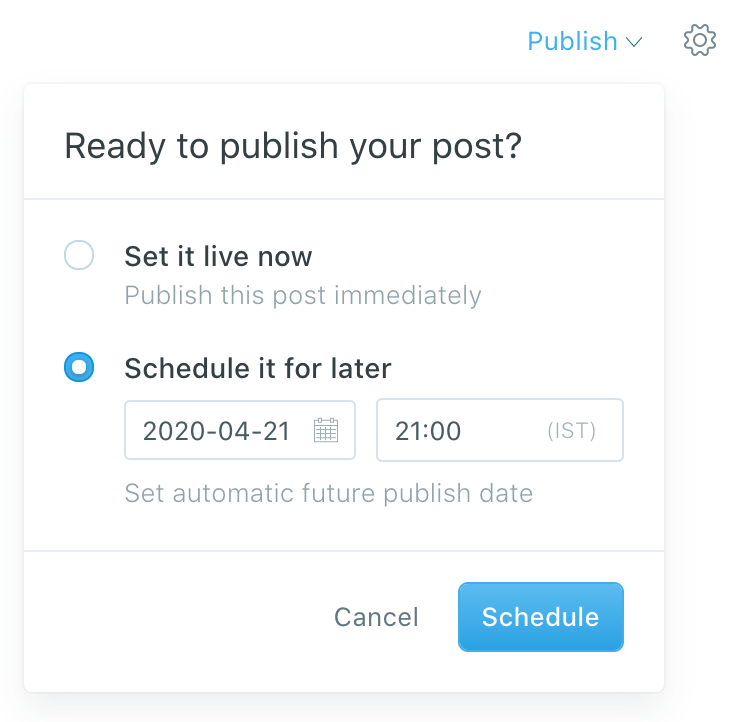
Where are you seeing that message? If you're changing the date in the post settings menu then you can't schedule a future publish date from there which is why it only allows dates in the past.
To schedule a post you have to use the "Schedule it for later" radio button and set a scheduled future time in the publish menu:
@tobimori can you expand with details on the problems you are seeing?
 kevinansfield
on 21 Apr 2020
kevinansfield
on 21 Apr 2020
@kevinansfield When updating something in the editor, the time always jumps multiple hours forward in two-hour-steps (which is the difference to UTC for GMT+1). In addition, all relative timestamps talk about the future even though something got published now. So for example, if I publish now, then change something, like the excerpt, and want to save, the time got moved two hours upfront and I can't publish because the date is not in the past.
tobimori
on 21 Apr 2020
@tobimori please be very specific with details and reproduction steps. Are you editing draft or published posts? Which time is jumping (which inputs/ui are you looking at)? Please detail your setup too - server timezone, selected timezone in ghost, client timezones, etc. Thank you 🙂
kevinansfield
on 21 Apr 2020
@kevinansfield Server timezone is GMT+1, Ghost Timezone GMT+1, Client Timezone GMT+1. Europe/Berlin.
I uploaded a short demonstration here. When updating/saving a published post, the publish time jumps (seen in the Koenig sidebar) and the update fails.
tobimori
on 21 Apr 2020
@tobimori unfortunately I'm really struggling to reproduce the time jumping behaviour even though as far as I can tell everything is set up the same with regards to time zones etc.
Can you provide some details on your server setup? Did you install using Ghost-CLI directly or are you running a container? Which version of Ghost and which version of node are you running? Which browser+version are you using?
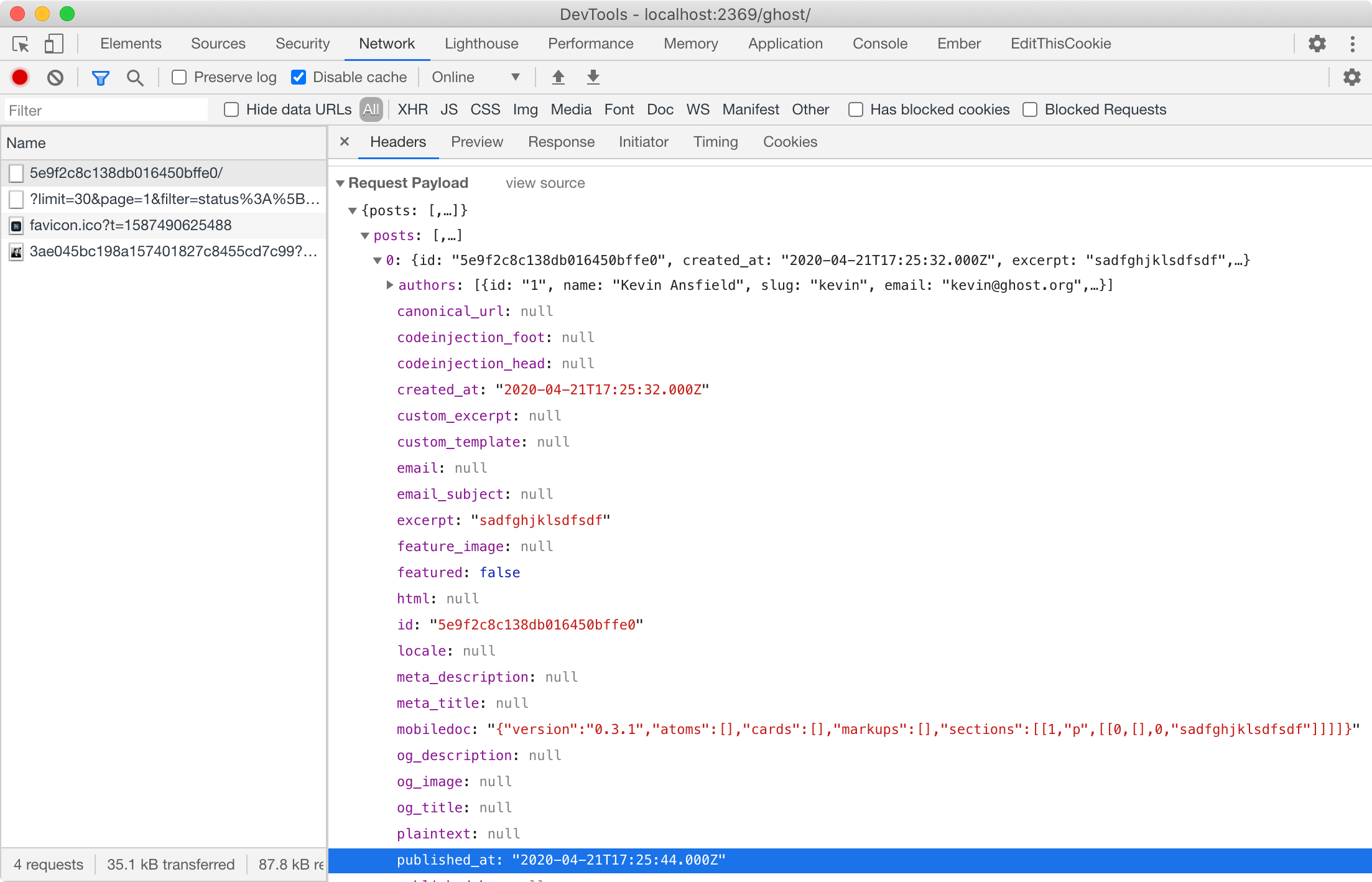
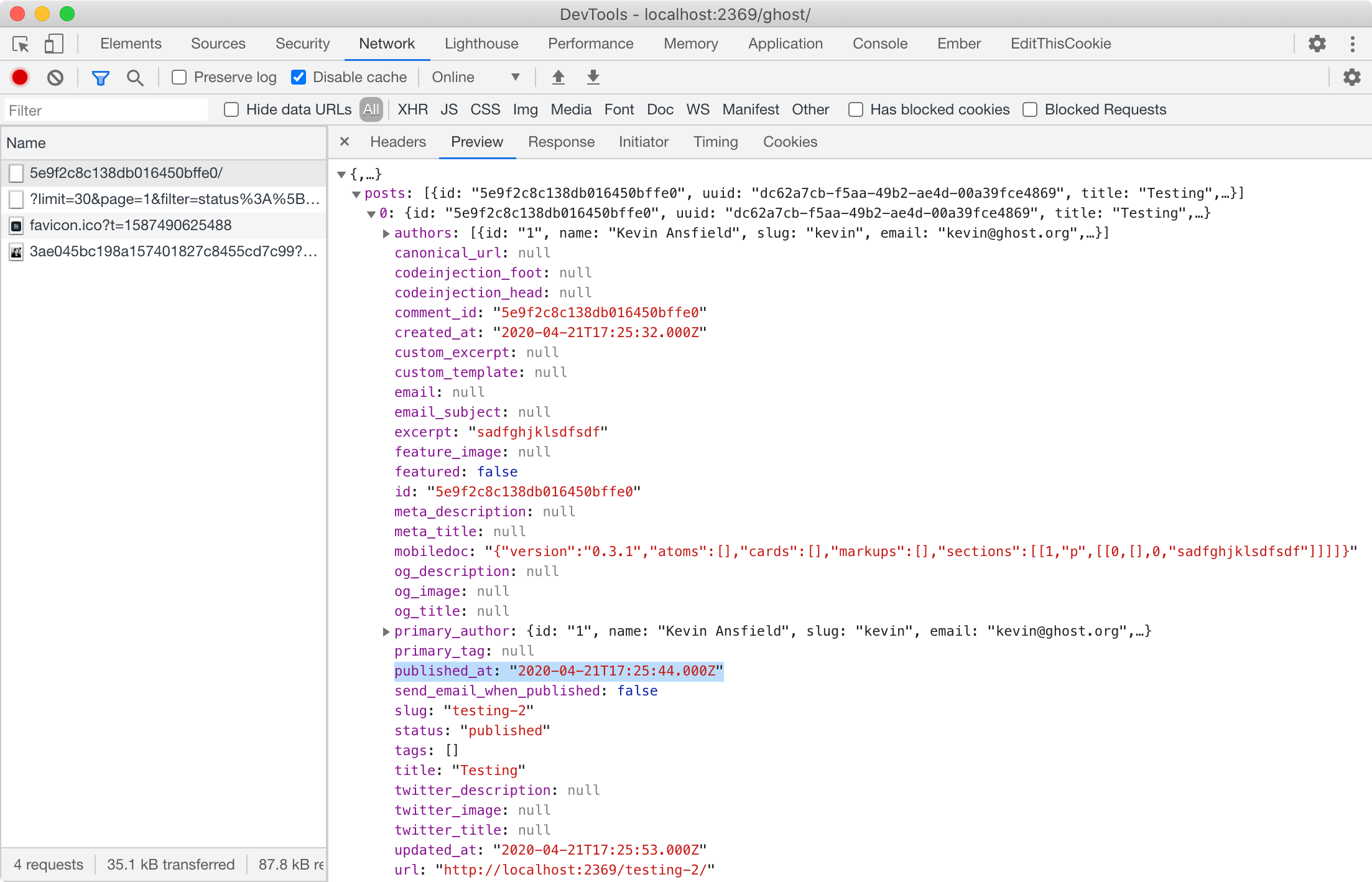
Another thing that would be helpful is tracking down if this is a client-side or server-side bug. If you're familiar with Chrome's developer tools, could you save a post with the tools open, then inspect the PUT request and and share the published_at time from the request and response payloads?
kevinansfield
on 21 Apr 2020
@kevinansfield I tried reproducing the bug too - on another host, and it didn't work.
published_at is, as far as time goes, 11:29, while it shows 15:29 in the UI (on the buggy host). On the working host, the time in the request is 11:44 while not jumping and showing 13:44 in the UI.
Installed with Ghost-CLI on both hosts.
The buggy host shows the correct time & timezone (also same as Ghost and client) when SSHing with date.
tobimori
on 21 Apr 2020
published_atis, as far as time goes, 11:29, while it shows 15:29 in the UI (on the buggy host).
The values from the network request/response are the most important bit of information, please ignore the UI for the moment. Unless you're saying the request had 11:29 and response had 15:29?
kevinansfield
on 21 Apr 2020
@kevinansfield I assume the values in the request are UTC - GMT+1/CEST is two hours forward from UTC, but the value the buggy Ghost UI shows is three hours forward from UTC.
tobimori
on 21 Apr 2020
Yes, request/response values are UTC. However the important information is exactly what is in those request/response payloads as there's not a direct correlation between those values and what the UI shows. It's the data that you can see in the network tab for the PUT request that I'm interested in right now as that will point to where to look next.
These are the two values that will help:
kevinansfield
on 21 Apr 2020
That value is 2020-04-20T21:29:00.000Z, when updating again it changed to 2020-04-20T23:29:00.000Z, and so on, and so on.
tobimori
on 21 Apr 2020
@tobimori I'm looking for two values from a single save request, the data sent in the request (seen on the Headers tab) and the data received in the response (seen on the Preview tab). This will show if there's a problem on the server or on the client.
kevinansfield
on 21 Apr 2020
@kevinansfield Ah, sorry, I didn't understand that. 2020-04-21T01:29:00.000Z and answer is 2020-04-21T03:29:00.000Z.
tobimori
on 21 Apr 2020
Cool, thank you. That confirms that it's a server-side problem rather than the admin app so we can eliminate a large chunk of potential issues.
Has the problem instance of Ghost been upgraded/restarted recently? I'm wondering if there was a DST change whilst the instance was running that hasn't been picked up correctly 🤔
kevinansfield
on 21 Apr 2020
@kevinansfield It was setup after the change in Germany.
tobimori
on 21 Apr 2020
@tobimori are there any differences between the working and non-working setups you have? Were they installed the same way and running on the same cloud provider?
If possible, can you provide the output of running date and ntpdate -q pool.ntp.org on each of the servers?
kevinansfield
on 22 Apr 2020
@kevinansfield It's the same provider, but different host systems.
date has the same output on both, ntpdate can't be run because it's shared hosting.
tobimori
on 22 Apr 2020
Details are always helpful when dealing with bugs. Which provider specifically, and what was the output of the date commands? The ntpdate command was to check for clock skew, do you notice any difference (minutes/seconds) between the date output and your local time?
kevinansfield
on 22 Apr 2020
Nope - there's no difference. The output looks similiar to this: Wed 22 Apr 14:30:01 CEST 2020 on both host systems. The provider is Uberspace. ntpdate apparently only works on the working host:
server 162.159.200.123, stratum 3, offset -0.001358, delay 0.02640
server 85.220.190.246, stratum 2, offset 0.000539, delay 0.02664
server 80.237.128.149, stratum 2, offset 0.000559, delay 0.02980
server 85.10.240.253, stratum 2, offset 0.001410, delay 0.03131
22 Apr 14:31:45 ntpdate[21403]: adjust time server 85.220.190.246 offset 0.000539 sec
tobimori
on 22 Apr 2020
@arbob I had a hunch that your problem is something to do with how Bitnami have set up their Ghost image and looks like I was right. After downloading their local vm to test I was able to reproduce what you're seeing. On inspecting their filesystem I found that a version of the moment-timezone library is installed that we've held back to an earlier version in our yarn.lock and package.json files. It sounds like they may be going against our docs/cli tool and are using npm instead of yarn 🤔 Either way I suggest contacting their support or switching to the recommended/supported stack for Ghost.
@tobimori did you use bitnami to install Ghost? You mentioned you used Ghost-CLI, did you follow the recommended/supported setup instructions exactly or did you follow something else?
kevinansfield
on 24 Apr 2020
As requested: I am hosting my two blogs at https://uberspace.de and followed the user guide at https://lab.uberspace.de/guide_ghost.html
 JuliCodes
on 24 Apr 2020
JuliCodes
on 24 Apr 2020
@pbeckmann Which host are you on?
tobimori
on 24 Apr 2020
@tobimori echeclus.uberspace.de and arend.uberspace.de. Both are U7 (their internal version schema). Both blogs exists before the CEST change in march and before the CET change in october last year.
JuliCodes
on 24 Apr 2020
@pbeckmann Interesting, I'm on hernmann (where I got problems) and on kopff (where everything works fine).
tobimori
on 24 Apr 2020
Looks like the issue with Uberspace is their upgrade guide, specifically this line:
[isabell@stardust content]$ npm install --production
If you follow that guide you will get a broken install because npm does not follow our package.json resolutions or lockfile correctly.
You need to use yarn instead of npm, or use Ghost-CLI to manage updates for you as per our docs at https://ghost.org/docs/api/v3/ghost-cli/update/
Closing this issue as its due to 3rd party tools performing incorrect steps/following incorrect installation instructions that are causing unsupported npm module versions to be installed.
kevinansfield
on 25 Apr 2020
Edit: It's a problem with the upgrade (script). Just tried upgrading on the host where it worked (never upgraded there apparently) before and now the same problem occures.
tobimori
on 25 Apr 2020
Related issues
 gergelyke
·
21Comments
gergelyke
·
21Comments
 hissingpanda
·
28Comments
hissingpanda
·
28Comments
 ErisDS
·
49Comments
ErisDS
·
49Comments
 ekerstein
·
116Comments
ErisDS
·
99Comments
ekerstein
·
116Comments
ErisDS
·
99Comments