Ghost: Email newsletter rendering issues in Microsoft Outlook (Windows)
Issue Summary
Problem 1
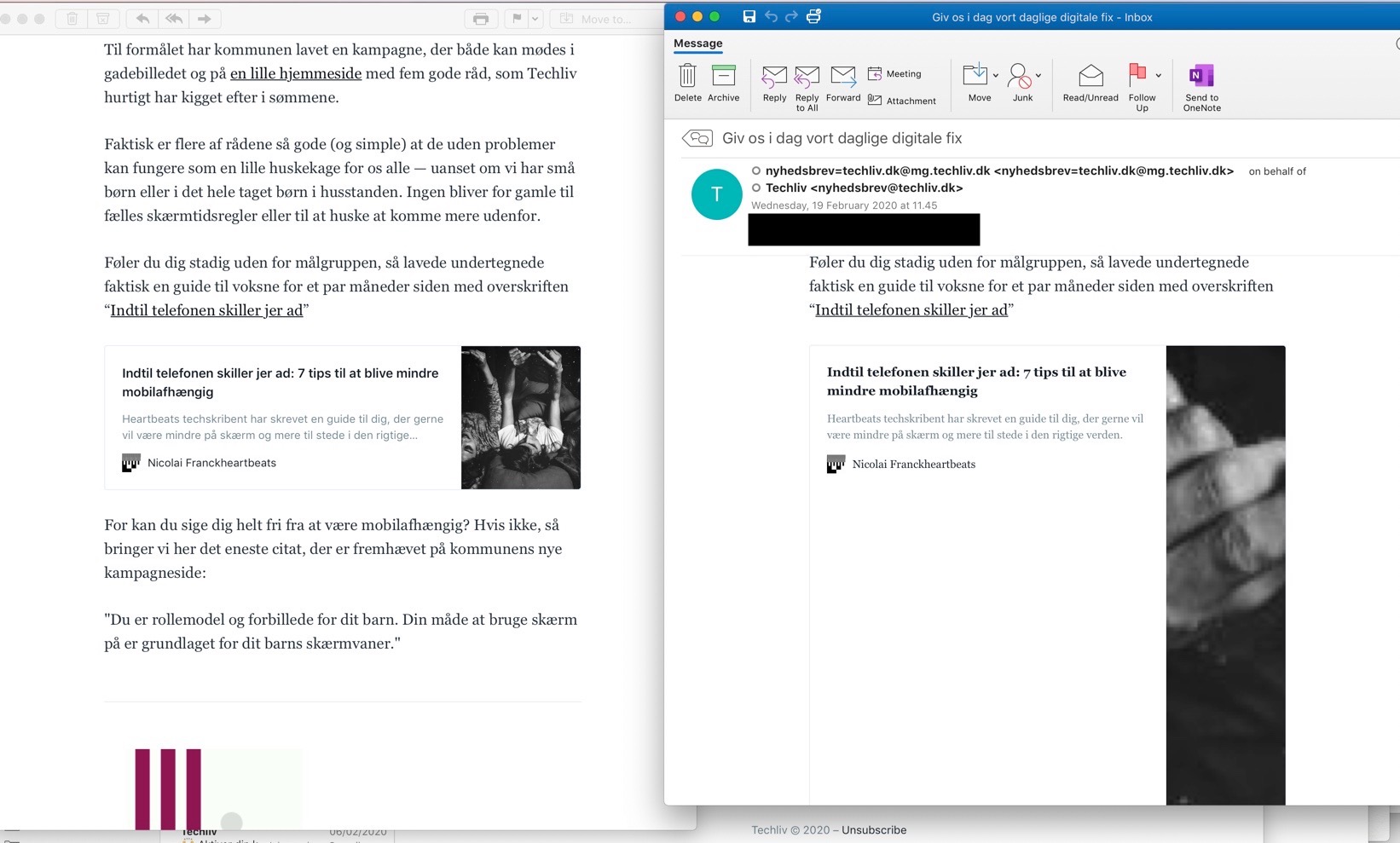
Native email newsletters are not wrapping text or images when viewing within Outlook for Microsoft Windows, content continues outside of the viewing pane, even when viewing the individual message in a separate window.


In comparison to Outlook for Mac

Problem 2
Outlook renders apostrophes as '
To Reproduce
View in Outlook for Windows
Technical details:
- Ghost Version: 3.3.0
- Browser/OS: Microsoft Outlook (Office 365 ProPlus) v1902 Build 11328.20492
Windows 10 Pro v1903 build 18362.592
 jaydenroberts
All 9 comments
Apparently this is also a problem for som users using Outlook on Mac. See the attached image where the bookmark in Outlook is way off, but it looks right in Apple Mail
 n1n10
on 20 Feb 2020
n1n10
on 20 Feb 2020
This issue has been automatically marked as stale because it has not had recent activity. It will be closed if no further activity occurs. Thank you for your contributions.
![stale[bot] picture](https://avatars3.githubusercontent.com/in/1724?v=4&s=40) stale[bot]
on 20 May 2020
stale[bot]
on 20 May 2020
Hi,
My readers are reporting the same issue. In addition, Outlook also renders apostrophes as ' for some reason.
 drorpoleg
on 24 Jun 2020
drorpoleg
on 24 Jun 2020
+1
 krrisis
on 14 Jul 2020
krrisis
on 14 Jul 2020
Note: I believe the apostrophe bug may be to do with some encoding issues that I've been talking to mailgun about
 ErisDS
on 11 Aug 2020
ErisDS
on 11 Aug 2020
There's a reference here that mentions lack of support for ' in Outlook, and to switch to '
if you have to support legacy browsers or writing HTML emails for Outlook then you're best sticking to
'
 matthanley
on 12 Aug 2020
matthanley
on 12 Aug 2020
Hiya! I just wanted to hop in here and say that the ' issue was reported by one of my readers, too. I'd love to see this fixed, please. Thanks team :)
 greenhamsam
on 13 Aug 2020
greenhamsam
on 13 Aug 2020
Hey @greenhamsam! The ' issue should be fixed in the next release 👍
matthanley
on 14 Aug 2020
@greenhamsam Hey! :wave: We just released 3.29.2 with the fix for the ' issue, so please update using Ghost-CLI :slightly_smiling_face:
 daniellockyer
on 18 Aug 2020
daniellockyer
on 18 Aug 2020
Related issues
 kirrg001
·
3Comments
kirrg001
·
3Comments
 jaguart
·
3Comments
jaguart
·
3Comments
 pateskinasy
·
3Comments
pateskinasy
·
3Comments
 hjzheng
·
4Comments
hjzheng
·
4Comments
 HenryMarshall
·
4Comments
HenryMarshall
·
4Comments