Ghost: Firefox: selection of the last word in a line doesn't work properly
Issue Summary
Double clicking on the last word in any line of multiline paragraph leads to unexpected behavior.
To Reproduce
Write a long long line which wraps to 2 lines at least.
Case 1:
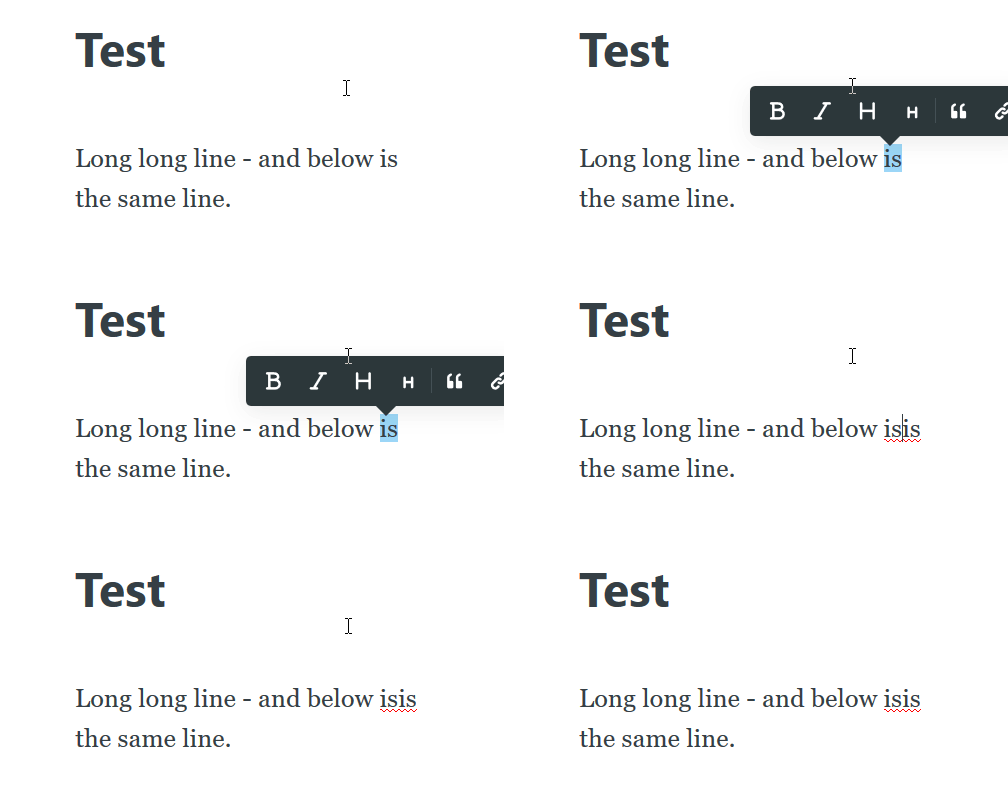
- Double-click just on the last word of the 1st line.
- Type new characters instead of that word.
- Unexpected 1:
Expected result: old word is substituted with a new chars. Actual: chars are types left of the old word.
Case 2:
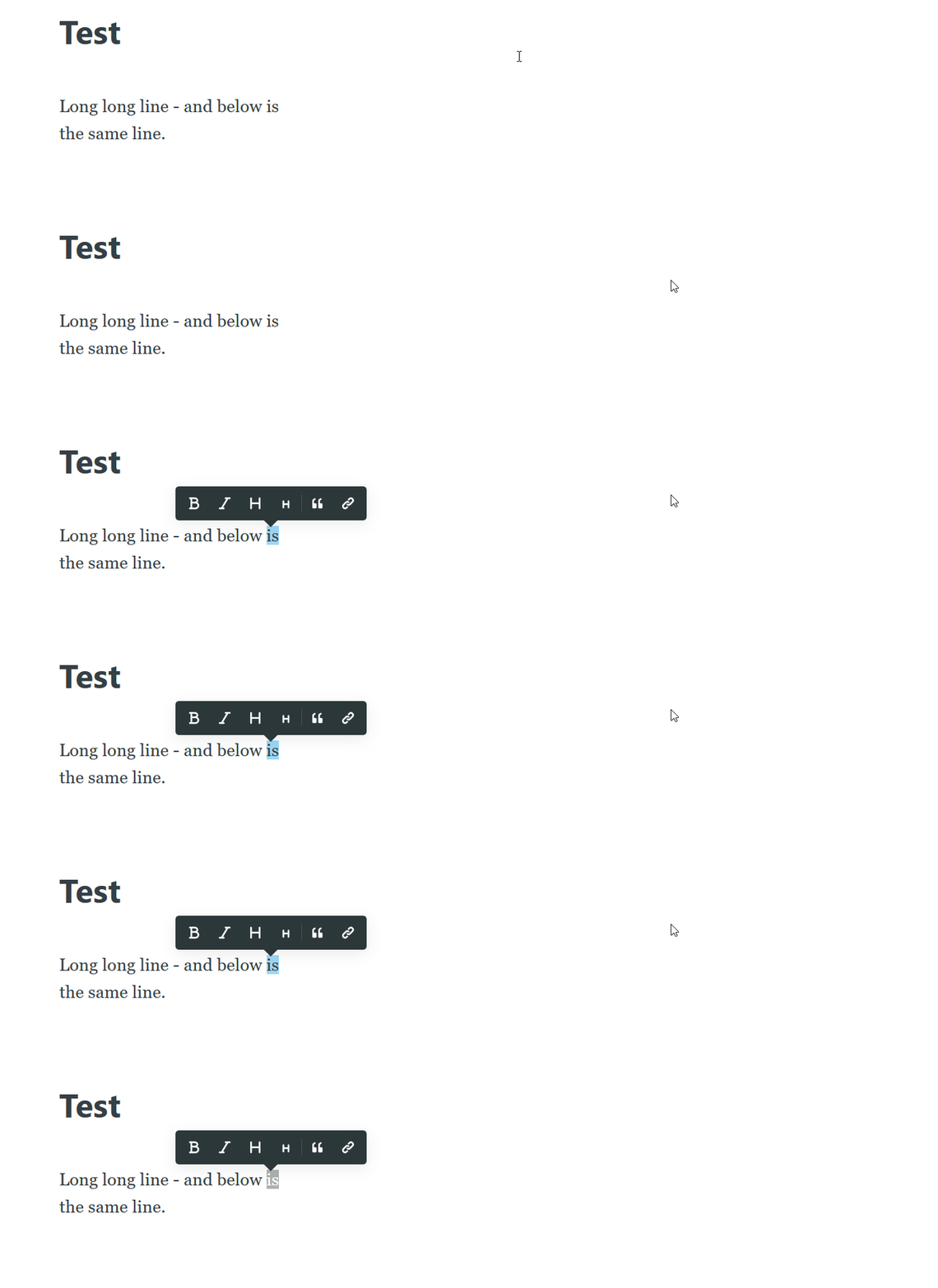
- Double-click far from the last word (shift mouse right of the word, mouse pointer should turn to an arrow - needs to be outside of the editor canvas, beyond the point long lines wrap).
- Word is selected, popup menu with transformation appears.
- Unexpected 2: Type new characters: nothing happens.
- Unexpected 3: Press Backspace: browser goes back in the history to the previous page.
Technical details:
- Ghost Version: Version 2.19.3
- Node Version: 8.15.1
- Browser/OS: Firefox 66.0.2 (Windows)
- Database: MySQL
 fadeevab
All 10 comments
Case 3:
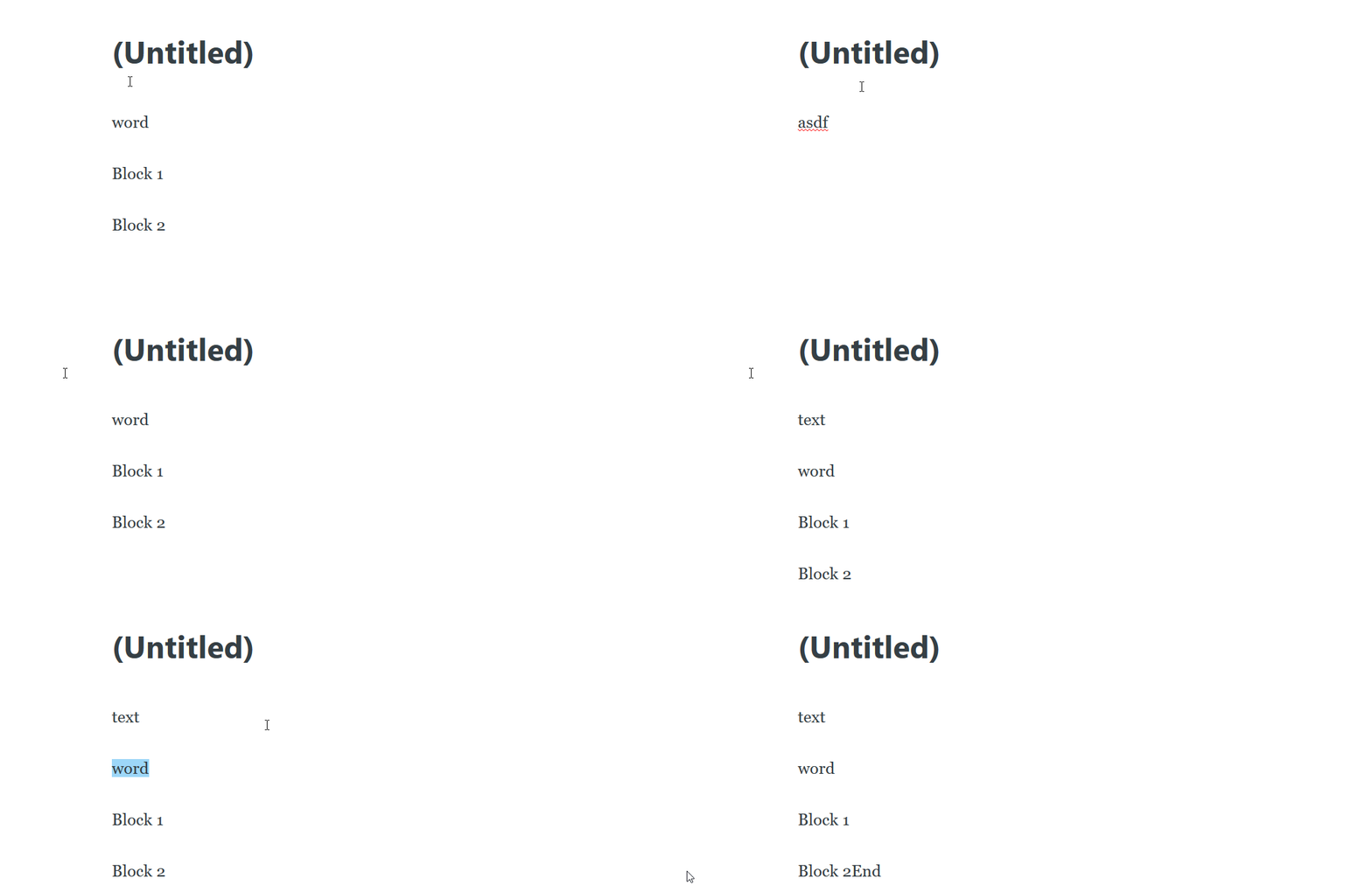
- Double-click on the head which contains only 1 word (1 text block with 1 word in 1 line). Double-click should be done much right, not too close to the word.
- Type a new word (any chars).
- Unexpected 4: A new word (new chars) appears in the latest block of entire post (and old word stay on its old place).
- Unexpected 5: All blocks are removed, if there is no text before selected "word".
fadeevab
on 6 Apr 2019
My
On Apr 6, 2019 9:48 AM, "Alexandr Fadeev" notifications@github.com wrote:
Case 3:
- Double-click on the head which contain only 1 word.
- Type a new word.
- Unexpected 4: A new word appears in the latest block of entire post.
—
You are receiving this because you are subscribed to this thread.
Reply to this email directly, view it on GitHub
https://github.com/TryGhost/Ghost/issues/10665#issuecomment-480509916,
or mute
the thread
https://github.com/notifications/unsubscribe-auth/AoHXH8DFLG_6CthmSQF214Wc7ATtHz_Gks5veLOsgaJpZM4cgODo
.
 lori21bishop
on 6 Apr 2019
lori21bishop
on 6 Apr 2019
Hi @fadeevab ! Was able to reproduce strange behavior of case 3 you and @lori21bishop described only in FireFox (v66.0.2) running on Ubuntu 18.04. The rest of the cases (1 and 2) might be Windows specific, as I couldn't reproduce them. Would be great if you could provide very short recordings for case 1 and 2, to make sure we have an exact way to reproduce.Thanks for reports :+1:
 naz
on 8 Apr 2019
naz
on 8 Apr 2019
I found 2 bugs there: all text is removed if no block before "word", and text is appended if any block above the "word" exists
fadeevab
on 8 Apr 2019
I added screen records into the original post.
fadeevab
on 8 Apr 2019
@fadeevab are you using line breaks (Shift+Enter) in your cases 1 and 2? The width of the line seems far too short for the amount of space you have to the right of it for a normal paragraph.
 kevinansfield
on 9 Apr 2019
kevinansfield
on 9 Apr 2019
@kevinansfield, Yes, in my test I'm using Shift+Enter, but I was able to reproduce with an automatically wrapped line.
fadeevab
on 10 Apr 2019
This issue has been automatically marked as stale because it has not had recent activity. It will be closed if no further activity occurs. Thank you for your contributions.
![stale[bot] picture](https://avatars3.githubusercontent.com/in/1724?v=4&s=40) stale[bot]
on 12 Jul 2019
stale[bot]
on 12 Jul 2019
(#10665) explain
On Fri, Jul 12, 2019, 3:04 AM stale[bot] notifications@github.com wrote:
This issue has been automatically marked as stale because it has not had
recent activity. It will be closed if no further activity occurs. Thank you
for your contributions.—
You are receiving this because you were mentioned.
Reply to this email directly, view it on GitHub
https://github.com/TryGhost/Ghost/issues/10665?email_source=notifications&email_token=AKA5OHYY5GZONQKY5LRA4YTP7A3KTA5CNFSM4HEA4DUKYY3PNVWWK3TUL52HS4DFVREXG43VMVBW63LNMVXHJKTDN5WW2ZLOORPWSZGODZZBAVI#issuecomment-510791765,
or mute the thread
https://github.com/notifications/unsubscribe-auth/AKA5OH6SICMTEM3LIF6LTNTP7A3KTANCNFSM4HEA4DUA
.
lori21bishop
on 12 Jul 2019
This issue has been automatically marked as stale because it has not had recent activity. It will be closed if no further activity occurs. Thank you for your contributions.
stale[bot]
on 10 Oct 2019
Related issues
 RadoslavGatev
·
3Comments
RadoslavGatev
·
3Comments
 pateskinasy
·
3Comments
pateskinasy
·
3Comments
 ss4344
·
4Comments
ss4344
·
4Comments
 marcuspoehls
·
4Comments
marcuspoehls
·
4Comments
 krokofant
·
3Comments
krokofant
·
3Comments