Issue Summary
I often use emacs bindings to do text editing (as far as I can tell, all macs have this built into their editors). Much to my chagrin, ctrl-d doesn't delete text in the ghost editor but my muscle memory forgets that that's the case.
Recently, doing that made all my images be replaced with the text "Upload" surrounded by a lot of nbsp's. I think I've got the repro nailed.
To Reproduce
- New post
- Insert image
- insert blank text line under image
- insert another blank text line below that
- go to the first blank line
- hit ctrl-d
Boom! Image is replaced with whitespace and "Upload"
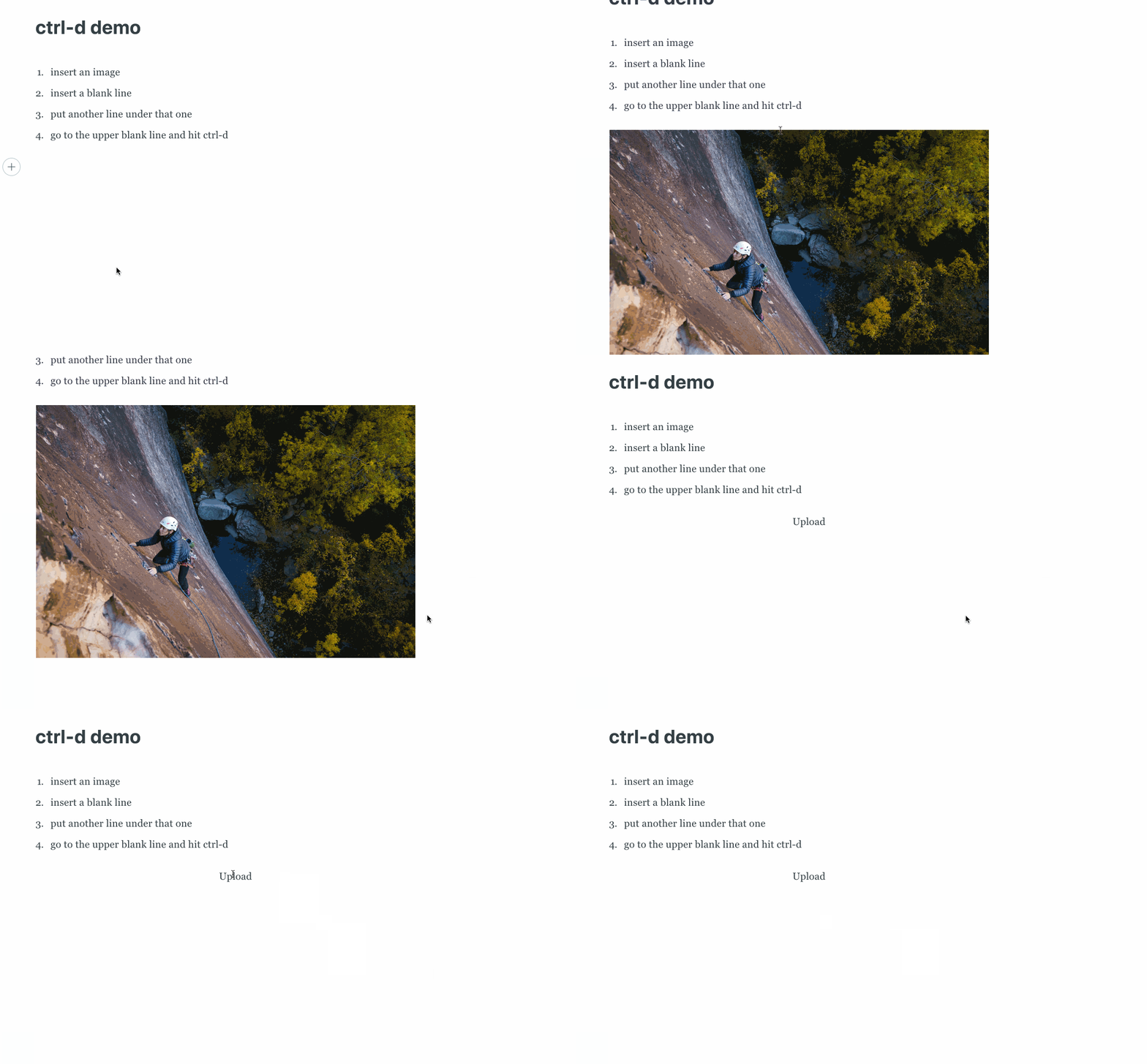
Technical details:
- Ghost Version: Ghost Pro 2.6.0
- Node Version: Ghost Pro 2.6.0
- Browser/OS: macosx 10.13/chrome 70.0.3538.110
- Database: Ghost Pro 2.6.0
 novaugust
All 26 comments
@rishabhgrg I can't replicate this on linux - ctrl-d adds a new bookmark - can you take a look?
 allouis
on 5 Dec 2018
allouis
on 5 Dec 2018
I couldn't reproduce this too.
 lunaticmonk
on 5 Dec 2018
lunaticmonk
on 5 Dec 2018
Hrrr! Are you on linux @lunaticmonk?
@novaugust are you able to replicate this in an incognito window? (browser extensions could be messing with stuff)
allouis
on 5 Dec 2018
@novaugust what command do you have Ctrl+d bound to? I've had a quick look into emacs bindings and there were some references to "delete next character" which would be Fn+Backspace on macOS but I'm unable to replicate with that.
The "Upload" with whitespace suggests that the browser is deleting outside of the editor's keyboard handling and causing the Ember card to crash 🤔
 kevinansfield
on 5 Dec 2018
kevinansfield
on 5 Dec 2018
@allouis I am using macos.
lunaticmonk
on 5 Dec 2018
@novaugust what command do you have Ctrl+d bound to? I've had a quick look into emacs bindings and there were some references to "delete next character" which would be Fn+Backspace on macOS but I'm unable to replicate with that.
Sorry @kevinansfield, I don't actually have it bound to anything. It's just the OS - works here in the github text box for example (all text boxes on my os actually, even my terminal). I just meant, I first encountered "ctrl+f" -> forward cursor, "ctrl-b" -> back cursor, "ctrl-d" -> delete in front of cursor in emacs, so I think of them as emacs bindings.
I could spin up a dev env and watch for logs if it has more information than what I'm seeing from my live site?
Happy to do whatever I can to help you debug. Kind of disastrous to have this happen at the end of an image heavy post :)
novaugust
on 5 Dec 2018
@novaugust unlikely to be any other logs available unless you see errors in the DevTools console when the card gets deleted? One thing that might help is the event log from https://unixpapa.com/js/testkey.html when you press the key combo - perhaps there's something particular about that keyboard shortcut that the editor isn't picking up on.
It does sound like the browser is performing manipulation on the contenteditable content directly, breaking the tie between the HTML content and the editor's data structure. From the screencap it looks like the card's HTML is parsed directly as HTML content which is why you get the weird rich-text result.
kevinansfield
on 5 Dec 2018
Oh, if you do try https://unixpapa.com/js/testkey.html, please check the "modifiers" and "DOM 3" checkboxes so the full info is shown 🙂
kevinansfield
on 5 Dec 2018
this is me hitting ctrl-d :)
keydown  keyCode=17        which=17        charCode=0
         shiftKey=false ctrlKey=true  altKey=false metaKey=false
         key=Control char=undefined location=1 repeat=false
keydown  keyCode=68  (D)   which=68  (D)   charCode=0
         shiftKey=false ctrlKey=true  altKey=false metaKey=false
         key=d char=undefined location=0 repeat=false
keyup    keyCode=68  (D)   which=68  (D)   charCode=0
         shiftKey=false ctrlKey=true  altKey=false metaKey=false
         key=d char=undefined location=0 repeat=false
keyup    keyCode=17        which=17        charCode=0
         shiftKey=false ctrlKey=false altKey=false metaKey=false
         key=Control char=undefined location=1 repeat=false
Interesting, thanks 😄 So it doesn't show itself as a special key like Fn+Backspace==Delete.
That probably means we need to add a key handler in mobiledoc-kit for Ctrl+d on Linux. Although, it's interesting that @allouis didn't see the same behaviour, from a little research it seems that Ctrl+d is the default bookmark manager shortcut for many people so maybe it's more subtle than a default text shortcut across all linux flavours 🤔.
kevinansfield
on 5 Dec 2018
for Ctrl+d on Linux
You saw I'm on macosx 10.13?
_edit_ derp, sorry, just saw you said _we_ need to add a key handler. thought you said I did ^.^
my computer shows CMD+D as the bookmark stuff. just making sure we're all talking about the same keyboard here!
novaugust
on 5 Dec 2018
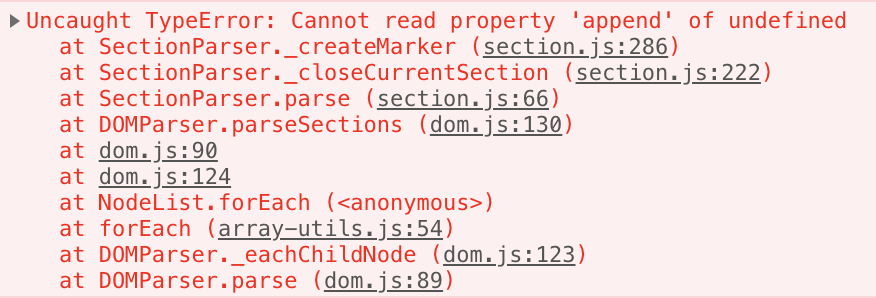
🙈 sorry, I got completely sidetracked by the first comments talking about Linux! A quick test shows an error when pressing Ctrl+d on macOS/Chrome on a blank paragraph after a gallery card:
Definitely enough to go on I think. This may also be related to some recent changes we made to our mobiledoc-kit fork 🤔
kevinansfield
on 5 Dec 2018
Ha, glad we're onto something now! good luck chief 👍
novaugust
on 5 Dec 2018
I'm currently unable to replicate with Ctrl+d _after_ a gallery card but there are definitely problems pressing it in a blank paragraph preceding any card.
kevinansfield
on 22 Jan 2019
Pretty scary when this nukes a post :X would love to have my editor back friends
novaugust
on 6 Apr 2019
This issue has been automatically marked as stale because it has not had recent activity. It will be closed if no further activity occurs. Thank you for your contributions.
![stale[bot] picture](https://avatars3.githubusercontent.com/in/1724?v=4&s=40) stale[bot]
on 5 Jul 2019
stale[bot]
on 5 Jul 2019
10994 is a similar issue involving the global control+h MacOS hotkey. I've closed that issue in favor of this one.
Here's a screencast demonstrating what happens with either the control+h or control+d hotkeys exploding images: https://youtu.be/HkbxeuO7j8k
 QuincyLarson
on 11 Aug 2019
QuincyLarson
on 11 Aug 2019
This issue has been automatically marked as stale because it has not had recent activity. It will be closed if no further activity occurs. Thank you for your contributions.
stale[bot]
on 9 Nov 2019
This is still an issue. I know stale bot is sweeping it under the rug here, but it is the main reason I compose my articles in a text editor then paste them into Ghost rather than composing directly in Ghost's editor.
QuincyLarson
on 9 Feb 2020
I've been looking into this again. Unfortunately it's quite a tricky one 😞
mobiledoc-kit works by intercepting keyboard events in order to update it's internal document representation rather than letting the browser modify the contenteditable contents ad-hoc and attempting to rebuild it's internal representation from the diff. For the vast majority of cases this is fine, however where it falls down is situations like this where there are extra/unknown keyboard shortcuts that are not intercepted.
We can try adding in extra keyboard interception to cover the above cases that we know about but there may still be edge cases and slightly incorrect behaviour.
kevinansfield
on 7 Mar 2020
@novaugust, @QuincyLarson I've pushed what I think should fix the issue but it's only handling Ctrl+h (backspace) and Ctrl+d (delete), if you use other keyboard shortcuts that modify text please let me know! It will go out in the next release which should be shortly after the weekend.
@novaugust from your original screencast it looks like your mapping may be different in that ctrl+d is performing a backspace operation rather than a delete operation. Is that true?
kevinansfield
on 7 Mar 2020
I haven't done anything to modify my mappings from OS defaults.
A note on Ctrl+d: when I use it at the end of one paragraph, before another paragraph, it successfully deletes the newline/paragraph and moves the text below up into the current paragraph, but it also defocuses/removes my cursor. i then have to click into the text again. not sure if that's part of this or a new issue. (this is with current ghost pro, not with your changes above!)
Other Ctrl+combos I use: mobiledoc-kit:
- ✅
f: move cursor forward 1 character (equivalent to left arrow). - ✅
option+f: move cursor forward one word (that'sctrl+option+f - ❌
b: move cursor backwards 1 character (equivalent to right arrow). i realize that this is probably being overwritten by ctrl+b for bold, but on a mac it would becmd+bfor bold,ctrl+bfor cursor movement. - ✅
option+b: move cursor backwards one word (ctrl+option+b) - ✅
emove cursor to end of line - ✅
a: move cursor to beginning of line - ✅
n: move cursor to next line - ❓
pmove cursor to previous line. works for moving from paragraph to paragraph, but not for moving to the paragraph above an image when the image is selected. - ✅
k: cut all text to end of line - ❓
y: uh, weirdly, hitting this is pasting the textkeyto my screen. i'd expect it to either do nothing, o to paste the text that was cut byctrl+k
novaugust
on 7 Mar 2020
Defocus with ctrl+d should be resolved with this fix 🤞
Left/right/up/down all have special handling in Koenig for dealing with card selection and moving in/out of the title input so it's not too surprising that the alternative key combos (ctrl+b,p) are not working quite so well in that regard.
ctrl+y is an odd one and sounds like a bug. Is it expected to be an exact equivalent to a ctrl+v paste operation?
kevinansfield
on 7 Mar 2020
ctrl+yis an odd one and sounds like a bug. Is it expected to be an exact equivalent to actrl+vpaste operation?
It's really 50/50 if it's supported. I learned of it as "yank". searching for that turned up this blog post, which describes it as i'm use to it working https://www.redpill-linpro.com/sysadvent/2015/12/09/shell-intro-tips.html
Github's comment editor right here works with it, but that's just the OS i reckon. It does have a separate buffer from copy. If i copy text, then hit yank, it still just returns the last value i killed, rather than the value i copied.
I'd expect editors that overwrite its functionality to just fully turn it off and have it noop
novaugust
on 8 Mar 2020
Here, this looks like a much better resource on osx/emacs crossover shortcuts
https://jblevins.org/log/kbd
novaugust
on 8 Mar 2020
Sorry, another that doesn't work as expected: CMD+backspace( labeled delete on a mac keyboard, but it's backspace? ) should delete everything left of the cursor
novaugust
on 8 Mar 2020
Related issues
 ErisDS
·
99Comments
ErisDS
·
23Comments
ErisDS
·
99Comments
ErisDS
·
23Comments
 gergelyke
·
21Comments
gergelyke
·
21Comments
 hissingpanda
·
28Comments
hissingpanda
·
28Comments
 arbob
·
28Comments
arbob
·
28Comments