Ghost: Allow a custom path for Ghost admin
I'm running ghost:2.1.2-alpine and I'm trying to host the /ghost panel under a separate domain.
I'm doing this because I have multiple ghost installations and I want one Google-based OAuth for all installations.
Now, I'm supplying an environment variable to the docker continer in the form of:
admin__url: "https://ghost.domain.mine/xyz/"
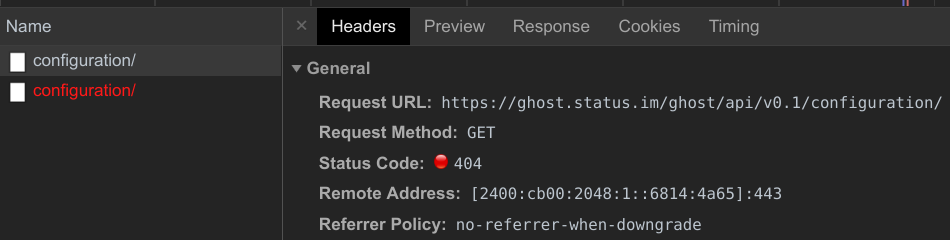
But despite that the configuration is ignored, and when the API call to /ghost/api/v0.1/configuration/ is made it is made for:
https://ghost.domain.mine/ghost/api/v0.1/configuration/
Which suggests to me that the xyz/ sub-path of the admin__url argument is ignored.
Why is this?
My proxy config:
   location /xyz {
       rewrite /xyz/(.*) /ghost/$1 break;
       proxy_pass http://127.0.0.1:8081/ghost;
       proxy_redirect https://ghost.domain.mine/ghost/ /xyz/;
       proxy_set_header Host $host;
       proxy_set_header X-Forwarded-Proto $scheme;
       proxy_set_header X-Forwarded-For $proxy_add_x_forwarded_for;
       proxy_set_header X-Real-IP $remote_addr;
   }
 jakubgs
All 13 comments
Proof:
jakubgs
on 13 Sep 2018
All other reources load just fine, but the API call fails because it insists on using the /ghost sub-path instead of /xyz one.
jakubgs
on 13 Sep 2018
I've managed to make it work with an ugly hack using the Referer header:
   location /ghost {
       if ($http_referer ~* "xyz") {
           rewrite /ghost/(.*) /xyz/$1 last;
       }
       if ($http_referer ~* "abc") {
           rewrite /ghost/(.*) /abc/$1 last;
       }
       return 502;
   }
But this really should be fixed.
jakubgs
on 14 Sep 2018
@jakubgs admin__url is not a valid config option. According to the config docs you should be using admin to set your admin url.
 kevinansfield
on 14 Sep 2018
kevinansfield
on 14 Sep 2018
 kirrg001
on 14 Sep 2018
kirrg001
on 14 Sep 2018
🤦♂️ my bad, got confused by how the table is formatted
kevinansfield
on 14 Sep 2018
Also, Ghost seems to insists on redirecting when it's not necessary(since I'm using a proxy) on adding the service port to the redirect header:
http://ghost.domain.mine:8091/xyz/
And also, Ghost seems to ignore the x-forwarded-proto: https header, which causes an infinite loop:
curl -skv http://127.0.0.1:8081/ghost/ -H 'x-forwarded-proto: https' -H 'host: ghost.domain.mine' > /dev/null

*   Trying 127.0.0.1...
* TCP_NODELAY set
* Connected to 127.0.0.1 (127.0.0.1) port 8081 (#0)
> GET /ghost/ HTTP/1.1
> host: ghost.domain.mine
> User-Agent: curl/7.58.0
> Accept: */*
> x-forwarded-proto: https
> x-forwarded-for: 167.99.216.199
>
< HTTP/1.1 301 Moved Permanently
< X-Powered-By: Express
< Cache-Control: public, max-age=31536000
< Location: https://ghost.domain.mine/ghost/
< Vary: Accept, Accept-Encoding
< Content-Type: text/plain; charset=utf-8
< Content-Length: 64
< Date: Sun, 16 Sep 2018 14:08:11 GMT
< Connection: keep-alive
<
{ [64 bytes data]
* Connection #0 to host 127.0.0.1 left intact
What's interesting is that the x-forwarded-proto header works just fine for the main site, but not for the Admin interface:
% curl -sv http://127.0.0.1:8081/ -H 'x-forwarded-proto: https' > /dev/null
...
< HTTP/1.1 200 OK
And:
% curl -sv http://127.0.0.1:8081/ghost/ -H 'x-forwarded-proto: https' > /dev/null
...
< HTTP/1.1 301 Moved Permanently
< Location: https://ghost.domain.mine/ghost/
But when I don't set admin__url at all Ghost respects the x-forwarded-proto and does not do the redirect:
% curl -sv http://127.0.0.1:8081/ghost/ -H 'x-forwarded-proto: https' > /dev/null
,,,
< HTTP/1.1 200 OK
@jakubgs from the docs on admin url: https://docs.ghost.org/docs/config#section-admin-url
As per the SSL section above, admin.url can be used to specify a different protocol for your admin panel. It can also be used to specify a different hostname (domain name). It cannot be used to affect the path at which the admin panel is served (this is always /ghost/).
There is no support for changing the location of the admin panel at the moment. It is hardcoded as /ghost/ in many parts of the application and is not a bug, but a well known and documented limitation.
That being said, it is something we would be happy to accept a PR for 🙂
 ErisDS
on 17 Sep 2018
ErisDS
on 17 Sep 2018
I see, that is a real pain...
That being said, it is something we would be happy to accept a PR for slightly_smiling_face
I wish I had the time to help you with this, but as it stands I am a single devops for a whole company. Maybe in the future. for now I'll probably implement a hack around this using domains. Thanks for explaining this.
jakubgs
on 17 Sep 2018
This issue has been automatically marked as stale because it has not had recent activity. It will be closed if no further activity occurs. Thank you for your contributions.
![stale[bot] picture](https://avatars3.githubusercontent.com/in/1724?v=4&s=40) stale[bot]
on 24 Apr 2019
stale[bot]
on 24 Apr 2019
Related issues
kirrg001
·
3Comments
 RadoslavGatev
·
3Comments
RadoslavGatev
·
3Comments
 HenryMarshall
·
4Comments
HenryMarshall
·
4Comments
 ArthurianX
·
4Comments
ArthurianX
·
4Comments
 jliikala
·
3Comments
jliikala
·
3Comments
Most helpful comment
I see, that is a real pain...
I wish I had the time to help you with this, but as it stands I am a single devops for a whole company. Maybe in the future. for now I'll probably implement a hack around this using domains. Thanks for explaining this.