Ghost: Import content failed - Cannot read property 'id' of undefined
Issue Summary
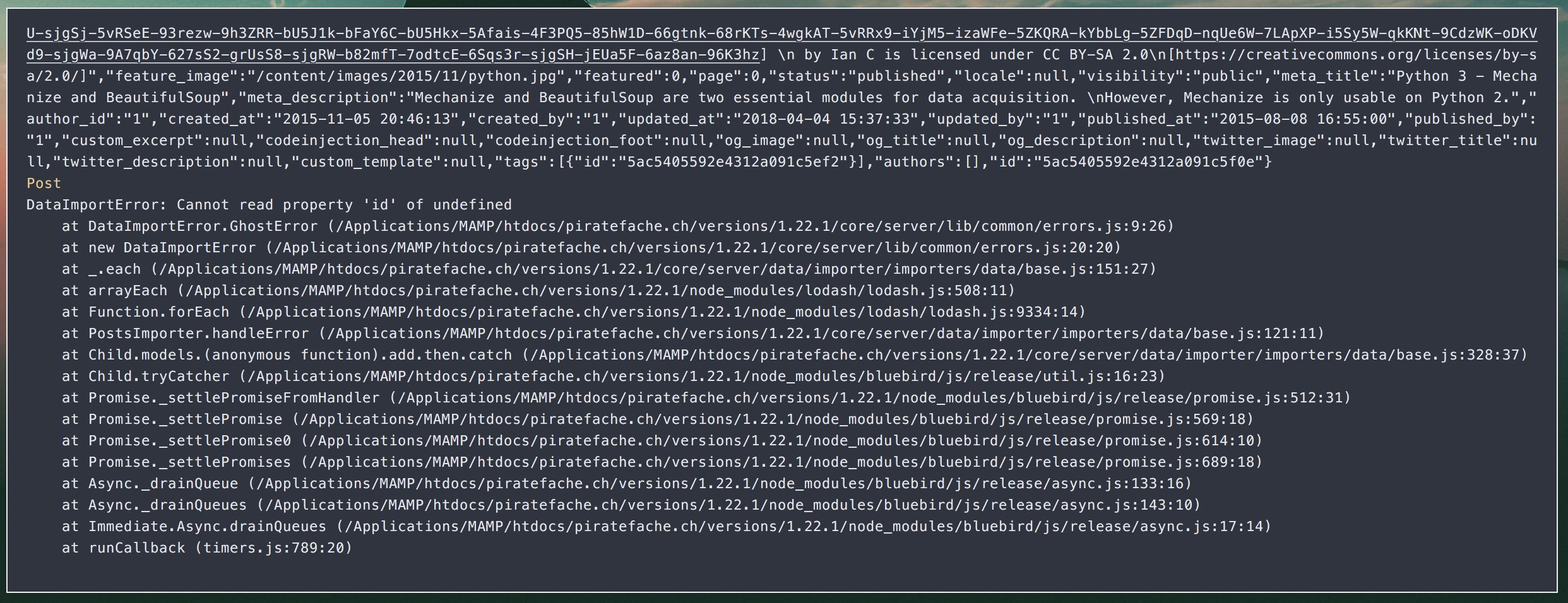
Content exportation from my server worked. But when I imported the JSON file on my computer, the following error appears.

Technical details:
Dev configuration (my computer) :
- Ghost Version: 1.22.1
- Node Version: 8.9.0
- Environment development
Prod configuration (my server with Docker) :
- Ghost Version : 1.22.1
- Node Version : 6-slim (image)
- Environment production
 MichaelCaraccio
All 18 comments
@MichaelCaraccio Hey!
Can you please share either the file to import or the exact error message from the server?
Thanks!
 kirrg001
on 5 Apr 2018
kirrg001
on 5 Apr 2018
Hello! The error from the server is the following :
MichaelCaraccio
on 5 Apr 2018
@MichaelCaraccio Okay i'll figure this out, but probably not before Monday. We have recently added some updates to the importer, it could be that we missed an edge case.
kirrg001
on 5 Apr 2018
@MichaelCaraccio Is it possible to share this file with me?
I'll treat it with respect and i'll remove it afterwards. Because i can't see where the error starts. It would take me longer to figure it out without the file.
You can send it to [email protected].
kirrg001
on 6 Apr 2018
@kirrg001 okay I send it now by email. Thanks :)
MichaelCaraccio
on 6 Apr 2018
@MichaelCaraccio The file you've send me, imports fine for me. No error?
Did you use the CLI to install Ghost?
kirrg001
on 6 Apr 2018
Hi, I have the same problem.
I have exported my content from the blog in production.
I installed a new blog locally on windows with ghost install local
I first deleted all the default contents with the *Delete all content" button
So I tried to import the json, I get this error:
Import failed
Can not read property 'id' of undefined
Before installing a clean version of local ghost I tried to update the old version I already had to run tests. ghost update did not work.
Here you can find the log:
https://pastebin.com/HDkti8bJ
 ubuntutest
on 7 Apr 2018
ubuntutest
on 7 Apr 2018
@ubuntutest Thanks for sharing. Is it possible to share your file with me? [email protected].
Before installing a clean version of local ghost I tried to update the old version I already had to run tests. ghost update did not work.
Here you can find the log:
https://pastebin.com/HDkti8bJ
This was already reported in https://github.com/TryGhost/Ghost/issues/9539, also on Windows.
@MichaelCaraccio You are not on Windows right?
kirrg001
on 7 Apr 2018
@kirrg001
I installed my dev local version with CLI :
$ ghost install local
Then I think that I "delete all content" before to import my data.
MichaelCaraccio
on 7 Apr 2018
@MichaelCaraccio Is your dev local on Windows?
kirrg001
on 7 Apr 2018
@kirrg001 dev local on MacOS (10.13.4)
MichaelCaraccio
on 7 Apr 2018
@MichaelCaraccio @ubuntutest
I am unable to reproduce 😩
Are you able to reproduce this problem all the time?
If yes, can you please share detailed steps with as many information as possible. That would help us a lot!!!
kirrg001
on 9 Apr 2018
I was able to replicate the problem after many test installations.
Windows 10 (but I think it is indifferent) -> ghost install local ->localhost:2368/ghost/ create the admin account exactly with the same information of the account in the json that you're going to import, including the same password -> labs -> delete all contents -> import json -> error
If during installation, you create an account different than the one in the json the problem does not occur
EDIT
I have done many other trial installations.
The problem is the email. If you use the e-mail in the json for the admin account you will encounter the problem
If you need more tests, ask without problems
ubuntutest
on 9 Apr 2018
@kirrg001 I think @ubuntutest is right. It's all about the information you give when you create the website for the first time.
If I fill the form with the same "Full name" as the JSON file, it will fail. The same email seems to work without any problem.
MichaelCaraccio
on 9 Apr 2018
@MichaelCaraccio @ubuntutest Thank you so much. I was able to track this down 👻
kirrg001
on 10 Apr 2018
@ubuntutest
I am still not sure why you were running into
RollbackError: delete from
posts_authors- SQLITE_ERROR: no such table: posts_authors
Ghost 1.22 contains two migration scripts. One to add the new multiple authors table (posts_authors) and one to update all the posts. And this looks like the table was never created.
Maybe the migration tasks are read from disk in different order? 🤔I can't really help with Windows, because i have not set up a VM and i currently don't have time for that 😖But if you figure out anything, let me know :)
kirrg001
on 10 Apr 2018
@kirrg001 wouldn't it make sense to at least number these files correctly? https://github.com/TryGhost/Ghost/tree/master/core/server/data/migrations/versions/1.22
 ErisDS
on 10 Apr 2018
ErisDS
on 10 Apr 2018
@ErisDS Yeah we could do that, but then we also need to migrate existing databases, because some of the them will hold the old filename and some the new file name. I think trying to keep consistency with the migrations table is very important.
But to be honest, i wanted to reproduce the problem first before doing anything.
It would be better if we could identify the files based on a unique id instead of the file names.
kirrg001
on 10 Apr 2018
Related issues
 kevinansfield
·
3Comments
kevinansfield
·
3Comments
 marcuspoehls
·
4Comments
marcuspoehls
·
4Comments
 shadowbottle
·
3Comments
kirrg001
·
3Comments
shadowbottle
·
3Comments
kirrg001
·
3Comments
 jliikala
·
3Comments
jliikala
·
3Comments
Most helpful comment
@MichaelCaraccio @ubuntutest Thank you so much. I was able to track this down 👻