Issue Summary
When user account is locked there is no information about this fact in admin panel. Team menu only shows if account is suspended. Another thing is that admin is not able to directly unlock account because there is no unlock option and resetting password from admin panel does not unlock that account. It is only possible to unlock account if you suspend it and then unsuspend.
Steps to Reproduce
- lock yourself with non-admin account
- log in as admin and try unlock account from step 1
Solution:
- add "locked" indicator in team menu
- add unlock button for admin/owner
- make password reset made by admin to also unlock account
Technical details:
- Ghost Version: beta2
- Node Version: 6
- Browser/OS: chrome
- Database: mariadb
 PaszaVonPomiot
All 10 comments
Hey @PaszaVonPomiot!
Sorry for late response.
One thing i've spotted is that if i am logged in as a none admin user and i change my status in the database to locked and refresh the admin panel, the admin spins forever. (403 response from server, which is correct). I assume that will also happen if i simply suspend the user in the admin panel with my blog owner (with 2 different browsers). I expect a redirect to the sign in page. cc @kevinansfield
When user account is locked there is no information about this fact in admin panel
Yeah that is correct and that i think has to be fixed, that is confusing. As blog owner, you won't see any status update in the UI.
add unlock button for admin/owner
The user can unlock himself by resetting the password. A user is only "locked" if he was imported. No need to add an unlock button. If the locked out user tries to login he will see
Your account is locked. Please reset your password to log in again by clicking the "Forgotten password?" link!
 kirrg001
on 13 Jul 2017
kirrg001
on 13 Jul 2017
To confirm there are 2 actions points here:
- [ ] investigate possible bug with locked accounts (I expect admin needs to react to a 403, it only logs out on 401's at the moment)
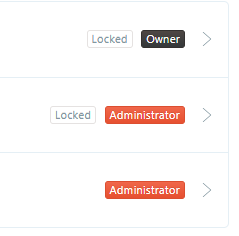
- [x] add a label in the team list to indicate an account is locked
 kevinansfield
on 14 Jul 2017
kevinansfield
on 14 Jul 2017
I've change the owner to a locked account and now I'm stuck. Can you heklp me with that?
 pollusb
on 30 Jul 2018
pollusb
on 30 Jul 2018
@pollusb not sure if there's an easier way but changing the value of 'status' column in DB from 'locked' to 'active' might help (I assume that if you're here looking for help you're self-hosted).
 ajostergaard
on 30 Jul 2018
ajostergaard
on 30 Jul 2018
Think I found the solution:
mysql -u root --password=PASSWORD bitnami_ghost -e "update users set status = 'active'"
pollusb
on 30 Jul 2018
@pollusb this seems to be the way to go.
 blakedietz
on 18 Aug 2018
blakedietz
on 18 Aug 2018
That is not a solution for production software.
 woodardj
on 4 Dec 2018
woodardj
on 4 Dec 2018
Locked accounts are intended to be unlocked via password reset. There's some suggestion that there's a bug but no reproduction case here that we can use to track it down.
 ErisDS
on 2 Jan 2019
ErisDS
on 2 Jan 2019
unlocking via 'forgot password' resulted in a spinning wheel followed by Request was rejected due to server error.
transforming @pollusb 's solution for sqlite worked great.
sqlite3 --header /path/to/database/connection/filename.db 'update users set status="active" where slug="myslug"'
the "server error" wasn't listed in the server (ghost - i didn't check nginx logs) logs but the client showed: GET https://ghost.example.com/ghost/api/v3/admin/users/me/?include=roles 403 (Forbidden)
 keithpjolley
on 22 Nov 2020
keithpjolley
on 22 Nov 2020
@keithpjolley please open a new issue following the issue template if you believe there's a bug in the forgotten password flow.
Thanks!
 matthanley
on 24 Nov 2020
matthanley
on 24 Nov 2020
Related issues
 onavascuez
·
35Comments
onavascuez
·
35Comments
 gergelyke
·
28Comments
gergelyke
·
28Comments
 morficus
·
28Comments
morficus
·
28Comments
 ekerstein
·
116Comments
ekerstein
·
116Comments
 bearnik
·
30Comments
bearnik
·
30Comments
Most helpful comment
Think I found the solution:
mysql -u root --password=PASSWORD bitnami_ghost -e "update users set status = 'active'"