Issue Summary
Ghost throws an ECONNREFUSED on npm start --production.
Steps to Reproduce
- Install Ghost 0.11.7 (not sure if this issue occurs elsewhere.
- Run
npm install --production. - Run
npm start --production.
Any other info e.g. Why do you consider this to be a bug? What did you expect to happen instead?
It should start Ghost without any problems. Instead, I get this jumble:
> [email protected] start /var/www/ghost
> node index.js

WARNING: Ghost is attempting to use a direct method to send email.
It is recommended that you explicitly configure an email service.
Help and documentation can be found at http://support.ghost.org/mail.


ERROR: connect ECONNREFUSED 127.0.0.1:3306

 Error: connect ECONNREFUSED 127.0.0.1:3306
    at Object.exports._errnoException (util.js:870:11)
    at exports._exceptionWithHostPort (util.js:893:20)
    at TCPConnectWrap.afterConnect [as oncomplete] (net.js:1063:14)
    --------------------
    at Protocol._enqueue (/var/www/ghost/node_modules/mysql/lib/protocol/Protocol.js:110:48)
    at Protocol.handshake (/var/www/ghost/node_modules/mysql/lib/protocol/Protocol.js:42:41)
    at Connection.connect (/var/www/ghost/node_modules/mysql/lib/Connection.js:98:18)
    at /var/www/ghost/node_modules/knex/lib/dialects/mysql/index.js:106:18
    at Promise._execute (/var/www/ghost/node_modules/bluebird/js/release/debuggability.js:300:9)
    at Promise._resolveFromExecutor (/var/www/ghost/node_modules/bluebird/js/release/promise.js:481:18)
    at new Promise (/var/www/ghost/node_modules/bluebird/js/release/promise.js:77:14)
    at Client_MySQL.acquireRawConnection (/var/www/ghost/node_modules/knex/lib/dialects/mysql/index.js:104:12)
    at Object.create (/var/www/ghost/node_modules/knex/lib/client.js:231:16)
    at Pool._createResource (/var/www/ghost/node_modules/generic-pool/lib/generic-pool.js:325:17)
    at Pool._ensureMinimum (/var/www/ghost/node_modules/generic-pool/lib/generic-pool.js:363:12)
    at new Pool (/var/www/ghost/node_modules/generic-pool/lib/generic-pool.js:156:8)
    at Client_MySQL.initializePool (/var/www/ghost/node_modules/knex/lib/client.js:261:17)
    at Client_MySQL.Client (/var/www/ghost/node_modules/knex/lib/client.js:108:12)
    at new Client_MySQL (/var/www/ghost/node_modules/knex/lib/dialects/mysql/index.js:62:20)
    at Knex (/var/www/ghost/node_modules/knex/lib/index.js:60:34)
    at Object.<anonymous> (/var/www/ghost/core/server/data/db/connection.js:55:20)
    at Module._compile (module.js:410:26)
    at Object.Module._extensions..js (module.js:417:10)
    at Module.load (module.js:344:32)
    at Function.Module._load (module.js:301:12)
    at Module.require (module.js:354:17)
    at require (internal/module.js:12:17)
Technical details:
- Ghost Version: 0.11.7
- Node Version: 4.2.6
- Browser/OS: Google Chrome Version 57.0.2987.133 (64-bit), Ubuntu 16.04 (64-bit)
- Database: mysql 5.7.17-0ubuntu0.16.04.1
 ifvictr
All 6 comments
Hey @ifvictr, sorry to hear you're having issues. The error you've supplied is saying your MySQL server isn't running or is not listening on 127.0.0.1 - it might be configured to use a socket rather than TCP in which case you'll need to update the mysql details in your config.json file.
This doesn't sound like a bug but rather an install issue, the best place to get support for install issues is in the #help channel on our Slack community - the real-time nature is much more conducive to walking through installation problems 😄
I'm going to close this issue as there's no bug as far as I can tell, we can re-open if there's an actual bug found rather than a configuration problem.
 kevinansfield
on 2 Apr 2017
kevinansfield
on 2 Apr 2017
@kevinansfield Actually, the problem has been resolved. Just had to add socketPath with the value /var/run/mysqld/mysqld.sock to the database configurations.
ifvictr
on 2 Apr 2017
Same problem.
 valterh4ck3r
on 20 Sep 2017
valterh4ck3r
on 20 Sep 2017
FYI I had the same issue. A bit more specific instructions for anyone else who may not know where to put the property... fixed by opening config.production.json in the ghost directory and adding property just below the..
"client": "mysql",
"connection": {
The line:
"socketPath": "/var/run/mysqld/mysqld.sock",
 david-zaletanski
on 21 Nov 2017
david-zaletanski
on 21 Nov 2017
I am using Ghost 2.9.1, got the same problem today
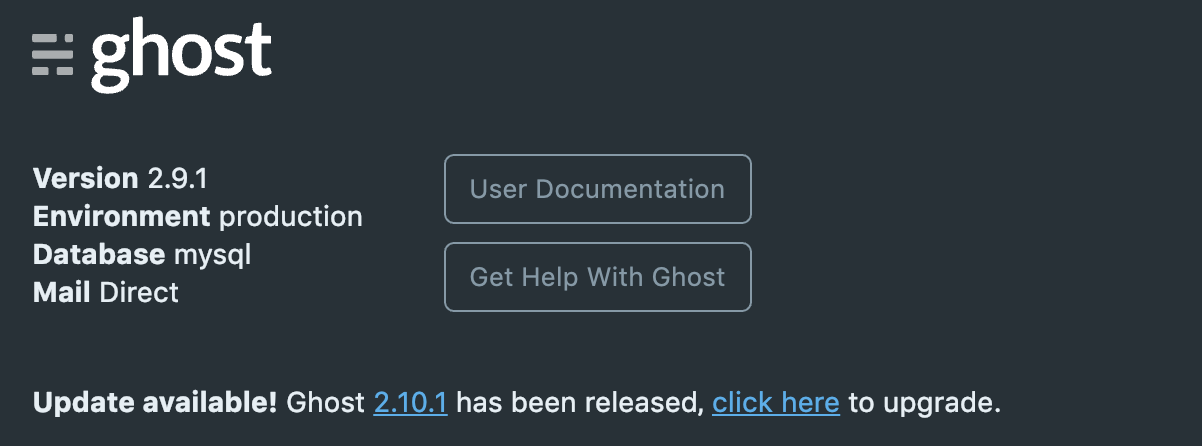
I just run ghost restart. it work for me
 1c7
on 10 Jan 2019
1c7
on 10 Jan 2019
Hi!
I have tried all previously mentioned solutions in this thread and I am still having this problem.
Specifically, I don't have /mysqld/mysqld.sock in my /var/run as @david-zaletanski does. Despite having mysql installed.
 tyconway
on 24 Jun 2020
tyconway
on 24 Jun 2020
Related issues
 jaguart
·
3Comments
jaguart
·
3Comments
 marcuspoehls
·
4Comments
marcuspoehls
·
4Comments
 pateskinasy
·
3Comments
kevinansfield
·
3Comments
pateskinasy
·
3Comments
kevinansfield
·
3Comments
 shadowbottle
·
3Comments
shadowbottle
·
3Comments
Most helpful comment
FYI I had the same issue. A bit more specific instructions for anyone else who may not know where to put the property... fixed by opening config.production.json in the ghost directory and adding property just below the..
"client": "mysql",
"connection": {
The line:
"socketPath": "/var/run/mysqld/mysqld.sock",