Ghidra: Cant Import anything
Describe the bug
Whenever I try to import anything it shows the error "Could not find importer service". I have tried reinstalling Ghidra.
To Reproduce
Force shutdown your computer while Ghidra is running (not completely sure if this caused it)
Expected behavior
I expect it to import my file.
Screenshots

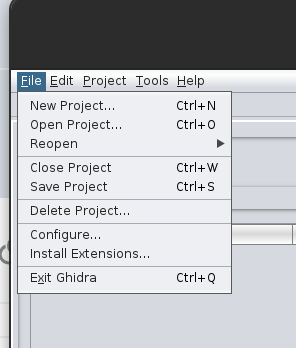
Attachments
If applicable, please attach any files that caused problems or log files generated by the software.
Environment (please complete the following information):
- OS: Ubuntu
- Java Version: 11.0
- Ghidra Version: 9.1
 ByamB4
All 5 comments
I'm not sure if this is 100% your problem, but it looks like you are missing some default tools. Try going to Tools --> Import Default Tools and enable the CodeBrowser.
 ryanmkurtz
on 5 Nov 2020
ryanmkurtz
on 5 Nov 2020
To echo what Ryan said, your screen shot only had a version tracking tool listed, which is pretty weird.
Also, the File menu screen shot you included didn't show some normal menu options that should be there, so your configuration does look like its been messed up. Is this a standard Ghidra install source (ie. from ghidra-sre.org) or another packaging?
 dev747368
on 5 Nov 2020
dev747368
on 5 Nov 2020
I'm not sure if this is 100% your problem, but it looks like you are missing some default tools. Try going to Tools --> Import Default Tools and enable the CodeBrowser.
Importing default tools solved problem, thanks again
ByamB4
on 5 Nov 2020
FYI, importing the default CodeBrowser tool will fix it when you are in the CodeBrowser, but you probably will still not have the things that you normally should have in the FrontEnd tool window. If (in the frontend tool) you check your File | Configure -> Ghidra Core you might need to enable some plugins that got disabled (ie. ImporterPlugin)
dev747368
on 5 Nov 2020
FYI, importing the default CodeBrowser tool will fix it when you are in the CodeBrowser, but you probably will still not have the things that you normally should have in the FrontEnd tool window. If (in the frontend tool) you check your File | Configure -> Ghidra Core you might need to enable some plugins that got disabled (ie. ImporterPlugin)
Big thanks
ByamB4
on 5 Nov 2020
Related issues
 astrelsky
·
3Comments
astrelsky
·
3Comments
 loudinthecloud
·
3Comments
loudinthecloud
·
3Comments
 gemini00
·
3Comments
gemini00
·
3Comments
 toor-de-force
·
3Comments
toor-de-force
·
3Comments
 forkoz
·
3Comments
forkoz
·
3Comments
Most helpful comment
FYI, importing the default CodeBrowser tool will fix it when you are in the CodeBrowser, but you probably will still not have the things that you normally should have in the FrontEnd tool window. If (in the frontend tool) you check your File | Configure -> Ghidra Core you might need to enable some plugins that got disabled (ie. ImporterPlugin)