Ghidra: DataTypeManager addDataType method is not working
Describe the bug
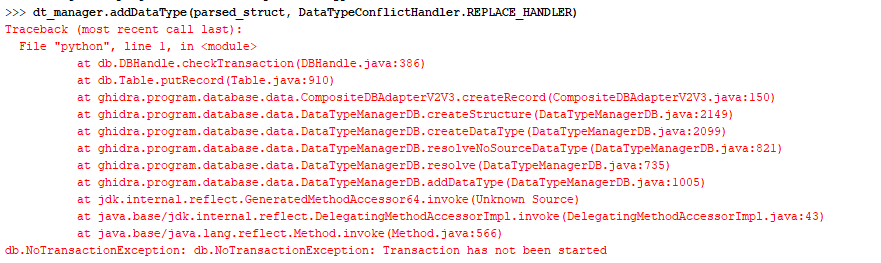
Error when using addDataType method on database what is not current open file.
Bug occurs only when you access database other than the one currently opened file created.
To Reproduce
Using shared project:
Open any file you want to analize.
Create new Project Archive (In example D2Data) in Data Type Manager then in python console write such functions:
tool = state.getTool();

from ghidra.app.services import DataTypeManagerService

service = tool.getService(DataTypeManagerService);

dataTypeManagers = service.getDataTypeManagers();

dataTypeManagers[1].getName() # make sure returned name is D2Data, otherwise change index

dt_manager = dataTypeManagers[1];

from ghidra.app.util.cparser.C import CParser

parser = CParser(dt_manager);

parsed_struct = parser.parse("struct D2Test {};");

from ghidra.program.model.data import DataTypeConflictHandler

dt_manager.addDataType(parsed_struct, DataTypeConflictHandler.REPLACE_HANDLER);
Expected behavior
Beign able to add structure to any DataTypeManager.
Screenshots
Environment (please complete the following information):
- OS: Windows 10
- Java Version: amazon-corretto-11.0.7.10.1-windows-x64-jdk
- Ghidra Version: 9.1.2
 dzik87
All 6 comments
Looks like you need to start a new transaction for that call. You can wrap your call with the start() and end(commit) methods from FlatProgramAPI.
 ryanmkurtz
on 1 Jun 2020
ryanmkurtz
on 1 Jun 2020
Thanks. I'll have a look into it and see what will happen.
I wonder tho why when I select database assigned to opened file I can do whatever I want?
dzik87
on 1 Jun 2020
Looks like you need to start a new transaction for that call. You can wrap your call with the
start()andend(commit)methods fromFlatProgramAPI.
Well i tried this and unless I am doing it wrong it still doesn't work. Still looking for solution to my problem.
dzik87
on 1 Jun 2020
I'm assuming you're trying to add datatypes to a file based DataTypeManager or a project DataTypeManager. The reason the FlatProgramApi methods didn't work is because they perform transactions on the program database (probably, haven't looked yet.) You will need to use startTransaction and endTransaction directly on the DataTypeManager you are using.
 astrelsky
on 2 Jun 2020
astrelsky
on 2 Jun 2020
Oops, thanks @astrelsky.
ryanmkurtz
on 2 Jun 2020
I'm assuming you're trying to add datatypes to a file based DataTypeManager or a project DataTypeManager. The reason the FlatProgramApi methods didn't work is because they perform transactions on the program database (probably, haven't looked yet.) You will need to use startTransaction and endTransaction directly on the DataTypeManager you are using.
This is working 100% without issues. And indeed i was adding to project DataTypeManager.
Anyway your solution is what i was after. Thank You very much.
dzik87
on 2 Jun 2020
Related issues
 rrivera1849
·
3Comments
rrivera1849
·
3Comments
 marcushall42
·
3Comments
marcushall42
·
3Comments
 CalcProgrammer1
·
3Comments
CalcProgrammer1
·
3Comments
 pd0wm
·
3Comments
pd0wm
·
3Comments
 tambry
·
3Comments
tambry
·
3Comments