Ghidra: Unable to Parse PDB (Failing validation)
Describe the bug
Attempting to load any PDB files results in the following exception:
PDB Execution failure of pdb.exe.
This was likely caused by severe execution failure which can occur if executed
on an unsupported platform. It may be neccessary to rebuild the PDB executable
for your platform (see Ghidra/Features/PDB/src).
ghidra.app.util.bin.format.pdb.PdbException: PDB Execution failure of pdb.exe.
This was likely caused by severe execution failure which can occur if executed
on an unsupported platform. It may be neccessary to rebuild the PDB executable
for your platform (see Ghidra/Features/PDB/src).
    at ghidra.app.util.bin.format.pdb.PdbParser.verifyPdbSignature(PdbParser.java:576)
    at ghidra.app.util.bin.format.pdb.PdbParser.processPdbContents(PdbParser.java:554)
    at ghidra.app.util.bin.format.pdb.PdbParser.parse(PdbParser.java:147)
    at pdb.LoadPdbTask$1.analysisWorkerCallback(LoadPdbTask.java:66)
    at ghidra.app.plugin.core.analysis.AutoAnalysisManager$AnalysisWorkerCommand.applyTo(AutoAnalysisManager.java:1677)
    at ghidra.app.plugin.core.analysis.AutoAnalysisManager$AnalysisTaskWrapper.run(AutoAnalysisManager.java:685)
    at ghidra.app.plugin.core.analysis.AutoAnalysisManager.startAnalysis(AutoAnalysisManager.java:785)
    at ghidra.app.plugin.core.analysis.AutoAnalysisManager.startAnalysis(AutoAnalysisManager.java:664)
    at ghidra.app.plugin.core.analysis.AutoAnalysisManager.startAnalysis(AutoAnalysisManager.java:629)
    at ghidra.app.plugin.core.analysis.AnalysisBackgroundCommand.applyTo(AnalysisBackgroundCommand.java:62)
    at ghidra.framework.plugintool.mgr.BackgroundCommandTask.run(BackgroundCommandTask.java:101)
    at ghidra.framework.plugintool.mgr.ToolTaskManager.run(ToolTaskManager.java:315)
    at java.base/java.lang.Thread.run(Thread.java:835)

---------------------------------------------------
Build Date: 2019-Aug-29 0928 EDT
Ghidra Version: 9.1
Java Home: C:\Program Files\Java\jdk-12.0.2
JVM Version: Oracle Corporation 12.0.2
OS: Windows 10 10.0 amd64
Workstation: DESKTOP-SSR8888
To Reproduce
Steps to reproduce the behavior:
- Load any PDB file.
Attachments
InheritanceTests.zip
The source for the executable in the attachment is located here
Additional context
Running pdb.exe directly and using createPdbXmlFiles.bat works without issue. Using the debugger I have stepped through to PDBParser.java line 514. The String[] cmd that is being passed to pdb.exe is the following:
cmd[0]: "C:\Users\astre\Documents\ghidra_9.1_DEV\Ghidra\Features\PDB\os\win64\pdb.exe"
cmd[1]: "C:\Users\astre\Documents\cpp\visual_studio\x64\Debug\main.pdb"
cmd[2]: "4d2d0e81-7184-44b2-b42d-0071b129ae9c"
cmd[3]: "00000001"
when running pdb.exe with those arguments it says "WARNING PDB signature does not match." however removing cmd[3] allows it to parse the file without an issue.
 astrelsky
All 14 comments
Each time the executable is built, the age is incremented. That is the field value of cmd[3]. The GUID is cmd[2]. These two fields are used to validate the correct PDB with the executable. Pdb.exe can be run with or without validation. By leaving out the GUID and age, no validation is done; and it must be doing partial validation if leaving out the age. Using an unmatched PDB can lead to incorrect data types and, more likely, labels being put down at the wrong places.
The part of Ghidra that tries to find the correct PDB needs some work and “might” get confused when there are multiple PDBs that are close matches, but not the correct match. It currently chooses one, and if it fails validation, it doesn’t check the others. Some of the paths that are checked are the location from which the executable was loaded, the download folder used when downloading PDBs from symbol servers, and the location specified in the executable (PE header)—this last location will no longer be checked in the master branch, as of a week or two ago, unless the option to do so is checked. We hope to clean up the searching code soon.
I would suggest moving all of the PDBs from the sorts of folders indicated above and doing a fresh build of the executable to try to get a matching PDB. Another option would be to try to selectively only make one PDB available at a time until the one with the matching age is found, at which point validation should succeed. Another option is to check the box on the PDB analyzer options that relates to checking the PE header specified path.
If the PDB file is not in the same folder as the executable, then it probable won’t be found unless you place it in the same folder that the executable was in when imported to Ghidra or unless you check the PDB analyzer option mentioned above.
 ghizard
on 2 Sep 2019
ghizard
on 2 Sep 2019
Related to #198
ghizard
on 2 Sep 2019
Interesting. I wonder if it is because I tried using it right after it was created. I noticed the age was one even though it wasn't a day old yet. I will check later if it is valid with the age set to 0.
Edit: this was not the case.
astrelsky
on 2 Sep 2019
The age isn’t the number of days. It is just a one-up count. Each time it is built (probably in the presence of an existing PDB or maybe solution file or maybe intermediate link file—I don’t know where it discovers the previous age), the age is incremented.
Here’s what can happen, and it has happened to me. You build the executable and import it to Ghidra. It will note the GUID and age of the PDB—say age is N. The PDB will also know its GUID and age. Then you happen to rebuild the executable, but don’t reimport it. A newer PDB is created with the same GUID, but with age N+1. Then if you try to analyze the program in Ghidra without reimporting it, it will look for age N, but only see the PDB with age N+1 and give the error.
Unfortunately, Ghidra is not outputting the most helpful error messages.
ghizard
on 2 Sep 2019
@astrelsky Have you investigated whether you had recompiled your executable after it had already been imported to Ghidra, which would have recreated a mismatched PDB for the program already imported? Have you tried any of the clean-up steps I suggested earlier to try to get a matched PDB?
ghizard
on 3 Sep 2019
@astrelsky Have you investigated whether you had recompiled your executable after it had already been imported to Ghidra, which would have recreated a mismatched PDB for the program already imported? Have you tried any of the clean-up steps I suggested earlier to try to get a matched PDB?
This occurs when creating a fresh visual studio project and compiling, deleting the .ghidra directory in %userprofile% (for sanity) and loading it into a fresh ghidra project.
astrelsky
on 4 Sep 2019
If you eliminate the value from cmd[3] and then look at the first line of XML that is created, you will see the GUID and age of the PDB. What is the age? I'm not sure if it is supposed to start at 0 or 1. The value should hopefully give us a clue.
ghizard
on 4 Sep 2019
If you eliminate the value from cmd[3] and then look at the first line of XML that is created, you will see the GUID and age of the PDB. What is the age? I'm not sure if it is supposed to start at 0 or 1. The value should hopefully give us a clue.
I figured it out. Ghidra is stripping the { and } from the guid. Adding them back in allows it to parse it properly.
astrelsky
on 4 Sep 2019
It seems that you hit on something. I’m not at work to check all, but to be clear, I have a couple of questions:
Where are you adding the braces (to the first line of the XML or to cmd[2])?
What version of Visual Studio are you using to build your target/PDB?
Since you are noting 9.1/master, I’m assuming you built the pdb.exe with the same VS in the previous question... yes?
I don’t see where we have removed the braces in Ghidra, but it could be that commits from 2 months ago have caused this issue. However, if you are using VS 2019, it could be that VS 2019 changed the GUID in the PDB itself or it could be changes in the DIA or other library methods, such as StringFromGUID2, used in the pdb.exe.
ghizard
on 4 Sep 2019
It seems that you hit on something. I’m not at work to check all, but to be clear, I have a couple of questions:
Where are you adding the braces (to the first line of the XML or to cmd[2])?
What version of Visual Studio are you using to build your target/PDB?
Since you are noting 9.1/master, I’m assuming you built the pdb.exe with the same VS in the previous question... yes?I don’t see where we have removed the braces in Ghidra, but it could be that commits from 2 months ago have caused this issue. However, if you are using VS 2019, it could be that VS 2019 changed the GUID in the PDB itself or it could be changes in the DIA or other library methods, such as StringFromGUID2, used in the pdb.exe.
I inserted the braces directly into pdbGuid in PdbParser.java on line 267 after stepping over it.
After digging a bit I pulled up the program information in ghidra. This is what it looks like.
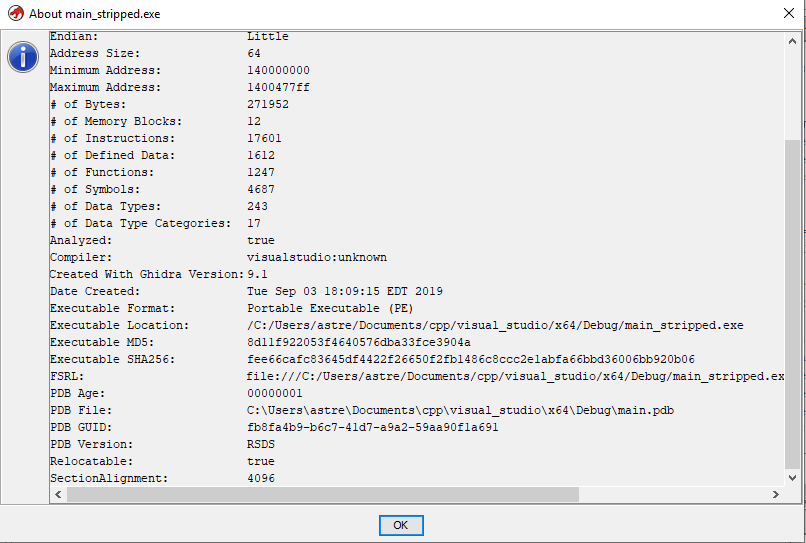
Should the braces be present in the guid there?
I do have vs2019 installed but made sure to compile both pdb.exe and the test binary with vs2017.
Should I ensuring that the vs 2017 version of msdia140.dll is registered and not the 2019 version?
astrelsky
on 4 Sep 2019
Ok. I can see that you added the braces to the value stored that supposedly comes from the PE header. I’ll have to look closer tomorrow to see what might have changed, if anything. But this could also mean that a change could have been introduced in the PeLoader. I’ll try to run older versions of Ghidra against newer and track the GUID throughout.
If you have the time and ability to make sure that the 2017 version of msdia140 is registered, that could eliminate one more variable.
ghizard
on 4 Sep 2019
Ok. I can see that you added the braces to the value stored that supposedly comes from the PE header. I’ll have to look closer tomorrow to see what might have changed, if anything. But this could also mean that a change could have been introduced in the PeLoader. I’ll try to run older versions of Ghidra against newer and track the GUID throughout.
If you have the time and ability to make sure that the 2017 version of msdia140 is registered, that could eliminate one more variable.
I ran a quick check and it appears the issue is either with pdb.exe or from the registered msdia140.dll I re-registered the vs2017 one last night. Running the pdb.exe from ghidra 9.0.4 loads parses the pdb without the braces but the one from ghidra 9.1 dev does not. I'm currently building ghidra and will try again with the rebuilt ghidra 9.1 pdb.exe now that the vs2017 msdia140.dll is registered.
@ghizard I have traced the issue back to pdb.exe itself. The one in release 9.0.4 works only without the braces but not with. The current pdb.exe build works only with the braces but not without.
astrelsky
on 4 Sep 2019
@astrelsky Thanks for the report back. Appreciate your drilling in on this. I've been tied up from the beginning of the day, so just going to start looking now.
ghizard
on 4 Sep 2019
It might take a little to propagate into master because of recent changes in building and testing of this native code, but I have a branch to fix this issue and a PDB help issue.
ghizard
on 4 Sep 2019
Related issues
astrelsky
·
3Comments
 rrivera1849
·
3Comments
rrivera1849
·
3Comments
 lab313ru
·
3Comments
lab313ru
·
3Comments
 gemini00
·
3Comments
gemini00
·
3Comments
 tambry
·
3Comments
tambry
·
3Comments