Ghidra: Ownership issue when copying a project between users
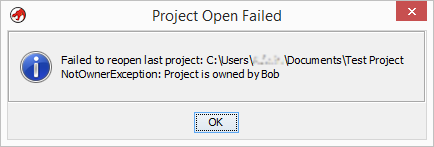
On Windows (but I suspect will happen on the other OSes as well) if you create a project under your current username then try to give it to someone else, or otherwise just copy it to another machine or VM with a different user name you will get an error:
"..Failure to open project ... NoOwnerException: Project is not owned by xxx.."
To Reproduce:
- Create a project using username "Bob"
- Copy that project over a to a different machine (or different user on the same machine, VM, etc), say "Sam" for example.
- Ghidra will not load the project under a different user (by name) but show an error box instead.
Expected behavior:
It's understandable there needs to be a "user" tracking for collaboration reasons, yet, I'm sure people will want to copy their projects around, to share them, etc.
Maybe as more of a "feature request", Ghidra could simply have a dialog option to either ignore the user mismatch, or switch the config to the current user automatically.
Environment"
- OS: Any Windows OS
- Java Version: 11.0.2
- Ghidra Version: Latest
Additional context:
To get around the issue it's an easy fix for now, just manually edit "project.prp" (an XML file) and change the "VALUE" to the current user.
I.E. '
 BigJim
All 4 comments
If you intend to share the project, export the project to an archive using File->Archive Current Project. On the receiving end, the archive file can be read in with File->Restore Project with no ownership issues.
 ahroach
on 12 Mar 2019
ahroach
on 12 Mar 2019
@BigJim, is @ahroach 's import/export suggestion sufficient for your needs? If so, we can go ahead and close the ticket.
 ryanmkurtz
on 13 Mar 2019
ryanmkurtz
on 13 Mar 2019
Sure that will work. Later I plan to revisit as I setup a dev environment and learn the source in the .zip files.
BigJim
on 13 Mar 2019
What if you're on the receiving end and don't have the archived version? It happened to me once and I seem to remember getting it to work by renaming or editing files or something—creating a temporary user with the correct name would probably work as well—but is there an easier way?
 flarn2006
on 6 Sep 2020
flarn2006
on 6 Sep 2020
Related issues
 lab313ru
·
16Comments
lab313ru
·
16Comments
 dalvarezperez
·
19Comments
dalvarezperez
·
19Comments
 0x6d696368
·
17Comments
0x6d696368
·
17Comments
 tzizi
·
17Comments
tzizi
·
17Comments
 progmboy
·
19Comments
progmboy
·
19Comments
Most helpful comment
Sure that will work. Later I plan to revisit as I setup a dev environment and learn the source in the .zip files.