Ghidra: Changing type of "this" parameter fails
Description
Trying to change the type of "this" parameter in a function fails with an unclear error message. I couldn't find any way to make it work.
To Reproduce
Steps to reproduce the behavior:
- Go to the function signature in the decompiler window.
- Click on
voidinfuncname(void *this, ...). - Press
Ctrl-L(or select "Retype variable" from the popup menu). - Enter
CFoo *in the dialog (whereCFoois a previously created, and recognized in this dialog, data type). - Answer "Continue" in the (annoying!) warning message box appearing next.
- See the error message box containing the following error (copy-pasted from the log window):
(RetypeVariableAction) Retype Failed: Failed to re-type variable 'this': Parameter commit failed for function at 75ca063a
Expected behavior
For retyping this to work, as it seems to do with the other parameters. Also, if possible, remove the annoying message box from the step (5), which seems completely unnecessary.
Environment (please complete the following information):
- Windows 7
- OpenJDK 11
Additional context
Note that "Auto create class structure" works, however then I can't find any way to rename AutoClass1 to something more reasonable without the decompiler getting upset and telling me that AutoClass1 is not found (if I rename it).
 vadz
vadz
All 4 comments
When using auto-storage (default) the 'this' auto-parameter obtains its type from its' parent Class namespace. If the function does not reside within a Class namespace its' type is "void *". There is currently a very loose association with a structure data type by the same name (name changes do not carry over between Class and Structure definition). If you rename the Class you will have to rename the associated structure. Creation and manipulation of Class namespace can be accomplished from the symbol tree. Associated structure can be manipulated from the data-type manager tree. Improvements are definitely needed in this area.
 ghidra1
on 10 Mar 2019
ghidra1
on 10 Mar 2019
Thanks for the explanation, but could you please also explain (or point to the part of the docs explaining it) how to make a function created by the initial analysis path a method of a class? I.e. right now I see void __thiscall ?Foo@CBar@@xxx(void *this), how exactly do I make this function a member of CBar (and, also, is using "Auto create class structure" from the popup menu shown when right clicking on "void", the right way to create CBar in the first place?)? Sorry if this is something obvious, but I just can't find any way to do it at the moment.
TIA!
vadz
on 10 Mar 2019
While we hope to add this to the Edit Function dialog but at present you must use either the Edit Label or Symbol Tree to accomplish this task.
I would recommend first creating the Class namespace using the symbol tree. Then you can use the Edit Label action while selecting the function "label" (not signature) from the listing. In the poup select Global namespace in pulldown and specify full namespace prefix to function name (e.g., MyClass::MyFunc).
From the symbol tree you can also drag Function node onto Class node to re-parent the function.
ghidra1
on 18 Mar 2019
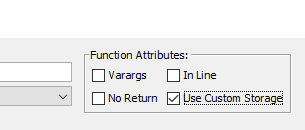
As a workaround, you may want to enable the _"Use Custom Storage"_ option in the _"Edit Function"_ dialog, it allows you to retype this as you please:
 huettenhain
on 31 May 2019
huettenhain
on 31 May 2019
Related issues
 progmboy
·
19Comments
progmboy
·
19Comments
 mewmew
·
16Comments
mewmew
·
16Comments
 tzizi
·
17Comments
tzizi
·
17Comments
 rszibele
·
35Comments
rszibele
·
35Comments
 0x6d696368
·
18Comments
0x6d696368
·
18Comments
Most helpful comment
As a workaround, you may want to enable the _"Use Custom Storage"_ option in the _"Edit Function"_ dialog, it allows you to retype

thisas you please: