Ghidra: Viewing Instructions in graph is not efficient.
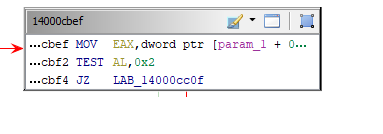
Watching instructions in graph view is not efficient at all since if the instructions are too long then they cannot be seen. You either need to hover to read it or maximize the window.
it would be amazing to expand according to the length of the biggest instruction in the block.
If the memory addresses at the front would be visible that would be even better.
Example:
 trickster0
All 2 comments
The size of each vertex is minimized by default in order to reduce the overall space used in the graph. Each vertex is limited to a pre-defined maximum width, but will be made as small as possible. In this case, the operands field is being constrained by the max width; the address field is being constrained by our default size.
To fix: Edit the field width settings by pressing the toolbar button at the top of the Function Graph with the tooltip "Edit Code Block Fields" (the icon looks similar to a keyboard). Once editing, click the field you wish to change and then drag it to be as large as you wish.
In you example you will need to change the 'Address Field' and the 'Operands' field.
 dragonmacher
on 7 Mar 2019
dragonmacher
on 7 Mar 2019
Ahh much better. Thank you for the clarification.
trickster0
on 7 Mar 2019
Related issues
 astrelsky
·
3Comments
astrelsky
·
3Comments
 Kerilk
·
3Comments
Kerilk
·
3Comments
 pd0wm
·
3Comments
pd0wm
·
3Comments
 awsaba
·
3Comments
awsaba
·
3Comments
 Barakat
·
3Comments
Barakat
·
3Comments
Most helpful comment
The size of each vertex is minimized by default in order to reduce the overall space used in the graph. Each vertex is limited to a pre-defined maximum width, but will be made as small as possible. In this case, the operands field is being constrained by the max width; the address field is being constrained by our default size.
To fix: Edit the field width settings by pressing the toolbar button at the top of the Function Graph with the tooltip "Edit Code Block Fields" (the icon looks similar to a keyboard). Once editing, click the field you wish to change and then drag it to be as large as you wish.
In you example you will need to change the 'Address Field' and the 'Operands' field.