Ghidra: Question: How would I export it to an exe?
I want to export the program back into a .exe after done editing it. How would I do that?
 Aholicknight
All 5 comments
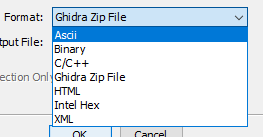
You need to select Binary as the export format which recreates the executable. You can also press F1 anywhere which opens up the help with the current context.
 rszibele
on 6 Mar 2019
rszibele
on 6 Mar 2019
@rszibele Thanks for your help but when I export it as a .bin the file output is this:
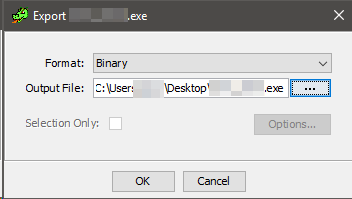
and the file does not output onto the Desktop.
Aholicknight
on 6 Mar 2019
Oi! Why are you trying to decompile citizen hack? Lmaooooooooo chm_client is very very familiar.
 SmurfRP
on 6 Mar 2019
SmurfRP
on 6 Mar 2019
@SmurfRP Wanted to see how it works. Now, how would I make it back to an .exe after editing it?
Aholicknight
on 6 Mar 2019
I'm unable to reproduce the saving issue. After importing an executable on Windows and exporting it, it does save the executable where I wanted it to save it. Ghirda automatically adds ".bin" to the file name, which you will have to remove to be able to run it.
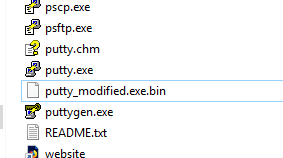
Windows is currently also affected by this other bug https://github.com/NationalSecurityAgency/ghidra/issues/19 so you _must_ import the executable in the "Raw Binary" format to be able to run the exported executable afterwards. It's possible that something is blocking Ghirda from saving on your end, check the Ghirda logs for any errors, which should be located at:
C:\Users\{USERNAME}\.ghirda\.ghirda-9.0\application.log
rszibele
on 6 Mar 2019
Related issues
 0x6d696368
·
3Comments
0x6d696368
·
3Comments
 lab313ru
·
3Comments
lab313ru
·
3Comments
 chibicitiberiu
·
3Comments
chibicitiberiu
·
3Comments
 gemini00
·
3Comments
gemini00
·
3Comments
 loudinthecloud
·
3Comments
loudinthecloud
·
3Comments
Most helpful comment
You need to select
Binaryas the export format which recreates the executable. You can also press F1 anywhere which opens up the help with the current context.