When using the VSCode plugin, VSCode is what launches the ghcide server, right? How do I get it to launch it in my project's nix shell so that the dependencies and things will be available?
 chris-martin
All 30 comments
In the extension you can set the command it runs and the arguments it passes. By default that's ghcide and --lsp, but you can change it to things like stack and exec -- ghcide --lsp to get it working with stack. The other option is to run stack exec code to launch VS Code inside the stack environment. I don't know how to do it with nix-shell, but I imagine it's something similar.
 ndmitchell
on 26 Sep 2019
ndmitchell
on 26 Sep 2019
@chris-martin try launching VSCode from nix-shell.
 domenkozar
on 26 Sep 2019
domenkozar
on 26 Sep 2019
@ndmitchell Can I put quotes in the "arguments" field? Like if I set the executable path to nix-shell and the arguments to --run 'ghcide --lsp'?
Or, can the executable path be relative to the project directory, so I can put the command to run ghcide in a bash script, set the executable path to ./ghcide.sh, and the arguments to nothing?
chris-martin
on 26 Sep 2019
@domenkozar That doesn't seem to help either. ghcid works in this project, but I still have red squiggles under all the imports in vscode, even when I launch it from the nix shell.
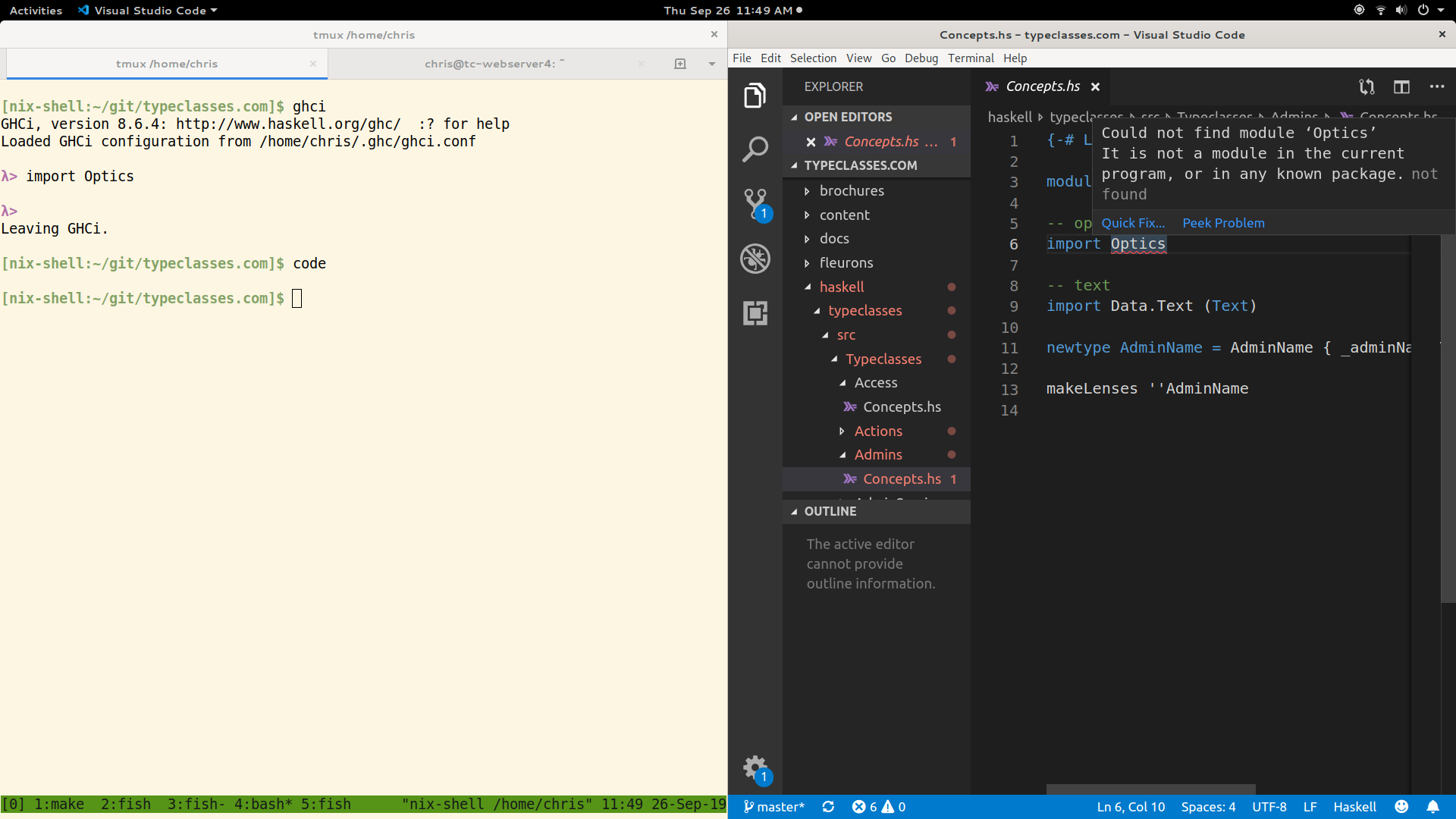
(This screenshot is taken with the default settings restored to command ghcide and arguments --lsp)
chris-martin
on 26 Sep 2019
Nevermind, I don't think this is an editor integration issue. If I just run "ghcide" on the command line inside the nix shell, it can't see any of the packages either. Just a whole lot of this:
Message:
Could not find module ‘Path’
It is not a module in the current program, or in any known package.
File: haskell/typeclasses/src/Typeclasses/SendingEmail/Daemon.hs
Range: 48:17-48:37
Source: not found
Severity: DsError
Message:
Could not find module ‘Network.Api.Postmark’
It is not a module in the current program, or in any known package.
File: haskell/typeclasses/src/Typeclasses/SendingEmail/Daemon.hs
Range: 51:17-51:37
Source: not found
Severity: DsError
Message:
Could not find module ‘Network.Api.Postmark’
It is not a module in the current program, or in any known package.
File: haskell/typeclasses/src/Typeclasses/SendingEmail/Daemon.hs
Range: 54:7-54:29
Source: not found
Severity: DsError
Message:
Could not find module ‘Control.Exception.Safe’
Perhaps you meant
Control.Exception.Base (from base-4.12.0.0)
Control.Exception (from base-4.12.0.0)
File: haskell/typeclasses/src/Typeclasses/Signup/Actions.hs
Range: 43:7-43:22
Source: not found
Severity: DsError
I have no idea about what you can quote and how - I'd try by experimentation. But I would always suggest getting ghcide on its own working first. Do you have a hie.yaml file? If so, what type is it?
ndmitchell
on 26 Sep 2019
No, nor do I have any sort of cabal, stack, etc. configuration. Just a bunch of Haskell source files that I compile with nix+ghc.
chris-martin
on 26 Sep 2019
I very much appreciate being able to test whether it's working first before trying the editor integration, btw! It might be nice if ghcide on the command line would print a summary of whether it's working at the end; I did test it on its own first, but I thought it was working when it wasn't really (all I saw was the last screenful of output, which is a list of haskell file paths and a final line that says "Done." so that appeared successful).
chris-martin
on 26 Sep 2019
I sent a PR for that in #138, so at least we can fix that. How do you open these files in ghci? How does ghci find the compilation database? Do you have a .ghci file? Or set some variables? Or are things installed globally?
ndmitchell
on 26 Sep 2019
My nix shell config looks something like this:
let
myHaskellPackages =
pkgs.haskellPackages.override {
overrides = {
# stuff to set some specific package versions
};
};
myHaskell =
(myHaskellPackages.ghcWithPackages (p: [
p.async
p.optics
# etc.
]));
in
pkgs.mkShell {
buildInputs = [ myHaskell myHaskellPackages.ghcid ];
LC_ALL = "en_US.UTF-8";
LOCALE_ARCHIVE = "${pkgs.glibcLocales}/lib/locale/locale-archive";
}
And I launch ghci with this bash script inside the nix shell:
flags="-no-user-package-db -Wall -fdefer-typed-holes"
files=$(find haskell/typeclasses/src -type f -name '*.hs')
ghci $flags $files
I'm not entirely sure what the ghcWithPackages function really does, to be honest, all I know is when I run ghci inside the nix shell all the packages I selected are available.
chris-martin
on 26 Sep 2019
If you create a hie.yaml file containing:
cradle:
direct:
arguments:
- -no-user-package-db
- -Wall
- -fdefer-typed-holes
Then you might have more luck. Make sure you run ghcide inside the same Nix shell as you run ghc.
ndmitchell
on 26 Sep 2019
Hm, I don't see any change.
[nix-shell:~/git/typeclasses.com]$ ghci
GHCi, version 8.6.4: http://www.haskell.org/ghc/ :? for help
Loaded GHCi configuration from /home/chris/.ghc/ghci.conf
λ> import Optics
λ> :t view
view :: Is k A_Getter => Optic' k is s a -> s -> a
λ> :q
Leaving GHCi.
[nix-shell:~/git/typeclasses.com]$ cat hie.yaml
cradle:
direct:
arguments:
- -no-user-package-db
- -Wall
- -fdefer-typed-holes
[nix-shell:~/git/typeclasses.com]$ ghcide | grep Optics | tail -n +10 | head -n5
Starting ghcide (GHC v8.6)
/home/chris/git/typeclasses.com
Could not find module ‘Optics’
Could not find module ‘Optics’
Could not find module ‘Optics’
Could not find module ‘Optics’
Could not find module ‘Optics’
Can you past the full log?
 mpickering
on 26 Sep 2019
chris-martin
on 26 Sep 2019
mpickering
on 26 Sep 2019
chris-martin
on 26 Sep 2019
Ah, the dreaded $NIX_GHC_LIBDIR. My guess is that in your Nix setup GHC is actually a shell script that sets $NIX_GHC_LIBDIR to some random path. If you copy that variable into your shell ghcide will pick it up, and I imagine you'll have more success. It's possible one of the ghcide Nix integrations will do that for you too.
ndmitchell
on 26 Sep 2019
Okay, I googled that and lifted a snippet of config that don't really understand, and this is working!
    pkgs.mkShell {
      buildInputs = [
        myHaskell
        myHaskellPackages.ghcid
        (import (builtins.fetchTarball
          "https://github.com/hercules-ci/ghcide-nix/tarball/master"
        ) {}).ghcide-ghc864
      ];
      LC_ALL = "en_US.UTF-8";
      LOCALE_ARCHIVE = "${pkgs.glibcLocales}/lib/locale/locale-archive";
      shellHook = ''
        export NIX_GHC="${myHaskell}/bin/ghc"
        export NIX_GHCPKG="${myHaskell}/bin/ghc-pkg"
        export NIX_GHC_DOCDIR="${myHaskell}/share/doc/ghc/html"
        export NIX_GHC_LIBDIR=$( $NIX_GHC --print-libdir )
      '';
    }
It does not appear that arguments can be quoted in the vscode settings. If I set the "arguments" option to --run "ghcide --lsp", the "output" tab shows:
error: unrecognised flag '--lsp"'
And single quotes (--run 'ghcide --lsp') doesn't work either. But I did put this into a shell script ghcide.sh
#! /usr/bin/env bash
set -eufo pipefail
nix-shell --pure --run 'ghcide --lsp'
and in vscode I set my ghcide executable to ./ghcide.sh and the arguments to nothing, and that seems to work.
Putting -no-user-package-db in hie.yaml is also necessary, otherwise I get type errors every time I use the containers package (and presumably others that are in my user oackage database).
I'm no longer seeing red squiggles on imports of Optics et al, and if I introduce an error I see red squiggles as expected. So, it looks good!
chris-martin
on 27 Sep 2019
Since this setup is project-specific, would it be possible to specify the ghcide executable in a config file (hie.yaml or something else?) instead of setting it in vscode?
chris-martin
on 27 Sep 2019
domenkozar
on 27 Sep 2019
I'll defer my remaining question to that issue, thank y'all so much for your help :heart:
chris-martin
on 27 Sep 2019
Is the bug here that ghcide chooses the wrong libdir? I'm not sure it's anything to do with hie-bios.
mpickering
on 27 Sep 2019
Nix sets its library directory inside the GHC shell script. That means hie-bios can't find it since it's technique is to pretend to be GHC, and that's insufficient. It's not a ghcide big, and given hie-bios is in charge of the environment which is wrong, it's something for hie-bios, or Nix. I wouldn't claim it's a bug in hie-bios though.
ndmitchell
on 27 Sep 2019
What I'd really love to see is documentation about what exactly the runtime requirements are: which other programs does ghcide interact with, and what files or environment variables does it expect to find where? I had assumed that if my environment contained a ghc/ghci executable that works for the project, that would be sufficient. Apparently there are some additional requirements, but I don't understand what they are. That makes setting up the integration very difficult.
chris-martin
on 27 Sep 2019
Ghcide needs to know what GHC flags are required to get your project loading. Those almost certainly point at package databases, which is the runtime artefacts we depend on. Hie-bios is responsible for collecting those flags for ghcide.
ndmitchell
on 28 Sep 2019
I don't believe this bug is being articulated correctly.
ghcidemanifestly sets an incorrect libdir, seeMain.getLibdir.- @ndmitchell argues it should be up to
hie-biosto supply the correct libdir, that currently isn't implemented. - The correct libdir can be found by calling
ghcwith--print-libdir. If there is an assumption that the GHC you want to use to compile your project is on your path then this is the most robust way to get the information.
That's why I think this is still a bug in ghcide, but it could be argued that it's a feature which should be added to hie-bios.
mpickering
on 30 Sep 2019
I don’t think assuming that ghc is in your PATH is a reasonable option. I use cabal -w quite often to test different GHC versions and that will go horribly wrong. IIRC stack makes it fairly easy to get the path to the GHC it uses. Does cabal have a similar option?
It seems like this logic will basically have to be replicated in most applications to hie-bios which seems like a bad idea so I tend to agree with @ndmitchell that this should go in hie-bios so we can get it right once.
 cocreature
on 30 Sep 2019
cocreature
on 30 Sep 2019
@cocreature hie-bios also assumes currently the GHC you want to use is on your path. I have had it in mind to change this but the correct API for specifying an alternative compiler has not been clear to me yet.
mpickering
on 30 Sep 2019
@mpickering oh I didn’t realize that. When does hie-bios call GHC?
cocreature
on 30 Sep 2019
It calls ghc in the wrapper script to answer questions that cabal and stack ask GHC during compilation (such as version).
When tooling catches up and provides dedicated targets to get this information I would expect this reliance to become unnecessary. For example, the ide-args command would provide /nix/store.../ghc --interactive foo baz so you could take the first argument as the compile to use to consult for libdir.
mpickering
on 30 Sep 2019
Ah I see, thanks for the explanation. I guess in a lot of cases you can still get away with calling the “wrong” GHC here until you start having conditionals in your cabal file so it’s not quite so bad whereas using the wrong libdir is never going to work.
cocreature
on 30 Sep 2019
If there is an assumption that the GHC you want to use to compile your project is on your path
At the very least, I had the assumption that if the GHC that I can use to compile my project is on my path, then that would be sufficient to safely assume that ghcide will work.
chris-martin
on 30 Sep 2019
Related issues
 pepeiborra
·
8Comments
pepeiborra
·
8Comments
 meditans
·
6Comments
meditans
·
6Comments
 anka-213
·
5Comments
anka-213
·
5Comments
 turion
·
7Comments
domenkozar
·
3Comments
turion
·
7Comments
domenkozar
·
3Comments
Most helpful comment
Okay, I googled that and lifted a snippet of config that don't really understand, and this is working!
It does not appear that arguments can be quoted in the vscode settings. If I set the "arguments" option to
--run "ghcide --lsp", the "output" tab shows:And single quotes (
--run 'ghcide --lsp') doesn't work either. But I did put this into a shell scriptghcide.shand in vscode I set my ghcide executable to
./ghcide.shand the arguments to nothing, and that seems to work.Putting
-no-user-package-dbinhie.yamlis also necessary, otherwise I get type errors every time I use thecontainerspackage (and presumably others that are in my user oackage database).I'm no longer seeing red squiggles on imports of
Opticset al, and if I introduce an error I see red squiggles as expected. So, it looks good!