Getx: Add reversed.toRxList() to RxList<E>?
I have a List.obs of objects and I needed to reverse the order of the objects, Flutter's List has this option which makes easy to reverse the order but when creating .obs Lists it doesn't have.

As workaround we need clone to a temporary List of objects, reverse, then copy to the observable List:
    final products = <Product>[].obs;
    products.addAll(await getProducts());

    var tempList = <Product>[];
    tempList.addAll(products.value);
    tempList = tempList.reversed.toList();
    products.clear();
    products.addAll(tempList);
But, is it possible to add it to RxList?
 final products = <Product>[].obs;
`products = products.reversed.toListRx(); // or something like this...`
 d-apps
All 6 comments
The reverse list is likely to be implemented in the future, but there is a much simpler way for you to do it:
final products = <Product>[].obs;
products.assignAll(products.value.reversed);
// maybe products.assignAll(List.from(products.value.reversed));
 jonataslaw
on 23 Aug 2020
jonataslaw
on 23 Aug 2020
The reverse list is likely to be implemented in the future, but there is a much simpler way for you to do it:
final products = <Product>[].obs; products.assignAll(products.value.reversed); // maybe products.assignAll(List.from(products.value.reversed));
The first didn't work but the second worked fine, thanks.
products.assignAll(List.from(products.value.reversed));
d-apps
on 23 Aug 2020
@d-apps If you're using a list view. You can simply set the reverse attribute to true. No need to reverse the actual list again.
ListView(
      ......
     reverse: true,
);
 djade007
on 24 Aug 2020
djade007
on 24 Aug 2020
The first didn't work but the second worked fine, thanks.
products.assignAll(List.from(products.value.reversed));
Based on your comment, I am closing this
jonataslaw
on 24 Aug 2020
@d-apps If you're using a list view. You can simply set the
reverseattribute totrue. No need to reverse the actual list again.
ListView(
      ......
     reverse: true,
);
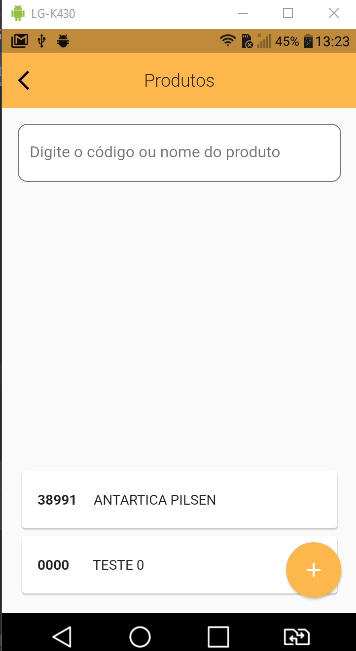
It doesn't work, it only reverse where the list will start, actually I didn't know about this behavior.
d-apps
on 24 Aug 2020
@d-apps If you're using a list view. You can simply set the
reverseattribute totrue. No need to reverse the actual list again.
ListView( ...... reverse: true, );It doesn't work, it only reverse where the list will start, actually I didn't know about this behavior.
To insert a new item to the bottom the list you can do:
_products.value.add(0, {product})
In addition: for animating new items added, you can use https://flutter.dev/docs/catalog/samples/animated-list
djade007
on 25 Aug 2020
Related issues
 rupamking1
·
3Comments
rupamking1
·
3Comments
 ChiwanAhn
·
4Comments
ChiwanAhn
·
4Comments
 jemariads
·
4Comments
jemariads
·
4Comments
 NiranjanShah
·
4Comments
NiranjanShah
·
4Comments
 NO-ob
·
4Comments
NO-ob
·
4Comments
Most helpful comment
@d-apps If you're using a list view. You can simply set the
reverseattribute totrue. No need to reverse the actual list again.ListView( ...... reverse: true, );