Getx: Entire ListView re-renders even when only one value changes with RxList
Describe the bug
I created a ListView.builder with the values of a RxList<int> and in the view i expected that only the value of the list that i updated that were re-rendered, but instead, all values in the list are re-rendered, even if i change only one value.
To Reproduce
- Copy the minimal reproduce code
- run
- click the button "Change third element value to 99"
Expected behavior
To be honest i don't know if is normal or not to update, but i guess it would be nice to not update other values
Screenshots
Better yet, i have a gif:
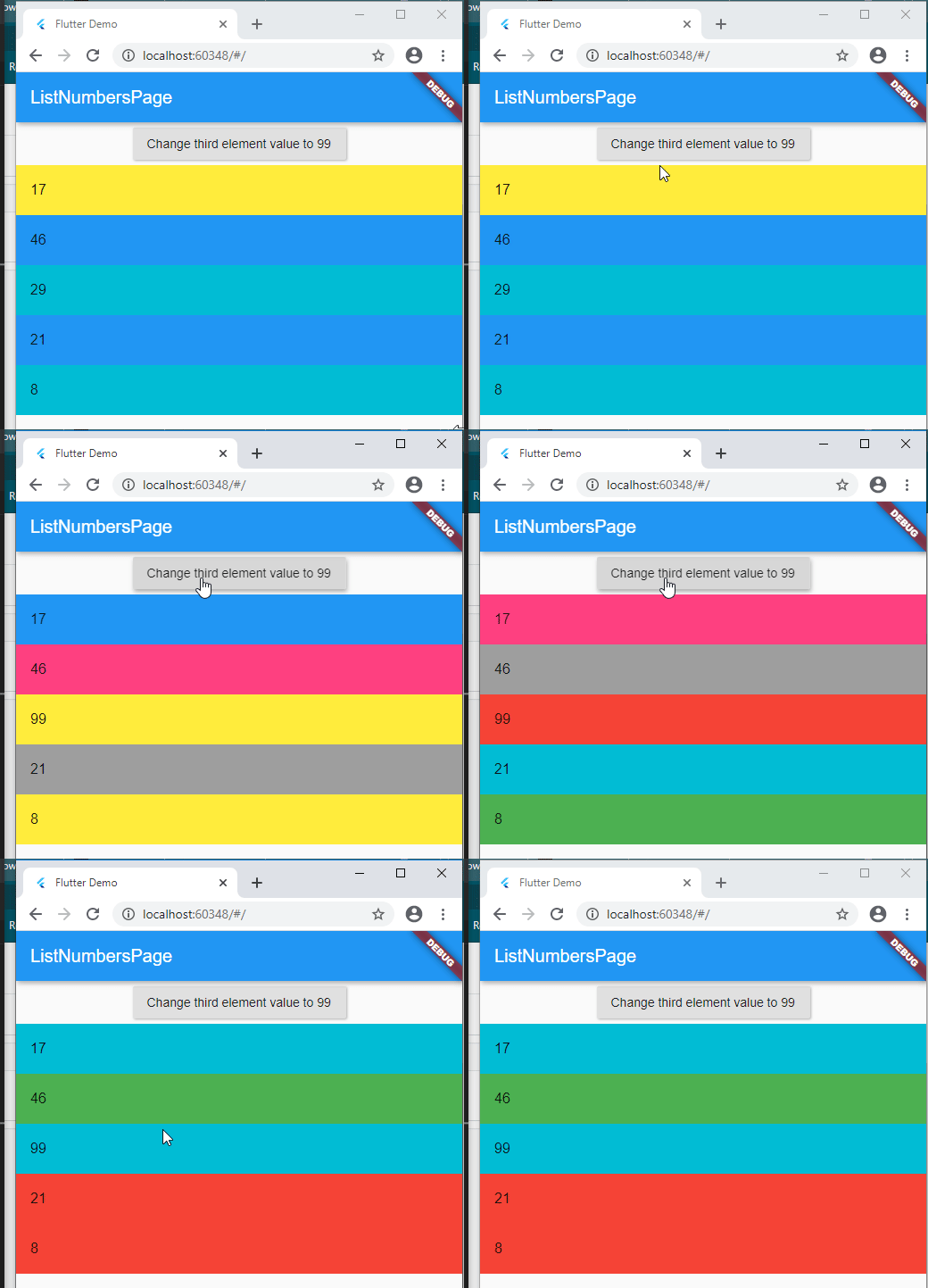
Flutter Version:
Enter the version of the Flutter you are using
Get Version:
Flutter 1.20.0-7.3.pre • channel beta • https://github.com/flutter/flutter.git
Framework • revision e606910f28 (3 days ago) • 2020-07-28 16:06:37 -0700
Engine • revision ac95267aef
Tools • Dart 2.9.0 (build 2.9.0-21.10.beta)
Describe on which device you found the bug:
Running on web, but i guess it's the same for every device
Minimal reproduce code
import 'dart:math';

import 'package:flutter/material.dart';
import 'package:get/get.dart';

void main() {
  Get.put(MyController(), permanent: true);
  runApp(
    MaterialApp(
      title: 'Flutter Demo',
      home: ListNumbersPage(),
    ),
  );
}

class ListNumbersPage extends GetView<MyController> {
  final List colors = [
    Colors.red,
    Colors.green,
    Colors.yellow,
    Colors.pinkAccent,
    Colors.blue,
    Colors.grey,
    Colors.cyan,
  ];
  final Random random = new Random();

  @override
  Widget build(BuildContext context) {
    return Scaffold(
      appBar: AppBar(title: Text('ListNumbersPage')),
      body: Container(
        child: Column(
          children: [
            RaisedButton(
              onPressed: controller.changeThirdElement,
              child: Text('Change third element value to 99'),
            ),
            Expanded(
              child: ListView.builder(
                itemCount: controller.numberList.length,
                itemBuilder: (_, index) {
                  return Obx(
                    () => Container(
                      color: colors[random.nextInt(colors.length)],
                      child: ListTile(
                        title: Text(controller.numberList[index].toString()),
                      ),
                    ),
                  );
                },
              ),
            ),
          ],
        ),
      ),
    );
  }
}

class MyController extends GetxController {
  var _numberList = <int>[].obs;

  RxList<int> get numberList => _numberList;

  void changeThirdElement() {
    _numberList[2] = 99;
  }

  @override
  void onInit() {
    super.onInit();

    // Populate the list with 5 elements that has random numbers
    final _random = Random();
    numberList.value = List<int>.generate(5, (_) => _random.nextInt(50));
  }
}
I'm sorry if this is the expected behavior, i don't understand streams very well 😅
 Nipodemos
All 4 comments
update: if i do this:
void changeThirdElement() {
    // using .value instead of access array directly
    _numberList.value[2] = 99;
  }
it stops work, the UI does not reload any item
Nipodemos
on 1 Aug 2020
Basically, when you do this:
  void changeThirdElement() {
    _numberList[2] = 99;
  }
You are changing your list by adding a new element in position 2 of it.
Soon, the entire List will be rebuilt.
I think you think you are changing a value of an object, but in reality, you are not changing the value of position 2 on your list.
If it were an RxInt List, you could do something like:
_numberList[2].value = 99;
And that would change the object, not the list.
Search for reference and replacement in memory, and you will find some content about it.
 jonataslaw
on 1 Aug 2020
jonataslaw
on 1 Aug 2020
Thank you for your fast response.
I appreciate very much for this information, i did not knew that and it helped a lot.
Indeed, the way you suggested worked perfectly, i'll leave the code here just for future reference:
import 'dart:math';

import 'package:flutter/material.dart';
import 'package:get/get.dart';


void main() {
  Get.put(MyController(), permanent: true);
  runApp(
    MaterialApp(
      title: 'Flutter Demo',
      home: ListNumbersPage(),
    ),
  );
}

class ListNumbersPage extends GetView<MyController> {
  final List colors = [
    Colors.red,
    Colors.green,
    Colors.yellow,
    Colors.pinkAccent,
    Colors.blue,
    Colors.grey,
    Colors.cyan,
  ];
  final Random random = new Random();

  @override
  Widget build(BuildContext context) {
    return Scaffold(
      appBar: AppBar(title: Text('ListNumbersPage')),
      body: Container(
        child: Column(
          children: [
            RaisedButton(
              onPressed: controller.changeThirdElement,
              child: Text('Change third element value to 99'),
            ),
            Expanded(
              child: ListView.builder(
                itemCount: controller.numberList.length,
                itemBuilder: (_, index) {
                  return Obx(
                    () => Container(
                      color: colors[random.nextInt(colors.length)],
                      child: ListTile(
                        // since every item is an independent obs, it is needed to put .value in order to work
                        title:
                            Text(controller.numberList[index].value.toString()),
                      ),
                    ),
                  );
                },
              ),
            ),
          ],
        ),
      ),
    );
  }
}

class MyController extends GetxController {
  // creating a list of RxInt instead of a RxList of ints
  var _numberList = <RxInt>[];

  List<RxInt> get numberList => _numberList;

  void changeThirdElement() {
    _numberList[2].value = 99;
  }

  @override
  void onInit() {
    super.onInit();
    final _random = Random();
    // every int generated has a obs in the end
    _numberList = List<RxInt>.generate(5, (_) => _random.nextInt(50).obs);
  }
}
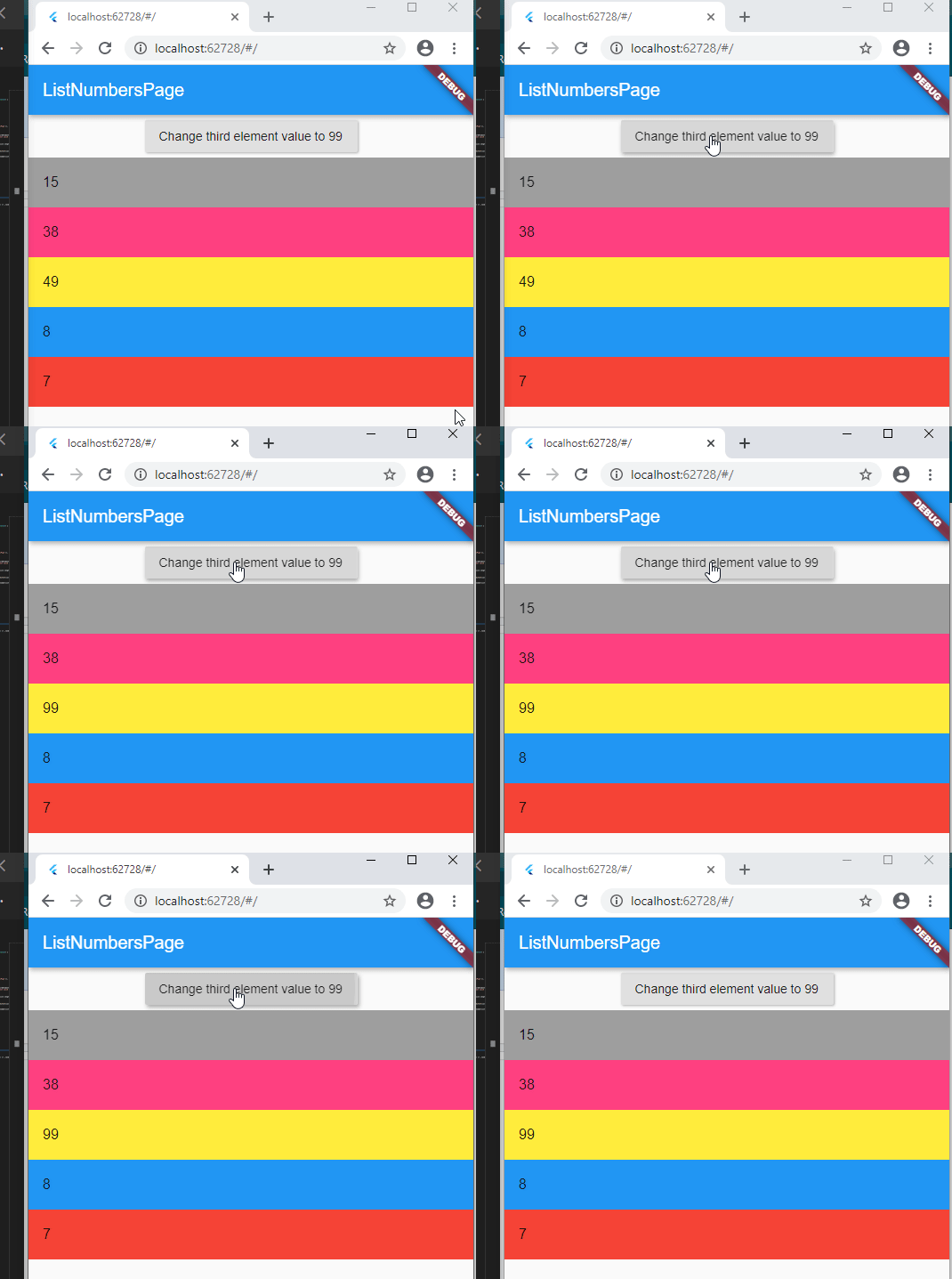
Thank you for making this excellent package, I learned a new thing today 😄
Nipodemos
on 1 Aug 2020
@Nipodemos Nice example of using RxList :+1:
I'm sure this will help a lot of users.
 ghprod
on 1 Aug 2020
ghprod
on 1 Aug 2020
Related issues
 GoldenSoju
·
3Comments
GoldenSoju
·
3Comments
 na2axl
·
3Comments
na2axl
·
3Comments
 NiranjanShah
·
4Comments
NiranjanShah
·
4Comments
 williamsilva-98
·
4Comments
williamsilva-98
·
4Comments
 ChiwanAhn
·
4Comments
ChiwanAhn
·
4Comments
Most helpful comment
@Nipodemos Nice example of using RxList :+1:
I'm sure this will help a lot of users.