Gesturefy: Gestures are starting already with a diagonal line
All gestures over the top of this page (embedded youtube video):
https://www.theverge.com/2017/11/16/16659314/google-pixel-buds-review-bluetooth-headphones
already have a roughly 2" diagonal line going left and up from my mouse position. So with every gesture it's as if I have already drawn a 45° line going right and down.
Happened on another site yesterday as well. Disabled all other extensions, issue still present . Windows 10, FF57.
 deesine
All 17 comments
I am seeing the same thing on only select websites. As an example, www.webex.com works fine but the subsite of https://cisco.webex.com does not work fine and I get the diagonal lines as well. Thanks!
 cfairbanks12
on 17 Nov 2017
cfairbanks12
on 17 Nov 2017
For me it happens randomly on pages. Most of the times it works, but sometimes it does not. Closing and reopening the tab solves this issue for me.
 untier
on 20 Nov 2017
untier
on 20 Nov 2017
Maybe your problem is related to this one: https://github.com/Robbendebiene/Gesturefy/issues/130 ?
 Robbendebiene
on 20 Nov 2017
Robbendebiene
on 20 Nov 2017
The only relation to #130 is the additional gesture line. What I'm experiencing has nothing to do with any particular gesture being activated, it happens on them all, and closing and reopening the tab has no effect.
I did notice something else: the size of the additional gesture line is longer or shorter depending on how far away from the top left corner of the window the mouse is when starting the gesture: the further from the top left = longer line. At full screen starting in top left corner, there is no additional line. Also, the additional line length calculation seems global: where starting in the window, and where the window is in the screen have the same effect on line length as above. So if I reduce the window size and then move it to some place say in the center of my screen, the same offset calculation happens, even when starting gesture in top left of window. Changing screen resolution has no effect.
deesine
on 20 Nov 2017
I also experience this problem with some web pages.
Maybe this screenshot helps to understand what is going on. I press the right mouse button and pull the mouse down (yellow marked move). What happens is that an additional line from a "random" point to the point where my click started is added before the gesture.
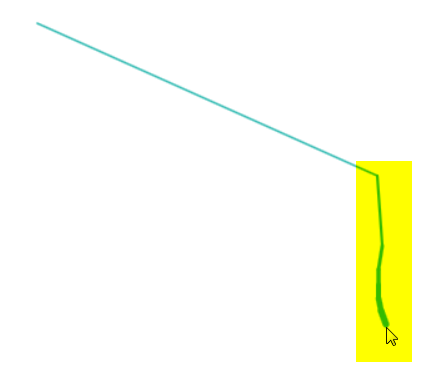
By fooling around a little on https://cisco.webex.com I can also point out:
The further right on my screen I start to drag, the longer the x-axis (horizontal) of the "random" part is.
The further down on my screen I start to drag, the longer the y-axis (vertical) of the "random" part is.
If you start the gesture in the top left corner of the website the effect nearly vanishes.
 haugs
on 21 Nov 2017
haugs
on 21 Nov 2017
This bug strongly limits the usability of the addon as it affects many websites.
Any ideas on when/how it can be fixed?
haugs
on 23 Nov 2017
Since I'm still not able to reprudce it, I can't fix it. I'm pretty sure it's related to this one: https://github.com/Robbendebiene/Gesturefy/issues/130#issuecomment-346693076 At least the reporter was able to get it working somehow when he changed the window size or resolution. Thats the only hint I currently have.
Robbendebiene
on 23 Nov 2017
Another pointer maybe. On this (german) site:
http://www.spiegel.de/wirtschaft/soziales/ungleichheit-gehoeren-sie-zu-den-oberen-zehn-prozent-a-1130531.html
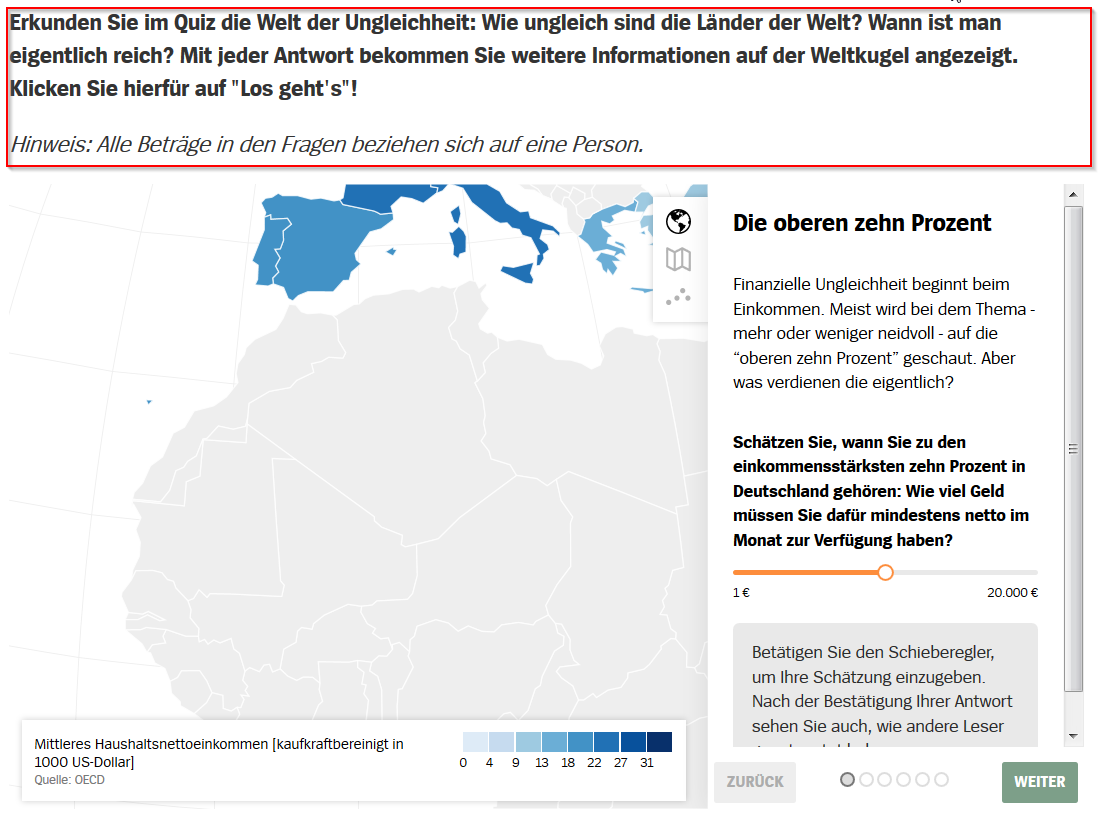
In the marked part above and on the sides of the quiz-weblet (id: uebermorgenapp) gesturefy works normal. But in the iframe itself I have the problem mentioned above. The iframe seems to use react.js. But I don't know, if this has any significance.
untier
on 25 Nov 2017
@untier Do you also use a HiDPI or Retina display?
Robbendebiene
on 25 Nov 2017
No, normal Full HD Display.
untier
on 27 Nov 2017
Can you please try if it is fixed in this version.
- donwload and unzip
- disable the existing gesturefy addon
- go to about:debugging and select "load temporary addon"
- select the manifest.json from the unzipped zip
Robbendebiene
on 27 Nov 2017
You did it, works perfect, all gestures on all previous problem pages.
Congratulations, well done!
On Sun, Nov 26, 2017 at 4:15 PM, Robbendebiene notifications@github.com
wrote:
Can you please try if it is fixed in this version
https://github.com/Robbendebiene/Gesturefy/archive/master.zip.
- donwload and unzip
- disable the existing gesturefy addon
- go to about:debugging and select "load temporary addon"
- select the manifest.json from the unzipped zip
—
You are receiving this because you authored the thread.
Reply to this email directly, view it on GitHub
https://github.com/Robbendebiene/Gesturefy/issues/105#issuecomment-347050802,
or mute the thread
https://github.com/notifications/unsubscribe-auth/AgKsQ59_kq7YjR7IZWlmYUs_a0IB01CFks5s6f8NgaJpZM4Qg2K0
.
deesine
on 27 Nov 2017
Yeah, same here!
My output for window.devicePixelRatio was value:1.25
With the version you provided above, the effect is gone.
Very good work! You totally made me stop missing FireGestures :)
haugs
on 27 Nov 2017
I will try to upload the patch this week.
Robbendebiene
on 27 Nov 2017
Thanks a lot!
untier
on 27 Nov 2017
@untier The problem you've encountered seems to be kind of a lag, because the globe (on your example website) requires a lot of cpu.
Robbendebiene
on 27 Nov 2017
Version 1.1.17 is available on Mozilla.
Bug fix reference: https://github.com/Robbendebiene/Gesturefy/commit/331bdaff9a374f2b014fb0cb0fbbaa5e7c038c56
Robbendebiene
on 28 Nov 2017
Related issues
 aold619
·
4Comments
aold619
·
4Comments
 HAMiDY25
·
3Comments
HAMiDY25
·
3Comments
 kramola-RU
·
6Comments
kramola-RU
·
6Comments
 ghost
·
7Comments
ghost
·
7Comments
 grzebo
·
6Comments
grzebo
·
6Comments