Geopandas: compatibility with Pysal 2.0.0
Geopandas: 0.4.0
My firends was trying to plot some maps with .plot() method of GeoDataFrame but got the following error wiht pysal 2.0.0 installed.
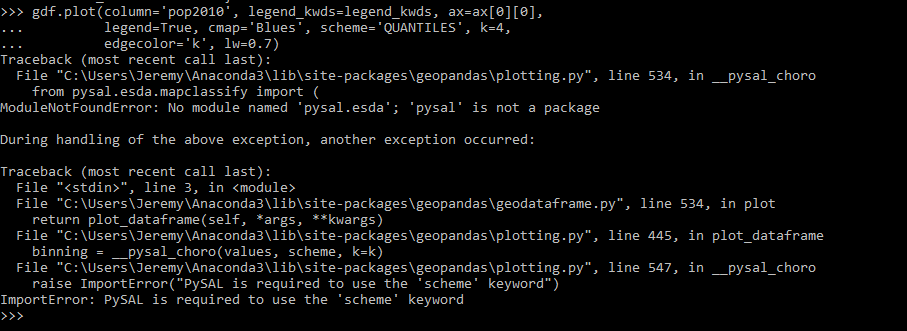


After
conda install pysal=1.14.4
Everything works. I check the new doc for pysal 2.0.0 and it seems like the structure of the package changed, so I wonder when will geopandas support pysal 2.0.0 so that I can upgrade it?
 StevenLi-DS
All 8 comments
This is already fixed on master (by using only mapclassify instead of relying on the full of pysal). I hope to release shortly (in a week or so).
 jorisvandenbossche
on 4 Feb 2019
jorisvandenbossche
on 4 Feb 2019
@StevenLi-DS Thanks for filing the report! Next time, copying/pasting the stack trace, rather than providing screenshots, would be preferable. That allows keyword searching as well as potentially copying/pasting on the part of someone trying to reproduce the error, not to mention generally being easier to read.
 jdmcbr
on 7 Feb 2019
jdmcbr
on 7 Feb 2019
@jdmcbr it didn't happen on my end. sorry about that.
StevenLi-DS
on 9 Feb 2019
@jorisvandenbossche any word on this fix release?
Also, to add a searchable code snippet + stack trace (as I couldn't find this issue when I was searching):
Geopandas (v0.4) doesn't recognize that PySAL (v2.0.0) is installed when running gdf.plot() and passing the scheme keyword argument. I'm doing this in a conda env on Win 10 with Python 3.7.
import geopandas as gpd
import matplotlib.pyplot as plt
import pysal
gdf_world = gpd.read_file(gpd.datasets.get_path('naturalearth_lowres'))
gdf_world.plot(column='pop_est', scheme='Quantiles')
ModuleNotFoundError                       Traceback (most recent call last)
C:\Anaconda\envs\asa\lib\site-packages\geopandas\plotting.py in __pysal_choro(values, scheme, k)
    533     try:
--> 534         from pysal.esda.mapclassify import (
    535             Quantiles, Equal_Interval, Fisher_Jenks)

ModuleNotFoundError: No module named 'pysal.esda'

During handling of the above exception, another exception occurred:

ImportError                               Traceback (most recent call last)
<ipython-input-2-6e3d853856f7> in <module>
      3 import pysal
      4 gdf_world = gpd.read_file(gpd.datasets.get_path('naturalearth_lowres'))
----> 5 gdf_world.plot(column='pop_est', scheme='Quantiles')

C:\Anaconda\envs\asa\lib\site-packages\geopandas\geodataframe.py in plot(self, *args, **kwargs)
    532         from there.
    533         """
--> 534         return plot_dataframe(self, *args, **kwargs)
    535
    536     plot.__doc__ = plot_dataframe.__doc__

C:\Anaconda\envs\asa\lib\site-packages\geopandas\plotting.py in plot_dataframe(df, column, cmap, color, ax, categorical, legend, scheme, k, vmin, vmax, markersize, figsize, legend_kwds, **style_kwds)
    443
    444     if scheme is not None:
--> 445         binning = __pysal_choro(values, scheme, k=k)
    446         # set categorical to True for creating the legend
    447         categorical = True

C:\Anaconda\envs\asa\lib\site-packages\geopandas\plotting.py in __pysal_choro(values, scheme, k)
    545         return binning
    546     except ImportError:
--> 547         raise ImportError("PySAL is required to use the 'scheme' keyword")

ImportError: PySAL is required to use the 'scheme' keyword
 gboeing
on 27 Feb 2019
gboeing
on 27 Feb 2019
I'm currently working around this with the following hack:
- Install PySAL 2.0 and Geopandas 0.4 (maybe via conda)
pip install -U --no-deps mapclassify git+git://github.com/geopandas/geopandas.git@master
That seems to do the trick.
 darribas
on 4 Mar 2019
darribas
on 4 Mar 2019
OK, I will do a small 0.4.1 bug fix release today, to get this out.
I am still intending to do the 0.5.0 release shortly, but since that has been my intention for already some time .. probably better to make sure at least the fiona and pysal compatibility fixes are out.
jorisvandenbossche
on 5 Mar 2019
Hi @StevenLi-DS I also downgraded my Pysal into 1.14.4, but the new error raised:
.....
.....
  File "F:\Python\lib\site-packages\matplotlib\artist.py", line 881, in _update_property
    raise AttributeError('Unknown property %s' % k)

AttributeError: Unknown property scheme
I had installed geopandas-0.4.0 , matplotlib-2.2.2, GDAL-2.3.3 , and geopandas-0.4.0+56.gca3216e mapclassify-2.0.1 following the method by @darribas .
I also posted a similar and detailed question at StackOverflow.
Thanks for checking !!
 ZhouXing-19
on 5 Mar 2019
ZhouXing-19
on 5 Mar 2019
Update: 0.4.1 release was pushed to pypi yesterday, and is also already available on conda-forge
jorisvandenbossche
on 7 Mar 2019
Related issues
 dzanaga
·
3Comments
dzanaga
·
3Comments
 kuanb
·
4Comments
kuanb
·
4Comments
 galak75
·
6Comments
galak75
·
6Comments
 linwoodc3
·
4Comments
linwoodc3
·
4Comments
 cjshowalter
·
5Comments
cjshowalter
·
5Comments
Most helpful comment
OK, I will do a small 0.4.1 bug fix release today, to get this out.
I am still intending to do the 0.5.0 release shortly, but since that has been my intention for already some time .. probably better to make sure at least the fiona and pysal compatibility fixes are out.