Geonode: Database Issue: Could not ADD GeoServer User 'test' Rule for Layer
Expected Behavior
I was trying to follow the documentation on https://docs.geonode.org/en/master/usage/managing_layers/using_remote_services.html | The ArcGIS REST MapServer
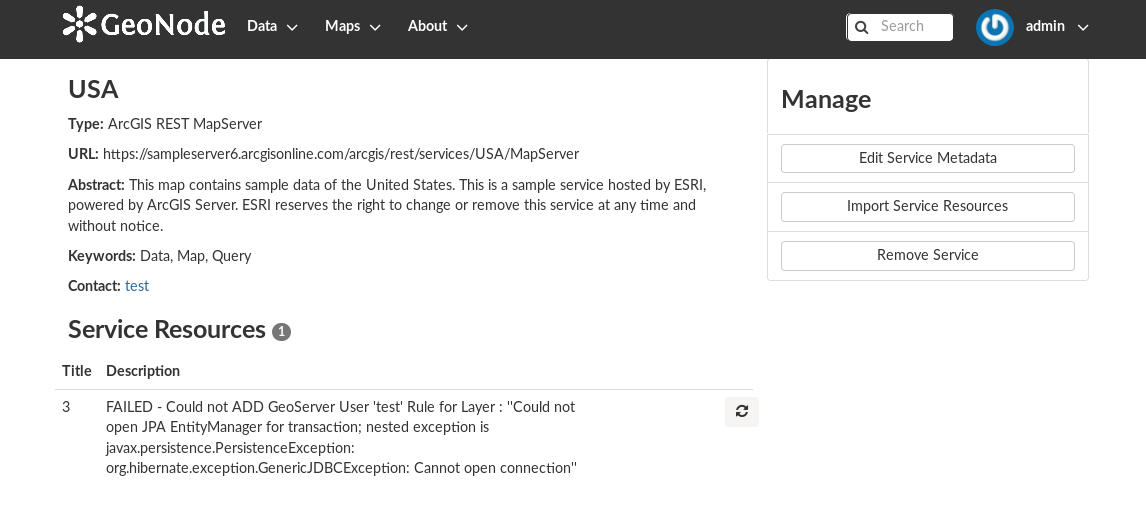
the resources will found correctly but when i try to import them i get this error
FAILED - Could not ADD GeoServer User 'test' Rule for Layer : ''Could not open JPA EntityManager for transaction; nested exception is javax.persistence.PersistenceException: org.hibernate.exception.GenericJDBCException: Cannot open connection''
after i did a trace back on the db container i found this error
2020-08-18 12:23:20.707 UTC [1148] FATAL:  role
"{{project_name}}_data" does not exist
Actual Behavior
it should be able to import the resources and i should be able to view the layers.
Steps to Reproduce the Problem
- use the project_template to generate new project,
- install requirements
- run the docker-compose commands
- login to geonode
- add new remote service of type ArcGIS REST MapServer
- the resources gets fetched correctly
- I select the layer i want and click import
- it fails with the error provided above.
Specifications
- GeoNode version: 2.17.1
- Installation method (manual, GeoNode Docker, SPCGeoNode Docker):
- Platform: GeoNode Docker
- Additional details:
 malnajdi
All 3 comments
Hi @malnajdi this error:
FATAL: role "{{project_name}}_data" does not exist indicates that something went wrong when creating your project.
As an example. The command:
django-admin startproject --template=./geonode-project -e py,sh,md,rst,json,yml,ini,env,sample,properties -n monitoring-cron -n Dockerfile malnajdi_geonode
should replace {{project_name}} in all *.py,sh,md,rst,json,yml,ini,env,sample,properties files. I would suggest to review your files grep -r "{{{project_name}}" 2>/dev/null and replace findings with your project_name. After that don't forget to rebuild your strack. docker-compose up -d --build
 t-book
on 19 Aug 2020
t-book
on 19 Aug 2020
Hi @malnajdi this error:
FATAL: role "{{project_name}}_data" does not existindicates that something went wrong when creating your project.As an example. The command:
django-admin startproject --template=./geonode-project -e py,sh,md,rst,json,yml,ini,env,sample,properties -n monitoring-cron -n Dockerfile malnajdi_geonodeshould replace
{{project_name}}in all *.py,sh,md,rst,json,yml,ini,env,sample,properties files. I would suggest to review your filesgrep -r "{{{project_name}}" 2>/dev/nulland replace findings with your project_name. After that don't forget to rebuild your strack.docker-compose up -d --build
Thanks a lot @t-book i was trying to automate the deployment using Ansible and i think there was conflict when printing {{ project_name }} in the command module which caused this.
Re-generating the project solved the issue. Thanks a lot
malnajdi
on 20 Aug 2020
Nice, thanks a lot! By the way, contributions in every form very welcome : https://github.com/GeoNode/ansible-geonode ;))
t-book
on 20 Aug 2020
Related issues
 frafra
·
10Comments
frafra
·
10Comments
 jondoig
·
8Comments
jondoig
·
8Comments
 gannebamm
·
4Comments
gannebamm
·
6Comments
gannebamm
·
4Comments
gannebamm
·
6Comments
 HaidarZ
·
4Comments
HaidarZ
·
4Comments