Generator-jhipster: Swagger doesn't work with JH 6.10.1
Overview of the issue
Since jHipster 6.10.1 the swagger api doesn't work in:
- New generated project with context.
- Update project from jHipsrer 6.10 with context.
Motivation for or Use Case
Swagger API
Reproduce the error
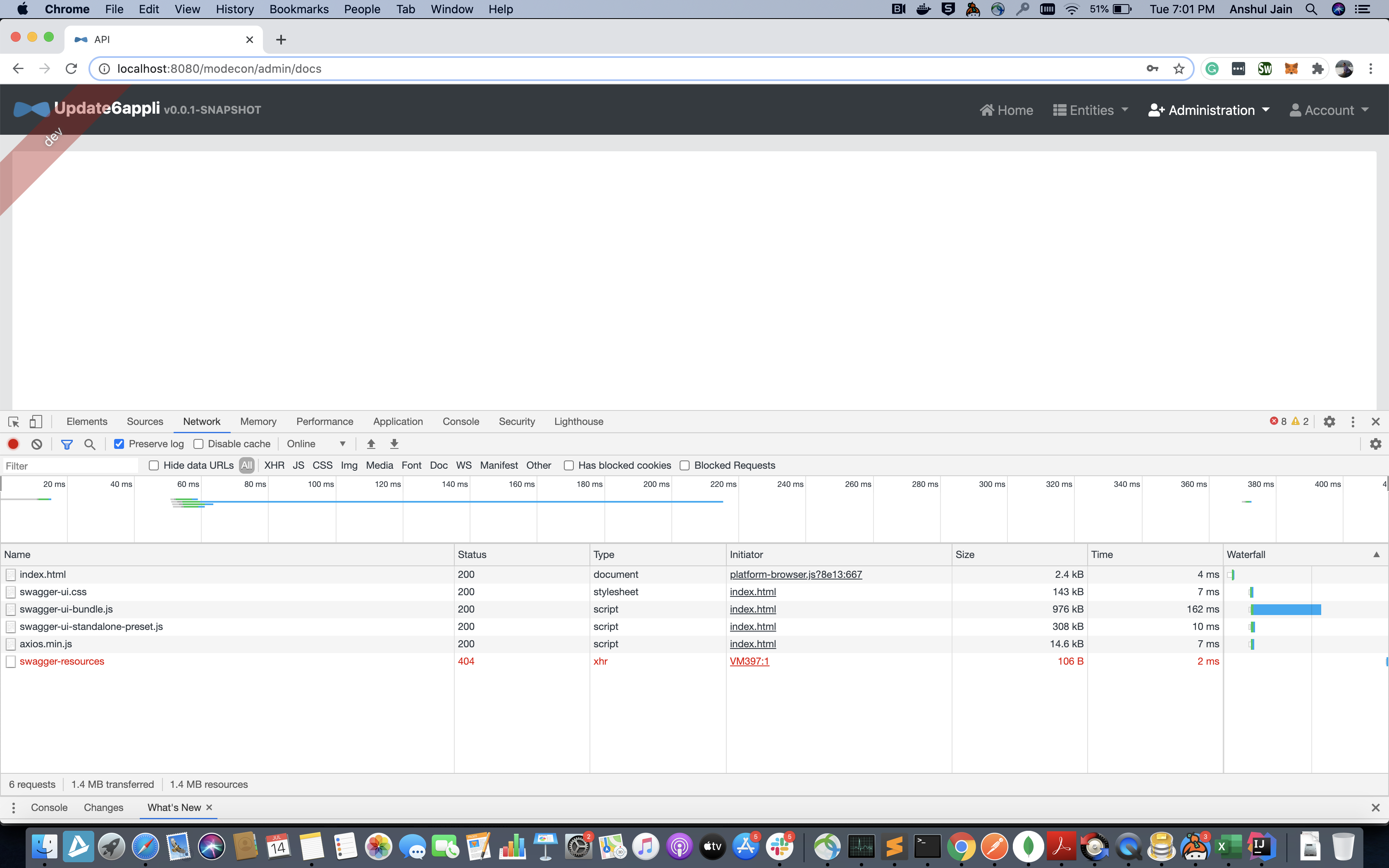
Swagger API doesn't work /admin/docs load the blank page with network tab showing the error.
Related issues
Suggest a Fix
JHipster Version(s)
6.10.1
JHipster configuration
`
{
"generator-jhipster": {
"promptValues": {
"packageName": "com.test.appli"
},
"jhipsterVersion": "6.10.1",
"applicationType": "monolith",
"baseName": "update6appli",
"packageName": "com.test.appli",
"packageFolder": "com/test/appli",
"serverPort": "8080",
"authenticationType": "jwt",
"cacheProvider": "caffeine",
"enableHibernateCache": false,
"websocket": false,
"databaseType": "mongodb",
"devDatabaseType": "mongodb",
"prodDatabaseType": "mongodb",
"searchEngine": false,
"messageBroker": false,
"serviceDiscoveryType": false,
"buildTool": "gradle",
"enableSwaggerCodegen": true,
"jwtSecretKey": "YTlhODRlMmI5ZTg2NTYzY2FhODgxM2Y2YzM0Y2ExYjgyYmYyOTVjY2UzYWM1YzQyZGE0ZDMyNTJlODY2ZWJkODg1NWY1YTcxZDlmZWIyNmE2MGEyZDgyMzJjZDExYzJmNDVmNDUzNWRhYTgxOTllMWQ5ZTdiM2E4ZjBhZTZhYTI=",
"embeddableLaunchScript": false,
"useSass": true,
"clientPackageManager": "npm",
"clientFramework": "angularX",
"clientTheme": "none",
"clientThemeVariant": "",
"creationTimestamp": 1594632723389,
"testFrameworks": [],
"jhiPrefix": "jhi",
"entitySuffix": "",
"dtoSuffix": "DTO",
"otherModules": [],
"enableTranslation": false,
"blueprints": []
}
}
`
Entity configuration(s) entityName.json files generated in the .jhipster directory
Browsers and Operating System
Google Chrome Version 83.0.4103.116
MacOs
- [x] Checking this box is mandatory (this is just to show you read everything)
 anshul-jain
All 7 comments
What I can see in your screenshot, is your context path. As you modified your project and add context path, you need to update the index.html, related to swagger too.
 pascalgrimaud
on 14 Jul 2020
pascalgrimaud
on 14 Jul 2020
@pascalgrimaud As per the documentation https://www.jhipster.tech/production/#running-the-application-under-a-context-path it's only one place where you need to update the context value. Which Index.html section you are saying needs update?
anshul-jain
on 15 Jul 2020
You should have a look at these lines of code https://github.com/jhipster/jhipster-sample-app/blob/master/src/main/webapp/swagger-ui/index.html#L24-L27 and probably add your context path somewhere.
Maybe something like that:
        axios.get("/modecon/swagger-resources").then(function (response) {
            response.data.forEach(function (resource) {
                urls.push({"name": resource.name, "url": '/modecon' + resource.location});
            });
If you confirm that, it means our documentation is not totally completed and we need to update our doc.
pascalgrimaud
on 15 Jul 2020
@pascalgrimaud I have tried with the approach you have shared but looks like there is a problem is a present even before that
https://github.com/jhipster/jhipster-sample-app/blob/8ba07644713e61d6b3615965842e06974c6c9761/src/main/webapp/swagger-ui/index.html#L24-L27 section it's not getting into the response function.

anshul-jain
on 15 Jul 2020
I used your configuration, applied the change. And everything works fine for me:
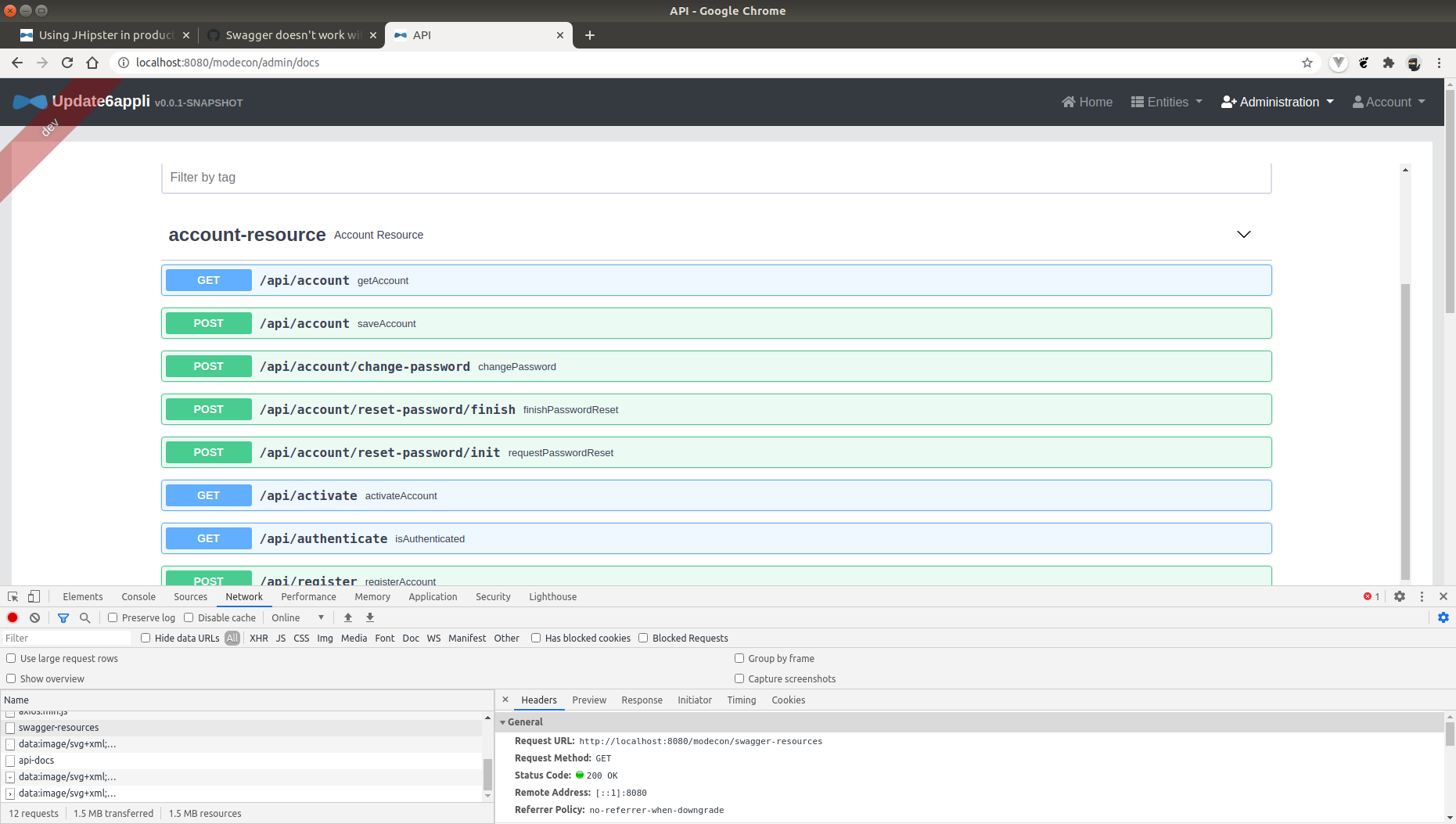
Here my git diff:
diff --git a/src/main/resources/config/application.yml b/src/main/resources/config/application.yml
index 8735b55..93ddc06 100644
--- a/src/main/resources/config/application.yml
+++ b/src/main/resources/config/application.yml
@@ -90,6 +90,7 @@ spring:

 server:
   servlet:
+    context-path: /modecon
     session:
       cookie:
         http-only: true
diff --git a/src/main/webapp/swagger-ui/index.html b/src/main/webapp/swagger-ui/index.html
index cff4591..d1101fc 100644
--- a/src/main/webapp/swagger-ui/index.html
+++ b/src/main/webapp/swagger-ui/index.html
@@ -21,9 +21,9 @@


         var urls = [];
-        axios.get("/swagger-resources").then(function (response) {
+        axios.get("/modecon/swagger-resources").then(function (response) {
             response.data.forEach(function (resource) {
-                urls.push({"name": resource.name, "url": resource.location});
+                urls.push({"name": resource.name, "url": "/modecon" + resource.location});
             });

             urls.sort(function (a, b) {
diff --git a/webpack/webpack.common.js b/webpack/webpack.common.js
index ca84250..a678455 100644
--- a/webpack/webpack.common.js
+++ b/webpack/webpack.common.js
@@ -89,7 +89,7 @@ module.exports = (options) => ({
             chunks: ['polyfills', 'main', 'global'],
             chunksSortMode: 'manual',
             inject: 'body',
-            base: '/',
+            base: '/modecon/',
         }),
         new AngularCompilerPlugin({
             mainPath: utils.root('src/main/webapp/app/app.main.ts'),
The only task here to do is to update our documentation.
pascalgrimaud
on 15 Jul 2020
@pascalgrimaud Thanks for your reply, Today I have a give a try again with the fresh copy of the project, with having all the Node Modules deleted and after this, I am able to access the swagger-docs section without any error.
Thanks
anshul-jain
on 16 Jul 2020
Related issues
 sdoxsee
·
4Comments
sdoxsee
·
4Comments
 lsadehaan
·
3Comments
lsadehaan
·
3Comments
 SudharakaP
·
3Comments
SudharakaP
·
3Comments
 marcelinobadin
·
3Comments
marcelinobadin
·
3Comments
 dronavallisaikrishna
·
3Comments
dronavallisaikrishna
·
3Comments
Most helpful comment
@pascalgrimaud Thanks for your reply, Today I have a give a try again with the fresh copy of the project, with having all the Node Modules deleted and after this, I am able to access the swagger-docs section without any error.
Thanks