Generator-jhipster: Swagger doesn't work
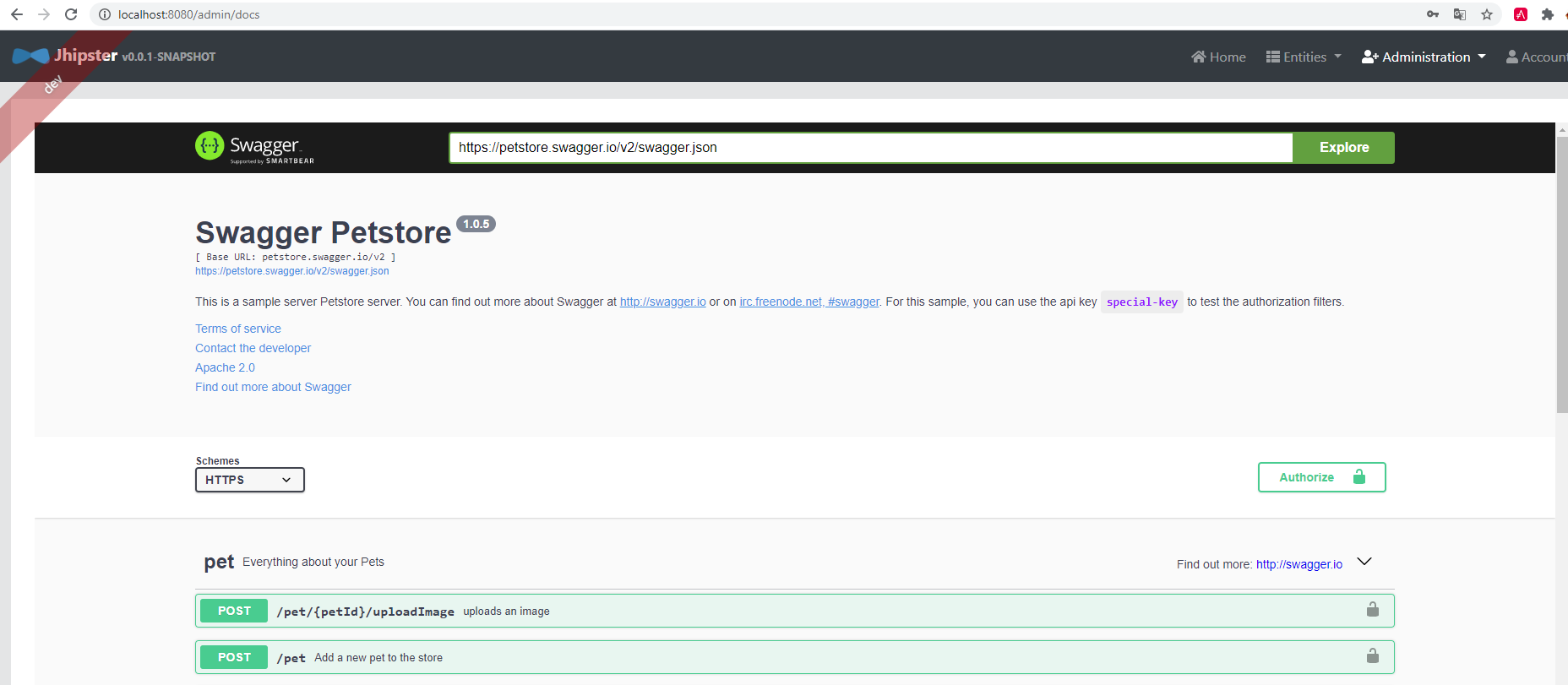
Since jHipster 6.10.0 the swagger api doesn't work in:
- new generate project
- update project from jHipsrer 6.9.1
Swagger API references to: https://petstore.swagger.io/v2/swagger.json
 jperezdelafuente
All 8 comments
@jperezdelafuente : you need to fill the template, otherwise we can't reproduce your issue as we don't have any information
 pascalgrimaud
on 2 Jul 2020
pascalgrimaud
on 2 Jul 2020
@pascalgrimaud
Overview of the issue
Since jHipster 6.10.0 the swagger api doesn't work in:
- new generate project
- update project from jHipsrer 6.9.1
Motivation for or Use Case
Swagger api
Reproduce the error
Swagger api doesn't work
JHipster Version(s)
jHipster 6.10.0
JHipster configuration
JHipster Version(s)
[email protected] D:\minah\demo-swagger
`-- [email protected]
.yo-rc.json file
{
  "generator-jhipster": {
    "promptValues": {
      "packageName": "com.mycompany.myapp"
    },
    "jhipsterVersion": "6.10.0",
    "applicationType": "monolith",
    "baseName": "jhipster",
    "packageName": "com.mycompany.myapp",
    "packageFolder": "com/mycompany/myapp",
    "serverPort": "8080",
    "authenticationType": "jwt",
    "cacheProvider": "ehcache",
    "enableHibernateCache": true,
    "websocket": false,
    "databaseType": "sql",
    "devDatabaseType": "h2Disk",
    "prodDatabaseType": "oracle",
    "searchEngine": false,
    "messageBroker": false,
    "serviceDiscoveryType": false,
    "buildTool": "maven",
    "enableSwaggerCodegen": false,
    "jwtSecretKey": "YourJWTSecretKeyWasReplacedByThisMeaninglessTextByTheJHipsterInfoCommandForObviousSecurityReasons",
    "embeddableLaunchScript": false,
    "useSass": true,
    "clientPackageManager": "npm",
    "clientFramework": "angularX",
    "clientTheme": "none",
    "clientThemeVariant": "",
    "creationTimestamp": 1593692622903,
    "testFrameworks": ["gatling", "cucumber", "protractor"],
    "jhiPrefix": "jhi",
    "entitySuffix": "",
    "dtoSuffix": "DTO",
    "otherModules": [],
    "enableTranslation": false,
    "blueprints": []
  }
}
JDL for the Entity configuration(s) entityName.json files generated in the .jhipster directory
JDL entity definitions
Environment and Tools
openjdk version "1.8.0_252"
OpenJDK Runtime Environment (build 1.8.0_252-b09)
OpenJDK 64-Bit Server VM (build 25.252-b09, mixed mode)
git version 2.21.0.windows.1
node: v12.16.3
npm: 6.14.5
yeoman: 3.1.1
yarn: 1.16.0
Docker version 19.03.8, build afacb8b
docker-compose version 1.25.5, build 8a1c60f6
Entity configuration(s) entityName.json files generated in the .jhipster directory
Without entities
Browsers and Operating System
Google Chrome Versión 83.0.4103.116 (Build oficial) (64 bits)
Windows 10
jperezdelafuente
on 2 Jul 2020
I have the same issue: When I navigate to /admin/docs Swagger opens with the Swagger Petstore just like the screenshot above.
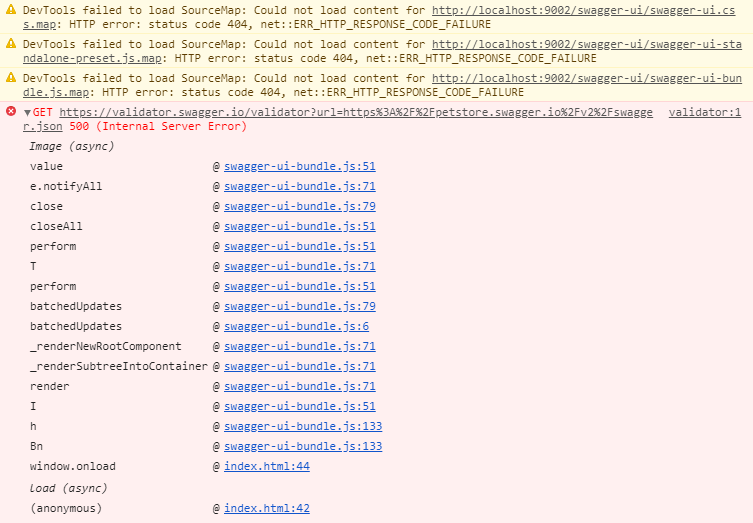
It seems like some Swagger resources cannot be loaded. See the screenshot from my Browser console below.
 niklasLensing
on 3 Jul 2020
niklasLensing
on 3 Jul 2020
Confirmed this is an issue with a new v6.10.x app. To reproduce, generate an app and navigate to the Swagger page.
As a workaround until this is fixed, you can replace the petstore URL https://petstore.swagger.io/v2/swagger.json with http://localhost:8080/v2/api-docs
 ruddell
on 3 Jul 2020
ruddell
on 3 Jul 2020
Ok, I think it's the same issue than: https://github.com/jhipster/jhipster-vuejs/issues/618
It should be the same fix: https://github.com/jhipster/jhipster-vuejs/pull/619/files
pascalgrimaud
on 3 Jul 2020
If the fix is confirmed, then, I'll do a patch release 6.10.1 when possible.
pascalgrimaud
on 3 Jul 2020
yeah, I did update the copy plugin and seems same issue over here. Just wondering, why none of our automated tests caught this
 vishal423
on 3 Jul 2020
vishal423
on 3 Jul 2020
I can confirm that the change from https://github.com/jhipster/jhipster-vuejs/pull/619/files fixes this issue for me.
niklasLensing
on 3 Jul 2020
Related issues
 tomj0101
·
3Comments
pascalgrimaud
·
4Comments
tomj0101
·
3Comments
pascalgrimaud
·
4Comments
 edvjacek
·
3Comments
edvjacek
·
3Comments
 SudharakaP
·
3Comments
SudharakaP
·
3Comments
 DanielFran
·
3Comments
DanielFran
·
3Comments