Generator-jhipster: War generated seems to not work in 6.0.1 (standalone and tomcat)
Overview of the issue
With JHipster 6.0.1, the war generated by the command ./mvnw -Pprod,war clean verify does not serve the webapp when deployed in Tomcat. It was working fine with JHipster 5.8.2 (because war was the default package type I guess).
When the app is deployed on Tomcat (the startup is working fine) and accessed via Chrome, the following appears in the console:
Console errors
loading.css:1 Failed to load resource: the server responded with a status of 404 ()
main.70794c3….css:1 Failed to load resource: the server responded with a status of 404 ()
global.2305a38….css:1 Failed to load resource: the server responded with a status of 404 ()
0.e733838….chunk.js:1 Failed to load resource: the server responded with a status of 404 ()
polyfills.e733838182…ea31ccb.bundle.js:1 Failed to load resource: the server responded with a status of 404 ()
main.e733838….bundle.js:1 Failed to load resource: the server responded with a status of 404 ()
global.e733838….bundle.js:1 Failed to load resource: the server responded with a status of 404 ()
0.e733838….chunk.js:1 Failed to load resource: the server responded with a status of 404 ()
polyfills.e733838182…ea31ccb.bundle.js:1 Failed to load resource: the server responded with a status of 404 ()
main.e733838….bundle.js:1 Failed to load resource: the server responded with a status of 404 ()
global.e733838….bundle.js:1 Failed to load resource: the server responded with a status of 404 ()
:8080/manifest.webapp:1 Failed to load resource: the server responded with a status of 404 ()
:8080/manifest.webapp:1 Manifest: Line: 1, column: 1, Unexpected token.
loading.css:1 Failed to load resource: the server responded with a status of 404 ()
global.2305a38….css:1 Failed to load resource: the server responded with a status of 404 ()
main.70794c3….css:1 Failed to load resource: the server responded with a status of 404 ()
On screen, the page displayed is:
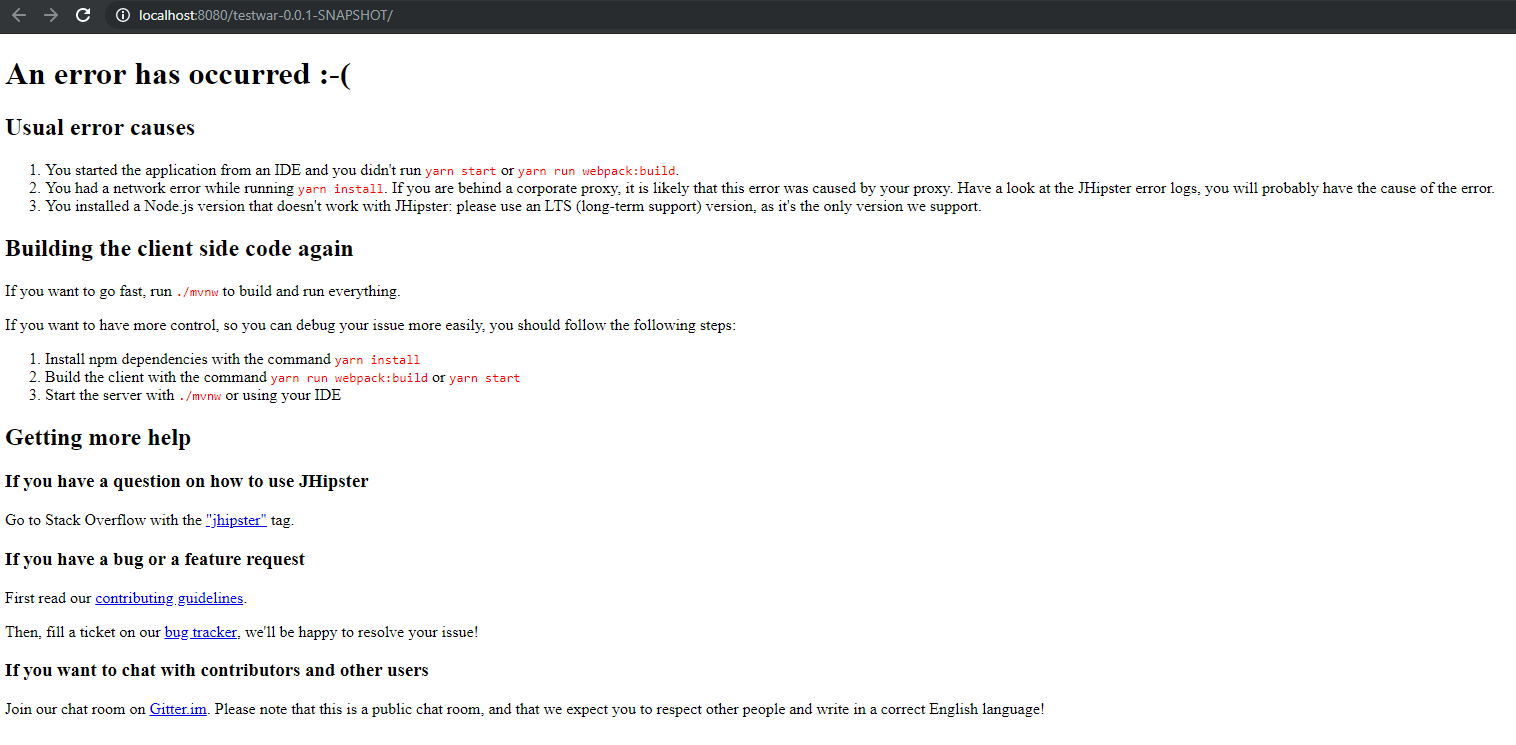
Trying to execute the war from command line with java -jar testwar-0.0.1-SNAPSHOT.war output the following error:
_no main manifest attribute in .\testwar-0.0.1-SNAPSHOT.war_
Please note that this command works if I try to run the jar and not the war (with a start-class property I needed to add otherwise I had the same error).
Everything is working fine if the app is started with ./mvnw.
Motivation for or Use Case
I use JHipster to create an app deployed on Tomcat.
I needed to upgrade JHipster because there is a bug in 5.8.2 about the Tomcat metrics (https://github.com/jhipster/generator-jhipster/issues/9195) fixed in 6.0.
Reproduce the error
- Create a new directory and cd into it
- run "jhipster" to create a new app
- run "./mvnw -Pprod,war clean verify" to build the war package
- deploy the war in tomcat and try to access to the app
Related issues
Suggest a Fix
The change about the war profile seems to be the cause (https://github.com/jhipster/generator-jhipster/pull/9034).
The current structure of the war is :
- META-INF
- MANIFEST.MF
- maven
- "package_name"
- "app_name"
- pom.properties
- pom.xml
- "app_name"
- "package_name"
- WEB-INF
- classes
- "package_root"
-> all the java files inside the package tree - config
-> *.yml - i18n
-> *.properties - META-INF
- build-info.properties
- static
-> webapp (with files not found by the browser) - templates
-> default templates - banner.txt
- git.properties
- logback-spring.xml
- stats.html
- "package_root"
- lib
-> *.jar - web.xml
- classes
JHipster Version(s)
6.0.1
JHipster configuration
JHipster Version(s)
[email protected] D:\Projects\testwar
`-- [email protected]
.yo-rc.json file
{
  "generator-jhipster": {
    "promptValues": {
      "packageName": "com.test.testwar",
      "nativeLanguage": "en"
    },
    "jhipsterVersion": "6.0.1",
    "applicationType": "monolith",
    "baseName": "testwar",
    "packageName": "com.test.testwar",
    "packageFolder": "com/test/testwar",
    "serverPort": "8080",
    "authenticationType": "session",
    "cacheProvider": "ehcache",
    "enableHibernateCache": true,
    "websocket": false,
    "databaseType": "sql",
    "devDatabaseType": "mysql",
    "prodDatabaseType": "mysql",
    "searchEngine": false,
    "messageBroker": false,
    "serviceDiscoveryType": false,
    "buildTool": "maven",
    "enableSwaggerCodegen": false,
    "rememberMeKey": "YourJWTSecretKeyWasReplacedByThisMeaninglessTextByTheJHipsterInfoCommandForObviousSecurityReasons",
    "clientFramework": "angularX",
    "clientTheme": "none",
    "clientThemeVariant": "",
    "useSass": true,
    "clientPackageManager": "yarn",
    "testFrameworks": ["gatling", "cucumber", "protractor"],
    "jhiPrefix": "jhi",
    "entitySuffix": "",
    "dtoSuffix": "DTO",
    "otherModules": [],
    "enableTranslation": true,
    "nativeLanguage": "en",
    "languages": ["en", "fr"]
  }
}
JDL for the Entity configuration(s) entityName.json files generated in the .jhipster directory
JDL entity definitions
Environment and Tools
java version "1.8.0_211"
Java(TM) SE Runtime Environment (build 1.8.0_211-b12)
Java HotSpot(TM) 64-Bit Server VM (build 25.211-b12, mixed mode)
git version 2.21.0.windows.1
node: v10.15.3
npm: 6.4.1
yarn: 1.15.2
Entity configuration(s) entityName.json files generated in the .jhipster directory
none
Browsers and Operating System
Windows 10
Chrome 74, IE 11, Firefox 67
Apache Tomcat 9.0.14
Apache Maven 3.6.1
- [x] Checking this box is mandatory (this is just to show you read everything)
 JorisNobre
All 15 comments
I'm not sure we support WARs anymore, @PierreBesson ?
 jdubois
on 31 May 2019
jdubois
on 31 May 2019
Honestly the way we do it has had numerous iterations. So it's possible that it broke at some point being rarely tested. However it does deploy correctly to appengine so the war should be valid.
The problem here seems to be that the frontend files are not properly served from the war.
 PierreBesson
on 31 May 2019
PierreBesson
on 31 May 2019
@PierreBesson exactly, the app is correctly deployed. It has created my database with Liquibase and the backend is logging to the tomcat log files.
Unfortunately the frontend is not served.
JorisNobre
on 31 May 2019
Tomcat deploys under a context-path by default (yours is /testwar-0.0.1-SNAPSHOT), did you check the "Running the application under a Context Path" section of the production docs?
 ruddell
on 31 May 2019
ruddell
on 31 May 2019
Yes I have tried to change the basehref but I still have the issue
JorisNobre
on 31 May 2019
What errors do you see in the browser console?
ruddell
on 31 May 2019
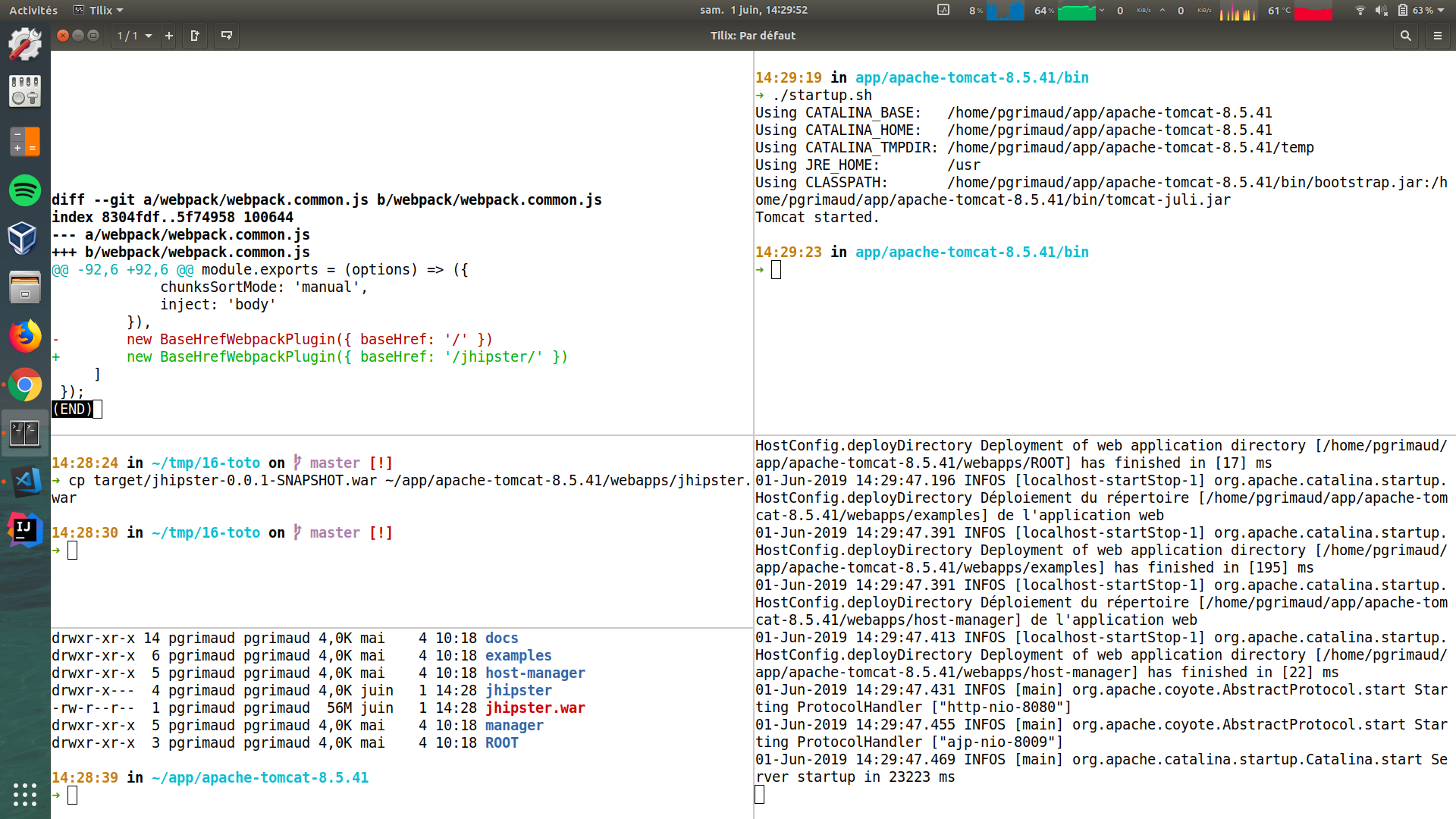
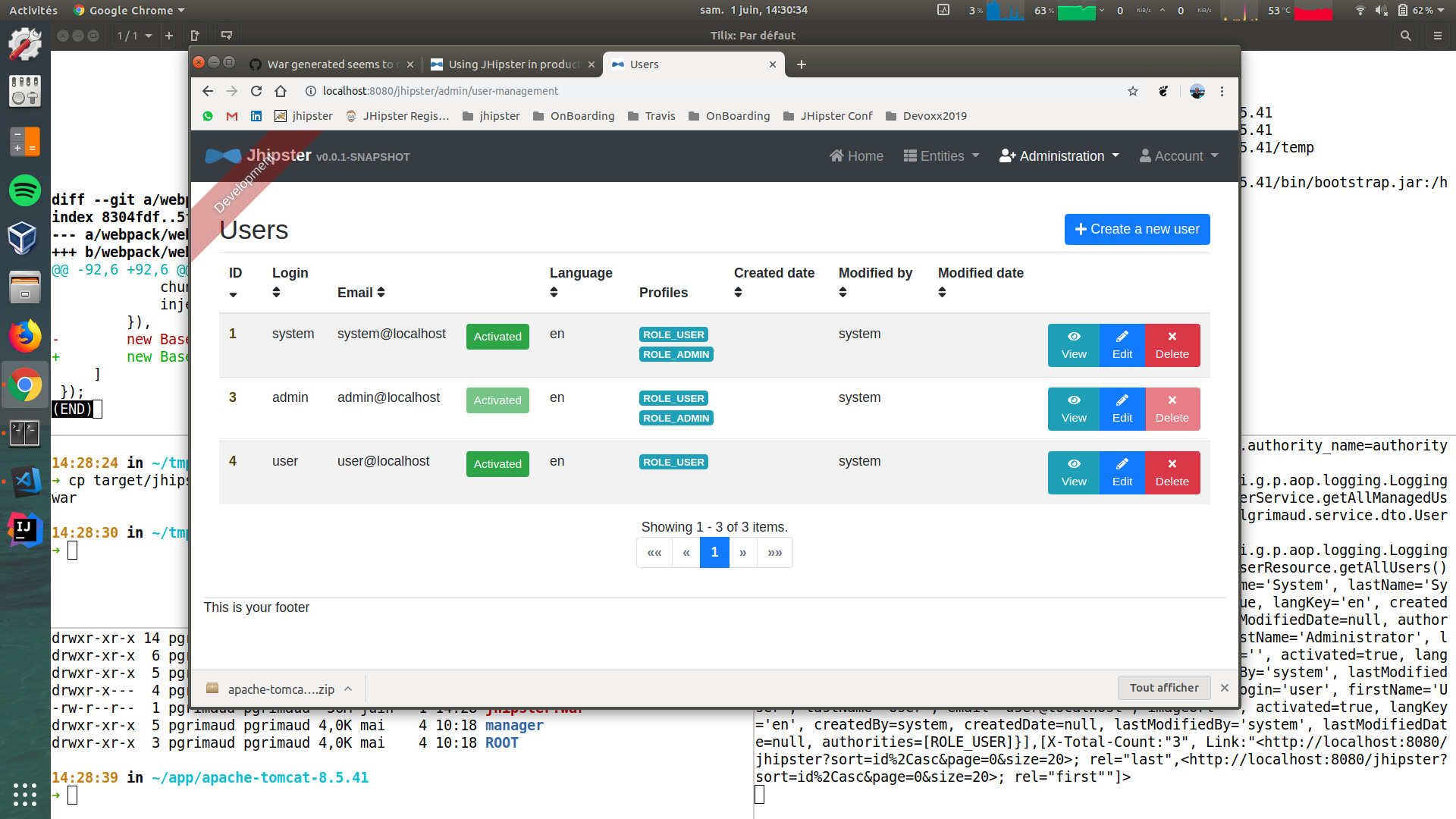
As suggested by @ruddell, you need to change the baseHref in webpack.common.js.
Just tested it, and I don't have any issue. Everything works fine for me.
See my screenshots:
 pascalgrimaud
on 1 Jun 2019
pascalgrimaud
on 1 Jun 2019
I'm closing this, as I can't reproduce it.
Don't hesitate to provide more information, steps, etc, if you think there is a real bug.
pascalgrimaud
on 1 Jun 2019
Thanks guys it works fine. I did not put the last slash in the basehref path. Hope this helps someone else in the future.
JorisNobre
on 3 Jun 2019
Nice, good to know the last "slash" is important !
Thanks for your feedback
pascalgrimaud
on 3 Jun 2019
I am also getting the same issue with jhipster 6.3.1. I have updated the baseHref as mentioned with slashes at start and end, still not working. Please help.
 ashishjmeshram
on 11 Oct 2019
ashishjmeshram
on 11 Oct 2019
I am also getting the same issue with jhipster 6.3.1. I have updated the baseHref as mentioned with slashes at start and end, still not working. Please help.
I updated my app to JHipster 6.4.1 and it works as expected.
JorisNobre
on 21 Oct 2019
Hi guys,
Have similar issue to resolve css/js fileswhen deploying a frontend react app using nginx on kubernetes, anyone has a clue how to setup nginx with proxy_pass for static files?
I have changed baseHref on webpack.common.js and added nginx_proxy pass following https://www.jhipster.tech/separating-front-end-and-api/ but looks like is not enough
new BaseHrefWebpackPlugin({ baseHref: '/jhipster/' }),
Thanks
 rodrigorodrigues
on 18 Dec 2019
rodrigorodrigues
on 18 Dec 2019
I tried to change contezxt pth on webpack but still same error
Wars not working but jars are working:
https://stackoverflow.com/questions/60338181/jhipster-spring-angular-jar-working-but-not-war-working
 aydincaner
on 21 Feb 2020
aydincaner
on 21 Feb 2020
@aydincaner : I think you're right, I saw this few weeks ago. Could you open a new specific ticket for this, with all details to reproduce plz ?
pascalgrimaud
on 21 Feb 2020
Related issues
 Steven-Garcia
·
3Comments
Steven-Garcia
·
3Comments
 tomj0101
·
3Comments
tomj0101
·
3Comments
 chegola
·
4Comments
chegola
·
4Comments
 sdoxsee
·
4Comments
sdoxsee
·
4Comments
 edvjacek
·
3Comments
edvjacek
·
3Comments
Most helpful comment
@aydincaner : I think you're right, I saw this few weeks ago. Could you open a new specific ticket for this, with all details to reproduce plz ?