Gdrive: Sign in with Google temporarily disabled for this app
When i try to get Verification Code with gdrive about
and pasting url to the browser and than login, i've got the following error ;
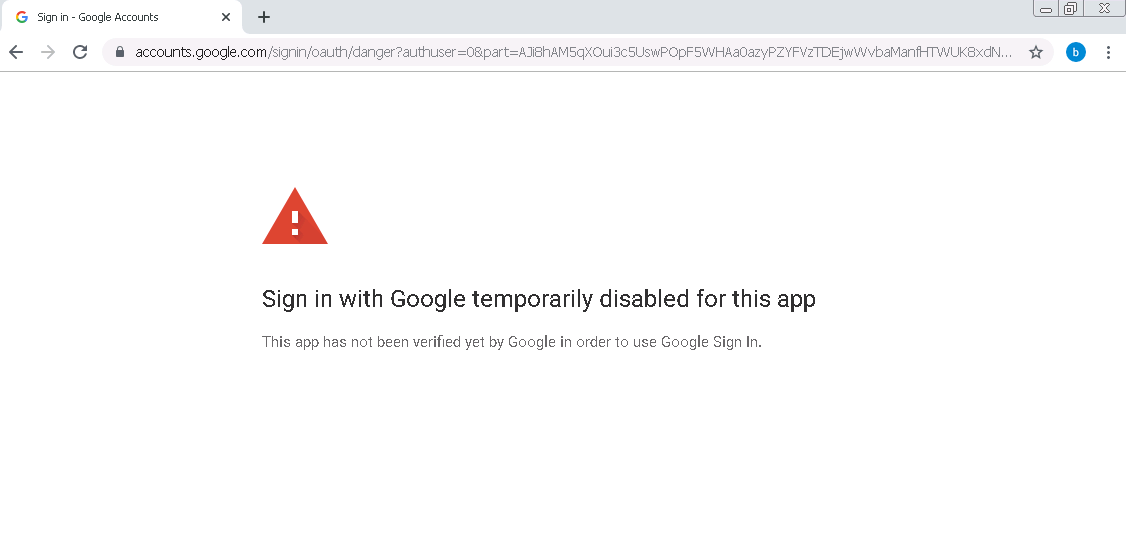
Sign in with Google temporarily disabled for this app
This app has not been verified yet by Google in order to use Google Sign In.
 chickenstealers
All 141 comments
I got the same error here.
 koji117
on 6 Nov 2019
koji117
on 6 Nov 2019
ditto
 AndoOfTheWoods
on 6 Nov 2019
AndoOfTheWoods
on 6 Nov 2019
me too
 pgbrown
on 6 Nov 2019
pgbrown
on 6 Nov 2019
I got this error too
 pratikkayal
on 6 Nov 2019
pratikkayal
on 6 Nov 2019
me too
 albertoaldrigo
on 6 Nov 2019
albertoaldrigo
on 6 Nov 2019
got this too
 mgilank
on 6 Nov 2019
mgilank
on 6 Nov 2019
If you happen to have authenticated earlier with another user you can solve this problem by copying that users /.gdrive folder to the users home folder for which authentication now fails.
 realjax
on 6 Nov 2019
realjax
on 6 Nov 2019
Problem still exists at this moment
 BartDotRun
on 7 Nov 2019
BartDotRun
on 7 Nov 2019
I got the same error too. Google disabled this app now.
 milan8
on 7 Nov 2019
milan8
on 7 Nov 2019
same
 ardunn
on 7 Nov 2019
ardunn
on 7 Nov 2019
Nothing you can do about this. The owner of the app will need to submit the app for review so that google can re-enable it. Google is beginning to review apps that use OAUTH permissions for security reasons.
 KyleDulay
on 8 Nov 2019
KyleDulay
on 8 Nov 2019
Same here :(
 ruizyi
on 9 Nov 2019
ruizyi
on 9 Nov 2019
I am having the same problem. Have somebody solve it yet. I am trying to link my gdrive account to VM instance on GCP but it is giving this problem.
 git-hamza
on 9 Nov 2019
git-hamza
on 9 Nov 2019
Nothing you can do about this. The owner of the app will need to submit the app for review so that google can re-enable it. Google is beginning to review apps that use OAUTH permissions for security reasons.
Is the gdrive V2 still working? Since that one uses the the authentication process.
BartDotRun
on 9 Nov 2019
I confirm login issues.
 theBreadCompany
on 9 Nov 2019
theBreadCompany
on 9 Nov 2019
You need to build the application from source using your own app key. You can find more information and the instructions on how to do that in this issue.
 wagesj45
on 9 Nov 2019
wagesj45
on 9 Nov 2019
Nothing you can do about this. The owner of the app will need to submit the app for review so that google can re-enable it. Google is beginning to review apps that use OAUTH permissions for security reasons.
Is the gdrive V2 still working? Since that one uses the the authentication process.
I cannot confirm as I have not had time to look into it, but @wagesj45 answer is a good one if you really need this to work, it's just a little extra work.
Regardless if you build the application from source using your own app key or not, if it requires Oauth permissions it will need to undergo app review by Google, so just keep that in mind.
KyleDulay
on 10 Nov 2019
For all of you that sill have working token_v2.json make a backup of it
i can use token_v2.json on many different server
chickenstealers
on 10 Nov 2019
For all of you that sill have working token_v2.json make a backup of it
i can use token_v2.json on many different server
this workaround works.
mgilank
on 10 Nov 2019
In case use the tutorial given by the issue @wagesj45 links to, please note that the token has an one hour expiry. I would be happy if there's a way to change this. I had to use this because I tried to relink gdrive to my google account, which (of course) failed, so I couldn't use my token anymore.
theBreadCompany
on 10 Nov 2019
unfortunately I have to say "me too" when using gdrive.
Sign in with Google temporarily disabled for this app
This app has not been verified yet by Google in order to use Google Sign In.
 hhitch
on 10 Nov 2019
hhitch
on 10 Nov 2019
Does somebody know if prasmussen is already developing again or should we contact him? Sorry, I don’t know what to do in these situations...
theBreadCompany
on 10 Nov 2019
me too.
this is Japanese error message.
このアプリでは「Google でログイン」機能が一時的に無効
このアプリは Google での確認がまだ完了していないため Google ログインを使用できません。
 shibababa
on 10 Nov 2019
shibababa
on 10 Nov 2019
When i try to get Verification Code with gdrive about
and pasting url to the browser and than login, i've got the following error ;Sign in with Google temporarily disabled for this app
This app has not been verified yet by Google in order to use Google Sign In.
temporary solution: build your own application with your own client_id and client_secret,see https://github.com/gdrive-org/gdrive/issues/392
click advance and allow your application to access your drive data when auth your application in your browser
 aisingio
on 11 Nov 2019
aisingio
on 11 Nov 2019
@aisingio please check my comment above. At least my token expires after an hour.
theBreadCompany
on 11 Nov 2019
@FbMbg it has been 2 hours since i auth my app and it seems everything works fine fow now
aisingio
on 11 Nov 2019
If you happen to have authenticated earlier with another user you can solve this problem by copying that users /.gdrive folder to the users home folder for which authentication now fails.
Dude you are a fucking hero, word the fuck up!
 mikedesu
on 11 Nov 2019
mikedesu
on 11 Nov 2019
Sure did! Very excited haha
Need a computer science tutor? https://mikebell.xyz
On Mon, Nov 11, 2019 at 3:15 AM Hamza Khan notifications@github.com wrote:
If you happen to have authenticated earlier with another user you can
solve this problem by copying that users /.gdrive folder to the users home
folder for which authentication now fails.Dude you are a fucking hero, word the fuck up!
Did you solve the problem?
—
You are receiving this because you commented.
Reply to this email directly, view it on GitHub
https://github.com/gdrive-org/gdrive/issues/506?email_source=notifications&email_token=AABILA4HLM2UGBV3PSVV6GLQTEIBBA5CNFSM4JJIPND2YY3PNVWWK3TUL52HS4DFVREXG43VMVBW63LNMVXHJKTDN5WW2ZLOORPWSZGOEDWAFFA#issuecomment-552338068,
or unsubscribe
https://github.com/notifications/unsubscribe-auth/AABILAZBFQETPVHEI7F2KADQTEIBBANCNFSM4JJIPNDQ
.
mikedesu
on 11 Nov 2019
@aisingio did you just replace the clientID and the clientSecret in handlers_drive.go?
theBreadCompany
on 11 Nov 2019
@FbMbg Yeah! works perfectly fine in the past 12 hours
aisingio
on 11 Nov 2019
Ok, I‘m going to recompile gdrive...
theBreadCompany
on 11 Nov 2019
@mikedesu Can you elaborate what you did there? I am trying to link my google drive account to GCP VM instance and i am having the same issue. I have .gdrive hidden file in my home directory. what do i have to do with that? Thanks
@git-hamza Copy your .gdrive folder onto the new server location. It seemed obvious based on the comment that I was replying to. I don't know how one can further elaborate.
mikedesu
on 11 Nov 2019
Where can i find the .gdrive folder?
On Mon, Nov 11, 2019, 10:51 PM darkmage notifications@github.com wrote:
@mikedesu https://github.com/mikedesu Can you elaborate what you did
there? I am trying to link my google drive account to GCP VM instance and i
am having the same issue. I have .gdrive hidden file in my home directory.
what do i have to do with that? Thanks@git-hamza https://github.com/git-hamza Copy your .gdrive folder onto
the new server location. It seemed obvious based on the comment that I was
replying to. I don't know how one can further elaborate.—
You are receiving this because you were mentioned.
Reply to this email directly, view it on GitHub
https://github.com/gdrive-org/gdrive/issues/506?email_source=notifications&email_token=ANHXHETRDDVJ2RMWWLPDEBTQTGLTVA5CNFSM4JJIPND2YY3PNVWWK3TUL52HS4DFVREXG43VMVBW63LNMVXHJKTDN5WW2ZLOORPWSZGOEDXS2JQ#issuecomment-552545574,
or unsubscribe
https://github.com/notifications/unsubscribe-auth/ANHXHEUPGSHQSTHGJ5EQ4YDQTGLTVANCNFSM4JJIPNDQ
.
git-hamza
on 11 Nov 2019
Where can i find the .gdrive folder?
@git-hamza Your user's home folder
mikedesu
on 11 Nov 2019
i dont have .gdrive file in my home? is it not installed properly?
git-hamza
on 11 Nov 2019
i dont have .gdrive file in my home? is it not installed properly?
@git-hamza Seems like you wouldn't have been able to perform the migration in the first place, and you don't have it installed properly so you shouldn't even be able to use it at all
mikedesu
on 11 Nov 2019
Can you guide me please?
git-hamza
on 11 Nov 2019
No.
Need a computer science tutor? https://mikebell.xyz
On Mon, Nov 11, 2019 at 2:09 PM Hamza Khan notifications@github.com wrote:
Can you guide me please?
—
You are receiving this because you were mentioned.
Reply to this email directly, view it on GitHub
https://github.com/gdrive-org/gdrive/issues/506?email_source=notifications&email_token=AABILA3H2TN7M675XWVYY7TQTGUX5A5CNFSM4JJIPND2YY3PNVWWK3TUL52HS4DFVREXG43VMVBW63LNMVXHJKTDN5WW2ZLOORPWSZGOEDXZTQQ#issuecomment-552573378,
or unsubscribe
https://github.com/notifications/unsubscribe-auth/AABILA3BFHVQ4MVQKMLZOODQTGUX5ANCNFSM4JJIPNDQ
.
mikedesu
on 11 Nov 2019
Ok, I recompiled gdrive and now it’s working. Thank you @wagesj45!
theBreadCompany
on 11 Nov 2019
I recompiled it too and it works like a charm, thanks @wagesj45!
 raphaelboulch
on 11 Nov 2019
raphaelboulch
on 11 Nov 2019
I was able to get it working this way:
1) Go to Google Developer
2) enable Google Drive APIs if you haven't already
3) Generate a new oauth client id/secret for a "native" app (other) and copy them
4) cd to your src dir, git clone https://github.com/gdrive-org/gdrive
5) open the file handlers_drive.go and replace the client id and secret key with your own
6) go get
7) go build
8) mv gdrive /usr/local/bin
9) gdrive about
10) copy and paste url into browser and grant permission
should work after that if you generated your access id and secret key correctly
My best,
Hugh
hhitch
on 12 Nov 2019
I was able to get it working this way:
- Go to Google Developer
- enable Google Drive APIs if you haven't already
- Generate a new oauth client id/secret for a "native" app (other) and copy them
- cd to your src dir, git clone https://github.com/gdrive-org/gdrive
- open the file handlers_drive.go and replace the client id and secret key with your own
- go get
- go build
- mv gdrive /usr/local/bin
- gdrive about
- copy and paste url into browser and grant permission
should work after that if you generated your access id and secret key correctly
My best,
Hugh
hello Hugh
can u explain the third step ?
 whulixiya
on 12 Nov 2019
whulixiya
on 12 Nov 2019
I was able to get it working this way:
- Go to Google Developer
- enable Google Drive APIs if you haven't already
- Generate a new oauth client id/secret for a "native" app (other) and copy them
- cd to your src dir, git clone https://github.com/gdrive-org/gdrive
- open the file handlers_drive.go and replace the client id and secret key with your own
- go get
- go build
- mv gdrive /usr/local/bin
- gdrive about
- copy and paste url into browser and grant permission
should work after that if you generated your access id and secret key correctly
My best,
Hughhello Hugh
can u explain the third step ?
Hi whilixiya
You need to log into Google and go to your Google Developer Console
https://console.developers.google.com/
once you're in there, you need to create a project
once you create a project, you create a credential
when you create a credential, you choose oauth client
when you create oauth client, you choose "other"
Hope this helps :)
Hugh
hhitch
on 12 Nov 2019
I mean, can u give me a complete example code of the 6th and 7th step?
On Wed, Nov 13, 2019 at 6:26 AM Kyle Lee whulixiya@gmail.com wrote:
Ok , get it. I have complete first five steps, what is 6 7 means? can u
give me a more specific explain?On Wed, Nov 13, 2019 at 2:26 AM hhitch notifications@github.com wrote:
I was able to get it working this way:
- Go to Google Developer
- enable Google Drive APIs if you haven't already
- Generate a new oauth client id/secret for a "native" app (other)
and copy them- cd to your src dir, git clone https://github.com/gdrive-org/gdrive
- open the file handlers_drive.go and replace the client id and
secret key with your own- go get
- go build
- mv gdrive /usr/local/bin
- gdrive about
- copy and paste url into browser and grant permission
should work after that if you generated your access id and secret key
correctly
My best,
Hughhello Hugh
can u explain the third step ?Hi whilixiya
You need to log into Google and go to your Google Developer Console
https://console.developers.google.com/
once you're in there, you need to create a project
once you create a project, you create a credential
when you create a credential, you choose oauth client
when you create oauth client, you choose "other"
Hope this helps :)
Hugh—
You are receiving this because you commented.
Reply to this email directly, view it on GitHub
https://github.com/gdrive-org/gdrive/issues/506?email_source=notifications&email_token=AJDECD5DSO7R2L7DV2VWK4DQTLYOZA5CNFSM4JJIPND2YY3PNVWWK3TUL52HS4DFVREXG43VMVBW63LNMVXHJKTDN5WW2ZLOORPWSZGOED3J6UI#issuecomment-553033553,
or unsubscribe
https://github.com/notifications/unsubscribe-auth/AJDECD5JLVMFSYWYVVTFBKDQTLYOZANCNFSM4JJIPNDQ
.--
Xiya Li
State Key Laboratory of Information Engineering in Surveying, Mapping and
Remote Sensing, Wuhan University, Wuhan, China
(Master)
--
Xiya Li
State Key Laboratory of Information Engineering in Surveying, Mapping and
Remote Sensing, Wuhan University, Wuhan, China
(Master)
whulixiya
on 12 Nov 2019
right, I didn't mention that you have to install Go Tools on your machine before that will work. Google has a new coding language called Go which is what GDrive is built with. Once you have Go Tools on the system them you can run it from the command line. I included the two Go commands you will need to compile this.
go get
that will install all the dependencies of the project.
go build
that will compile the sources to the executable which ends up being gdrive
Good Luck!
hhitch
on 12 Nov 2019
This project is dead... moving on to rclone instead.
 blakekl
on 13 Nov 2019
blakekl
on 13 Nov 2019
Hi everybody,
I write a tutorial step-by-step to create your own Google credential here:
https://github.com/mbrother2/backuptogoogle/wiki/Create-own-Google-credential-step-by-step
I also write script to auto build gdrive and create cron auto backup to Google Drive, you can try here:
https://github.com/mbrother2/backuptogoogle
 mbrother2
on 13 Nov 2019
mbrother2
on 13 Nov 2019
hi .... is this works for SUSE Linux
 ch-and-an
on 14 Nov 2019
ch-and-an
on 14 Nov 2019
Hi @ch-and-an,
I have just add support FreeBSD, my script will be support SUSE Linux soon.
mbrother2
on 14 Nov 2019
Hi everybody,
I write a tutorial step-by-step to create your own Google credential here:
https://github.com/mbrother2/backuptogoogle/wiki/Create-own-Google-credential-step-by-stepI also write script to auto build gdrive and create cron auto backup to Google Drive, you can try here:
https://github.com/mbrother2/backuptogoogle
Thanks working good
tips using bash for run script and go1.12.5"
 yohukm
on 14 Nov 2019
yohukm
on 14 Nov 2019
Hi @yohukm,
Run my script is very simple, you can follow here: https://github.com/mbrother2/backuptogoogle#how-to-use
My script will complie gdrive with go1.12.5. If you only want to complie gdrive without use butgg.sh & cron_backup.sh script, just run sh butgg.sh --setup only-build
mbrother2
on 15 Nov 2019
@mbrother2
ok thank your script working good.
but in vultr vps it must using bash butgg.sh --setup only-build rather then sh butgg.sh --setup only-build
yohukm
on 15 Nov 2019
@yohukm
I use sh shell in my script because this shell can use on Linux or FreeBSD system, if you use bash shell, some commands can work wrong. Please show me the result of two command on your server:
uname -a
which sh
Welcome to Ubuntu 16.04.6 LTS (GNU/Linux 4.4.0-148-generic x86_64)
- Documentation: https://help.ubuntu.com
- Management: https://landscape.canonical.com
- Support: https://ubuntu.com/advantage
118 packages can be updated.
62 updates are security updates.
New release '18.04.3 LTS' available.
Run 'do-release-upgrade' to upgrade to it.
Last login: Fri Nov 15 06:51:08 2019 from 36.71.xxx.xxx
root@bot:~# uname -a
Linux bot 4.4.0-148-generic #174-Ubuntu SMP Tue May 7 12:20:14 UTC 2019 x86_64 x86_64 x86_64 GNU/Linux
root@bot:~# which sh
/bin/sh
root@bot:~#
yohukm
on 15 Nov 2019
root@botbinance:/var/www/html/gdrive# sh butgg.sh --setup
butgg.sh: 61: [: /root/.gdrive/butgg.log: unexpected operator
[ 15/11/2019 10:07:11 ] ---
[ 15/11/2019 10:07:12 ] Cheking network...
[ 15/11/2019 10:07:12 ] Connect Github successful
[ 15/11/2019 10:07:12 ] Connect Google successful
[ 15/11/2019 10:07:12 ] Checking OS...
[ 15/11/2019 10:07:12 ] OS supported
[ 15/11/2019 10:07:12 ] Downloading script cron file from github...
% Total % Received % Xferd Average Speed Time Time Time Current
Dload Upload Total Spent Left Speed
100 6486 100 6486 0 0 16659 0 --:--:-- --:--:-- --:--:-- 16630
butgg.sh: 39: [: Ubuntu: unexpected operator
butgg.sh: 39: [: Ubuntu: unexpected operator
butgg.sh: 1: butgg.sh: md5: not found
butgg.sh: 45: [: fd4ed0c766ca96af93cd15fc1eda4bc6: unexpected operator
[ 15/11/2019 10:07:12 ] -e \e[31m[CHECKS][FAIL]\e[0m Can not verify md5sum for file cron_backup.sh. Exit!
root@botbinance:/var/www/html/gdrive#
If i use bash script work fine
yohukm
on 15 Nov 2019
@yohukm
Thank you for your informations. I will be check the script soon.
mbrother2
on 15 Nov 2019
@yohukm
I created an issue for your case, please follow here https://github.com/mbrother2/backuptogoogle/issues/1
mbrother2
on 16 Nov 2019
this stinks. i hate compiling GO.. it's a pain in the ass.
 mralexgray
on 16 Nov 2019
mralexgray
on 16 Nov 2019
You can use this compiled version using my api key: https://github.com/Exonip/gdrive/releases/tag/2.2.0
You have to trust the application. (Click on expanded options and Open Linux Drive (insecure))
 Exonip
on 17 Nov 2019
Exonip
on 17 Nov 2019
Hi @Exonip , thanks for fixing it quickly! Is it possible to release a windows build for 2.2 either?
 epaminond
on 18 Nov 2019
epaminond
on 18 Nov 2019
Hi @Exonip , thanks for fixing it quickly! Is it possible to release a windows build for 2.2 either?
I Added a windows build to https://github.com/Exonip/gdrive/releases/tag/2.2.0
Exonip
on 18 Nov 2019
Hi All,
I'm facing an error during verify the GDrive app on google account.
Can anyone guide me on how can I fix that? I'm using windows platform
 qasimmughal0
on 18 Nov 2019
qasimmughal0
on 18 Nov 2019
I have sent a pull request that allows the user to specify their own credentials: https://github.com/gdrive-org/gdrive/pull/513
You can simply:
- build with my PR
- create an oauth client https://console.cloud.google.com/apis/credentials
- download the credentials file https://console.cloud.google.com/apis/credentials
- Copy the file to
~/.gdrive/oauthClient.json.
You will probably have to delete your old token.
 colemickens
on 19 Nov 2019
colemickens
on 19 Nov 2019
@ch-and-an
My script supports openSUSE & SUSE Linux Enterprise now. Please try!
mbrother2
on 19 Nov 2019
I finally got it working. No thanks to the "help" above that requires hours of googling and leved 10 guthub wizardry. People are not mind readers you know!
Here is what I did.
Step A
On clean installations of rasbian buster lite.
sudo apt-get update
sudo apt-get upgrade
Update & upgrade to the latest, I am not sure if this is really required, but it's considered a good practise.
Step B
Install git.
sudo apt-get install git
Step C
Download go binary (I tried other versions, as for the love for fellow man, no one bothered to put anywhere what version of go should be used to compile gdrive. Thanks! BTW use go1.12.5 for now.)
wget https://storage.googleapis.com/golang/go1.12.5.linux-armv6l.tar.gz
Step D
Extract
sudo tar -C /usr/local -xzf go1.12.5.linux-armv6l.tar.gz
Add installed go to path
export PATH=$PATH:/usr/local/go/bin
Then I set up my home dir as my go workspace
export GOPATH=$HOME
Then I just cloned colemickens repository and build it from there, because he/she/whatever(<-because we don't want to offend anyone/anything, now do we? The world is sutch a sane place nowdays...) did not bother to tell how to "build with my PR". I tried to google and reading pages and pages of git documents and tutorial etc., but for the love of god, I could not clone their commit. I don't consider my self a total noob, when it comes to git and linux, but this was just HUGE waste of time and made me very frustrated and anrgy! FFS! I was here just to set up a monitoring on my internet connection speed not to get my level 10 git wizard certificate! So...
go get github.com/colemickens/gdrive
Then I moved the gdrive executable to /usr/local/bin with
sudo mv ~/go/bin/gdrive /usr/local/bin/gdrive
Step E
Then I created the creditential file and renamed it to oauthClient.json
created a directory
mkdir .gdrive
and movet the file there.
Then I just run
gdrive list
and fallowed the given link to get my key.
This should work on other platforms with just changing the correct binary file name for your platform in step C.
mbrother2 has made a nice tutorial for creating the creditential file, if any of you have issues with it. I am not sure, because my knowlage in google API's is very limited, but what I understud from the pop-ups while making the creditential file, I will have only 100 authentications, before I have to aply for google to review for the creditential. Yeah, it's really a huge security risk for my google account, purposely made for this project, but hey, atleast they seem to take their security seriously.
P.S. Sorry for any miss spellings etc. my grammar checker has vanished from my browser (propably yet another firefox update, that makes it harder for the end user) and I have not had the time or motivation to investigate it further, sorry. Also, I sincerely hope no one if offended by my wenting, but when you spend 8 hours to do something very simple, just because people get lazy or expect you to ba a psychic, it gets little bit frustrating.
 teliakusettaa
on 21 Nov 2019
teliakusettaa
on 21 Nov 2019
For anyone else that wants to use my PR that I volunteered my own time to write/submit... I'm happy to help here or over email. It's probably more productive than getting so worked up that you write a silly rant about offending people. (btw, pretty cool how you managed to use "their" without knowing my gender and it worked just fine.)
Alternatively, a maintainer could merge one of the three pending PRs that would make this issue considerably easier for users to handle...
BTW: If you're on a GitHub issue thread with a bunch of developers, there is some base level understanding that is expected. That having been said, my offer of help is sincere, I would be happy to get as many new people as possible involved in the GitHub process/ecosystem/etc...
colemickens
on 22 Nov 2019
I made a video, in case it might help others. https://www.youtube.com/watch?v=pBcAUNwXuGk Most of the video is actually just me waiting for Google to activatee the Drive API for my project. Otherwise it's pretty short and sweet. Note, if it's your first time doing this, you need to activate the Drive API, but it will also make you add a "Title" to your OAuth app.
colemickens
on 22 Nov 2019
Hi all,
You can try my script here:
https://github.com/mbrother2/backuptogoogle
What can this script do?
- Complie gdrive (https://github.com/gdrive-org/gdrive) on your server with your Google credential
- Create cron auto backup
- Auto remove old backup on Google Drive
- Run upload from your backup directory to Google Drive whenever you want
- Detail log
mbrother2
on 22 Nov 2019
For those simply looking to wget a single file, I found this: https://medium.com/@paudelanjanchandra/download-google-drive-files-using-wget-3c2c025a8b99
This worked for me.
 strategicent
on 22 Nov 2019
strategicent
on 22 Nov 2019
Hi all,
I updated my script to send error email if upload to Google Drive fail. Please try with update butgg:
- For Linux:
butgg.bash --update
butgg.bash --setup config
- For BSD:
butgg.sh --update
butgg.sh --setup config
Nothing you can do about this. The owner of the app will need to submit the app for review so that google can re-enable it. Google is beginning to review apps that use OAUTH permissions for security reasons.
Just checked Gdrive CLI today and it seems to be working now. I'm guessing the owner of the app was able to get it re-enabled sometime last week.
 aallen170
on 2 Dec 2019
aallen170
on 2 Dec 2019
Nothing you can do about this. The owner of the app will need to submit the app for review so that google can re-enable it. Google is beginning to review apps that use OAUTH permissions for security reasons.
Just checked Gdrive CLI today and it seems to be working now. I'm guessing the owner of the app was able to get it re-enabled sometime last week.
Works for old installations. Does not work for new installs - just checked few minutes ago...
 zerodiscount
on 4 Dec 2019
zerodiscount
on 4 Dec 2019
Not working for me today either.
 Steven1000000
on 6 Dec 2019
Steven1000000
on 6 Dec 2019
Ditto. Been going on for at least a couple of months.
 mannbarry2
on 6 Dec 2019
mannbarry2
on 6 Dec 2019
Same here
 hetscue
on 6 Dec 2019
hetscue
on 6 Dec 2019
Same here. Is there any plan to resolve this?
 skyuuka
on 7 Dec 2019
skyuuka
on 7 Dec 2019
Hello, see my comment on #514 : https://github.com/gdrive-org/gdrive/issues/514#issuecomment-563182795
 loiclefloch
on 9 Dec 2019
loiclefloch
on 9 Dec 2019
I have escalated this via our Agency in an attempt to get further understanding from Google. I have at least 3 applications that all consistently fail.
mannbarry2
on 9 Dec 2019
Same here
 mahapajapati
on 9 Dec 2019
mahapajapati
on 9 Dec 2019
Got error::
Response: {
"error": "invalid_grant",
"error_description": "Token has been expired or revoked."
}
 ILABUTK
on 10 Dec 2019
ILABUTK
on 10 Dec 2019
I have had the same problem with OLW not connecting to Blogger. I found a version that works.
Download OLW (Build 0.5.1.2) - Nightly I can verify it does work for me on Windows 10. I installed it tonight and connected with no problems. You can download it on this page - https://www.mybloggertricks.com/2015/12/fixing-open-live-writer-errors.html. Hope this helps. ;)
 PoSmedley
on 11 Dec 2019
PoSmedley
on 11 Dec 2019
What is the status on this issue? Is there a date on when this will be fixed?
 JoeKononchik
on 13 Dec 2019
JoeKononchik
on 13 Dec 2019
We managed to overcome the issue by the following method, which may assist some of you
- Using firefox v71
- upgraded user to full admin rights in Google Analytics (temporary)
- On a vendors pc proceeded, she got a different error message to me , perhaps due to her security settings. On her PC it gave an "unsafe to proceed" error message but she was able to proceed anyway to complete the integration.
Worth a try...
mannbarry2
on 13 Dec 2019
I found an easy solution for this and it's completely safe & easy to use as you will use your client ID and client secret.
- Set up OAuth:
- Visit the Google Cloud Console
- Go to the OAuth Consent tab, fill it, and save.
- Go to the Credentials tab and click Create Credentials -> OAuth Client ID
- Choose Other and Create.
- Use the download button to download your credentials.
- Now you have both client ID and client secret in this credential file in the following form:
{"installed":{"client_id": <your client id>,"project_id":"i-m-sky-bot","auth_uri":"https://accounts.google.com/o/oauth2/auth","token_uri":"https://oauth2.googleapis.com/token","auth_provider_x509_cert_url":"https://www.googleapis.com/oauth2/v1/certs","client_secret": <your client secret>,"redirect_uris":["urn:ietf:wg:oauth:2.0:oob","http://localhost"]}} - Enable the Drive API:
- Visit the Google API Library page.
- Search for Drive.
Make sure that it's enabled. Enable it if not.
Now you just need to edit the binary and insert your credentials instead of the one hard coded : -
$ sed -i "s|367116221053-7n0vf5akeru7on6o2fjinrecpdoe99eg.apps.googleusercontent.com|<your client id>|g" path/to/the/executable/gdrive

$ sed -i "s|1qsNodXNaWq1mQuBjUjmvhoO|<your client secret>|g" path/to/the/executable/gdrive
And you are done, run $ gdrive list, then open the link and you'll get verification code for your own app... :)
 Akash98Sky
on 19 Dec 2019
Akash98Sky
on 19 Dec 2019
Thanks @colemickens
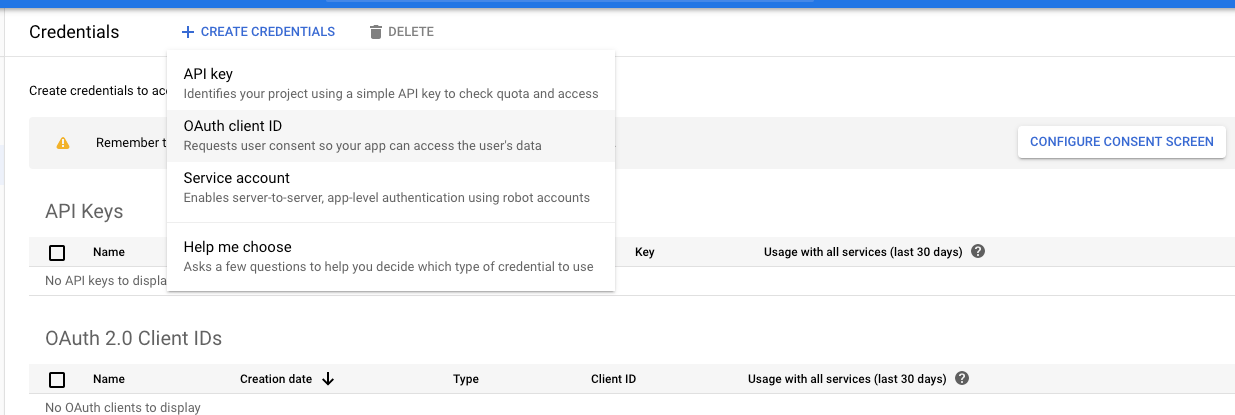
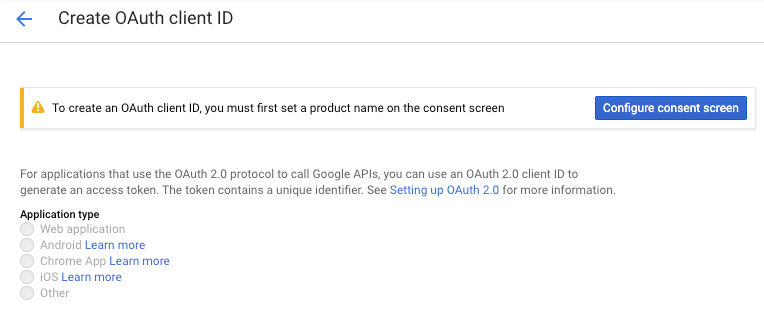
Thanks for your video, but I can't Create OAuth client ID
To create an OAuth client ID, you must first set a product name on the consent screen
 thearabbit
on 20 Dec 2019
thearabbit
on 20 Dec 2019
@thearabbit Once you add a title, you can't remove it, so I wasn't able to show it in the video. Just follow the link and do what it says - set a title. Then continue with the instructions per the video, it will work out.
colemickens
on 20 Dec 2019
Where the Title?
thearabbit
on 20 Dec 2019
The big blue thing that says "Configure consent screen" is a button.
colemickens
on 20 Dec 2019
OK, I configured consent screen, and then created auth client.
Now I am trying gdrive config....
👍
thearabbit
on 20 Dec 2019
@Akash98Sky I've updated my credentials and yet still requested to to enter a verification code, for which webpage is Unverified App
Yes it'll ask. But now the link will able to generate a code for your gdrive credentials. Go ahead with the link and you'll get the code for your app.
The thing that was wrong here is that this app credentials is old and google doesn't allow generation of verification code with this app, so we are using our own app credentials.
Akash98Sky
on 20 Dec 2019
I found an easy solution for this and it's completely safe & easy to use as you will use your client ID and client secret.
- Set up OAuth:
- Visit the Google Cloud Console
- Go to the OAuth Consent tab, fill it, and save.
- Go to the Credentials tab and click Create Credentials -> OAuth Client ID
- Choose Other and Create.
- Use the download button to download your credentials.
- Now you have both client ID and client secret in this credential file in the following form:
{"installed":{"client_id": <your client id>,"project_id":"i-m-sky-bot","auth_uri":"https://accounts.google.com/o/oauth2/auth","token_uri":"https://oauth2.googleapis.com/token","auth_provider_x509_cert_url":"https://www.googleapis.com/oauth2/v1/certs","client_secret": <your client secret>,"redirect_uris":["urn:ietf:wg:oauth:2.0:oob","http://localhost"]}}
- Enable the Drive API:
- Visit the Google API Library page.
- Search for Drive.
- Make sure that it's enabled. Enable it if not.
- Now you just need to edit the binary and insert your credentials instead of the one hard coded : -
$ sed -i "s|367116221053-7n0vf5akeru7on6o2fjinrecpdoe99eg.apps.googleusercontent.com|<your client id>|g" path/to/the/executable/gdrive

$ sed -i "s|1qsNodXNaWq1mQuBjUjmvhoO|<your client secret>|g" path/to/the/executable/gdrive
And you are done, run $ gdrive list and your secret key to your own app... :)
I followed these instructions, but now I get zsh: exec format error: ./gdriv after the sid commands.
 caseyjkey
on 20 Dec 2019
caseyjkey
on 20 Dec 2019
@caseykey reinstall, don't use sed, use a hex editor instead
 elig0n
on 20 Dec 2019
elig0n
on 20 Dec 2019
@Akash98Sky I've updated my credentials and yet still requested to to enter a verification code, for which webpage is Unverified App
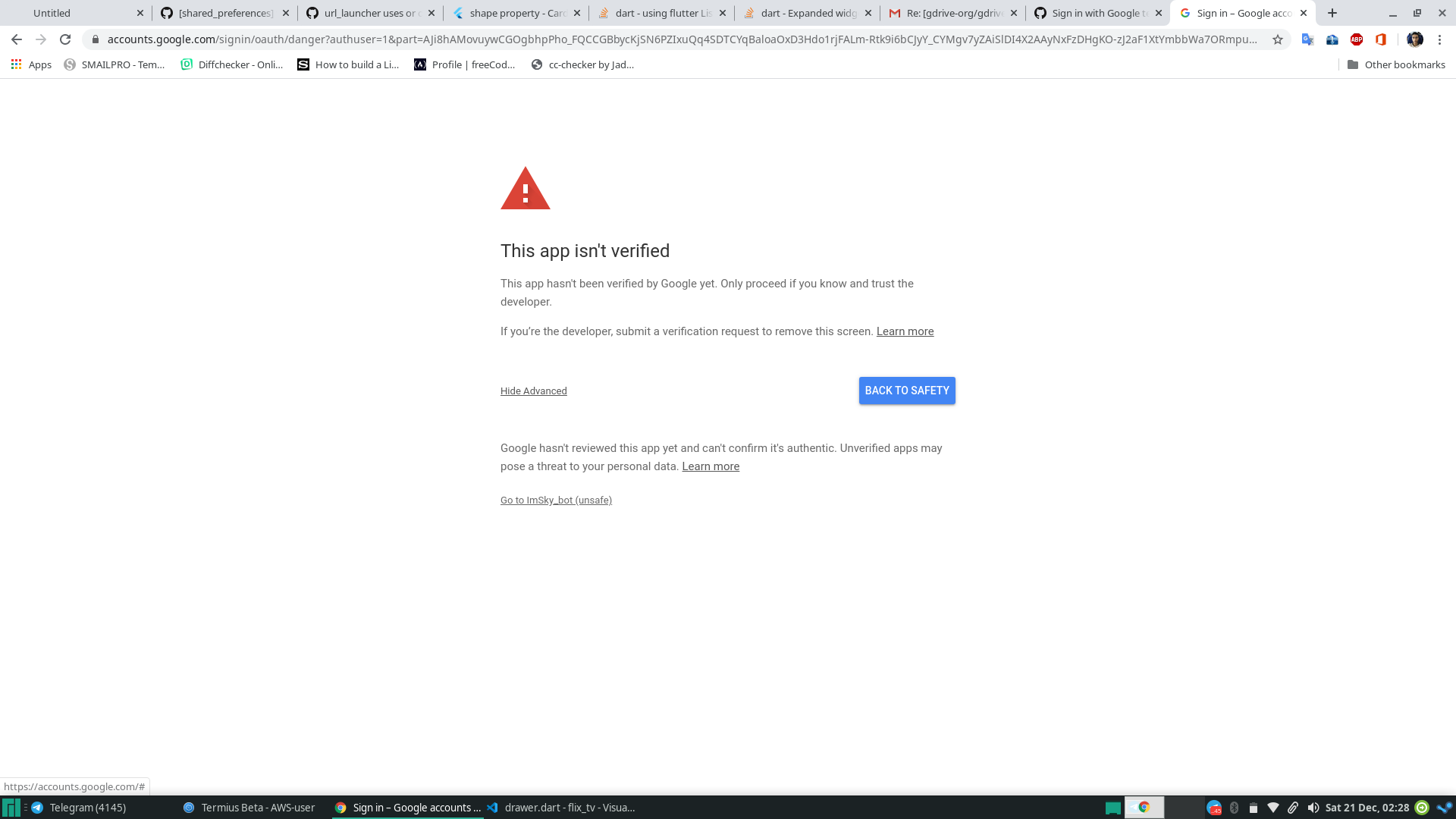
It may show unverified, but just click on advanced and click goto <your app name>(unsafe)
Akash98Sky
on 20 Dec 2019
After verification via the above methods I get
gdrive list
Failed to list files: googleapi: got HTTP response code 400 with body:
elig0n
on 20 Dec 2019
I followed these instructions, but now I get zsh: exec format error: ./gdriv after the
sidcommands.
have you replaced <your client id> with your client id and <your client secret> with client secret?
and '<' '>' should also be removed.
then it should be fine
Akash98Sky
on 20 Dec 2019
After verification via the above methods I get
gdrive list
Failed to list files: googleapi: got HTTP response code 400 with body:
enabled GDRIVE API? as mentioned in step 2
Akash98Sky
on 20 Dec 2019
I followed these instructions, but now I get zsh: exec format error: ./gdriv after the
sidcommands.have you replaced with your client id and with client secret?
and '<' '>' should also be removed.then it should be fine
Yes, I entered my client_id, which is a string beginning with numbers and ends with .com, and I didn't use any quotes.
I did the same for the "client_secret". So my commands looked something like...
`$ sed -i "s|367116221053-7n0vf5akeru7on6o2fjinrecpdoe99eg.apps.googleusercontent.com|7numsletters-morenumsandletters.apps.googleusercontent.com|g" gdrive
$ sed -i "s|1qsNodXNaWq1mQuBjUjmvhoO|NUMSLETTERS_NuMsLETTERS-R|g" gdrive`
I also tried using a hex editor, which also resulted in the same error.
caseyjkey
on 20 Dec 2019
I followed these instructions, but now I get zsh: exec format error: ./gdriv after the
sidcommands.have you replaced with your client id and with client secret?
and '<' '>' should also be removed.
then it should be fineYes, I entered my client_id, which is a string beginning with numbers and ends with .com, and I didn't use any quotes.
I did the same for the "client_secret". So my commands looked something like...
`$ sed -i "s|367116221053-7n0vf5akeru7on6o2fjinrecpdoe99eg.apps.googleusercontent.com|7numsletters-morenumsandletters.apps.googleusercontent.com|g" gdrive$ sed -i "s|1qsNodXNaWq1mQuBjUjmvhoO|NUMSLETTERS_NuMsLETTERS-R|g" gdrive`
I also tried using a hex editor, which also resulted in the same error.
Ohh, due to some reason(may be google changed their encoding technique) your credentials length is different from the hard coded ones. So editing binary won't work as the length needs to be the same in this case.
@elig0n your client id and secret length is same as the hard coded ones?
client ID-> 72 characters
client secret -> 24 characters
Akash98Sky
on 20 Dec 2019
My client ID is 71 characters and the client secret is 24 characters.
caseyjkey
on 20 Dec 2019
@Akash98Sky to your questions: yes and yes.
elig0n
on 20 Dec 2019
@elig0n:
After verification via the above methods I get
gdrive list
Failed to list files: googleapi: got HTTP response code 400 with body:
Hi. I had this message too and discovered it was due to me running the 64bit version of gdrive.exe using a token created with the 32bits exe (win7 OS). I tried again the command with the 32bit exe and it worked fine even though I was now on a 64 bit installation of Windows. Hope this helps.
 cfrantzol
on 21 Dec 2019
cfrantzol
on 21 Dec 2019
This almost fixed yet? I couldnt get the above oauth workaround to work either.. :(
-db
 dirtbag
on 21 Dec 2019
dirtbag
on 21 Dec 2019
@elig0n:
After verification via the above methods I get
gdrive list
Failed to list files: googleapi: got HTTP response code 400 with body:Hi. I had this message too and discovered it was due to me running the 64bit version of gdrive.exe using a token created with the 32bits exe (win7 OS). I tried again the command with the 32bit exe and it worked fine even though I was now on a 64 bit installation of Windows. Hope this helps.
I do run the 64bit version of gdrive.exe but it's a fresh install off chocolatey.
It does not happen with gdrive on WSL
elig0n
on 25 Dec 2019
the sed method should work if your ClientID is the same lenth (72). But mine was actually 73 characters, so no go. Secret seems to always be 24 bytes.
For me it worked to build from source.
The file to enter clientID and secret is "handlers_drive.go"
When I ran gdrive for auth, google page gave a warning but I was able to skip the warning when I checked that I trust the source. I then got the code.
 Qubits01
on 26 Dec 2019
Qubits01
on 26 Dec 2019
367116221053-7n0vf5akeru7on6o2fjinrecpdoe99eg.apps.googleusercontent.com
Thanks!
 DeiverJC
on 26 Dec 2019
DeiverJC
on 26 Dec 2019
Mine is also 73 characters long, so when i tried to edit the binary with the sed method, I got an "Segmentation Fault"
 major-mayer
on 27 Dec 2019
major-mayer
on 27 Dec 2019
Hello All,
In fact, there are two options you can use instead of patching the file:
-i [ --id ] arg Authentication ID
-e [ --secret ] arg Authentication secret
Unfortunately, I've got:
Please input the authentication code here:
4/v...
Failed to refresh auth token: HTTP 401, body: {
"error": "unauthorized_client",
"error_description": "Unauthorized"
}
May be, it's due to the fact that I used "grive1" google OAuth application name instead of simply "grive": it's because I were not able to save it: when I set the application ID to "grive", GOOGLE will report an error upon pressing the Save button:
We detected a problem with the Product name shown to users field. Make sure it describes your specific product and avoid using a name that suggests that your product comes from Google or another company. Learn more
P.S. It seems it is offtopic since it relates to grive2. The problem is solved after deleting the .grive file.
 dendroid66
on 5 Jan 2020
dendroid66
on 5 Jan 2020
Does anyone have a solution to the problem with editing the binary? I'm getting a segmentation fault too.
 pipparichter
on 5 Jan 2020
pipparichter
on 5 Jan 2020
$ sed -i "s|367116221053-7n0vf5akeru7on6o2fjinrecpdoe99eg.apps.googleusercontent.com|
$ sed -i "s|1qsNodXNaWq1mQuBjUjmvhoO|
Is this only for linux? How could I do for windows user if it's try ?
hetscue
on 6 Jan 2020
@hetscue
Try my script to build gdrive with your own Google credential on Windows:
https://github.com/mbrother2/backuptogoogle#how-to-use
mbrother2
on 6 Jan 2020
$ sed -i "s|367116221053-7n0vf5akeru7on6o2fjinrecpdoe99eg.apps.googleusercontent.com||g" path/to/the/executable/gdrive
$ sed -i "s|1qsNodXNaWq1mQuBjUjmvhoO||g" path/to/the/executable/gdrive
Is this only for linux? How could I do for windows user if it's try ?
Use any hex editor software to edit the executable file.
And search for those strings and replace them with your ones.
Akash98Sky
on 6 Jan 2020
I followed these instructions, but now I get zsh: exec format error: ./gdriv after the
sidcommands.have you replaced with your client id and with client secret?
and '<' '>' should also be removed.
then it should be fineYes, I entered my client_id, which is a string beginning with numbers and ends with .com, and I didn't use any quotes.
I did the same for the "client_secret". So my commands looked something like...
`$ sed -i "s|367116221053-7n0vf5akeru7on6o2fjinrecpdoe99eg.apps.googleusercontent.com|7numsletters-morenumsandletters.apps.googleusercontent.com|g" gdrive$ sed -i "s|1qsNodXNaWq1mQuBjUjmvhoO|NUMSLETTERS_NuMsLETTERS-R|g" gdrive`
I also tried using a hex editor, which also resulted in the same error.
I dont understand your syntax...
what is the command going to be like?
sed -i "s|what-goes-here|what-goes-here|g" gdrive-executable
is the first |what-goes-here| what already exists in the file, and the second |what-goes-here| the new entry?
 eskrei01
on 15 Jan 2020
eskrei01
on 15 Jan 2020
Guys it 's very simple.
If your ClientID is longer than 72 characters, sed and hexedit will NOT work.
There's NO workaround for this. You basically overwrite program code this way.
ClientID less than 72 might work, you have to insert filler nop bytes (not tested).
Only if your ID is exactly 72 chars long it will reliably work.
Only possiblity if ID>72 is to compile from source, it's not that difficult acutally.
Qubits01
on 15 Jan 2020
Guys it 's very simple.
If your ClientID is longer than 72 characters, sed and hexedit will NOT work.
There's NO workaround for this. You basically overwrite program code this way.
ClientID less than 72 might work, you have to insert filler nop bytes (not tested).
Only if your ID is exactly 72 chars long it will reliably work.Only possiblity if ID>72 is to compile from source, it's not that difficult acutally.
So what you are saying is that i can just add filler bytes to the client id?
Mine is 71 char long, if i add a number to the beginning it should work? to me that sounds strange as the client ID from google no longer matches... Perhaps it is possible to edit the ID directly in the developer console?
eskrei01
on 16 Jan 2020
Hello Everyone,
I've written a way to fix the issue. Please check this article: Mount Google Drive using GDrive on Linux Server with Own OAuth Credentials.
I hope this method will work on all servers.
Thanks.
 mdobydullah
on 22 Jan 2020
mdobydullah
on 22 Jan 2020
Hi @mdobydullah, the first very thanks for your guaid 🥇
- I got error with
go build(mac)
handlers_drive.go:12:2: cannot find package "github.com/prasmussen/gdrive/auth" in any of:
    /usr/local/Cellar/go/1.13.6/libexec/src/github.com/prasmussen/gdrive/auth (from $GOROOT)
    /Users/theara/go/src/github.com/prasmussen/gdrive/auth (from $GOPATH)
gdrive.go:7:2: cannot find package "github.com/prasmussen/gdrive/cli" in any of:
    /usr/local/Cellar/go/1.13.6/libexec/src/github.com/prasmussen/gdrive/cli (from $GOROOT)
    /Users/theara/go/src/github.com/prasmussen/gdrive/cli (from $GOPATH)
compare.go:5:2: cannot find package "github.com/prasmussen/gdrive/drive" in any of:
    /usr/local/Cellar/go/1.13.6/libexec/src/github.com/prasmussen/gdrive/drive (from $GOROOT)
    /Users/theara/go/src/github.com/prasmussen/gdrive/drive (from $GOPATH)
- My
handlers_drive.go
package main

import (
    "fmt"
    "io"
    "io/ioutil"
    "net/http"
    "os"
    "path/filepath"
    "time"

    "github.com/prasmussen/gdrive/auth"
    "github.com/prasmussen/gdrive/cli"
    "github.com/prasmussen/gdrive/drive"
)

const ClientId = "739992122513-**************apps.googleusercontent.com"
const ClientSecret = "7i9ncRrM**************dm"
const TokenFilename = "token_v2.json"
const DefaultCacheFileName = "file_cache.json"
.......
- I install
goviabrew install go
$ go version
// go version go1.13.6 darwin/amd64
I tried to fixe cannot find package "github.com/prasmussen/gdrive/auth" with:
go get github.com/prasmussen/gdrive
- I could build (Work fine)
go build
``
- Upload `gdrive` to server `/usr/local/bin` (DigitalOcean-Ubuntu)
- Set file permission `sudo chmod 755 /filepath/gdrive` or `sudo chmod +x /filepath/gdrive`

But get error with testing `gdrive about/list`
```js
-bash: /usr/local/bin/gdrive: cannot execute binary file: Exec format error
Please help me
thearabbit
on 23 Jan 2020
NOW I work fine with
export GOOS=linux
----
go build
👍
thearabbit
on 23 Jan 2020
Hi @thearabbit
Congrats and thanks for the macOS solution. I've updated my article and added macOS solution. You can check the article again: Mount Google Drive using GDrive on Linux Server with Own OAuth Credentials
mdobydullah
on 23 Jan 2020
@mdobydullah, could you note for fixe this cannot find package "github.com/prasmussen/gdrive/auth"
go get github.com/prasmussen/gdrive
Hi @thearabbit, Done bro...!
mdobydullah
on 23 Jan 2020
Excuse me @mdobydullah, Could you help for my issue https://github.com/gdrive-org/gdrive/issues/522
thearabbit
on 23 Jan 2020
Hi @mdobydullah, I have problem on Google API Service (Expire 30days)

I have problem with gdrive usage???
thearabbit
on 24 Jan 2020
Hello @thearabbit,
I've answered on the issue #522.
Google API Service: I think you won't face any issue with GDrive. But it's better to verify your application.
mdobydullah
on 24 Jan 2020
初心者の方のために、この問題を解決するための動画を作りました。
もしよかったら、参考にしてみてください。
For beginners, I made a video explaining how to solve this problem.
It is explained in Japanese, but I hope you find it helpful.
https://youtu.be/y6PeIwCbtiQ
 shiyotsuki
on 2 Feb 2020
shiyotsuki
on 2 Feb 2020
For Mac(UNIX) user,
LC_ALL=C sed -i "" "s/367116221053-7n0vf5akeru7on6o2fjinrecpdoe99eg.apps.googleusercontent.com/(Your client ID)" gdrive
 Shintaro-run
on 10 Feb 2020
Shintaro-run
on 10 Feb 2020
I was able to get it working this way:
- Go to Google Developer
- enable Google Drive APIs if you haven't already
- Generate a new oauth client id/secret for a "native" app (other) and copy them
- cd to your src dir, git clone https://github.com/gdrive-org/gdrive
- open the file handlers_drive.go and replace the client id and secret key with your own
- go get
- go build
- mv gdrive /usr/local/bin
- gdrive about
- copy and paste url into browser and grant permission
should work after that if you generated your access id and secret key correctly
My best,
Hugh
Thanks. it works like charm! BTW, what does go get do at stage 6? I did that but it says go get: no install location for directory /Users/gwanghyeongim/Documents/py/pyRecipe/05_gdrive/gdrive outside GOPATH
 harryghgim
on 23 Feb 2020
harryghgim
on 23 Feb 2020
No need to compile from source, just create service account in google console and use --service-account option
 yarkm13
on 7 Mar 2020
yarkm13
on 7 Mar 2020
Authentication still not posible. Service account doesn't have enough storage.
 JurajMa
on 24 Mar 2020
JurajMa
on 24 Mar 2020
@JurajMa create directory in your main account and share it with service account email address. Now you need to point your service account to work with that directory.
yarkm13
on 24 Mar 2020
For those who still struggle with using gdrive, you may want to use rclone instead.
https://rclone.org/docs/
Shintaro-run
on 25 Mar 2020
Hi Guys
Can someone help me about Gdrive issue.
I'm getting following issue
Response: {
"error": "invalid_grant",
"error_description": "Token has been expired or revoked."
Thanks
qasimmughal0
on 20 Apr 2020
This solution worked fine for my needs:
I followed @mbrother2's very excellent guide https://github.com/mbrother2/backuptogoogle/wiki/Create-own-Google-credential-step-by-step On slight difference, between step 7 and step 8, Google has added a new screen. A GCP account is needed but a GSuite account isn't strictly necessary, still works when the "External" radio button is selected.
I used my personal OAuth tokens and replaced the original developer's in the binary:
sed -i "s|367116221053-7n0vf5akeru7on6o2fjinrecpdoe99eg.apps.googleusercontent.com|INSERT_DOMAIN_HERE|g" path/to/the/executable/gdrive
sed -i "s|1qsNodXNaWq1mQuBjUjmvhoO|INSERT_TOKEN_HERE|g" path/to/the/executable/gdrive
 joshenders
on 6 May 2020
joshenders
on 6 May 2020
This solution worked fine for my needs:
I followed @mbrother2's very excellent guide https://github.com/mbrother2/backuptogoogle/wiki/Create-own-Google-credential-step-by-step On slight difference, between step 7 and step 8, Google has added a new screen. A GCP account is needed but a GSuite account isn't strictly necessary, still works when the "External" radio button is selected.
I used my personal OAuth tokens and replaced the original developer's in the binary:
sed -i "s|367116221053-7n0vf5akeru7on6o2fjinrecpdoe99eg.apps.googleusercontent.com|INSERT_DOMAIN_HERE|g" path/to/the/executable/gdrive
sed -i "s|1qsNodXNaWq1mQuBjUjmvhoO|INSERT_TOKEN_HERE|g" path/to/the/executable/gdrive
Works! Thank you!
 DOUARA
on 13 May 2020
DOUARA
on 13 May 2020
This solution worked fine for my needs:
I followed @mbrother2's very excellent guide https://github.com/mbrother2/backuptogoogle/wiki/Create-own-Google-credential-step-by-step On slight difference, between step 7 and step 8, Google has added a new screen. A GCP account is needed but a GSuite account isn't strictly necessary, still works when the "External" radio button is selected.
I used my personal OAuth tokens and replaced the original developer's in the binary:
sed -i "s|367116221053-7n0vf5akeru7on6o2fjinrecpdoe99eg.apps.googleusercontent.com|INSERT_DOMAIN_HERE|g" path/to/the/executable/gdrive
sed -i "s|1qsNodXNaWq1mQuBjUjmvhoO|INSERT_TOKEN_HERE|g" path/to/the/executable/gdrive
lol Thanks!!!
 onlinebr
on 15 May 2020
onlinebr
on 15 May 2020
Going to https://developers.google.com/oauthplayground allows you to get an access token or refresh token. Under the Drive API v3 section, select one of the following APIs:
https://www.googleapis.com/auth/drive.readonly
https://www.googleapis.com/auth/drive
Then click Authorize APIs, and Exchange authorization code for token. This will give you a token suitable for use with --access-token. For some reason the refresh token doesn't seem to work with --refresh-token.
 blaisegassend
on 14 Jul 2020
blaisegassend
on 14 Jul 2020
Going to https://developers.google.com/oauthplayground allows you to get an access token or refresh token. Under the Drive API v3 section, select one of the following APIs:
https://www.googleapis.com/auth/drive.readonly
https://www.googleapis.com/auth/drive
Then click Authorize APIs, and Exchange authorization code for token. This will give you a token suitable for use with --access-token. For some reason the refresh token doesn't seem to work with --refresh-token.
I can confirm this works!
 truekonrads
on 21 Jul 2020
truekonrads
on 21 Jul 2020
Thanks to @blaisegassend
I just tried that method and was able to save the output in a new token_v2.json file in ~/.gdrive
gdrive list then worked right away.
 Amooti73
on 9 Aug 2020
Amooti73
on 9 Aug 2020
Apologies for my post since it only works for an hour. I had to repeat the process today to get access.
Amooti73
on 10 Aug 2020
I can confirm that the solution of @truekonrads works
 Hadrien-Cornier
on 27 Oct 2020
Hadrien-Cornier
on 27 Oct 2020
Apologies for my post since it only works for an hour. I had to repeat the process today to get access.
Is there a way around the expiration issue? I created my personal OAuth tokens and replaced the original developer's in the binary. The gdrive works fine for an hour but the token expires after that.
 imotabar
on 25 Nov 2020
imotabar
on 25 Nov 2020
Related issues
 loctong
·
4Comments
loctong
·
4Comments
 cod3r-dev
·
7Comments
cod3r-dev
·
7Comments
 ChrisMann89
·
5Comments
ChrisMann89
·
5Comments
 GaryFurash
·
3Comments
GaryFurash
·
3Comments
 JuliArianes
·
6Comments
JuliArianes
·
6Comments
Most helpful comment
I was able to get it working this way:
1) Go to Google Developer
2) enable Google Drive APIs if you haven't already
3) Generate a new oauth client id/secret for a "native" app (other) and copy them
4) cd to your src dir, git clone https://github.com/gdrive-org/gdrive
5) open the file handlers_drive.go and replace the client id and secret key with your own
6) go get
7) go build
8) mv gdrive /usr/local/bin
9) gdrive about
10) copy and paste url into browser and grant permission
should work after that if you generated your access id and secret key correctly
My best,
Hugh