Gdrive: TUTORIAL: How to get rid of 403 Errors
How to get rid of 403 errors
Many people get Errors like
Failed to get file: googleapi: Error 403: Rate Limit Exceeded, rateLimitExceeded
and thanks to LINKIWI https://github.com/prasmussen/gdrive/issues/392#issuecomment-423048518 I found a way to fix it properly.
What causes the problem?
The developer made one API for this program and an Google API can "only" make 10 million requests at a day. That means that too many people use this program and the requests gets full.
How much does an own API cost?
Nothing, Google made them free for everyone.
How do I fix it then?
You have to make an own API, download the programing language go, change the API to your own one and compile it to an .exe.
(And btw. binary editing resulted in errors)
And now step by step:
Download "go" for your platform from https://golang.org/dl/ and install it following the instructions for your platform here and download Git from https://git-scm.com/downloads and install it with standard settings
Download the repository as .zip from GitHub and unzip it in a new folder or simply execute
git clone https://github.com/gdrive-org/gdrive.git

Log into your Google Account (or create one) and go to the Google Developer API Website (and if needed accept the ToS)
Click on "Create Project"
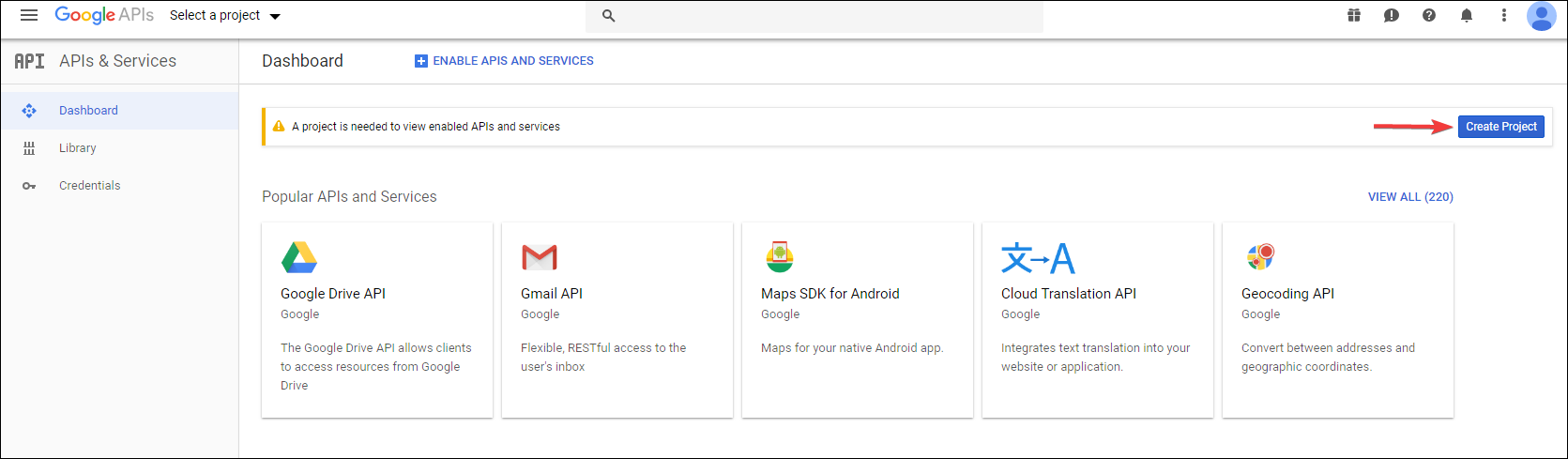
and then click "CREATE"

Give it a name (in my case "Google CLI TA40") and click "Create"

Now go to Google Drive API and click "ENABLE"

Now on the left side, click "Credentials"
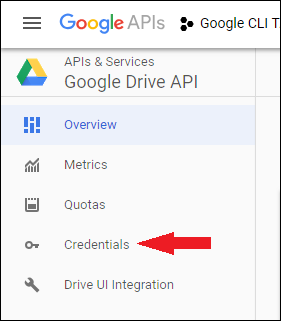
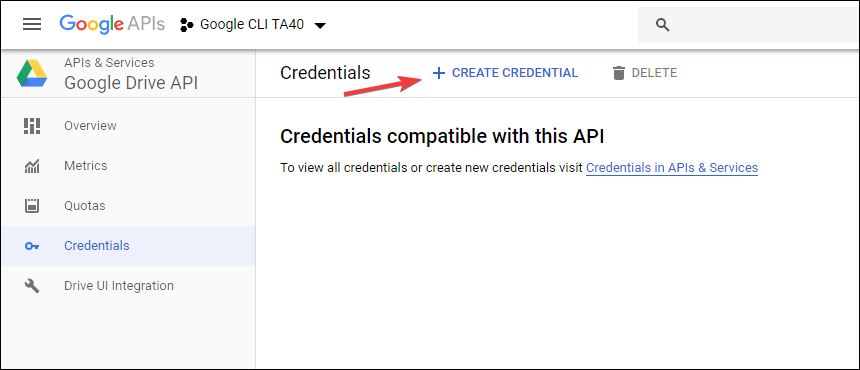
And click "CREATE CREDENTIAL"
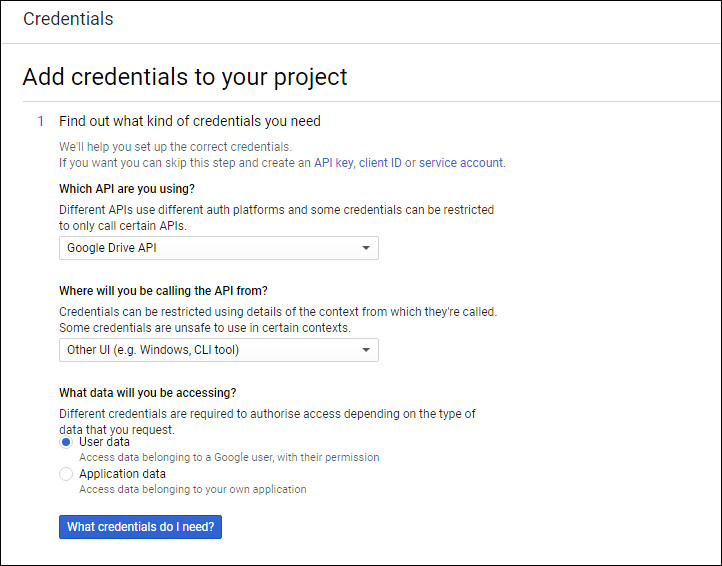
Fill the things like I did and then click on "What credentials do I need?"
Give it a name (I took the name of the API)
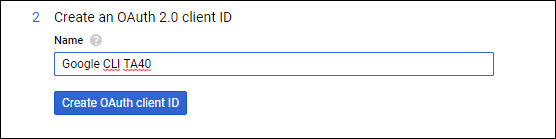
Next select your e-mail and then give it a name (I again took the name of the API)

Click on "Download" (A .json file will be downloaded)

Open the .json file in the editor of your choice.(Notepad++ prefered)
You should see :- "client_id" which looks like this:
81915486XXXX-XXXX22bh62ql2rbnaqtpds82od4ql976.apps.googleusercontent.com "client_secret" which are random characters like this:
lnA7ZFg5NEGOMpFhd6e4PqnyIn the unzipped repository open the file names "handlers_drive.go" (via Notepad++) and change these 2 variables to the ones you got in step 14

and save itopen CMD/terminal and go to the folder where the "handerls_drive.go" is.
First type this:go get github.com/prasmussen/gdrive(thanks to mbenlioglu https://github.com/prasmussen/gdrive/issues/426#issuecomment-459046466)
Now type this:go build -ldflags '-w -s'
Now you should have an executable for you platform which you can use normally
You can reset your data by deleting the %appdata%\.gdrive on Windows, $HOME/.gdrive on other platforms
Cross Compiling a Linux/OS X/Windows etc. version of gdrive from your device:
If you want to compile the binary for an OS other than the one you're using you should first set GOOS and GOARCH variables for that system.
Look up your target OS here: https://golang.org/doc/install/source#environment
Now do this in terminal:
On Windows:
SET GOOS=your os
SET GOARCH=your arch
On Mac OS/Linux:
export GOOS=your os
export GOARCH=your arch
then do go build -ldflags '-w -s'
Example variables if target platform is a 64 bit Linux machine:
GOOS=linux
GOARCH=amd64
Edit: Updated to cover all platforms
 TA40
TA40
All 59 comments
Thanks for the tutorial. Closes #424 and #392. Should be included to the repo imo
Also I think Client ID/Secret should be read from client_id.json directly instead of hard-coding and simply replacing that file would solve it. I might create a pull request but not sure if the repo is still maintained.
 mbenlioglu
on 30 Jan 2019
mbenlioglu
on 30 Jan 2019
Last update was a year ago, so yeah, I don't think so. But this step-by-step tutorial should be fine, if anything's missing, let me know
TA40
on 30 Jan 2019
TA40 isn't it possible to compile a linux amd64 version of this even if your doing it from golang installed on windows. Try to follow your steps and everything good so far, just need figure out the how to compile it and compile it for ubuntu 64bit, so amd64. Trying to do this from windows right now. If know if this possible and how maybe let me know and add to the guide?
 scrumbee
on 30 Jan 2019
scrumbee
on 30 Jan 2019
I don't know how to compile it for linux etc.
I can test it if you give me some type of commands but I don't know how to CrossCompile on a Windows machine
TA40
on 30 Jan 2019
yea been trying too google it myself but yea might be better install unbutu in vmware and go from there. Like never done much compiling etc so dont realy know what im doing. Tryd follow ur steps for windows compile but yes giving me errors like this atm:
C:Userszibiagogdrive-master>go build
handlers_drive.go:12:2: cannot find package "github.com/prasmussen/gdrive/auth" in any of:
C:Gosrcgithub.comprasmussengdriveauth (from $GOROOT)
C:Userszibiagosrcgithub.comprasmussengdriveauth (from $GOPATH)
gdrive.go:7:2: cannot find package "github.com/prasmussen/gdrive/cli" in any of:
C:Gosrcgithub.comprasmussengdrivecli (from $GOROOT)
C:Userszibiagosrcgithub.comprasmussengdrivecli (from $GOPATH)
compare.go:5:2: cannot find package "github.com/prasmussen/gdrive/drive" in any of:
C:Gosrcgithub.comprasmussengdrivedrive (from $GOROOT)
C:Userszibiagosrcgithub.comprasmussengdrivedrive (from $GOPATH)
scrumbee
on 30 Jan 2019
After you've changed the token, running _release/build-all.sh on Linux (or bash on Windows) should build all versions defined in "PLATFORMS" variable.
2 prerequisites:
1. install go first.
2. execute $ go get github.com/prasmussen/gdrive
mbenlioglu
on 30 Jan 2019
yea been trying too google it myself but yea might be better install unbutu in vmware and go from there. Like never done much compiling etc so dont realy know what im doing. Tryd follow ur steps for windows compile but yes giving me errors like this atm:
C:Userszibiagogdrive-master>go build
handlers_drive.go:12:2: cannot find package "github.com/prasmussen/gdrive/auth" in any of:
C:Gosrcgithub.comprasmussengdriveauth (from $GOROOT)
C:Userszibiagosrcgithub.comprasmussengdriveauth (from $GOPATH)
gdrive.go:7:2: cannot find package "github.com/prasmussen/gdrive/cli" in any of:
C:Gosrcgithub.comprasmussengdrivecli (from $GOROOT)
C:Userszibiagosrcgithub.comprasmussengdrivecli (from $GOPATH)
compare.go:5:2: cannot find package "github.com/prasmussen/gdrive/drive" in any of:
C:Gosrcgithub.comprasmussengdrivedrive (from $GOROOT)
C:Userszibiagosrcgithub.comprasmussengdrivedrive (from $GOPATH)
execute go get github.com/prasmussen/gdrive first you should be able to build then
mbenlioglu
on 30 Jan 2019
Okay, I found it out.
On Windows you can do SET GOOS=linux and GOARCH=amd64 and then do go build
This will create a linux executable file
You can look for your OS here: https://golang.org/doc/install/source#environment
execute
go get github.com/prasmussen/gdrivefirst you should be able to build then
will add this one to the guide, thanks
TA40
on 30 Jan 2019
Will give this a try and get back to you asap.
scrumbee
on 30 Jan 2019
Okay so based on all this info i manged to compile a working version for my Ubuntu server. Have tested it and confirmed its using the new API info i put inn and no more 404 errors. Thanks for putting this together TA40. But yea if someone knows how code this maybe next thing would be to move the google api Credentials to a config file rather than having them hard coded like this. Would be ideal for regular users so they don't have to compile it themselves.
scrumbee
on 30 Jan 2019
Nice, good to know that it's working. Anything to add to the tutorial where you had problems or so?
And well, thanks to LINKIWI for finding this out https://github.com/prasmussen/gdrive/issues/392#issuecomment-423048518
TA40
on 30 Jan 2019
Well nothing big but i installed golang first then git, newly reinstalled windows so didn't have it and you will need to restart your computer for GIT to work in golang so maybe add that. But yea besides that everything was straight forward and painless.
scrumbee
on 30 Jan 2019
I think for that you just had to restart your command line ^^
TA40
on 30 Jan 2019
Yea might forgotten to do that after i installed git, know i did it after i installed golang. But yea so lovely to set it upload without any errors. You intrested in maybe working on this some more, like im no code expert but removed the hard coded api bits and get that put into a config file instead.
scrumbee
on 30 Jan 2019
I myself have no idea how to do this because I don't know how golang works^^
TA40
on 30 Jan 2019
Yea read a little up on it, but yea im in the same boat so would just be trail and error. So yea when have some time to spend i might test some see if can figure something out. Well at least this post is here and hopeful those who need it will find it. And yea by all means if anyone don't know how to get this done id be more than willing to help out and compile for someone.
scrumbee
on 30 Jan 2019
For the lazy people who don't want to recompile (myself included) - How to change the API credentials in gdrive binary without recompile on Linux
NOTE - This ONLY works if the client_id and client_secret are both the same length as the ones defined originally in the gdrive binary. If they are not these lengths, this method will not work and you will have to recompile from source.
STEP 1
Generate API credentials for Google Drive (see TA40's OP here - follow steps 3-14)
STEP 2
Get the client_id and client_secret from your client_id.json file. The client_id MUST be 72 chars long and the client_secret MUST be 24 chars long. If they are not these lengths, following this method will probably break gdrive, and you will have to recompile gdrive from source instead.
Use your favourite method - I used wc to get the length
echo -n **CLIENT_ID** | wc -c
echo -n **CLIENT_SECRET** | wc -c
STEP 3
Backup your gdrive binary
cp gdrive gdrive.old
STEP 4
Edit binary in-place with sed (Replace **CLIENT_ID** and **CLIENT_SECRET** with your newly generated details from client_id.json).
sed -i -e 's/367116221053-7n0vf5akeru7on6o2fjinrecpdoe99eg.apps.googleusercontent.com/**CLIENT_ID**/g' gdrive
sed -i -e 's/1qsNodXNaWq1mQuBjUjmvhoO/**CLIENT_SECRET**/g' gdrive
STEP 4a
Delete the old .gdrive/token_v2.json (Thanks leekung)
cd ~ && rm .gdrive/token_v2.json
STEP 5
Run gdrive list to confirm that it has worked. It will ask you to go through the OAuth login process again to generate a new token, but after you should have a list of files in your Google Drive.
END HOWTO
Also I think Client ID/Secret should be read from client_id.json directly instead of hard-coding and simply replacing that file would solve it. I might create a pull request but not sure if the repo is still maintained.
This would be the best way forward. There is a note in the README about the state of maintenance though:
This tool is not being actively maintained at the moment, ymmv.
Edit 2019-03-25: There are reports that these steps do not work on FreeBSD (see this comment). I only tested this on Linux. If its not working for you - follow other peoples instructions and rebuild from source.
 rohfle
on 31 Jan 2019
rohfle
on 31 Jan 2019
Well if you know how to code and fix it i would be interested in this, if even just make a pull request with changes il be more then happy to compile it for all different OS. Assuming he actual cheeks this he could just put in the new stuff. Maybe have the default config use the hard coded Client ID/Secret as default so it will still work but users can then easily change it as they wish since it would be in a config file.
scrumbee
on 31 Jan 2019
@mbenlioglu @scrumbee I have submitted a pull request with working external client credential support - https://github.com/prasmussen/gdrive/pull/428
Enjoy
rohfle
on 31 Jan 2019
@mbenlioglu @scrumbee I have submitted a pull request with working external client credential support - #428
Enjoy
Thanks for the effort @rohfle. Just checked it out looks nice
mbenlioglu
on 31 Jan 2019
Looks very good thanks, just suggestion not sure if its needed or not but add to read me a example of a client_id.json config file. Just to make it clear for everyone how it should look as im sure there gone be some that has questions regarding it.
scrumbee
on 1 Feb 2019
someone can fork this repo, like i did and start maintaining it, i am willing but i am new to this
github.com/tripLr
 tripLr
on 9 Feb 2019
tripLr
on 9 Feb 2019
I only create the CREDENTIAL(not yet build) ,everything already works fine,403 not show up again
 cnrting
on 13 Feb 2019
cnrting
on 13 Feb 2019
Hi!
First, It's very useful howto, thanks for your work. I go trough the steps, and everything looks fine no error message or warning. After I tested and got this message:
./gdrive-linux-x64 list
Failed to list files: Get https://www.googleapis.com/drive/v3/files?alt=json&fields=nextPageToken%2Cfiles%28id%2Cname%2Cmd5Checksum%2CmimeType%2Csize%2CcreatedTime%2Cparents%29&orderBy=&pageSize=30&q=trashed+%3D+false+and+%27me%27+in+owners: oauth2: cannot fetch token: 401 Unauthorized
Response: {
"error": "unauthorized_client",
"error_description": "Unauthorized"
}
i build in windows 10 (in virtualbox) linux x64. What is wrong? Can somebody help?
 Th0masT
on 24 Feb 2019
Th0masT
on 24 Feb 2019
For the lazy people who don't want to recompile (myself included) - How to change the API credentials in gdrive binary without recompile on Linux
You mighty king. This worked perfectly, and I'm back to my uploads after they failed for a week.
 vashti
on 27 Feb 2019
vashti
on 27 Feb 2019
Okay so based on all this info i manged to compile a working version for my Ubuntu server. Have tested it and confirmed its using the new API info i put inn and no more 404 errors. Thanks for putting this together TA40. But yea if someone knows how code this maybe next thing would be to move the google api Credentials to a config file rather than having them hard coded like this. Would be ideal for regular users so they don't have to compile it themselves.
I have a fork, I am maintaining,
tripLr
on 1 Mar 2019
For the lazy people who don't want to recompile (myself included) - How to change the API credentials in gdrive binary without recompile on Linux
NOTE - This ONLY works if the client_id and client_secret are both the same length as the ones defined originally in the gdrive binary. If they are not these lengths, this method will not work and you will have to recompile from source.
STEP 1
Generate API credentials for Google Drive (see TA40's OP here - follow steps 3-14)STEP 2
Get theclient_idandclient_secretfrom your client_id.json file. The client_id MUST be 72 chars long and the client_secret MUST be 24 chars long. If they are not these lengths, following this method will probably break gdrive, and you will have to recompile gdrive from source instead.Use your favourite method - I used
wcto get the lengthecho -n **CLIENT_ID** | wc -c echo -n **CLIENT_SECRET** | wc -cSTEP 3
Backup your gdrive binary
cp gdrive gdrive.oldSTEP 4
Edit binary in-place withsed(Replace**CLIENT_ID**and**CLIENT_SECRET**with your newly generated details from client_id.json).sed -i -e 's/367116221053-7n0vf5akeru7on6o2fjinrecpdoe99eg.apps.googleusercontent.com/**CLIENT_ID**/g' gdrive sed -i -e 's/1qsNodXNaWq1mQuBjUjmvhoO/**CLIENT_SECRET**/g' gdriveSTEP 5
Rungdrive listto confirm that it has worked. It will ask you to go through the OAuth login process again to generate a new token, but after you should have a list of files in your Google Drive.END HOWTO
Also I think Client ID/Secret should be read from client_id.json directly instead of hard-coding and simply replacing that file would solve it. I might create a pull request but not sure if the repo is still maintained.
This would be the best way forward. There is a note in the README about the state of maintenance though:
This tool is not being actively maintained at the moment, ymmv.
I have started maintaing my for of this. All code help appreciated
tripLr
on 1 Mar 2019
Okay so based on all this info i manged to compile a working version for my Ubuntu server. Have tested it and confirmed its using the new API info i put inn and no more 404 errors. Thanks for putting this together TA40. But yea if someone knows how code this maybe next thing would be to move the google api Credentials to a config file rather than having them hard coded like this. Would be ideal for regular users so they don't have to compile it themselves.
I have a fork, I am maintaining,
Active maintenance of this repo will restart soon
mbenlioglu
on 1 Mar 2019
After I tested and got this message:
./gdrive-linux-x64 list
Failed to list files: Get https://www.googleapis.com/drive/v3/files?alt=json&fields=nextPageToken%2Cfiles%28id%2Cname%2Cmd5Checksum%2CmimeType%2Csize%2CcreatedTime%2Cparents%29&orderBy=&pageSize=30&q=trashed+%3D+false+and+%27me%27+in+owners: oauth2: cannot fetch token: 401 Unauthorized
Response: {
"error": "unauthorized_client",
"error_description": "Unauthorized"
}
You need to delete your old .json from AppData.. The current credentials dont match the new build you have made. Once deleted you will be prompted in the exe.
 ThomasAllan
on 4 Mar 2019
ThomasAllan
on 4 Mar 2019
Having to build the app with the credentials hardcoded presents a serious problem to those who want to use more than one account via gdrive. It is not reasonable to re-build the app each time with new credentials. How can we deal with this situation?
 yogesch
on 5 Mar 2019
yogesch
on 5 Mar 2019
I can confirm this basic procedure worked on Linux Ubuntu 16.04
I did steps 1-14 (I already has 1-12 done, just did 13, and 14 with emacs or you can use any linux editor).
after that:
download and unzip go : https://dl.google.com/go/go1.12.linux-amd64.tar.gz
1a. mv go1.12.linux-amd64.tar.gz /usr/local/
1b. cd /usr/local
1c. tar -zxvf go1.12.linux-amd64.tar.gz
1d. export PATH=/usr/local/go/binexport GOOS=linux
export GOARCH=amd64get gdrive and compile
cd $HOME
go get github.com/prasmussen/gdrive
git clone https://github.com/prasmussen/gdrive/
cd $HOME
cd gdrive
go get github.com/prasmussen/gdrive
go build
and then a gdrive executable shows up.
sudo cp gdrive /usr/local/bin
and it should work!
The whole thing is quick, can be done in < 15 minutes and is totally better than trying to script around the issue with whiles.
 kakalotto
on 5 Mar 2019
kakalotto
on 5 Mar 2019
For the lazy people who don't want to recompile (myself included) - How to change the API credentials in gdrive binary without recompile on Linux
NOTE - This ONLY works if the client_id and client_secret are both the same length as the ones defined originally in the gdrive binary. If they are not these lengths, this method will not work and you will have to recompile from source.
STEP 1
Generate API credentials for Google Drive (see TA40's OP here - follow steps 3-14)
STEP 2
Get theclient_idandclient_secretfrom your client_id.json file. The client_id MUST be 72 chars long and the client_secret MUST be 24 chars long. If they are not these lengths, following this method will probably break gdrive, and you will have to recompile gdrive from source instead.
Use your favourite method - I usedwcto get the lengthecho -n **CLIENT_ID** | wc -c echo -n **CLIENT_SECRET** | wc -cSTEP 3
Backup your gdrive binary
cp gdrive gdrive.old
STEP 4
Edit binary in-place withsed(Replace**CLIENT_ID**and**CLIENT_SECRET**with your newly generated details from client_id.json).sed -i -e 's/367116221053-7n0vf5akeru7on6o2fjinrecpdoe99eg.apps.googleusercontent.com/**CLIENT_ID**/g' gdrive sed -i -e 's/1qsNodXNaWq1mQuBjUjmvhoO/**CLIENT_SECRET**/g' gdriveSTEP 5
Rungdrive listto confirm that it has worked. It will ask you to go through the OAuth login process again to generate a new token, but after you should have a list of files in your Google Drive.
END HOWTOAlso I think Client ID/Secret should be read from client_id.json directly instead of hard-coding and simply replacing that file would solve it. I might create a pull request but not sure if the repo is still maintained.
This would be the best way forward. There is a note in the README about the state of maintenance though:
This tool is not being actively maintained at the moment, ymmv.
I have started maintaing my for of this. All code help appreciated
This doesn't work on FreeBSD.
After making the replacements in the binary, trying to run it gives an error saying Shared object has no run-time symbol table
yogesch
on 5 Mar 2019
Building via the ports tree (after extracting the code and making the changes) on FreeBSD doesn't seem to work entirely. I have not tried to build the code directly.
It asks for the credentials to allow the "project" to access the drive on each attempt, i.e., it fails to store the token somewhere.
Edit/update - it works on building the code directly.
So, just follow the steps, and you should be fine on FreeBSD.
yogesch
on 5 Mar 2019
I can confirm it works on Mac OS X too.
One step I left out on Linux (which applies to Mac for sure and BSD probably) is to remove the .gdrive directory
rm -rf $HOME/.gdrive
kakalotto
on 6 Mar 2019
@kakalotto: Thank you very much! It's working.
a little addition:
1d. export PATH=/usr/local/go/bin
It's doesn't work on my system
Here is my working :
export PATH=$PATH:/usr/local/go/bin
tested on ubuntu mate 18.04.02 LTS bionic
Th0masT
on 6 Mar 2019
For Raspberry Pi 3/3+, I got it to work by following the above instructions and then using
cd /tmp
wget https://dl.google.com/go/go1.12.linux-armv6l.tar.gz
sudo tar -C /usr/local -xzf go1.12.linux-armv6l.tar.gz
nano ~/.profile
add export PATH=$PATH:/usr/local/go/bin to the end of ~/.profile
logout or exit
log back in to activate the new PATH
git clone https://github.com/gdrive-org/gdrive.git
cd gdrive
export GOOS=linux
export GOARCH=arm
go get github.com/prasmussen/gdrive
go build
./gdrive
that should work
Edit: That didn't end up working. I ended up using https://github.com/gdrive-org/gdrive/blob/master/_release/build-all.sh and just editing line 4 with PLATFORMS="linux/rpi" and I changed these two:
export GOOS=linux
export GOARCH=rpi
then cp gdrive/_release/bin/gdrive-linux-rpi to wherever you want to run it from.
 starbuck93
on 12 Mar 2019
starbuck93
on 12 Mar 2019
For me it sitll not working. I was able to build Linux file but still not working. Same 403 error
 rakeshr
on 14 Mar 2019
rakeshr
on 14 Mar 2019
Try to re-create a new token may be it solve your problem.
 sukawatd
on 15 Mar 2019
sukawatd
on 15 Mar 2019
Try to re-create a new token may be it solve your problem.
If you mean.. remove current token..gDrive give me to get token again by going web URL then.. I have done that few times still same.
Let me know if you mean anything else simple tell me the process if you don't mind.
rakeshr
on 15 Mar 2019
Try to re-create a new token may be it solve your problem.
If you mean.. remove current token..gDrive give me to get token again by going web URL then.. I have done that few times still same.
Let me know if you mean anything else simple tell me the process if you don't mind.
I have same your problem. I've done 2 things below
- After I modified handlers_drive.go then I also copy this file into ~/go/src/github.com/prasmussen/gdrive/handlers_drive.go before build package.
- I've re-create new token.
After that I open google console to monitor the api request.
Good luck.
sukawatd
on 15 Mar 2019
I am creating on Windows machine.. so what I need to do ?
Try to re-create a new token may be it solve your problem.
If you mean.. remove current token..gDrive give me to get token again by going web URL then.. I have done that few times still same.
Let me know if you mean anything else simple tell me the process if you don't mind.I have same your problem. I've done 2 things below
- After I modified handlers_drive.go then I also copy this file into ~/go/src/github.com/prasmussen/gdrive/handlers_drive.go before build package.
- I've re-create new token.
After that I open google console to monitor the api request.
Good luck.
rakeshr
on 15 Mar 2019
I have downloaded gdrive master files on computer and editing there only.
rakeshr
on 15 Mar 2019
I am creating on Windows machine.. so what I need to do ?
Try to re-create a new token may be it solve your problem.
If you mean.. remove current token..gDrive give me to get token again by going web URL then.. I have done that few times still same.
Let me know if you mean anything else simple tell me the process if you don't mind.I have same your problem. I've done 2 things below
- After I modified handlers_drive.go then I also copy this file into ~/go/src/github.com/prasmussen/gdrive/handlers_drive.go before build package.
- I've re-create new token.
After that I open google console to monitor the api request.
Good luck.
I also test on Windows 10. It's working properly.
- Install git for windows https://git-scm.com/download/win
- Install Go for windows https://golang.org/doc/install?download=go1.12.1.windows-amd64.msi
- set go environment in advanced system setting
- GOPATH = C:ProjectsGo
- GOROOT = C:go
- Open git bash then type this command
$ cd /c/Projects/Go
$ git clone https://github.com/gdrive-org/gdrive.git
$ go get github.com/prasmussen/gdrive - Edit handlers_drive.go in folder "C:/Projects/Go/gdrive/" (follow instruction above) then you also copy this file to "C:ProjectsGosrcgithub.comprasmussengdrive"
- On git bash terminal run this command
$ env GOOS=windows GOARCH=amd64 go build -ldflags '-w -s'
After you run this command you will see gdrive.exe on C:ProjectsGogdrive directory.
Good luck
This link very useful https://medium.freecodecamp.org/setting-up-go-programming-language-on-windows-f02c8c14e2f
sukawatd
on 15 Mar 2019
Whoever translated it to Crosscompiling with linux and Windows, big thanks!
TA40
on 16 Mar 2019
6. env GOOS=windows GOARCH=amd64 go build -ldflags '-w -s'
Something is wrong I am still getting 403 error.. couple things I noticed on your step.
[1] how do you set "GOPATH" and "GOROOT" [ I used SET GOPATH is that right?]
[2] I did go get github.com/prasmussen/gdrive but it made no folder like"src" and so on in "Go" folder.
Let me clear I am using Windows machine to generate gdrive to be used on linux server. I did set GOOS to linux and GoArch to AMD64
rakeshr
on 16 Mar 2019
Thanks a lot for this tutorial, gdrive works fine on Linux for me now !
Fred
 fredx181
on 16 Mar 2019
fredx181
on 16 Mar 2019
For the lazy people who don't want to recompile (myself included) - How to change the API credentials in gdrive binary without recompile on Linux
NOTE - This ONLY works if the client_id and client_secret are both the same length as the ones defined originally in the gdrive binary. If they are not these lengths, this method will not work and you will have to recompile from source.
STEP 1
Generate API credentials for Google Drive (see TA40's OP here - follow steps 3-14)STEP 2
Get theclient_idandclient_secretfrom your client_id.json file. The client_id MUST be 72 chars long and the client_secret MUST be 24 chars long. If they are not these lengths, following this method will probably break gdrive, and you will have to recompile gdrive from source instead.Use your favourite method - I used
wcto get the lengthecho -n **CLIENT_ID** | wc -c echo -n **CLIENT_SECRET** | wc -cSTEP 3
Backup your gdrive binary
cp gdrive gdrive.oldSTEP 4
Edit binary in-place withsed(Replace**CLIENT_ID**and**CLIENT_SECRET**with your newly generated details from client_id.json).sed -i -e 's/367116221053-7n0vf5akeru7on6o2fjinrecpdoe99eg.apps.googleusercontent.com/**CLIENT_ID**/g' gdrive sed -i -e 's/1qsNodXNaWq1mQuBjUjmvhoO/**CLIENT_SECRET**/g' gdriveSTEP 5
Rungdrive listto confirm that it has worked. It will ask you to go through the OAuth login process again to generate a new token, but after you should have a list of files in your Google Drive.END HOWTO
Also I think Client ID/Secret should be read from client_id.json directly instead of hard-coding and simply replacing that file would solve it. I might create a pull request but not sure if the repo is still maintained.
This would be the best way forward. There is a note in the README about the state of maintenance though:
This tool is not being actively maintained at the moment, ymmv.
best for me. but after step 4. You need to delete the old .gdrive/token_v2.json
cd ~ && rm .gdrive/token_v2.json
 leekung
on 21 Mar 2019
leekung
on 21 Mar 2019
For the lazy people who don't want to recompile (myself included) - How to change the API credentials in gdrive binary without recompile on Linux
NOTE - This ONLY works if the client_id and client_secret are both the same length as the ones defined originally in the gdrive binary. If they are not these lengths, this method will not work and you will have to recompile from source.
STEP 1
Generate API credentials for Google Drive (see TA40's OP here - follow steps 3-14)STEP 2
Get theclient_idandclient_secretfrom your client_id.json file. The client_id MUST be 72 chars long and the client_secret MUST be 24 chars long. If they are not these lengths, following this method will probably break gdrive, and you will have to recompile gdrive from source instead.Use your favourite method - I used
wcto get the lengthecho -n **CLIENT_ID** | wc -c echo -n **CLIENT_SECRET** | wc -cSTEP 3
Backup your gdrive binary
cp gdrive gdrive.oldSTEP 4
Edit binary in-place withsed(Replace**CLIENT_ID**and**CLIENT_SECRET**with your newly generated details from client_id.json).sed -i -e 's/367116221053-7n0vf5akeru7on6o2fjinrecpdoe99eg.apps.googleusercontent.com/**CLIENT_ID**/g' gdrive sed -i -e 's/1qsNodXNaWq1mQuBjUjmvhoO/**CLIENT_SECRET**/g' gdriveSTEP 5
Rungdrive listto confirm that it has worked. It will ask you to go through the OAuth login process again to generate a new token, but after you should have a list of files in your Google Drive.END HOWTO
Also I think Client ID/Secret should be read from client_id.json directly instead of hard-coding and simply replacing that file would solve it. I might create a pull request but not sure if the repo is still maintained.
This would be the best way forward. There is a note in the README about the state of maintenance though:
This tool is not being actively maintained at the moment, ymmv.
YOU ARE AWESOME !!
I am one of those lazy guy who does not want to build it manually :p Your detailed steps worked like a charm !
 avgcoderlife
on 22 Mar 2019
avgcoderlife
on 22 Mar 2019
Get the client_id and client_secret from your client_id.json file. The client_id MUST be 72 chars long and the client_secret MUST be 24 chars long. If they are not these lengths, following this method will probably break gdrive, and you will have to recompile gdrive from source instead.
Use your favourite method - I used wc to get the length
echo -n CLIENT_ID | wc -c
echo -n CLIENT_SECRET | wc -c
For me the client_id is 73 chars, despite that I tried to edit the binary with the sed commands.
But indeed, as mentioned in the how-to, it breaks gdrive (segmentation fault), so for me compiling was the way to go and now works fine.
fredx181
on 23 Mar 2019
It will possible to put API key in argument, to avoid each people compile his own executable ?
 ordimans
on 25 Mar 2019
ordimans
on 25 Mar 2019
It will possible to put API key in argument, to avoid each people compile his own executable ?
It'll be one of the first issues to be addressed, since it's making the program unstable. I'm currently having tight deadlines, I'll inspect pr's and reorganize repo as soon as I catch a break.
mbenlioglu
on 26 Mar 2019
@ordimans
It will possible to put API key in argument, to avoid each people compile his own executable ?
Not on command line, but as a file on disk, there is currently unmerged pull request - https://github.com/gdrive-org/gdrive/pull/428
The pull request allows you to override credentials with a client_id.json file in the ~/.gdrive directory.
rohfle
on 6 Apr 2019
Try to re-create a new token may be it solve your problem.
If you mean.. remove current token..gDrive give me to get token again by going web URL then.. I have done that few times still same.
Let me know if you mean anything else simple tell me the process if you don't mind.I have same your problem. I've done 2 things below
- After I modified handlers_drive.go then I also copy this file into ~/go/src/github.com/prasmussen/gdrive/handlers_drive.go before build package.
- I've re-create new token.
After that I open google console to monitor the api request.
Good luck.
Thank you it worked for me !
 Amendill
on 16 Apr 2019
Amendill
on 16 Apr 2019
I made a patch that allows direct use of the credentials.json file.
476
This is better than the prior pull 428, because "credentials.json" is the exact filename used by google when you generate new creds from a project. So everything becomes dragndrop with no fiddling around.
(edit: and. umm.. its a LOT smaller patch ;) )
 ppbrown
on 12 Jul 2019
ppbrown
on 12 Jul 2019
I agree with @ppbrown - #476 is way simpler. The only thing better about #428 is that it loads and uses the entire credentials file as exported from Google API console. #476 loads the credentials, extracts the client id and secret, and then recreates the credentials json with constant values for login endpoints, scopes etc that are set inside gdrive.
Do we really care about this? Probably not unless these constant values or the format of the credentials file are changed by Google.
One other thing to note - when I download credentials from Google API Console, I get a randomly named file like client_secret_892342893429834_[...].json.
rohfle
on 13 Jul 2019
A typo here:
open CMD/terminal and go to the folder where the "handerls_drive.go" is
should be "handlers_drive.go" lol
 michaeledi
on 12 Nov 2019
michaeledi
on 12 Nov 2019
Hello everyone, i try to create a repository https://github.com/marufshidiq/gdrive-cli-builder to build this application with our Google API credentials and the build process is using GitHub Actions, so we don't need to setup anything in our computer. I have been used this to build my own app, i hope this can help anyone who want to build this app with much easier.
 marufshidiq
on 30 Apr 2020
marufshidiq
on 30 Apr 2020
@rohfle It still asked me to enter the Enter verification code: , should it still ask it after we made all the changes on the source code and compile it?
 avatar-lavventura
on 30 Dec 2020
avatar-lavventura
on 30 Dec 2020
I wonder if someone could create a fork of this.
Then, the OP steps could be made 10 times.
Then, the executable would be generated 10 times.
Then, if running executable1 fails with 403 error, it would automatically try the executable2 and so on.
I think it is not too complicated to implement, just will require some effort to make it 10 times.
And if you are used to code/compile on this language, may be, it does not need to be 10 big executables, but just 10 small libraries that the code would internally switch to let the magic happen! :)
Yes, each one would require each user to allow the permissions, but that is not a big deal at all.
 tcel2
on 2 Jan 2021
tcel2
on 2 Jan 2021
Related issues
 ijunaid8989
·
4Comments
ijunaid8989
·
4Comments
 OleOldhoj
·
6Comments
OleOldhoj
·
6Comments
 4getit
·
4Comments
4getit
·
4Comments
 loctong
·
4Comments
loctong
·
4Comments
 jnovotny
·
3Comments
jnovotny
·
3Comments
Most helpful comment
For the lazy people who don't want to recompile (myself included) - How to change the API credentials in gdrive binary without recompile on Linux
NOTE - This ONLY works if the client_id and client_secret are both the same length as the ones defined originally in the gdrive binary. If they are not these lengths, this method will not work and you will have to recompile from source.
STEP 1
Generate API credentials for Google Drive (see TA40's OP here - follow steps 3-14)
STEP 2
Get the
client_idandclient_secretfrom your client_id.json file. The client_id MUST be 72 chars long and the client_secret MUST be 24 chars long. If they are not these lengths, following this method will probably break gdrive, and you will have to recompile gdrive from source instead.Use your favourite method - I used
wcto get the lengthSTEP 3
Backup your gdrive binary
cp gdrive gdrive.oldSTEP 4
Edit binary in-place with
sed(Replace**CLIENT_ID**and**CLIENT_SECRET**with your newly generated details from client_id.json).STEP 4a
Delete the old .gdrive/token_v2.json (Thanks leekung)
STEP 5
Run
gdrive listto confirm that it has worked. It will ask you to go through the OAuth login process again to generate a new token, but after you should have a list of files in your Google Drive.END HOWTO
This would be the best way forward. There is a note in the README about the state of maintenance though:
Edit 2019-03-25: There are reports that these steps do not work on FreeBSD (see this comment). I only tested this on Linux. If its not working for you - follow other peoples instructions and rebuild from source.