Gdevelop: colision doesnt work on large rotated platforms
Describe the bug
Putting aside that you can't actually rotate any instances atm, if you do try to do with the event sheet ,
their collision no longer works
To Reproduce
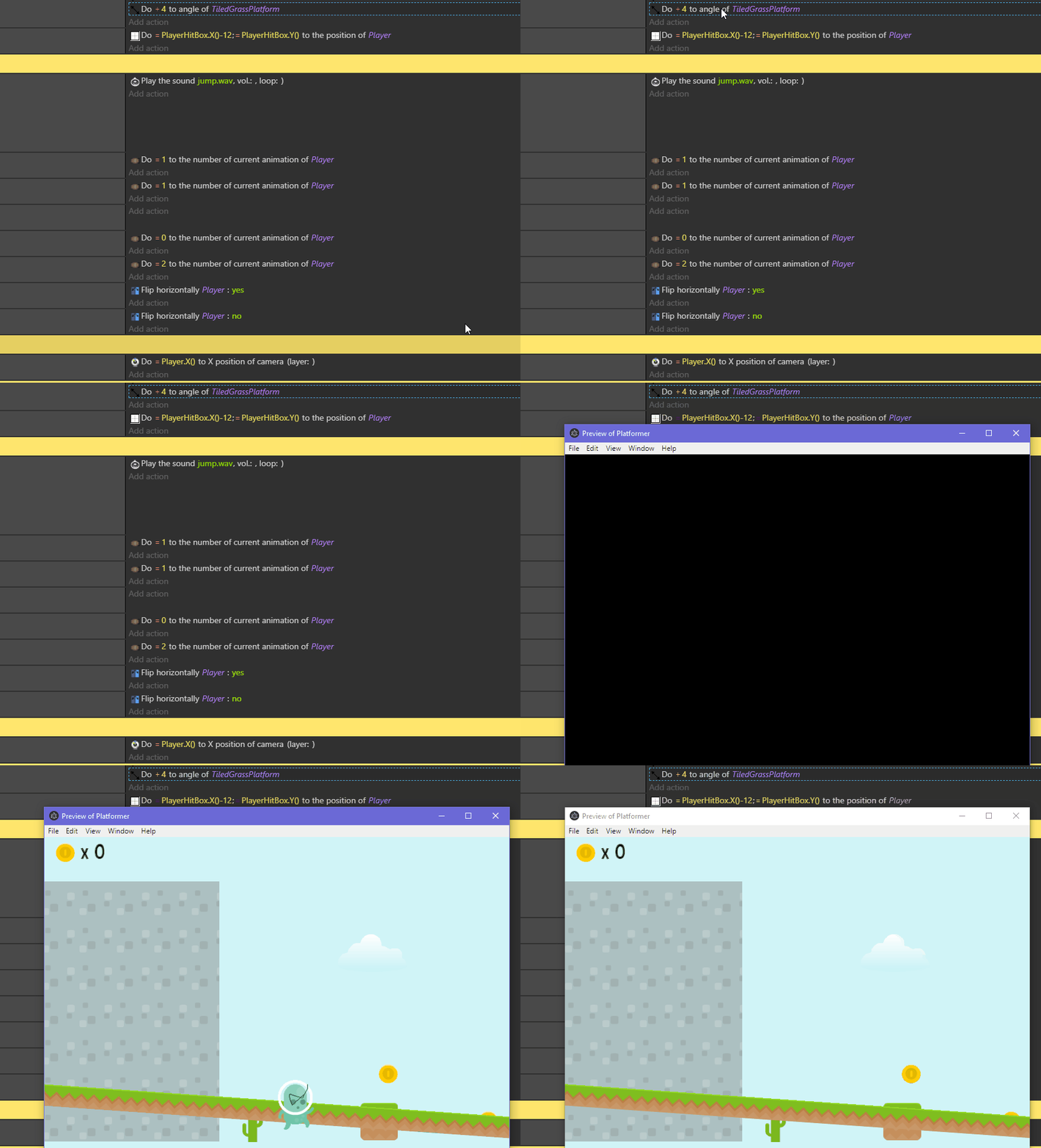
Do +5 to angle of the tiledgrass platform at the start of the scene
You will get this:
 blurymind
All 21 comments
Is it working on smaller platforms?
On Sat, 29 Sep 2018, 12:54 Todor Imreorov, notifications@github.com wrote:
Describe the bug
Putting aside that you can't actually rotate any instances atm, if you do
try to do with the event sheet ,
their collision no longer works
To ReproduceDo +5 to angle of the tiledgrass platform at the start of the scene
You will get this:
[image: tiltedplatformsgd]
https://user-images.githubusercontent.com/6495061/46248395-a31e6880-c410-11e8-874d-b8639a6881f4.gif—
You are receiving this because you are subscribed to this thread.
Reply to this email directly, view it on GitHub
https://github.com/4ian/GDevelop/issues/676, or mute the thread
https://github.com/notifications/unsubscribe-auth/ABOIgqagDEEDdPViM1LK8KxaZouM1PNSks5uf6WpgaJpZM4XAltB
.
 4ian
on 29 Sep 2018
4ian
on 29 Sep 2018
It does work on a smaller platform, but the player can only go down the slope. You can't walk uphill :)
blurymind
on 30 Sep 2018
sparkman recently made a video that illustrated the point that gdevelop games cant have tilted platforms
https://www.youtube.com/watch?v=lrmO4jn6y8Q
In his video the workaround he employs is utterly bad, so I wondered- cant we just use rotated platforms for ground collisions? The editor doesnt allow to rotate platforms, so his set up wont be easy to do. The engine's platformer behavior doesnt like uphill slopes
blurymind
on 30 Sep 2018
Uphill slopes should work, up to a certain degree that can be setup in the platformer character:
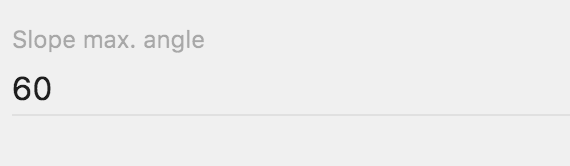
I think we should set a default value of something like 60 degrees so that people that don't know about this property are not thinking that slope don't work. I thought it made 60 degrees to be the default, maybe it's not the case or that should be changed in the platformer example (PR welcome :D)
So I guess here the issue is large/resized platforms.
4ian
on 30 Sep 2018
sparkman recently made a video
This video is from 2017 ^^ Is that the one you wanted to link? 😄
But anyway:
- tilted platform should work.
- it seems that there is an issue with collision boundaries on large/scaled/tilted platforms.
4ian
on 30 Sep 2018
ah yes sorry you are right. Youtube decided to recommend it to me today xD
Increasing the slope indeed fixes it.
I wonder why very big platforms mess up the collision
blurymind
on 30 Sep 2018
if we have slope, wouldnt it be nice to be able to rotate platforms in the Ide?
blurymind
on 30 Sep 2018
I think it shows the problem better:
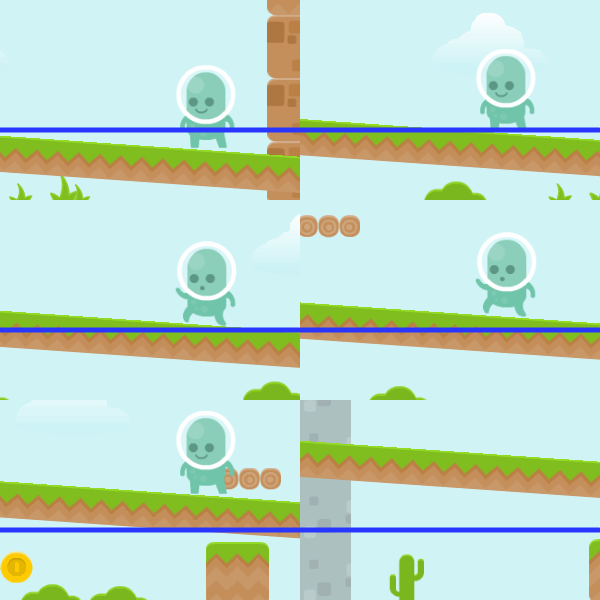
The blue line is imaginary, I guess it's the platform top surface when it isn't rotated, so there's a code that uses the non-rotated Y position of the platform, then the separation algorithm fixes it until the object is pushed down instead up like at the end of the gif.
 Lizard-13
on 30 Sep 2018
Lizard-13
on 30 Sep 2018
if we have slope, wouldnt it be nice to be able to rotate platforms in the Ide?
You can with the "Angle" property in the property panel ;)
The blue line is imaginary, I guess it's the platform top surface when it isn't rotated, so there's a code that uses the non-rotated Y position of the platform, then the separation algorithm fixes it until the object is pushed down instead up like at the end of the gif.
Great catch! Somehow there must be something wrong with the way the engine get the potential colliding objects.. might be _updatePotentialCollidingObjects called with a bad maxMovementLength.
4ian
on 30 Sep 2018
@4ian would you be open to the idea of adding rotation to the resize/move instance widget? :)
I can give it a try some time, if nobody else picked it up
Not sure how it will operate on multiselection though. Should they move and rotate or just rotate? The second would be simpler to do of course
blurymind
on 1 Oct 2018
Yes, it was mainly not done because of no time for it. :)
Created a card for it on the trello: https://trello.com/c/cMYnMyTb/165-add-a-rotation-handle-in-addition-to-resize-handles-on-scene-editor
As for multiselection if that's easier you can start by rotating individually each instance without moving. Ideally move and rotate would be easier but that's a bit more fun work with cos and sin ;)
4ian
on 1 Oct 2018
I noticed that the resize sprite pixi is not used at all by the button. I
can fix that while at it if you want :p
On Mon, 1 Oct 2018 17:08 Florian Rival, notifications@github.com wrote:
Yes, it was mainly not done because of no time for it. :)
Created a card for it on the trello:
https://trello.com/c/cMYnMyTb/165-add-a-rotation-handle-in-addition-to-resize-handles-on-scene-editorAs for multiselection if that's easier you can start by rotating
individually each instance without moving. Ideally move and rotate would be
easier but that's a bit more fun work with cos and sin ;)—
You are receiving this because you authored the thread.
Reply to this email directly, view it on GitHub
https://github.com/4ian/GDevelop/issues/676#issuecomment-425965367, or mute
the thread
https://github.com/notifications/unsubscribe-auth/AGMbVV2iaTmDPrNkLRzgIdQ6Xvypj6j3ks5ugj4KgaJpZM4XAltB
.
blurymind
on 1 Oct 2018
Ah yes true, feel free to remove it :)
4ian
on 1 Oct 2018
Would you like me ti give it an image? If not i have to at least use
something for rotate to distinguish it from resize
On Mon, 1 Oct 2018 17:17 Florian Rival, notifications@github.com wrote:
Ah yes true, feel free to remove it :)
—
You are receiving this because you authored the thread.
Reply to this email directly, view it on GitHub
https://github.com/4ian/GDevelop/issues/676#issuecomment-425968603, or mute
the thread
https://github.com/notifications/unsubscribe-auth/AGMbVe1zTxSEqy6-niRni7E7Z4obPzeHks5ugkAMgaJpZM4XAltB
.
blurymind
on 1 Oct 2018
You can use a Circle :) I've done a few programs doing this.
Sketch is using the same handles but you have to press Cmd and the cursor change to a rotating one (not sure if we can do something similar easy).
4ian
on 1 Oct 2018
I think it should be its own button to make it easier on touch input
devices in the future :D
On Mon, 1 Oct 2018 17:24 Florian Rival, notifications@github.com wrote:
You can use a Circle :) I've done a few programs doing this.
Sketch is using the same handles but you have to press Cmd and the cursor
change to a rotating one (not sure if we can do something similar easy).—
You are receiving this because you authored the thread.
Reply to this email directly, view it on GitHub
https://github.com/4ian/GDevelop/issues/676#issuecomment-425971260, or mute
the thread
https://github.com/notifications/unsubscribe-auth/AGMbVXqG7Oepo1bBqwZjiK37tn_ovFoGks5ugkHPgaJpZM4XAltB
.
blurymind
on 1 Oct 2018
Good remark, let's good for the circle - that what used to be in GD4 and I think it's quite understandable and useable :)
4ian
on 1 Oct 2018
So I found the issue, it's because the code to check what platforms are around the character (_updatePotentialCollidingObjects, which is using gdjs.PlatformObjectsManager.prototype.getAllPlatformsAround, which is calling this._platformRBush.search) is using a specific structure ("rbush") to store platforms positions in an efficient way. But only the bounding box is used meaning that rotated platforms won't be properly considered. (so that the character is moved into them, then moved out).
We'll have to come up with a better solution that using bounding box. Potentially have bounding boxes that are larger enough to contain the rotated object.
4ian
on 23 Oct 2018
Potentially a solution is in gdjs.PlatformObjectsManager to replace the ".owner.getAABB()" by a call to a function "getExtendedAABB()", and implement gdjs.PlatformRuntimeBehavior.prototype.getExtendedAABB to return a bounding box that is large enough. (and also remove gdjs.PlatformRuntimeBehavior.prototype.getAABB which is dead code it seems).
4ian
on 23 Oct 2018
Pull request coming that fix at the same time a bunch of collisions related features and improve performance.
4ian
on 25 Oct 2018
@4ian Thank you for the fix 😸
blurymind
on 26 Oct 2018
Related issues
 Wend1go
·
3Comments
Wend1go
·
3Comments
 Jeje2201
·
5Comments
4ian
·
4Comments
4ian
·
3Comments
blurymind
·
5Comments
Jeje2201
·
5Comments
4ian
·
4Comments
4ian
·
3Comments
blurymind
·
5Comments
Most helpful comment
Pull request coming that fix at the same time a bunch of collisions related features and improve performance.