1) Default sprite size
The default sprite size of an image is 64x64. If you are creating a game in 32x32 you need to set the canvas size for every new image.
- Suggestion:
Piskel has a setting for the defauls sprite size but it isn't used in the embedded version.
So my suggestion is to save the value of default sprite size together with the GD project.
2) Backup copies of sprites
I don't know if this is a bug or a feature but each time you delete a frame inside Piskel (or a whole object inside GD) it is only deleted from the editor but not the file system. Upon creating a new sprite animation a lot of trash is generated inside the project directory which also gets copied into the export folder on compilation of the game and bloats the game size.
- Suggestion:
Either delete old frames from the file system or exclude them from game export.
3) Mess in the project directory
This is somehow related to 2). Every sprite you create with Piskel is saved inside the root folder of the project. With hundreds of sprites in a game this creates a real mess.
- Suggestion:
Add the possibility to save a sprite in a sub folder of the project.
4) Layers get lost upon saving
Piskel has a feature to create layered sprites but the layers don't get saved. I have created a layered sprite and was shocked to see that upon reopening there was only one layer left.
- Suggestion:
Upon saving a sprite create both:
-- A Piskel-project file that contains all the meta data of the sprite (and use it when you start Piskel the next time to preserve the layers)
-- A PNG file of all layers merged into one (for use inside the GD game)
 Wend1go
All 22 comments
@blurymind You could be interested in some if these suggestions :)
 4ian
on 11 Jun 2018
4ian
on 11 Jun 2018
I also would like to add a few things:
When we open Piskel, it display the name of the image at the top. Would be nice if we could rename the image by clicking the name at the top of the window. Of course we can rename the image by going in to the Save property of Piskel, but this way would be faster and more productive.
When we rename the image in Piskel though, if we use the Save to GDevelop button, it saves using the object name + counter and ignoring the name we entered. It would be nice if we could save the image we have created using the name we set in Piskel. Of course we can save the images using the export option in Piskel and the name of the actual image doesn't matter to the end user, but it would be still nice to have.
For the above reasons, when we press Save to GDevelop, it is overwriting the currently used image which is not necessarily what we want. For example for a new animation I did want to use an existing image so I did open the image, changed it and when I pressed save it has been overwritten and also has been changed for the other animation that I did not want to change.
All the functionality we need is right there in Piskel, but for someone not familiar with Piskel and don't know it is a 3rd party tool integrated, it can be confusing and not a nice experience, may even frustrating. If possible, I would prefer to see a custom version of Piskel for GD. What I mean is, remove import/export and save options and replace it with clear and straight options such as Save, Save as, Open and a field to rename the image to whatever we want.
Also, as I mentioned on the forum would be nice if the theming of Piskel would match GD.
 ddabrahim
on 11 Jun 2018
ddabrahim
on 11 Jun 2018
Yeah of course :)
On the new sprite size, i was actualy thinking of having piskel prompt you
about what size you want every time. That would be a cleaner way to do it
imo.On having piskel actually delete files, i decided against it to avoid any
possible unintended deletion of files. When you remove images from
gdevelop, it doesnt actually delete them either - you are in charge of what happens to the unused files you created/copied to the project folder.
An alternative is have a process in gdevelop that checks for any unused files in the project folder when exporting the game.
One thing that can help cleanup unwanted images is to give them more
descriptive names. Putting them in a subfolder should be easy to do. How
about the subfolders are the name of the animation they were a part of? A
piskel subfolder with images and a piskel file perhaps? That would be somewhat inconsistent with how gdevelop puts all resources in one folder, but does make sense when you have many animation frames
- On the layer saving - I was actually thinking of saving piskel files and
using that to keep the data, but did not want to introduce more complexity
to how the resource is managed in gdevelop. This requires having gdevelop
newide to start supporting a new resource type with layers- the piskel file
itself. Is @4ian ok with that?
An alternative is to have a warning when
saving, but that could get annoying. If i just attach the path of the
piskel file to the anination clip- that could get out of sync
On Mon, 11 Jun 2018 13:03 Florian Rival, notifications@github.com wrote:
@blurymind https://github.com/blurymind You could be interested in some
if these suggestions :)—
You are receiving this because you were mentioned.
Reply to this email directly, view it on GitHub
https://github.com/4ian/GD/issues/518#issuecomment-396219578, or mute
the thread
https://github.com/notifications/unsubscribe-auth/AGMbVdR3nbcFWV0XpraxLqB6RWceimctks5t7lx3gaJpZM4UihTA
.
 blurymind
on 11 Jun 2018
blurymind
on 11 Jun 2018
@ddabrahim I was actually thinking of making the name editable - as you describe. Also it will affect the file names - helping with making them easier to clean up.
blurymind
on 11 Jun 2018
Sprite size:
Prompting for the size each time a new sprite is created would be ok but the text fields should be prefilled with the dimensions of the last created sprite. Otherwise there wouldn't be much time saved compared to opening the settings and changing the dimensions there. A lot of games are grid based so the size will be mostly the same for nearly all the sprites.
Subfolder for sprites
We could achieve a clean project structure by design if the sprites were saved in a given folder structure Project->Images->[Objectname]->[Animationname]
Like so:
- My_game_project
- Images
- Player
- Walk
- Jump
- Idle
- Wolf
- Sleeping
- Walking
- Attacking
- Player
- Images
By taking the name of the object and animations for a folder path we could avoid adding an entry field into piskel. The name of the animation would also be the name displayed inside Piskel.
Layers
If @4ian decides not to support the piskel project format the coresponding widgets should be removed from Piskel to avoid confusion. But removing such a powerful feature that already exists feels very strange.
Wend1go
on 11 Jun 2018
@Wend1go the pop up will appear upon creating a new piskel animation- so it will save steps for sure
I am ok to introduce subfolders for new piskel animations - but for editing animations that alreay exist- piskel will save them in the same folder where the user placed them to begin with - that applies for any new frames created in piskel for a clip that was imported in gdevelop prior to being opened.
On Layers- you can already save piskel files in piskel - and reopen them too. The complexity comes with keeping track of exported frames. It is useful to be able to store layers of course and that is something that we will eventually add support for. Just have to look into how it would work under the hood and if it can be done in a less disruptive way in gdevelop. I need to find a way to bind an animation clip in gdevelop to a piskel file - but then you also have to take into account any frames that were added in gdevelop and dont have layers
blurymind
on 11 Jun 2018
I am opening a pull request here:
https://github.com/4ian/GD/pull/522
Will try to tackle these one by one :)
Got inspired by seeing sparckman use gdevelop's new ide with piskel
https://www.youtube.com/watch?v=iBWXvvgQ_-g
blurymind
on 15 Jun 2018
Sparckmans gdevelop series is fantastic exposure for gdevelop!
On Fri, 15 Jun 2018, 6:00 pm Todor Imreorov, notifications@github.com
wrote:
I am opening a pull request here:
522 https://github.com/4ian/GD/pull/522
Will try to tackle these one by one :)
Got inspired by seeing sparckman use gdevelop's new ide with piskel
https://www.youtube.com/watch?v=iBWXvvgQ_-g—
You are receiving this because you are subscribed to this thread.
Reply to this email directly, view it on GitHub
https://github.com/4ian/GD/issues/518#issuecomment-397683012, or mute
the thread
https://github.com/notifications/unsubscribe-auth/AQ8mixu4HulNZbpIDW16VyUBzLE3hpoyks5t8-g9gaJpZM4UihTA
.
 zatsme
on 15 Jun 2018
zatsme
on 15 Jun 2018
I tackled the resize prompt request and new file naming request.
For the layers request- I could try solving it, but first I need to be able to save a file path string in the image sequence of an object somehow
Do you guys think that piskel made frames should be saved inside a pskl folder?
Or maybe add ability to select the folder on new animations?
blurymind
on 17 Jun 2018
Ok, now you can also select the folder where you want piskel to create new frames, as well as the name of the files:
Note:
- if you select a folder outside of your project- piskel will refuse to use it
- On animations imported from gdevelop- the folder and the name can not be edited by design- so the user doesnt make the mistake of saving half their sequence in another folder
Here is a gif demo

Please note that gdevelop and piskel are not meant to be used for deleting or renaming actual files. If you create a lot of unused files in your project- you have to delete them yourself.
Perhaps in the future gdevelop could automatically detect unused files and not bundle them with exports?
blurymind
on 17 Jun 2018
@4ian I can add the ability to preserve layers, but I need help with adding a new variable to the direction prop - to store the path or atleast name of the piskel file associated with a sprite list.
This variable needs to be stored in the project.json file when saving the project.
How would one go about doing that? Trying to figure out how gdevelop saves a project now.
Can it be done without touching gdjs?
blurymind
on 21 Jun 2018
Can you give a few examples of what you would store?
4ian
on 23 Jun 2018
@4ian for this I was wondering if we can just have piskel save a pskl file, along with the flattened image frames. So next time you open the animation, piskel can check if it can access the pskl file. If the answer is yes- then instead of opening the flattened image sequence- it opens the pskl file that still has the layer data in it.
But in order to do that, apart of the image sequence, I also need to keep track of the path to the pskl file of each animation sequence created by piskel. That would be just a string path to where the file is relative to the project root. In a sense- yes it is a resource. Maybe have it store all pskl files in a pskl subfolder?
One thing that could be problematic for that approach is of course the case where the user has changed the image sequence in gdevelop- I am still not sure how to handle that corner case. Piskel could compare the image sequence in the pskl file with the flattened image sequence and then ask the user which one to load?
An alternative is to disable authoring piskel created image sequences in gdevelop's ide - changing the frame order or removing/adding new frames. Only allow it in piskel for piskel created animations
In any case- preserving layer data is the most challenging part of this request. It would be quite nice to have it of course
blurymind
on 23 Jun 2018
@Wend1go most of the suggestions are now merged :) Feel free to git pull and test.
Only missing thing now is layers data preservation - but that is more complicated, so will get back to it at a later stage
blurymind
on 27 Jun 2018
Looks pretty neat.
I'll try it out tomorrow evening.
Wend1go
on 27 Jun 2018
Well done the work flow feels a lot better now. :+1:
Just two things:
1) If I hadn't already known that I can select the object folder by clicking on the yellow path text, I would never have guessed that this is possible. I wonder if it would be better to either place two buttons inside the string that opens choose folder dialogues for object - and animation folders or a second textbox to enter the object name. (But I think it would be best if one would be forced to set an object name right in the add object dialogue. I'll create a separate feature request for this since it has nothing to do with piskel directly)
2) The open dialogue starts at the root folder of the home directory instead of the project folder. So one has to click through the whole tree until he reaches the projects images folder which can get pretty annoying over time.
According to this page the showOpenDialog function has an optional "defaultPath" parameter that could probably be used to point it to the project folder.
http://docs.w3cub.com/electron/api/dialog/
Wend1go
on 27 Jun 2018
Thank you for the feedback!
If I hadn't already known that I can select the object folder by clicking on the yellow path text, I would never have guessed that this is possible.
 I wonder if it would be better to either place two buttons inside the string that opens choose folder dialogues for object - and animation folders or a second textbox to enter the object name.
 (But I think it would be best if one would be forced to set an object name right in the add object dialogue.
 I'll create a separate feature request for this since it has nothing to do with piskel directly)
At first I tried a button instead of a label and it was very distracting and clunky. I am more open to the idea of adding a separate button on the side of the label inside piskel ("Change folder"?). That is relatively easy to do- you do not need to create another issue. I do not like the idea of cluttering gdevelop's newIde with more buttons/labels for setting the path. You can already set the animation name in gdevelop prior to creating it in piskel. It gets transfered if you havent noticed :)
Another idea is to have it prompt your for the path automatically, upon creating the new animation. That might get annoying to some, but it seems sensible - to prevent people from forgetting to set it
@4ian what do you think?
The open dialogue starts at the root folder of the home directory instead of the project folder. So one has to click through the whole tree until he reaches the projects images folder which can get pretty annoying over time.
According to this page the showOpenDialog function has an optional "defaultPath" parameter that could probably be used to point it to the project folder.
http://docs.w3cub.com/electron/api/dialog/
It defaults to the last folder that you have selected. In my experience, because that folder was the project folder- since I was opening a project before testing- It started at the project folder.
I can very easily change it to always default to the project folder instead. That is an easy fix
blurymind
on 27 Jun 2018
@Wend1go will this do? It's pretty obvious :) Also, the user can still click on the label and set folder.
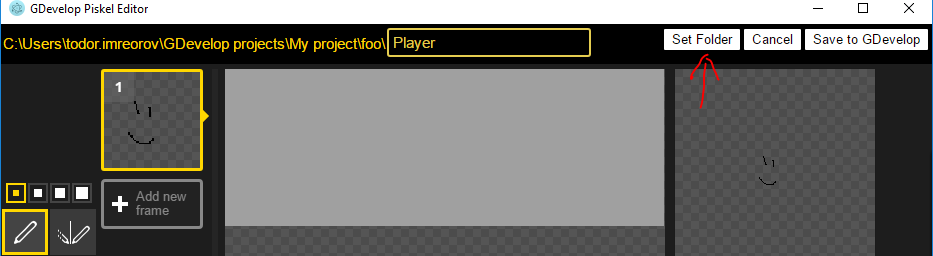
The file dialog is now always starting at the project root - as you requested. The downside to that is that it is not going to remember the last selected folder - but that is not a big deal in this usecase
blurymind
on 28 Jun 2018
Looks good :)
Wend1go
on 28 Jun 2018
PR coming tonight :)
blurymind
on 28 Jun 2018
@Wend1go that is now merged into gdevelop.
Can you close this issue and open a new one about the layers please?
Adding support for layers/pskl files in gdevelop sprites is a bigger task and we have to figure out how to adress it in an ellegant way
blurymind
on 29 Jun 2018
implemented by @blurymind in #543
Wend1go
on 29 Jun 2018
Related issues
blurymind
·
5Comments
 giusreds
·
4Comments
ddabrahim
·
4Comments
giusreds
·
4Comments
ddabrahim
·
4Comments
 Phenomena3
·
5Comments
4ian
·
3Comments
Phenomena3
·
5Comments
4ian
·
3Comments
Most helpful comment
Sparckmans gdevelop series is fantastic exposure for gdevelop!
On Fri, 15 Jun 2018, 6:00 pm Todor Imreorov, notifications@github.com
wrote: