Gb-studio: Bug that causes the first scene init to not work.
For some reason, when I play test my game, it somehow causes the first scene init code to not work.

I use windows 10 to code and play test.
 bigjawed
All 19 comments
Attaching the project that is causing the issue: themagicpencil.zip
 pau-tomas
on 7 Jan 2020
pau-tomas
on 7 Jan 2020
I'm struggling to reproduce this issue, I've tried both Mac and Windows 10, the release version of 1.2.0 and the dev build 1.2.1-beta1 on both but using the project that @pau-tomas attached it seems to work as expected. Attached a screen recording of what happens when opening that project file and running on Windows 10 for me.
@pau-tomas does the project you attached fail for you in the same way? Wondering how I can reproduce this.
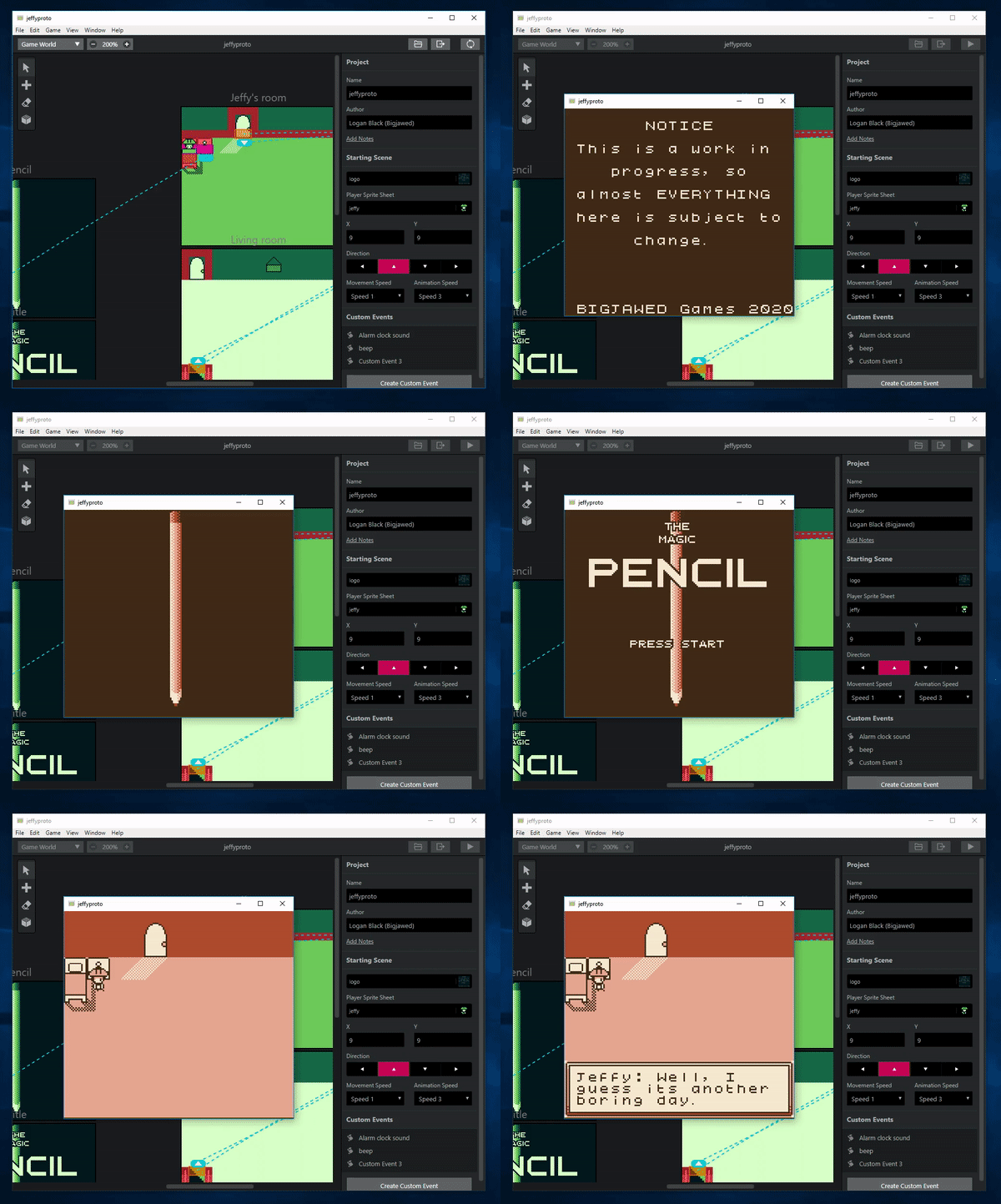
 chrismaltby
on 7 Jan 2020
chrismaltby
on 7 Jan 2020
I haven't been able to reproduce on Mac either. I don't have access to Windows machine. The project was shared by @bigjawed on Discord. I wonder if it's related to 32 or 64 bits builds specifically?
pau-tomas
on 7 Jan 2020
This issue is a random intermittent fault, where a scene init doesn't fire, or something random like an emote happens on scene start, around a 1 in 20 chance, windows 10, usually in live development sessions where i'm re testing a scene frequently.
It's the worst kind of issue to fix, but i've just had it happen 4 times out of about 30 simple scene tests, seems like it's jumping to a random bank at the start and running that, but only sometimes...
Are the roms from testing stored somewhere so i can rip a copy when a bad build happens again? like now where i got a full game crash?
 RichardULZ
on 8 Jan 2020
RichardULZ
on 8 Jan 2020
Here we go! found it in C:tmp18c3a1b6-00c9-4c62-92cf-fb40af88af59buildwebrom (only when using dev builds.
This is my own project, built 2 times, one working, one not. and the project file.
BadBuilds.zip
Gotta compare it in a hex editor
RichardULZ
on 8 Jan 2020
@RichardULZ that’s exactly what’s happening. The first scene init doesn’t activate sometimes. I don’t have any roms for this prototype. This game is a wip. (Work in progress)
bigjawed
on 8 Jan 2020
Thanks @RichardULZ that's really useful. I've put those two ROMs into Hex Fiend, there's only a few very small hex differences.
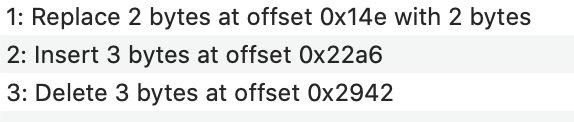
I believe this is the header checksum value so it's only different because of the other changes.
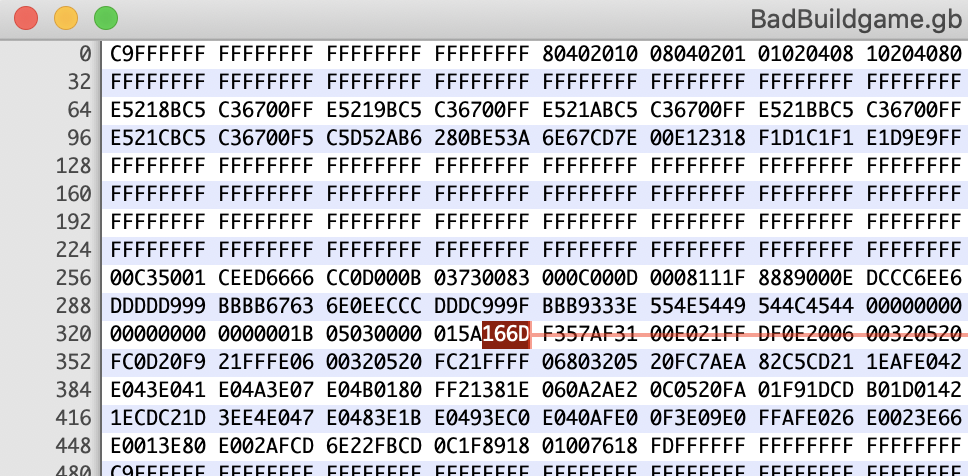
This appears to be the main change, not figured out which part of the game this corresponds to yet though.
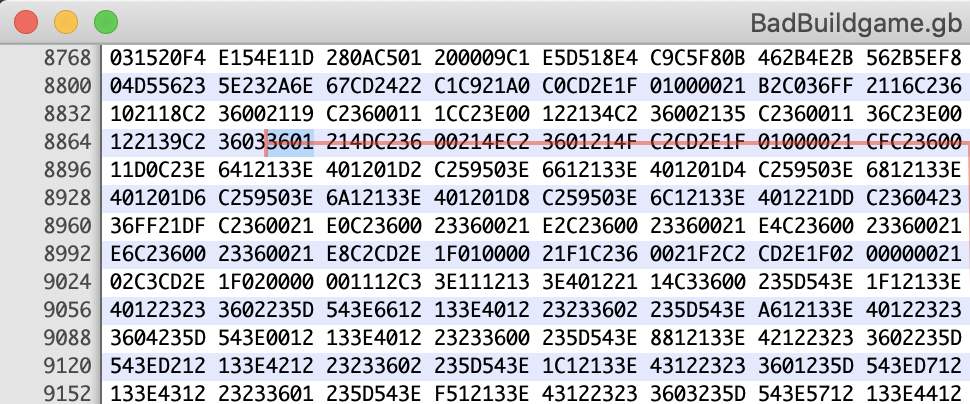
This is just removing the extra empty data from the added part in 2.
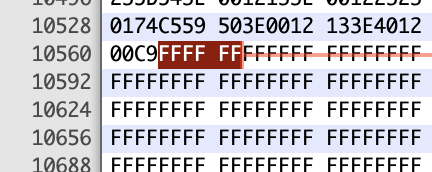
Annoyingly if I build on a Mac there's a very large number of small hex differences so I can't easily test this myself right now but I'm assuming given the address location that it's in bank 1, meaning it's in the engine itself. My immediate thought would be an issue with some of the code that modifies the engine before build
https://github.com/chrismaltby/gb-studio/blob/1d1d5ca7f966f46e1d9684406f466727e01f5d3d/src/lib/compiler/makeBuild.js#L100-L116
or
https://github.com/chrismaltby/gb-studio/blob/1d1d5ca7f966f46e1d9684406f466727e01f5d3d/src/lib/compiler/compileData.js#L355-L383
When I get access to Windows again (my PC is boxed away while I'm moving flat right now!) I might try making small changes to these parts and seeing which sections of the ROM get modified, it might help narrow down the issue.
chrismaltby
on 8 Jan 2020
Another update from investigating, I found this disassembler https://github.com/mattcurrie/mgbdis which I ran both of your ROMs though @RichardULZ
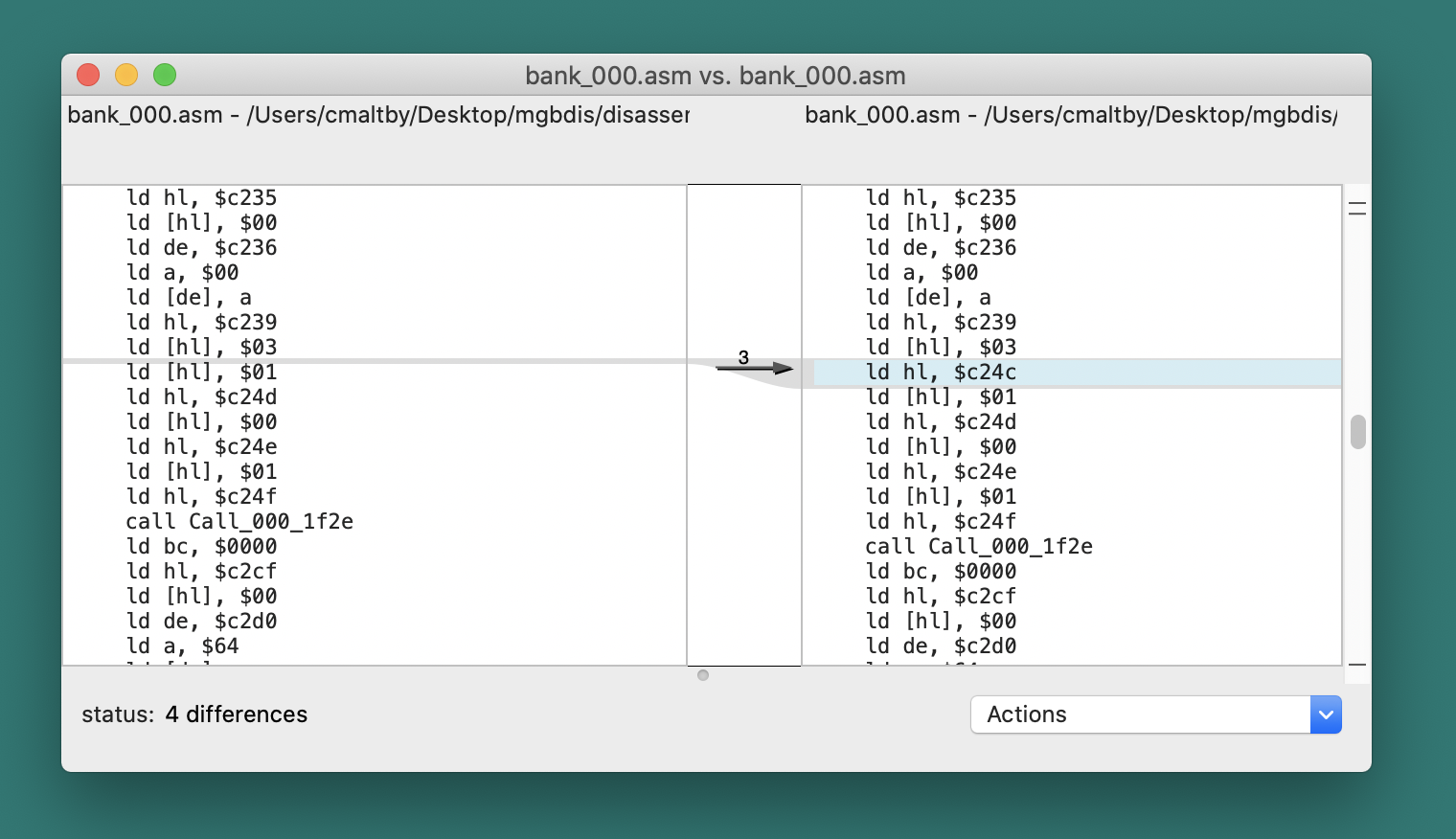
The only diff (other than the checksum) is this, an extra ld no idea whats causing this yet but getting closer.
I've attached the assembly of the only files that differ.
bank_000_bad.asm.txt
bank_000_good.asm.txt
chrismaltby
on 8 Jan 2020
It gets even weirder the missing $c24c seems to refer to the value of emote_type value set in Scene_b.c
I found that in the .sym and .map files that get generated with the ROM and looking at the other ld commands around those lines seem to match up
./build/rom/game.sym:00:C24C _emote_type
./build/rom/game.map:       _emote_type C24C
Don't see any reason right now why that line would be missing from a build.
Is the Windows GBDK compiler nondeterministic? :-/
chrismaltby
on 8 Jan 2020
What an insane bug, I'll try to run a few more compiles, perhaps even good builds have subtle differences...
Uh, well these good build are different now with a new dev session, perhaps i modified the project accidentally?
The compiles have been identical for 8 runs, and now i have another bad build 9, and then a good build 10, that has differences.. and then a good build that's identical again 11.
Next time i find a bad build i might dump the whole working folder.
RichardULZ
on 8 Jan 2020
Alright get ready to scream!
Here's a bunch of builds with the full working folder, i haven't looked through the actual differences yet, but there are a few types, one Bad build where an emote pops up, and a few different versions of Good Roms...
I used WinMerge to test for binary/text differences and decide if i should copy them, but didn't realize sdcc puts in a timestamp, so i copied a lot of them then skipped through until a visible bug showed up (the dreaded emote, it just mocks you, then runs like any other build).
Can't rule that out as a possibility though... timestamps and that they also have different NAME lcc148360 each time you generate.
RichardULZ
on 8 Jan 2020
From those test builds, it seems to be missing commands like ld hl,#_emote_actor, ld hl,#_text_out_speed, and ld hl,#_menu_index at random, despite having references to these as normal later on.
I expect all of these cause a subtle issue even in _good_ builds, but the one most noticeable/severe seem to relate with ld hl,#_emote_actor.
GoodC19 with Bad25, emote actor issue that's noticeable at start.

GoodC19 with Bad25, signs that a menu event might fail on this bad build too?

GoodC19 with GoodB18, signs that even on this normal build you may have issues with text box closing speed?

The src files are identical, so it must be lcc messing something up.
Now, i have no idea how sdcc and lcc work, but we can either figure out how to fix/update it in gbdk, may need @gregtour 's help,
or run a brutal after check on the tmp files in obj for the right number of ld hl,#_ links in each file against a known good, then error/retry many times until it's perfect... the boggle sort way.
Possibly both.
RichardULZ
on 11 Jan 2020
Here's a zip with gbdk and a project for testing, perhaps in a virtual machine, just press make.bat and if you're lucky, it'll make different files in /obj/ 😅
If you get a copy of WinMerge https://winmerge.org/, you can compare the insides with a copy of the project quickly.
F5 to refresh, and add the Differences display column by customizing columns, if it's over 2 differences (time and lcc numb), you have a bug, double click to open the text compare view to see what's changed.
Might be nice to compare against how mac / linux create their files too, since they seem different.
RichardULZ
on 11 Jan 2020
Nice one, thanks for investigating further into this. Still in the middle of moving (made it to the other flat at least) so I’ll probably be quiet for a while as I’m getting settled but this seems really helpful!
I wonder if there’s any chance that the code that inserts the game name and patches the ROM after building is not writing the file correctly? I had a similar issue with project files corrupting on save that only affected Windows, might just be grasping at this point.
The other thing is I’ve got a web assembly port of GBDK that’s almost ready:
https://github.com/chrismaltby/gbdk-emscripten
This would mean the build process would be identical across all platforms, it’s a little slower than running natively but I could set it up to not recompile the engine each time. If I cached the built engine files all it really needs to do is recompile the data files each time and link everything.
chrismaltby
on 11 Jan 2020
Hi @RichardULZ If I'd have actually read your comments properly I'd have seen you're checking the .lst files which means it's definitely before the ROM patching happens.
So I did a bit more research and narrowed it down a little more. When you build the game it's using lcc to build the files but really that's mostly just a wrapper that calls sdcpp then sdcc then asgbz80 to build the .o files, then it links the files to build the ROM using linkgbz80. The issue seems to happen in sdcc so I've made a branch with a test script that runs sdcc on a number of files 100 times, strips out the timestamps and lists how many times the files differ. On Windows 10 64-bit I'm seeing around 5 to 10% of the engine file tests having these small errors (the data bank files always seem fine though interestingly). Running the same tests on macOS and Windows 7 32-bit (the only other Windows OS I have access to) always seems to work though.
You can run the tests by using the branch
https://github.com/chrismaltby/gb-studio/tree/test/sdcc-bug
and running
yarn
npm run test-sdcc-bug
Since it seems to work in 32-bit Windows I thought maybe the issue would be solved by using the 32-bit binaries on 64-bit Windows too but unfortunately that didn't help.
One thing that actually seems to potentially fix the issue is setting SDCC to run in Windows 8 compatibility mode
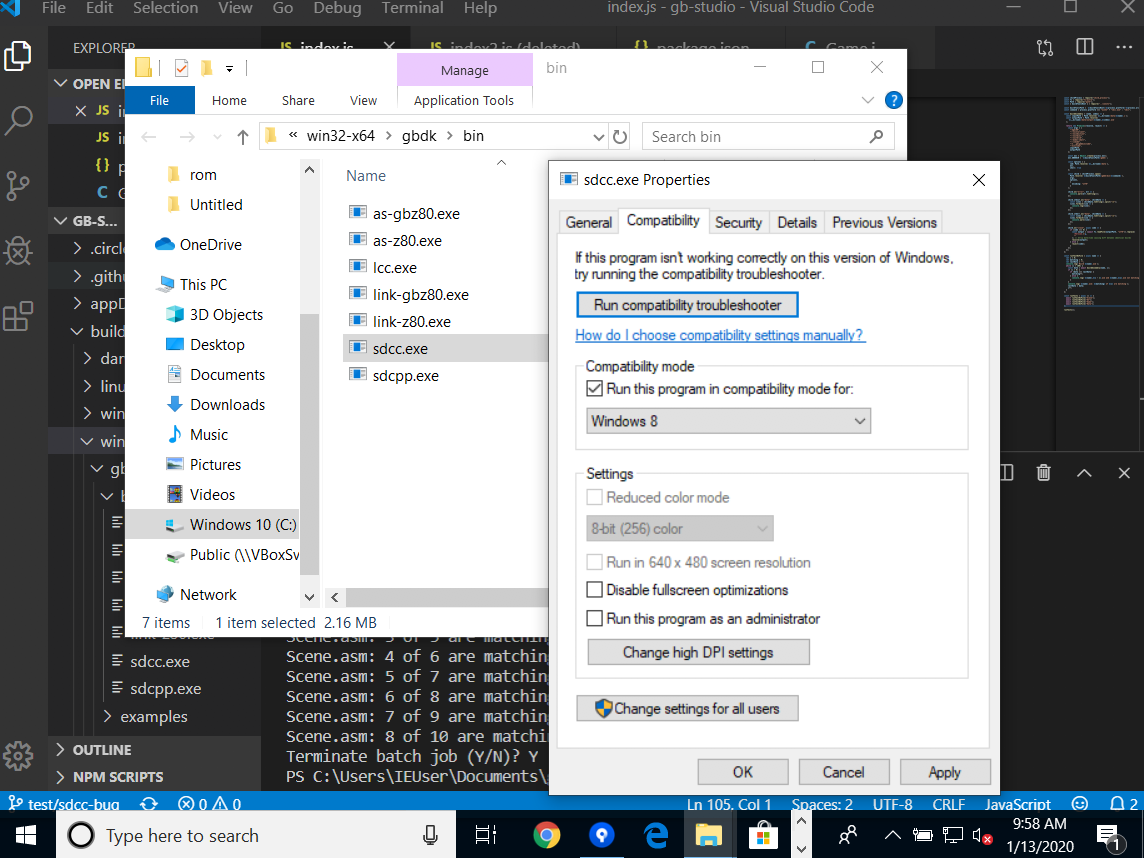
When I turn that on I'm unable to reproduce the bug with the test suite again but unfortunately it doesn't seem to actually make a change that I commit to git, not sure where those settings are stored or if there's a way to force Windows to run a binary in compatibility mode.
chrismaltby
on 13 Jan 2020
I might have fixed it! :-D
I found a way to set compatibility mode within a batch script by adding set __COMPAT_LAYER=WIN7RTM to the top of the file. I dropped this into the Windows build process in 314e67373a21cb57011a7172d0e7f1b774e70a26 and since then haven't been able to reproduce the issue in Windows 10. Hope I'm not speaking too soon.
chrismaltby
on 14 Jan 2020
I was thinking about trying that, lots of results were showing to edit the registry, but one or two suggested COMPAT_LAYER, Didn't have time to check it out at work, but testing now.
Zalo has some wizard stuff going on where it's running native Make commands through a make.exe app, and then through a much newer sdcc 3.80.
RichardULZ
on 14 Jan 2020
No issues so far! 🤞
I suppose if the command is not recognized on windows 7 it will continue as normal. Great job!
That's a lot of fixes piled up for 1.2.1
RichardULZ
on 14 Jan 2020
Excellent, I'll close this for now then. Yeah, I think this is the last fix for 1.2.1 now. I'll start getting it ready for release when I have a minute.
chrismaltby
on 14 Jan 2020
Related issues
 timsamoff
·
4Comments
timsamoff
·
4Comments
 josefnpat
·
4Comments
josefnpat
·
4Comments
 cubicstyle
·
3Comments
cubicstyle
·
3Comments
 Animacreep
·
4Comments
RichardULZ
·
6Comments
Animacreep
·
4Comments
RichardULZ
·
6Comments
Most helpful comment
I might have fixed it! :-D
I found a way to set compatibility mode within a batch script by adding
set __COMPAT_LAYER=WIN7RTMto the top of the file. I dropped this into the Windows build process in 314e67373a21cb57011a7172d0e7f1b774e70a26 and since then haven't been able to reproduce the issue in Windows 10. Hope I'm not speaking too soon.