Gb-studio: Cannot get certain Joypad Inputs to work...
Note: for support questions, please use one of the following channels.
Reddit: /r/gbstudio
Discord: Join Chat
This repository's issues are reserved for feature requests and bug reports.
I'm submitting a ...
- [X] bug report
- [ ] feature request
- [ ] support request => Please do not submit support request here, see note at the top of this template.
Do you want to request a feature or report a bug?
Bug
- What is the current behavior?
I am able to set Joypad Input events for "A" and "Z" but not for "B".
- If the current behavior is a bug, please provide the steps to reproduce and if possible a minimal demo of the problem
The Title Screen Scene contains conditional logic to Switch Scenes. Currently, "A" and "Z" are working, but if you try "B" where "Z" is set, it doesn't work.
- What is the expected behavior?
I should be able to set any of the relevant Inputs to work this way.
Please tell us about your environment:
- Version: 1.0.0
- Platform: macOS
Other information (e.g. detailed explanation, stacktraces, related issues, suggestions how to fix, links for us to have context, eg. stackoverflow, gitter, etc)
Zip file of project attached:
 timsamoff
All 9 comments
68 [Bug] If joypad input pressed
 RichardULZ
on 7 May 2019
RichardULZ
on 7 May 2019
68 _[Bug] If joypad input pressed_
Actually, this is a slightly different bug than https://github.com/chrismaltby/gb-studio/issues/68, since I can get isolated Inputs to work, just not the "B" key.
Check my source files to see.
timsamoff
on 8 May 2019
Ok, I opened your project, first off, unless you're using another emulator, You should reference the keys by their game boy buttons, Z is the shortcut for A button. And wasd is the same as arrow keys.
https://www.gbstudio.dev/docs/keyboard-shortcuts/
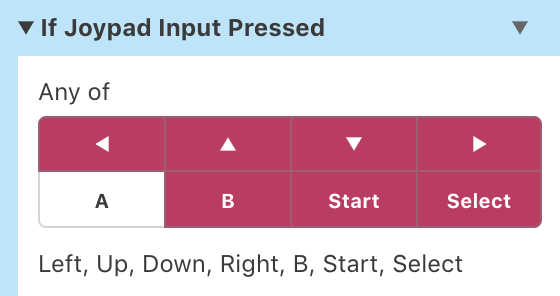
The problem is, you have pushed all the other buttons, so instead of checking for A, you're checking for everything but A. Now, this is a ui issue, and i've run into it too, @chrismaltby The buttons selected are not clear enough with black and white when you can select multiple buttons, Perhaps colour the pressed buttons as Green or Orange, and unpressed can stay the same grey/black.
As for the code, if you checked await for every button, but only checked if A or select were pressed, you'd be stuck, as it won't repeat, you could put it in a loop, but the ideal method would be
Await A or Select,
If A, go to outside,
Else, controls,
since you know what the other button will be.
There was an issue with bad buttons on 1.0 for windows, but mac is fine.
RichardULZ
on 9 May 2019
I guess theres some confusion here because the "A" GameBoy button is mapped to "Z" on the keyboard, "A" on the keyboard is mapped to "Left" on the GameBoy DPAD (as the movement is mapped to WASD keys as well as the arrows)
But also as you said @RichardULZ it wasn't clear enough which buttons were selected so I've just pushed a commit 4f5cd8e389bc7d4886cfa48545178ffe9be2590b which uses the highlight colour on the input selector rather than just slightly changing the shade of grey and also adds a label underneath showing which options are selected. Hopefully this makes it a little clearer in the next release.
 chrismaltby
on 9 May 2019
chrismaltby
on 9 May 2019
Before I explain my experience, yes, I agree with everything @RichardULZ stated -- which is what I tried first, and it didn't work (on a Mac).
My experience...
It works this way -- which is weird -- but this is all "in engine" (i.e., I haven't tried building and emulating yet).
When I reverse the button selection in the code, it no longer works.
So, something remains funky on the 1.0.0 Mac side as well.
timsamoff
on 9 May 2019
@chrismaltby: Is pink selected? Or white? In my opinion, pink appears selected and white appears deselected.
So should I make my Input choices "Z" and "B" maybe?
timsamoff
on 9 May 2019
Hi @timsamoff pink is selected. You seem to be mixing up the inputs again though it's not "Z" and "B" if you're talking about playing on a web browser it's "Z" and "X" but if you're talking about playing on a GameBoy it's "B" and "A".
GameBoy A == Keyboard Z
GameBoy B == Keyboard X
I've fixed your project so the title screen will show the controls if you press "X" and start the game if you press "Z". And when you're on the controls page press "Z" to return to the title screen.
I work on a Mac and can confirm there was no issues with the tech side here it was just confusion on the UI.
chrismaltby
on 9 May 2019
@chrismaltby: Ah, ok, thank you... I'll check it out and report back (my version is quite a bit beyond this I've now). ;)
timsamoff
on 9 May 2019
@chrismaltby: I just checked your fix and... Thanks! I'll integrate this into my latest version.
timsamoff
on 9 May 2019
Related issues
timsamoff
·
4Comments
 uKomodo
·
5Comments
uKomodo
·
5Comments
 darkhog
·
6Comments
darkhog
·
6Comments
 mrcampbell
·
5Comments
mrcampbell
·
5Comments
 wrt0302
·
5Comments
wrt0302
·
5Comments
Most helpful comment
I guess theres some confusion here because the "A" GameBoy button is mapped to "Z" on the keyboard, "A" on the keyboard is mapped to "Left" on the GameBoy DPAD (as the movement is mapped to WASD keys as well as the arrows)
But also as you said @RichardULZ it wasn't clear enough which buttons were selected so I've just pushed a commit 4f5cd8e389bc7d4886cfa48545178ffe9be2590b which uses the highlight colour on the input selector rather than just slightly changing the shade of grey and also adds a label underneath showing which options are selected. Hopefully this makes it a little clearer in the next release.