Gatsby: Popped up command window without saving
Description
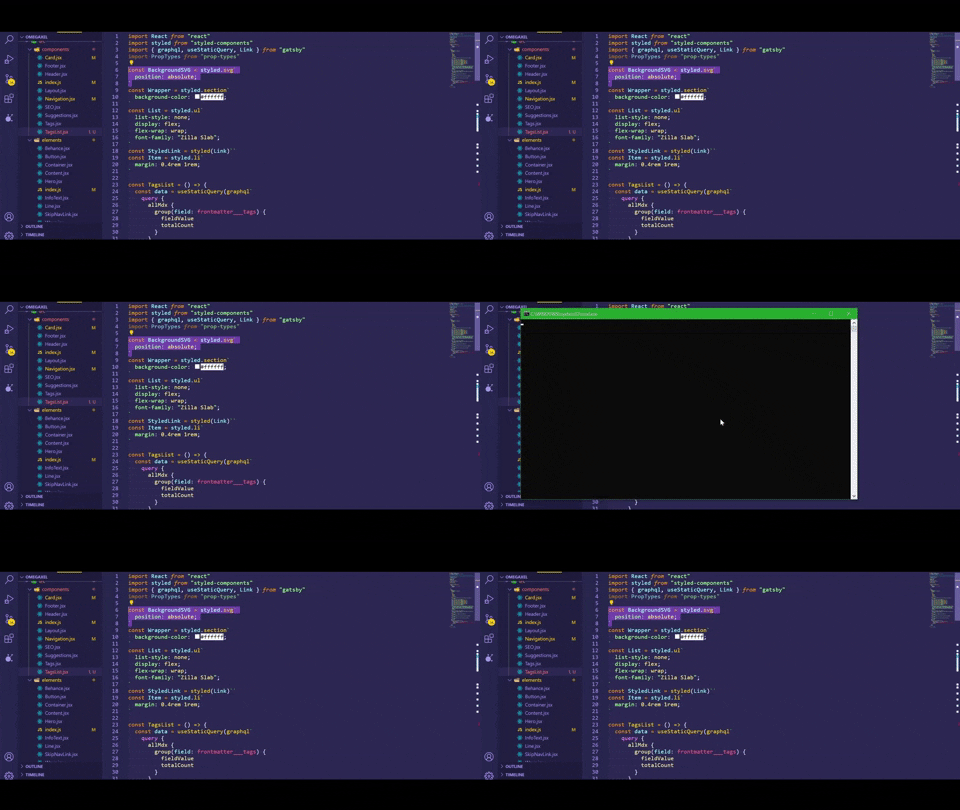
One or more command windows pops up randomly, even when not coding / not saving and while gatsby develop is running.
Steps to reproduce
This bug is hard to reproduce in itself as it is highly random, I have tried to observe it but have failed to understand the logic, I am still trying to analyze it.
Cmder seem to not being the cause as I have tried with Windows Default command and still occurring.
https://github.com/Coffee-Up/bug-repro (it is a very simple repo i have just added gatsby-plugin-mdx, but the bug is still present in it)
Actual result
A window pops up randomly and you loose the focus on the window you were for 1 second then you get the focus back again. Sometimes there are 3 windows simultaneously popping up for 1 sec then it closed instantaneously.
More
- This bug occurred when I upgrade for
gatbsy 2.26.1. - After running a
gatsby develop→ shutting down the local server → anothergatsby developgatsby inform you that you have already something running onlocalhost/8000but when i check my ports list it is closed/not opened. edit: it is not always the case i just have experienced so maybe it is not relevant.
Environment
Window Command:
Cmder.exe
Version 1.3.16.1035
VScode:
Version: 1.51.1 (user setup)
Commit: e5a624b788d92b8d34d1392e4c4d9789406efe8f
Date: 2020-11-10T23:34:32.027Z
Electron: 9.3.3
Chrome: 83.0.4103.122
Node.js: 12.14.1
V8: 8.3.110.13-electron.0
OS: Windows_NT x64 10.0.19041
System:
OS: Windows 10 10.0.19041
CPU: (4) x64 Intel(R) Core(TM) i5-5200U CPU @ 2.20GHz
Binaries:
Node: 12.18.4 - C:\Program Filesnodejsnode.EXE
Yarn: 1.22.5 - C:\Program Files (x86)\Yarn\bin\yarn.CMD
npm: 6.14.6 - C:\Program Filesnodejsnpm.CMD
Languages:
Python: 3.7.7
Browsers:
Chrome: 87.0.4280.66
Edge: Spartan (44.19041.423.0), Chromium (87.0.664.41)
npmPackages:
gatsby: ^2.26.1 => 2.26.1
gatsby-image: ^2.4.20 => 2.5.0
gatsby-plugin-image: ^0.2.0 => 0.2.0
gatsby-plugin-manifest: ^2.4.33 => 2.6.0
gatsby-plugin-mdx: 1.5.0 => 1.5.0
gatsby-plugin-netlify: 2.5.0 => 2.5.0
gatsby-plugin-offline: ^3.2.30 => 3.4.0
gatsby-plugin-page-progress: ^2.1.1 => 2.1.1
gatsby-plugin-react-helmet: ^3.3.12 => 3.4.0
gatsby-plugin-scroll-reveal: ^0.0.7 => 0.0.7
gatsby-plugin-sharp: ^2.6.38 => 2.8.0
gatsby-plugin-sitemap: ^2.4.17 => 2.6.0
gatsby-plugin-styled-components: ^3.3.14 => 3.4.0
gatsby-remark-images: ^3.3.33 => 3.5.1
gatsby-source-filesystem: ^2.3.32 => 2.5.0
gatsby-transformer-sharp: ^2.6.0 => 2.6.0
npmGlobalPackages:
gatsby-cli: 2.14.0
 Coffee-Up
All 7 comments
Coffee-Up
on 23 Nov 2020
That's weird - are you 100% sure this happens only when running gatsby? Another question - what version did you use before upgrade? That _might_ gives a clue to at least limit the changes that happened between that version and 2.26.1
 pieh
on 23 Nov 2020
pieh
on 23 Nov 2020
That's weird - are you 100% sure this happens only when running
gatsby? Another question - what version did you use before upgrade? That _might_ gives a clue to at least limit the changes that happened between that version and2.26.1
i was on 2.24.67. i was thinking the same as you but this occured exactly after the upgrades i did because I had a lot of complains and couldn't even start a gatsby develop. on reddit someone ask for the same bug than so I am confident it is bug's gatsby. kyle Mathew ask me to write an issue so I did.
Coffee-Up
on 24 Nov 2020
Ok, I seem to able to reproduce now. Particularly when I set invalid gatsby-config like:
module.exports = {
  /* Your site config here */
  plugins: [`s`],
}
with s plugin not being a thing which result in expected error:
 ERROR #10226  CONFIG

Couldn't find the "s" plugin declared in "D:\test\i28233\gatsby-config.js".

Tried looking for a local plugin in D:\test\i28233\plugins\s.

Tried looking for an installed package in the following paths:
 - D:\test\i28233\node_modules\gatsby\dist\bootstrap\load-themes\node_modules\s
 - D:\test\i28233\node_modules\gatsby\dist\bootstrap\node_modules\s
 - D:\test\i28233\node_modules\gatsby\dist\node_modules\s
 - D:\test\i28233\node_modules\gatsby\node_modules\s
 - D:\test\i28233\node_modules\s
 - D:\test\node_modules\s
 - D:\node_modules\s

not finished open and validate gatsby-configs - 0.083s
(above is not very important), but importantly I do see about 3 cmd.exe windows popping up and disapearing soon after:

On the right I try to use https://docs.microsoft.com/en-us/sysinternals/downloads/procmon which might give me more insight into what those command prompts try to execute but didn't yet narrow it down - there is a lot of logs there, so might be searching for needle in haystack and will need different approach, but will see.
pieh
on 24 Nov 2020
I opened https://github.com/gatsbyjs/gatsby/pull/28258 which does fix the multiple command prompt windows showing up from what I could reproduce, but I don't think it's safe for me to say it will fix all the cases of it - specifically those that show up during gatsby develop being alive. In this case it seems like parent processes not being alive anymore trigger showing the command prompt window
pieh
on 24 Nov 2020
Hey @Coffee-Up fix for the issue I found and could reproduce went out in [email protected], as mentioned in previous comment I acknowledge that might not be only case of it (the issue is pretty generic), so I addressed instance that I could reproduce, please open new issue if after upgrading you still experience those command prompt showing up
pieh
on 25 Nov 2020
@pieh You rock ! It seems to have fixed the issue, thank you very much for your contribution !
Coffee-Up
on 27 Nov 2020
Related issues
 mikestopcontinues
·
3Comments
mikestopcontinues
·
3Comments
 ferMartz
·
3Comments
ferMartz
·
3Comments
 dustinhorton
·
3Comments
dustinhorton
·
3Comments
 rossPatton
·
3Comments
rossPatton
·
3Comments
 hobochild
·
3Comments
hobochild
·
3Comments
Most helpful comment
Hey @Coffee-Up fix for the issue I found and could reproduce went out in
[email protected], as mentioned in previous comment I acknowledge that might not be only case of it (the issue is pretty generic), so I addressed instance that I could reproduce, please open new issue if after upgrading you still experience those command prompt showing up