gatsby-remark-autolink-headers includes text "true" before each heading
Description
The gatsby-remark-autolink-headers is prepending the text "true" to all headings.
Steps to reproduce
- Clone minimal reproduction repo at https://github.com/timothymcmackin/gatsby-test-headings
- Run
yarn install. - Run
yarn develop. - In a web browser, open http://localhost:8000/heading-test/
Expected result
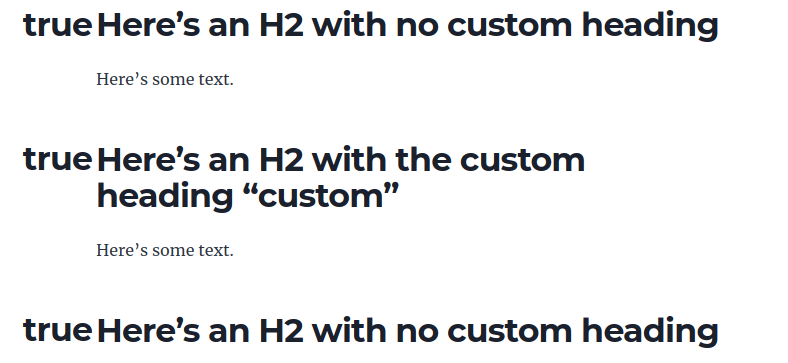
The Markdown code for the page heading-test, which looks like this:
## Here's an H2 with no custom heading

Here's some text.

## Here's an H2 with the custom heading "custom" {#custom}

Here's some text.

## Here's an H2 with no custom heading
should get converted into H2s with no extraneous information.
Actual result
The headings all have the text "true" prepended, as in this screencap:
Environment
System:
OS: Linux 4.4 Ubuntu 18.04.4 LTS (Bionic Beaver)
CPU: (4) x64 Intel(R) Core(TM) i7-6600U CPU @ 2.60GHz
Shell: 4.4.20 - /bin/bash
Binaries:
Node: 12.14.1 - ~/.nvm/versions/node/v12.14.1/bin/node
Yarn: 1.22.4 - ~/.yarn/bin/yarn
npm: 6.13.4 - ~/.nvm/versions/node/v12.14.1/bin/npm
Languages:
Python: 2.7.17 - /usr/bin/python
npmPackages:
gatsby: 2.25.1 => 2.25.1
gatsby-image: 2.4.21 => 2.4.21
gatsby-plugin-feed: 2.6.0 => 2.6.0
gatsby-plugin-google-analytics: 2.4.0 => 2.4.0
gatsby-plugin-manifest: 2.5.1 => 2.5.1
gatsby-plugin-offline: 3.3.1 => 3.3.1
gatsby-plugin-react-helmet: 3.3.14 => 3.3.14
gatsby-plugin-sharp: 2.7.0 => 2.7.0
gatsby-remark-autolink-headers: 2.4.0 => 2.4.0
gatsby-remark-copy-linked-files: 2.3.19 => 2.3.19
gatsby-remark-images: 3.4.0 => 3.4.0
gatsby-remark-prismjs: 3.6.0 => 3.6.0
gatsby-remark-responsive-iframe: 2.4.17 => 2.4.17
gatsby-remark-smartypants: 2.3.13 => 2.3.13
gatsby-source-filesystem: 2.4.0 => 2.4.0
gatsby-transformer-remark: 2.9.1 => 2.9.1
gatsby-transformer-sharp: 2.5.21 => 2.5.21
 timothymcmackin
All 3 comments
HTML of the headings looks like this:
<h2 id="heres-an-h2-with-no-custom-heading" style="position:relative;"><a href="#heres-an-h2-with-no-custom-heading" aria-label="heres an h2 with no custom heading permalink" class="anchor before">true</a>Here’s an H2 with no custom heading</h2>
@timothymcmackin, I faced this problem too. Strict using of icon option in config with SVG provided solve it.
 AleksandrIvanenko
on 3 Nov 2020
AleksandrIvanenko
on 3 Nov 2020
I faced the same problem and the solution by @AleksandrIvanenko did work!
 shionhonda
on 4 Nov 2020
shionhonda
on 4 Nov 2020
Related issues
 Oppenheimer1
·
3Comments
Oppenheimer1
·
3Comments
 mikestopcontinues
·
3Comments
mikestopcontinues
·
3Comments
 rossPatton
·
3Comments
rossPatton
·
3Comments
 theduke
·
3Comments
theduke
·
3Comments
 magicly
·
3Comments
magicly
·
3Comments
Most helpful comment
@timothymcmackin, I faced this problem too. Strict using of
iconoption in config with SVG provided solve it.