gatsby build stuck at "100% Generating image thumbnails"
Description
Build gets stuck at this stage indefinitely:
success run page queries - 8.438s - 46/46 5.45/s
[============================]   188.240 s 2081/2082 100% Generating image thumbnails
Also on netlify it does not build anymore:
Build exceeded maximum allowed runtime
Maybe related to #14078, but the proposed workaround (downgrading node) does not fix the problem.
Steps to reproduce
Checkout: https://github.com/jo3rn/jo3rn.de
Run gatsby develop
Expected result
The website builds and is available.
Actual result
Build process stuck at Generating image thumbnails.
Environment
  System:
    OS: Windows 10 10.0.19041
    CPU: (8) x64 Intel(R) Core(TM) i7-8565U CPU @ 1.80GHz
  Binaries:
    Node: 10.18.1 - C:\Program Files\nodejs\node.EXE
    npm: 6.13.4 - C:\Program Files\nodejs\npm.CMD
  Languages:
    Python: 3.8.6
  Browsers:
    Chrome: 85.0.4183.121
    Edge: Spartan (44.19041.423.0)
  npmPackages:
    gatsby: ^2.24.66 => 2.24.66
    gatsby-cli: ^2.12.101 => 2.12.101
    gatsby-image: ^2.4.20 => 2.4.20
    gatsby-plugin-catch-links: ^2.3.13 => 2.3.13
    gatsby-plugin-feed: ^2.5.13 => 2.5.13
    gatsby-plugin-layout: ^1.3.12 => 1.3.12
    gatsby-plugin-manifest: ^2.4.32 => 2.4.32
    gatsby-plugin-netlify: ^2.3.16 => 2.3.16
    gatsby-plugin-offline: ^2.0.6 => 2.2.10
    gatsby-plugin-react-helmet: ^3.3.12 => 3.3.12
    gatsby-plugin-react-svg: ^2.0.0 => 2.1.2
    gatsby-plugin-sass: ^2.3.14 => 2.3.14
    gatsby-plugin-sharp: ^2.6.37 => 2.6.37
    gatsby-plugin-sitemap: ^2.4.14 => 2.4.14
    gatsby-plugin-styled-jsx: ^3.3.13 => 3.3.13
    gatsby-plugin-styled-jsx-postcss: ^2.0.2 => 2.0.2
    gatsby-remark-copy-linked-files: ^2.3.17 => 2.3.17
    gatsby-remark-emojis: ^0.2.3 => 0.2.5
    gatsby-remark-external-links: ^0.0.4 => 0.0.4
    gatsby-remark-images: ^2.0.1 => 2.0.6
    gatsby-remark-prismjs: ^3.5.14 => 3.5.14
    gatsby-remark-responsive-iframe: ^2.4.15 => 2.4.15
    gatsby-remark-smartypants: ^2.3.12 => 2.3.12
    gatsby-source-filesystem: ^2.3.31 => 2.3.31
    gatsby-transformer-remark: ^2.8.36 => 2.8.36
    gatsby-transformer-sharp: ^2.5.16 => 2.5.16
  npmGlobalPackages:
    gatsby: 2.24.57
 jo3rn
jo3rn
All 4 comments
Hi @jo3rn
I was checking this out and there seem to be few things here that cause stucks:
- One is related to https://github.com/gatsbyjs/gatsby/issues/21885 (and
gatsby-plugin-styled-jsx-postcss) (and in here the workaround is to use node < 12 - which you already do locally from what I see from your environment information, but not sure what node version would be used in Netlify). - The other seems to be stuck inside some processing that
stylispackage does:
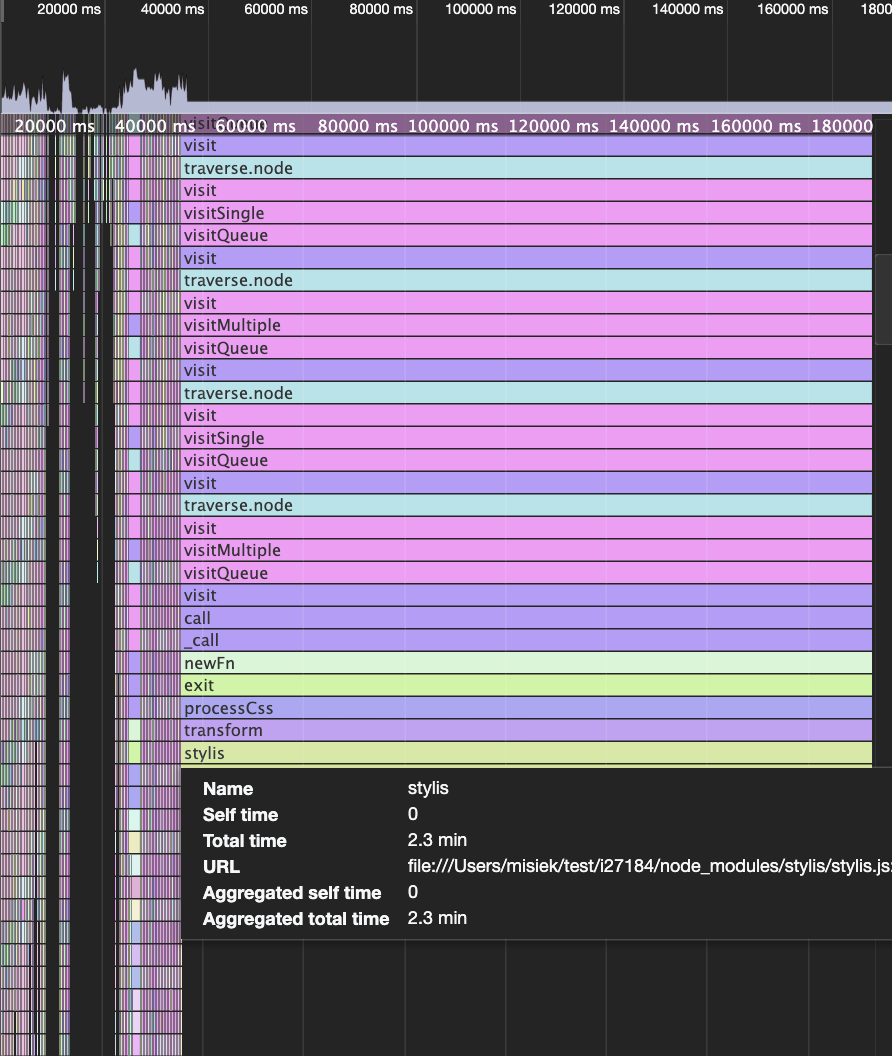
I don't know the details on why exactly, but I tracked this down to styles defined in https://github.com/jo3rn/jo3rn.de/blob/d319f29f73436a746906cbbdadeccff81cf8e0ff/src/components/Header/Header.js#L74-L250 - after I removed them, I was able to build successfully. So I would suggest to take a look at those and try to spot any syntax errors there (or maybe variables there are undefined or empty?).
In any case in both cases root of the issues are in upstream packages and not originate directly from Gatsby itself
 pieh
on 1 Oct 2020
pieh
on 1 Oct 2020
This seems to be exact cause of it - this opens comment that is never closed. After removing just this line I'm able to build
pieh
on 1 Oct 2020
Ah sorry to waste your time, that was totally something on my side. Thank you!
May I ask what tool you are using in your screenshot?
jo3rn
on 1 Oct 2020
May I ask what tool you are using in your screenshot?
This is chrome dev tools profiler. There is some write up in https://www.gatsbyjs.com/docs/debugging-the-build-process/#running-gatsby-with-the-inspect-flag on how to set this up and connect to it, but it lacks a bit of nuance:
- for
gatsby buildyou need to run:node --inspect-brk node_modules/.bin/gatsby build - for
gatsby developyou need to runnode node_modules/.bin/gatsby develop --inspect-brk(different position of--inspect-brktoggle)
(I skipped the--lazytoggle, because it's not strictly needed)
Once you are connected with dev tools you can use Profile tab and start profiling there and just after some time in this case of being stuck you can stop profiling and you will get charts like that and access to other stats etc)
pieh
on 1 Oct 2020
Related issues
 rossPatton
·
3Comments
rossPatton
·
3Comments
 benstr
·
3Comments
benstr
·
3Comments
 jimfilippou
·
3Comments
jimfilippou
·
3Comments
 ferMartz
·
3Comments
ferMartz
·
3Comments
 brandonmp
·
3Comments
brandonmp
·
3Comments