Gatsby: Getting `Loading (StaticQuery)` with version 2.24.11 (production only)
Description
When using version 2.24.11 and StaticQuery we get Loading (StaticQuery) (production only) (code).
When using 2.23.22-static-query-template.8 the problem is solved.
Steps to reproduce
Unfortunately this issue only happens when we deploy to production, so I'm not sure how I can help you to reproduce it without breaking our docs :/
Expected result
StaticQuery should return a result.
Actual result
Loading (StaticQuery) is shown.
Environment
System:
OS: macOS Mojave 10.14.6
CPU: (12) x64 Intel(R) Core(TM) i7-8850H CPU @ 2.60GHz
Shell: 5.3 - /bin/zsh
Binaries:
Node: 11.13.0 - ~/.nvm/versions/node/v11.13.0/bin/node
Yarn: 1.19.1 - /usr/local/bin/yarn
npm: 6.13.4 - ~/.nvm/versions/node/v11.13.0/bin/npm
Languages:
Python: 2.7.10 - /usr/bin/python
Browsers:
Safari: 12.1.2
npmPackages:
gatsby: ^2.2.2 => 2.24.11
gatsby-image: ^2.0.34 => 2.4.13
gatsby-plugin-manifest: ^2.0.24 => 2.4.21
gatsby-plugin-offline: ^2.0.25 => 2.2.10
gatsby-plugin-react-helmet: ^3.0.10 => 3.3.10
gatsby-plugin-sass: ^2.0.11 => 2.3.12
gatsby-plugin-sharp: ^2.0.29 => 2.6.22
gatsby-source-filesystem: ^2.0.27 => 2.3.23
gatsby-transformer-react-docgen: ^5.0.0 => 5.2.11
gatsby-transformer-remark: ^2.8.3 => 2.8.27
gatsby-transformer-sharp: ^2.1.17 => 2.5.11
npmGlobalPackages:
gatsby-cli: 2.12.66
 M-i-k-e-l
All 37 comments
@M-i-k-e-l Hey
Can you try clearing node_modules, running gatsby clean and building? This appears to be a babel loader cache issue which we're resolving in https://github.com/gatsbyjs/gatsby/pull/26053
 sidharthachatterjee
on 28 Jul 2020
sidharthachatterjee
on 28 Jul 2020
got same issue with version 2.19.23
 pleky
on 28 Jul 2020
pleky
on 28 Jul 2020
@M-i-k-e-l Hey
Can you try clearing
node_modules, runninggatsby cleanand building? This appears to be a babel loader cache issue which we're resolving in #26053
Hi @sidharthachatterjee,
I believe I've done gatsby clean before (it was suggested in a page I cannot find ATM :) ) and I've cleared node_modules on each version change.
Just to be sure I've changed to version 2.24.11 and done both things and the bug still occurred.
M-i-k-e-l
on 28 Jul 2020
@M-i-k-e-l We've discovered an issue in gatsby-plugin-offline where this occurs. Can you please remove gatsby-plugin-offline and add gatsby-plugin-remove-serviceworker and try again?
sidharthachatterjee
on 28 Jul 2020
@sidharthachatterjee, I can try, but now I see that we have the following in our plugins section:
// this (optional) plugin enables Progressive Web App + Offline functionality
// To learn more, visit: https://gatsby.dev/offline
// 'gatsby-plugin-offline',
So I guess it was a default setup of some kind, and it looks like it's not enabled, should I still do it?
M-i-k-e-l
on 28 Jul 2020
Yeah, in this case, it's not enabled. Can you run npm list babel-plugin-remove-graphql-queries and tell me what you see?
sidharthachatterjee
on 28 Jul 2020
- You want it with version
2.24.11or does it not matter? - If I re-installed
node_modules- do I need to deploy first (I get a lot of errors ATM)?
M-i-k-e-l
on 28 Jul 2020
In case it doesn't matter, this is what I get with version 2.23.22-static-query-template.8 after re-installing node_modules and gatsby clean (did not deploy):
[email protected] /__redacted__/uilib-docs
└─┬ UNMET PEER DEPENDENCY [email protected]
├── [email protected]
└─┬ [email protected]
└── [email protected] deduped
npm ERR! peer dep missing: gatsby@^2.4.0, required by [email protected]
npm ERR! peer dep missing: gatsby@^2.0.100, required by [email protected]
npm ERR! peer dep missing: gatsby@^2.0.0, required by [email protected]
npm ERR! peer dep missing: gatsby@^2.0.0, required by [email protected]
npm ERR! peer dep missing: gatsby@>2.0.15, required by [email protected]
npm ERR! peer dep missing: gatsby@^2.2.0, required by [email protected]
npm ERR! peer dep missing: gatsby@^2.0.15, required by [email protected]
npm ERR! peer dep missing: gatsby@^2.12.0, required by [email protected]
npm ERR! peer dep missing: gatsby@^2.12.1, required by [email protected]
M-i-k-e-l
on 28 Jul 2020
@M-i-k-e-l Okay, that explains it. You'll want [email protected] and [email protected]
Can you try adding a resolution to your package.json?
{
  "resolutions": {
"babel-plugin-remove-graphql-queries": "2.9.15"
  }
}
Used this:
"dependencies": {
"babel-plugin-remove-graphql-queries": "^2.9.15",
"classnames": "^2.2.6",
"gatsby": "^2.24.11",
"gatsby-image": "^2.0.34",
"gatsby-plugin-manifest": "^2.0.24",
"gatsby-plugin-offline": "^2.0.25",
"gatsby-plugin-react-helmet": "^3.0.10",
"gatsby-plugin-sass": "^2.0.11",
"gatsby-plugin-sharp": "^2.0.29",
"gatsby-source-filesystem": "^2.0.27",
"gatsby-transformer-react-docgen": "^5.0.0",
"gatsby-transformer-remark": "^2.8.3",
"gatsby-transformer-sharp": "^2.1.17",
"lodash": "^4.17.11",
"node-sass": "^4.11.0",
"prop-types": "^15.7.2",
"react": "^16.8.4",
"react-dom": "^16.8.4",
"react-helmet": "^5.2.0"
},
"devDependencies": {
"prettier": "^1.16.4"
},
"keywords": [
"gatsby"
],
"resolutions": {
"babel-plugin-remove-graphql-queries": "2.9.15"
},
Re-installed node_modules --> gatsby clean --> deploy --> same problem.
Ran npm list babel-plugin-remove-graphql-queries and got:
[email protected] __redacted__/public-ui-lib/uilib-docs
├── [email protected]
└─┬ [email protected]
├── [email protected] deduped
└─┬ [email protected]
└── [email protected] deduped
M-i-k-e-l
on 29 Jul 2020
BTW, thanks a lot for taking the time and looking in to this!
M-i-k-e-l
on 29 Jul 2020
@M-i-k-e-l Can you try upgrading to [email protected]? Just published a fix that should make query result loading a lot more robust
sidharthachatterjee
on 29 Jul 2020
With babel-plugin-remove-graphql-queries or without?
M-i-k-e-l
on 29 Jul 2020
@M-i-k-e-l Without any resolutions.
sidharthachatterjee
on 29 Jul 2020
With only changing the [email protected] version I still got the error.
M-i-k-e-l
on 29 Jul 2020
What is your production environment? Does the node version match the one on your local?
We were experiencing the same and our production was using node v12.18.3. Downgrading to v12.16.3 did the trick.
 lzambarda
on 3 Aug 2020
lzambarda
on 3 Aug 2020
I'm not sure if I can get that info or downgrade, but thanks for the suggestion.
M-i-k-e-l
on 6 Aug 2020
@M-i-k-e-l Have you been able to solve that issue ? I have the same one on production.
 Karniej
on 15 Aug 2020
Karniej
on 15 Aug 2020
Hi @Karniej, we're currently using 2.23.22-static-query-template.8 and it's working for us.
M-i-k-e-l
on 16 Aug 2020
Hi @Karniej, we're currently using
2.23.22-static-query-template.8and it's working for us.
This is the Gatsby version name? 😃
I'll try it out now.
I've used most of my free bulls minutes on Netlify because of this bug 😅
Karniej
on 16 Aug 2020
Unfortuanately this didn't work for me neither... I'm stuck - because all the query I have are on the template pages
Karniej
on 16 Aug 2020
@Karniej, Perhaps you have a different problem, consider opening a ticket.
M-i-k-e-l
on 18 Aug 2020
I'm having the same issue.
I noticed that it was only on production and the only thing different from staging was that it was using a CDN for all assets (styles and scripts included). I decided to flush the cache on CDN and that magically resolved the "Loading (StaticQuery)" issue for a lot of users, but if the user had a previous (the non-updated) version cached in their browser, they would now see "Loading (StaticQuery)".
I'm not sure what that means for a possible solution to this issue, but I figured it might give someone an idea :eyes:
I tried clearing gatsby cache and nuking node_modules as advised in https://github.com/gatsbyjs/gatsby/issues/24890, and in a comment on this issue, to no avail.
 karolis-adapt
on 18 Aug 2020
karolis-adapt
on 18 Aug 2020
I noticed that it was only on production and the only thing different from staging was that it was using a CDN for all assets (styles and scripts included). I decided to flush the cache on CDN and that magically resolved the "Loading (StaticQuery)" issue for a lot of users, but if the user had a previous (the non-updated) version cached in their browser, they would now see "Loading (StaticQuery)".
The issue I was having was definitely because I had misconfigured caching -- I overlooked that gatsby page-data and app-data need to be fetched anew every time (I had them cached previously). Once I got the cache rules correct and flushed CDN cache (and added a cache-busting mechanism similar to what's described in an answer on stackoverflow), it finally stopped showing the "Loading (StaticQuery)" message and everything seems to be finally working correctly.
karolis-adapt
on 25 Aug 2020
I'm having the same issue.
I cleaned node_module and install by yum install
I also tried version below
"gatsby": "2.24.11"
"babel-plugin-remove-graphql-queries": "^2.9.15"
but it's not work for us.
I didn't try this.
https://github.com/gatsbyjs/gatsby/issues/26038#issuecomment-675663169
I'm using AWS Amplify Console.
Even though I make new pipeline (New CDN, New hosting storage), I had a same error.
 yoshi-star
on 16 Oct 2020
yoshi-star
on 16 Oct 2020
I resolved this by my self
string is wrong at MetaData.js
(\GATSYBY ROOT\src\components\common\meta\MetaData.js )
Right side is incorrect.
Left side is correct
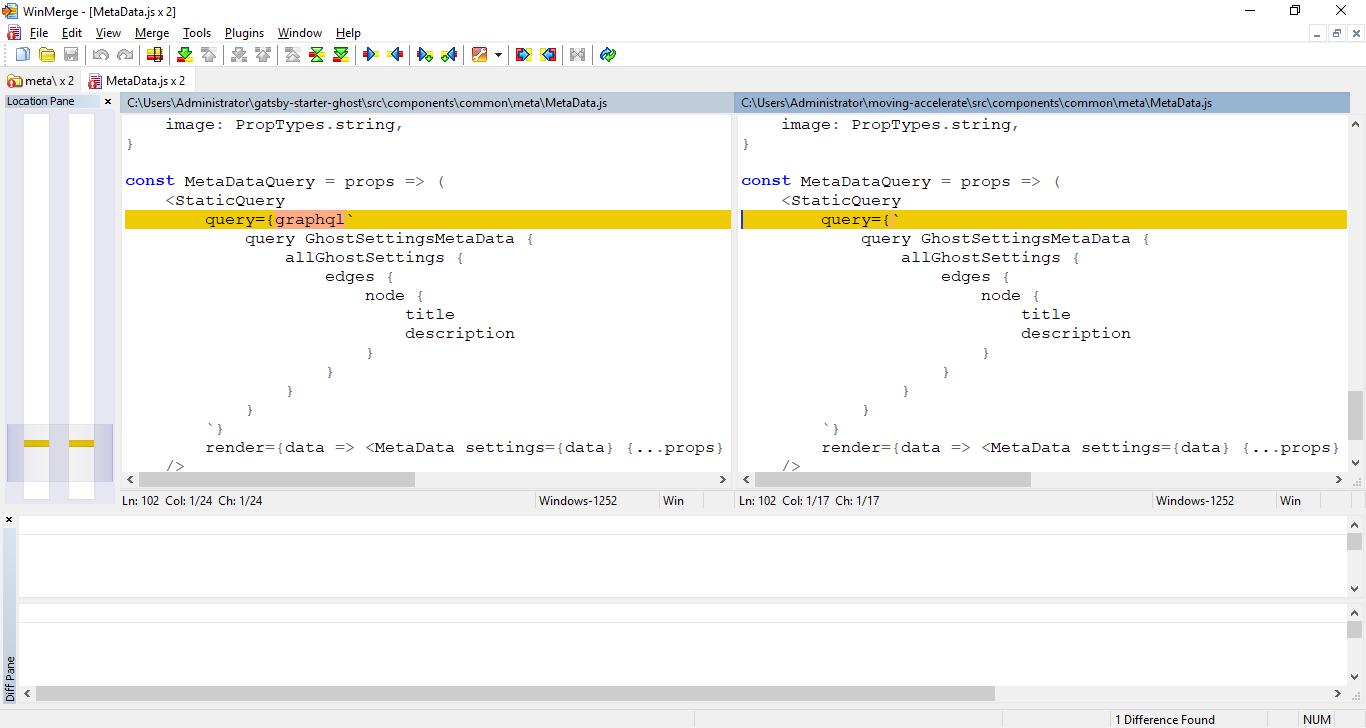
yoshi-star
on 16 Oct 2020
For people having problems here — could you validate your cache-control headers are setup correctly by running: npx check-gatsby-caching https://url-of-your-gatsby-site.com
 KyleAMathews
on 16 Oct 2020
KyleAMathews
on 16 Oct 2020
@KyleAMathews
I tried and got below. Is it running normally?

yoshi-star
on 19 Oct 2020
You need to change the URL to your site's production URL.
On Sun, Oct 18, 2020, 6:07 PM yoshi-star notifications@github.com wrote:
@KyleAMathews https://github.com/KyleAMathews
I tried and got below. Is it running normally?
[image: image]
https://user-images.githubusercontent.com/71750189/96389380-35595b00-11ea-11eb-8d0c-05a8c851338d.png—
You are receiving this because you were mentioned.
Reply to this email directly, view it on GitHub
https://github.com/gatsbyjs/gatsby/issues/26038#issuecomment-711444915,
or unsubscribe
https://github.com/notifications/unsubscribe-auth/AAARLB474KBGVNP7TD6GU5DSLN7MZANCNFSM4PIMLHBQ
.
KyleAMathews
on 19 Oct 2020
@KyleAMathews
Thank you.
Except for the "JavaScript and CSS", it is running normally (headers are correct!).
JavaScript and CSS
http://exmaple.com
✅ - Expected
+ Received

  Object {
-   "max-age": 0,
-   "must-revalidate": true,
+   "immutable": true,
+   "max-age": 31536000,
    "public": true,
  }
(https://www.npmjs.com/package/check-gatsby-caching)
You need to change the URL to your site's production URL.
…
On Sun, Oct 18, 2020, 6:07 PM yoshi-star @.*> wrote: @KyleAMathews https://github.com/KyleAMathews I tried and got below. Is it running normally? [image: image] https://user-images.githubusercontent.com/71750189/96389380-35595b00-11ea-11eb-8d0c-05a8c851338d.png — You are receiving this because you were mentioned. Reply to this email directly, view it on GitHub <#26038 (comment)>, or unsubscribe https://github.com/notifications/unsubscribe-auth/AAARLB474KBGVNP7TD6GU5DSLN7MZANCNFSM4PIMLHBQ .
yoshi-star
on 19 Oct 2020
For people having problems here — could you validate your cache-control headers are setup correctly by running: npx check-gatsby-caching https://url-of-your-gatsby-site.com
@KyleAMathews thanks for this! I realised that my page-data.json and app-data.json cache was configured wrongly. It was set to max-age=31536000 by accident.
I followed the Gatsby caching guide here by setting max-age=0 and that fixed it for me!
I could replicate this bug by:
- Visiting my page on a non incognito browser
- Changing a file(in my case an jpg file) that is queried from a StaticQuery tag and redeploying the code
- After refreshing the same page again and i'll see the
Loading (StaticQuery)text at the component where i made the change
Analysis
The cause of this bug is because my page-data.json for that page was cached and was referencing a file hash that no longer exists.
I suspect that as a result for not being able to find the file hash, the StaticQuery component might be returning the Loading (StaticQuery)
This is just my guess... haven't dug into the code to understand the root cause yet. Hope this helps!
*This doc helped me understand how graphql queries are eventually stored as json hashes
 shaomingtan
on 27 Nov 2020
shaomingtan
on 27 Nov 2020
@M-i-k-e-l Can this issue be closed? From this and other issues it became clear that in most cases the wrong caching headers were the culprit. I've also seen that you recently merged a PR with latest version and it works.
 LekoArts
on 27 Nov 2020
LekoArts
on 27 Nov 2020
Hi @LekoArts,
I think you are correct, closing.
M-i-k-e-l
on 29 Nov 2020
@KyleAMathews I was having this issue as well and ran check-gatsby-caching but I'm not sure how to interpret the results since it appears to be expecting "No cache-control header set":
C:\WINDOWS\system32>npx check-gatsby-caching https://loremipsum.com
npx: installed 234 in 32.904s
Validating headers for the Gatsby site: https://loremipsum.com


HTML
https://loremipsum.com
✅ - Expected
+ Received

  Object {
-   "null": "No cache-control header set",
+   "max-age": 0,
+   "must-revalidate": true,
+   "public": true,
  }


app-data.json
https://loremipsum.com/page-data/app-data.json
✅ - Expected
+ Received

  Object {
-   "null": "No cache-control header set",
+   "max-age": 0,
+   "must-revalidate": true,
+   "public": true,
  }


Page Data
https://loremipsum.com/page-data/index/page-data.json
✅ - Expected
+ Received

  Object {
-   "null": "No cache-control header set",
+   "max-age": 0,
+   "must-revalidate": true,
+   "public": true,
  }


JavaScript and CSS
https://loremipsum.com/webpack-runtime-f92ba82caa6ed1300194.js
✅ - Expected
+ Received

  Object {
-   "null": "No cache-control header set",
+   "immutable": true,
+   "max-age": 31536000,
+   "public": true,
  }
 azheng003
on 8 Dec 2020
azheng003
on 8 Dec 2020
oops, that was a bug — could you try it again? I published a fix to the checkbox icon.
KyleAMathews
on 8 Dec 2020
@KyleAMathews This is what I get now:
C:\WINDOWS\system32>npx check-gatsby-caching https://loremipsum.com
npx: installed 234 in 32.568s
Validating headers for the Gatsby site: https://loremipsum.com


HTML
https://loremipsum.com
❌ - Expected
+ Received

  Object {
-   "null": "No cache-control header set",
+   "max-age": 0,
+   "must-revalidate": true,
+   "public": true,
  }


app-data.json
https://loremipsum.com/page-data/app-data.json
❌ - Expected
+ Received

  Object {
-   "null": "No cache-control header set",
+   "max-age": 0,
+   "must-revalidate": true,
+   "public": true,
  }


Page Data
https://loremipsum.com/page-data/index/page-data.json
❌ - Expected
+ Received

  Object {
-   "null": "No cache-control header set",
+   "max-age": 0,
+   "must-revalidate": true,
+   "public": true,
  }


JavaScript and CSS
https://loremipsum.com/webpack-runtime-f92ba82caa6ed1300194.js
❌ - Expected
+ Received

  Object {
-   "null": "No cache-control header set",
+   "immutable": true,
+   "max-age": 31536000,
+   "public": true,
  }
yes, that means the server that's hosting your site isn't setting a cache-control header — this is recommended to ensure Gatsby's caching is correctly setup https://developer.mozilla.org/en-US/docs/Web/HTTP/Headers/Cache-Control
KyleAMathews
on 8 Dec 2020
Related issues
 ghost
·
3Comments
ghost
·
3Comments
 totsteps
·
3Comments
totsteps
·
3Comments
 mikestopcontinues
·
3Comments
mikestopcontinues
·
3Comments
 theduke
·
3Comments
theduke
·
3Comments
 jimfilippou
·
3Comments
jimfilippou
·
3Comments
Most helpful comment
With only changing the
[email protected]version I still got the error.