Gatsby: async-await functions are not working in IE11
Description
After upgrading to the latest version of Gatsby, IE11 no longer works with async await functions.
Steps to reproduce
# 1. Set up a sample project
$ npx gatsby-cli new reproduce-gatsby-issue-async-await
$ cd reproduce-gatsby-issue-async-await
$ yarn upgrade --latest

# 2. Edit src/pages/index.js with async function

# 3. build and serve project
$ yarn gatsby build && yarn gatsby serve

# 4. then, open http://localhost:9000/ in a browser
In src/pages/index.js, add async function code to display console.log after 1 second in useEffect.
diff from default project
diff --git a/src/pages/index.js b/src/pages/index.js
index 6f061ca..b21110b 100644
--- a/src/pages/index.js
+++ b/src/pages/index.js
@@ -1,14 +1,28 @@
-import React from "react"
+import React, { useState, useEffect } from "react"
 import { Link } from "gatsby"

 import Layout from "../components/layout"
 import Image from "../components/image"
 import SEO from "../components/seo"

-const IndexPage = () => (
+export const wait = ms =>
+  new Promise(resove => {
+    setTimeout(resove, ms)
+  })
+
+const IndexPage = () => {
+  const [waited, setWaited] = useState(false)
+  useEffect(() => {
+    ;(async () => {
+      await wait(1000)
+      setWaited(true)
+    })()
+  }, [])
+
+  return (
     <Layout>
       <SEO title="Home" />
-    <h1>Hi people</h1>
+      <h1>Hi people{waited && " - Worked!"}</h1>
       <p>Welcome to your new Gatsby site.</p>
       <p>Now go build something great.</p>
       <div style={{ maxWidth: `300px`, marginBottom: `1.45rem` }}>
@@ -17,6 +31,7 @@ const IndexPage = () => (
       <Link to="/page-2/">Go to page 2</Link> <br />
       <Link to="/using-typescript/">Go to "Using TypeScript"</Link>
     </Layout>
-)
+  )
+}

 export default IndexPage
The reproduction project is here.
https://github.com/fujikky/reproduce-gatsby-issue-async-await
Expected result
After 1 second, Worked! is displayed on the heading title.
Actual result
No problem with Chrome.
In IE11 - Windows 10, got a runtime error.
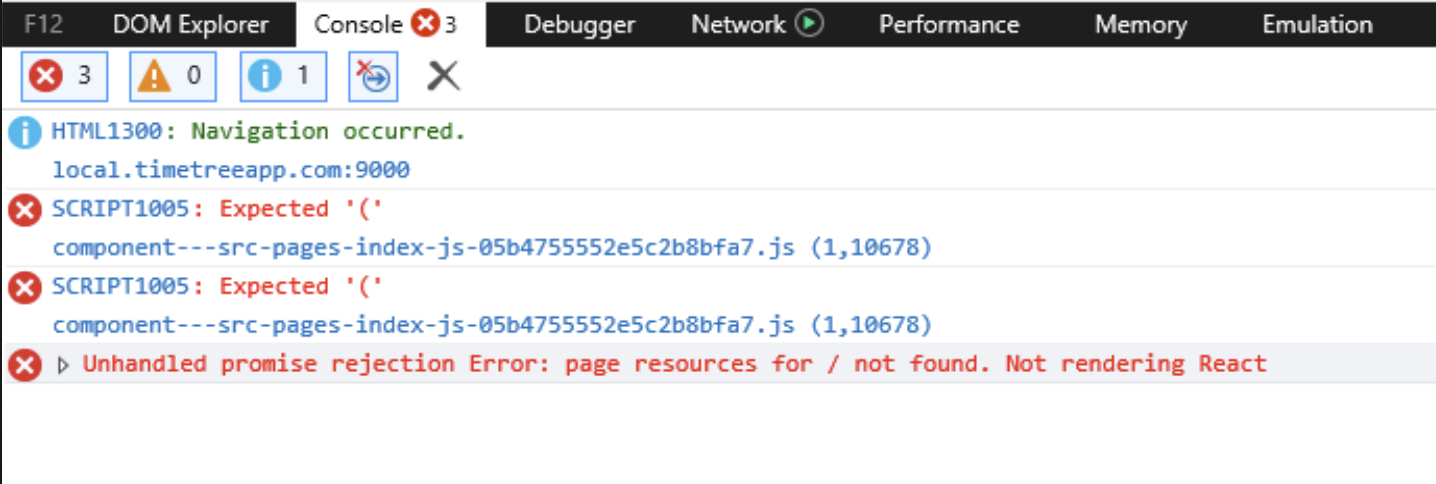
Environment
- Internet Exploler 11.1339.17763.0
- Windows 10 Enterprise Evaluation (version 1809)
- Running with VirtualBox image downloaded from:
https://developer.microsoft.com/en-us/microsoft-edge/tools/vms/ $ gatsby infoSystem: OS: macOS 10.15.5 CPU: (16) x64 Intel(R) Core(TM) i9-9980HK CPU @ 2.40GHz Shell: 5.7.1 - /bin/zsh Binaries: Node: 12.14.0 - /var/folders/41/sk7nqvy57y906b5fx50bddj00000gn/T/yarn--1594785359673-0.6413617726071603/node Yarn: 1.22.4 - /var/folders/41/sk7nqvy57y906b5fx50bddj00000gn/T/yarn--1594785359673-0.6413617726071603/yarn npm: 6.13.4 - ~/.anyenv/envs/nodenv/versions/12.14.0/bin/npm Languages: Python: 2.7.16 - /usr/bin/python Browsers: Chrome: 83.0.4103.116 Firefox: 77.0.1 Safari: 13.1.1 npmPackages: gatsby: ^2.24.2 => 2.24.2 gatsby-image: ^2.4.13 => 2.4.13 gatsby-plugin-manifest: ^2.4.18 => 2.4.18 gatsby-plugin-offline: ^3.2.17 => 3.2.17 gatsby-plugin-react-helmet: ^3.3.10 => 3.3.10 gatsby-plugin-sharp: ^2.6.19 => 2.6.19 gatsby-source-filesystem: ^2.3.19 => 2.3.19 gatsby-transformer-sharp: ^2.5.11 => 2.5.11
 fujikky
All 9 comments
I am experiencing this issue as well and had to downgrade to "gatsby": "2.21.0"
 k-sav
on 15 Jul 2020
k-sav
on 15 Jul 2020
Same here. A rollback to 2.21.0 doesn't help me, unfortunately.
 TimFletcher
on 19 Jul 2020
TimFletcher
on 19 Jul 2020
FWIW I removed all instances of async / await and am now getting errors related to generator functions not being transpiled by Babel. IE chokes on function*.
TimFletcher
on 20 Jul 2020
Ok, so my issue with function* was due to not using the IE11 compatible version of react-hook-form. After removing all my async/await statements and replacing them with promises / .then() I'm now up and running.
TimFletcher
on 21 Jul 2020
I have found a workaround for this issue.
Add the code below to gatsby-node.js.
exports.onCreateBabelConfig = ({ actions }) => {
  actions.setBabelPlugin({
    name: require.resolve("@babel/plugin-transform-regenerator"),
  });
};
This seems to work for my project.
fujikky
on 21 Jul 2020
Hi @fujikky
Sorry to hear you're running into an issue. To help us best begin debugging the underlying cause, it is incredibly helpful if you're able to create a minimal reproduction. This is a simplified example of the issue that makes it clear and obvious what the issue is and how we can begin to debug it.
If you're up for it, we'd very much appreciate if you could provide a minimal reproduction and we'll be able to take another look.
Thanks for using Gatsby! 💜
 wardpeet
on 22 Jul 2020
wardpeet
on 22 Jul 2020
@wardpeet
This is reproduction repository: https://github.com/fujikky/reproduce-gatsby-issue-async-await
Also deployed here: https://reproduce-gatsby-issue-async-await.netlify.app/
It contains the following async await functions.
const [waited, setWaited] = useState(false)
useEffect(() => {
  ;(async () => {
    await wait(1000)
    setWaited(true)
  })()
}, [])
As expected behavior, Worked! is displayed in the headline title after 1 second.
Chrome worked fine, but IE11 got a runtime error.
fujikky
on 23 Jul 2020
Thanks! Seems like I made a mistake in our babel-config. I've got a PR up and should be merged tomorrow. Sorry for the inconvenience it may have caused.
wardpeet
on 23 Jul 2020
Fixed in [email protected]
wardpeet
on 24 Jul 2020
Related issues
 kalinchernev
·
3Comments
kalinchernev
·
3Comments
 theduke
·
3Comments
theduke
·
3Comments
 ghost
·
3Comments
ghost
·
3Comments
 3CordGuy
·
3Comments
3CordGuy
·
3Comments
 ferMartz
·
3Comments
ferMartz
·
3Comments
Most helpful comment
Fixed in
[email protected]