Gatsby: Links using current url as root
Description
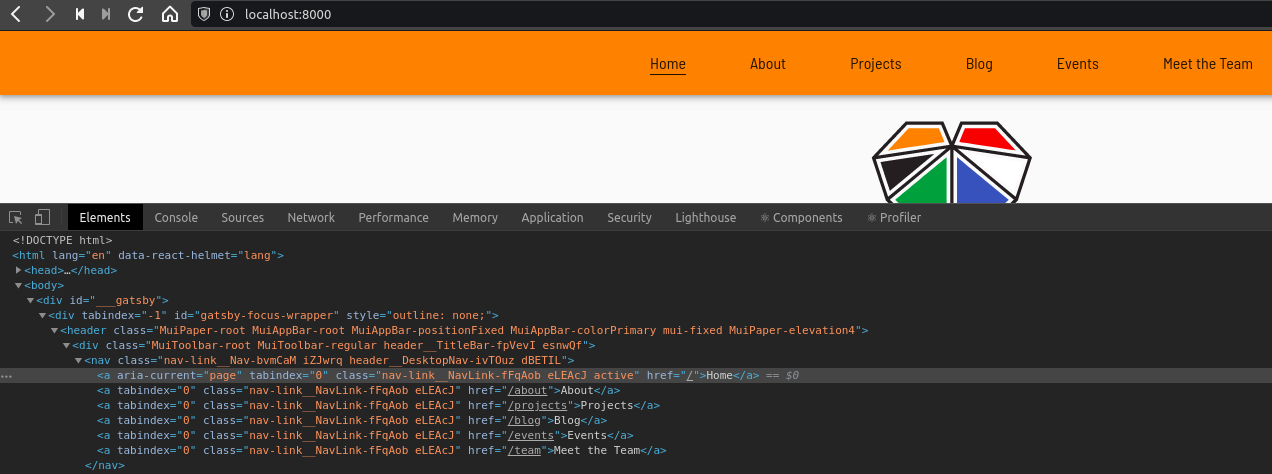
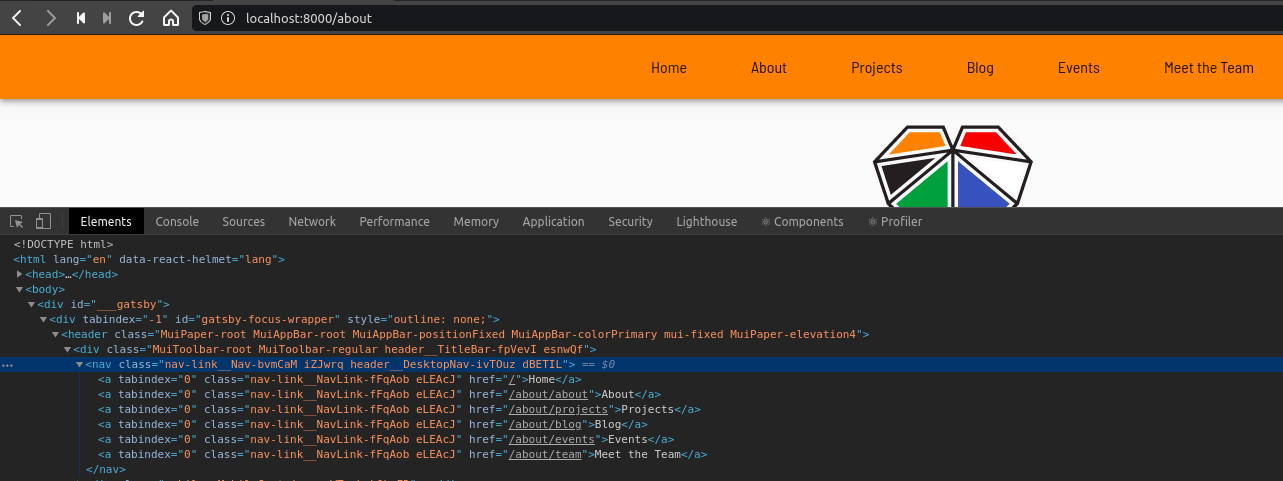
Links (using Gatsby Link component) have started to use the current page address as though it is the root of the site. This means that links from the home page at / are fine but links from any other page result in 404s.
e.g. a link to /about from / is OK but a link to /about from /blog directs the browser to /blog/about.
I noticed this when updating dependencies on an older project. I've gone back to the project as it is on master and I'm now seeing the same problem there. It's fine in my current production environment. Running a production build locally and serving it with npx http-server . also results in this issue.
Screenshot showing rendered html for primary links on home page
Screenshot showing rendered html for primary links on about page. Note that all hrefs now begin with /about
Thank you :heart:
Steps to reproduce
- Browse to deploy preview
- Click any primary nav link (e.g. to the about page)
- You should be on the about page. Click any other primary nav link
- You should now have a 404
Deploy preview of update-dependencies branch, with broken links - https://deploy-preview-53--friends-of-chitambo.netlify.app
Repo - https://github.com/Vazerthon/friends-of-chitambo
Production site, working as expected - https://friendsofchitambo.org.uk/
The site uses Contentful for data. I'm not sure if there's a way I can allow someone to build the project without providing keys
Expected result
Links should always use absolute paths
Actual result
Links appear to use the current path as the base for hrefs
Environment
I was using Node 13.5.0 until recently. Going back to that does not seem to help
on master
  System:
    OS: Linux 4.15 Ubuntu 18.04.4 LTS (Bionic Beaver)
    CPU: (4) x64 Intel(R) Core(TM) i7-6500U CPU @ 2.50GHz
    Shell: 5.4.2 - /usr/bin/zsh
  Binaries:
    Node: 14.4.0 - ~/.nvm/versions/node/v14.4.0/bin/node
    Yarn: 1.21.1 - /usr/bin/yarn
    npm: 6.14.5 - ~/.nvm/versions/node/v14.4.0/bin/npm
  Languages:
    Python: 2.7.17 - /usr/bin/python
  Browsers:
    Chrome: 83.0.4103.97
    Firefox: 77.0.1
  npmPackages:
    gatsby: ^2.13.50 => 2.23.3
    gatsby-image: ^2.2.8 => 2.4.7
    gatsby-plugin-manifest: ^2.2.4 => 2.4.11
    gatsby-plugin-material-ui: ^2.1.5 => 2.1.9
    gatsby-plugin-offline: ^2.2.4 => 2.2.10
    gatsby-plugin-react-helmet: ^3.1.3 => 3.3.4
    gatsby-plugin-sharp: ^2.2.9 => 2.6.11
    gatsby-plugin-styled-components: ^3.1.2 => 3.3.4
    gatsby-source-contentful: ^2.1.17 => 2.3.15
    gatsby-source-filesystem: ^2.1.8 => 2.3.11
    gatsby-transformer-json: ^2.2.2 => 2.4.5
    gatsby-transformer-sharp: ^2.2.5 => 2.5.5
On update-dependencies branch
  System:
    OS: Linux 4.15 Ubuntu 18.04.4 LTS (Bionic Beaver)
    CPU: (4) x64 Intel(R) Core(TM) i7-6500U CPU @ 2.50GHz
    Shell: 5.4.2 - /usr/bin/zsh
  Binaries:
    Node: 14.4.0 - ~/.nvm/versions/node/v14.4.0/bin/node
    Yarn: 1.21.1 - /usr/bin/yarn
    npm: 6.14.5 - ~/.nvm/versions/node/v14.4.0/bin/npm
  Languages:
    Python: 2.7.17 - /usr/bin/python
  Browsers:
    Chrome: 83.0.4103.97
    Firefox: 77.0.1
  npmPackages:
    gatsby: ^2.23.3 => 2.23.3
    gatsby-image: ^2.4.7 => 2.4.7
    gatsby-plugin-manifest: ^2.4.11 => 2.4.11
    gatsby-plugin-material-ui: ^2.1.9 => 2.1.9
    gatsby-plugin-offline: ^3.2.9 => 3.2.9
    gatsby-plugin-react-helmet: ^3.3.4 => 3.3.4
    gatsby-plugin-sharp: ^2.6.11 => 2.6.11
    gatsby-plugin-styled-components: ^3.3.4 => 3.3.4
    gatsby-source-contentful: ^2.3.15 => 2.3.15
    gatsby-source-filesystem: ^2.3.11 => 2.3.11
    gatsby-transformer-json: ^2.4.5 => 2.4.5
    gatsby-transformer-sharp: ^2.5.5 => 2.5.5
 Vazerthon
All 7 comments
I'm betting it's possible that the URL that ends up in the links are not prefixed with a "/" which likely is making the link act as a relative rather than absolute link.
 lannonbr
on 13 Jun 2020
lannonbr
on 13 Jun 2020
@lannonbr you're right that they don't begin with / but that hasn't changed, the data that builds the primary nav is below.
To make this even stranger, production re-builds triggered by content changes are still going through fine and not resulting in broken pages.
[
  {text: "Home", to: "/", weight: 1},
  {text: "About", to: "about", weight: 2},
  {text: "Projects", to: "projects", weight: 3},
  {text: "Blog", to: "blog", weight: 100},
  {text: "Events", to: "events", weight: 110},
  {text: "Meet the Team", to: "team", weight: 120}
],
Edit
I've just tried forcing a / onto the beginning of every link with
const absoluteTo = to => (to.startsWith('/') ? to : `/${to}`);
but this has made no difference
Vazerthon
on 14 Jun 2020
Hi @Vazerthon. We recently added support for relative links with gatsby-link, so this is expected behaviour. The previous links will have given errors in the console in development mode, because they would not have been valid. We previously only supported absolute, local links. That said, if you are indeed now forcing a slash onto the links then it should fix it. Can you share the code that you're using for that?
 ascorbic
on 16 Jun 2020
ascorbic
on 16 Jun 2020
Hi. I'm having the same issue with Localized links. The regular links with Link work fine. Please help.
The component:
const LocalizedLink = ({ to, ...props }) => {
const { locale } = useContext(LocaleContext);
const isIndex = to === /;
const path = ${locales[locale].path}${isIndex ? `` :${to}};
return ;
};
Thank you.
Solved.
It looks like it's working nou after I added slash at the beginning of the string:
const path = /${locales[locale].path}${isIndex ? `` :${to}};
 juliahop
on 16 Jun 2020
juliahop
on 16 Jun 2020
Thanks @ascorbic, I was in a rush when I tested adding a / at the start of links.
I've had a quick look just now and I can get some links working so I think I'll just need to go through the site checking where I've used Link. I'll check properly later tonight then close this issue.
Thanks for your help!
Vazerthon
on 17 Jun 2020
That's all working with / added at the start of each link. Thanks again for your help @ascorbic
The previous links will have given errors in the console in development mode
They did, and I foolishly ignored them :see_no_evil:
Vazerthon
on 17 Jun 2020
That's great. Thanks for letting me know.
ascorbic
on 17 Jun 2020
Related issues
 andykais
·
3Comments
andykais
·
3Comments
 kalinchernev
·
3Comments
kalinchernev
·
3Comments
 signalwerk
·
3Comments
signalwerk
·
3Comments
 brandonmp
·
3Comments
brandonmp
·
3Comments
 benstr
·
3Comments
benstr
·
3Comments
Most helpful comment
Hi @Vazerthon. We recently added support for relative links with gatsby-link, so this is expected behaviour. The previous links will have given errors in the console in development mode, because they would not have been valid. We previously only supported absolute, local links. That said, if you are indeed now forcing a slash onto the links then it should fix it. Can you share the code that you're using for that?