Gatsby: How to use gatsby-image with strapi?
Summary
Hello, I use gatsby-image plugin with strapi. My image data is fetched by gatsby-source-strapi.
But it occurs error.

Also, I try to ..,GatsbyImageSharpFixed, but it doesn't work.
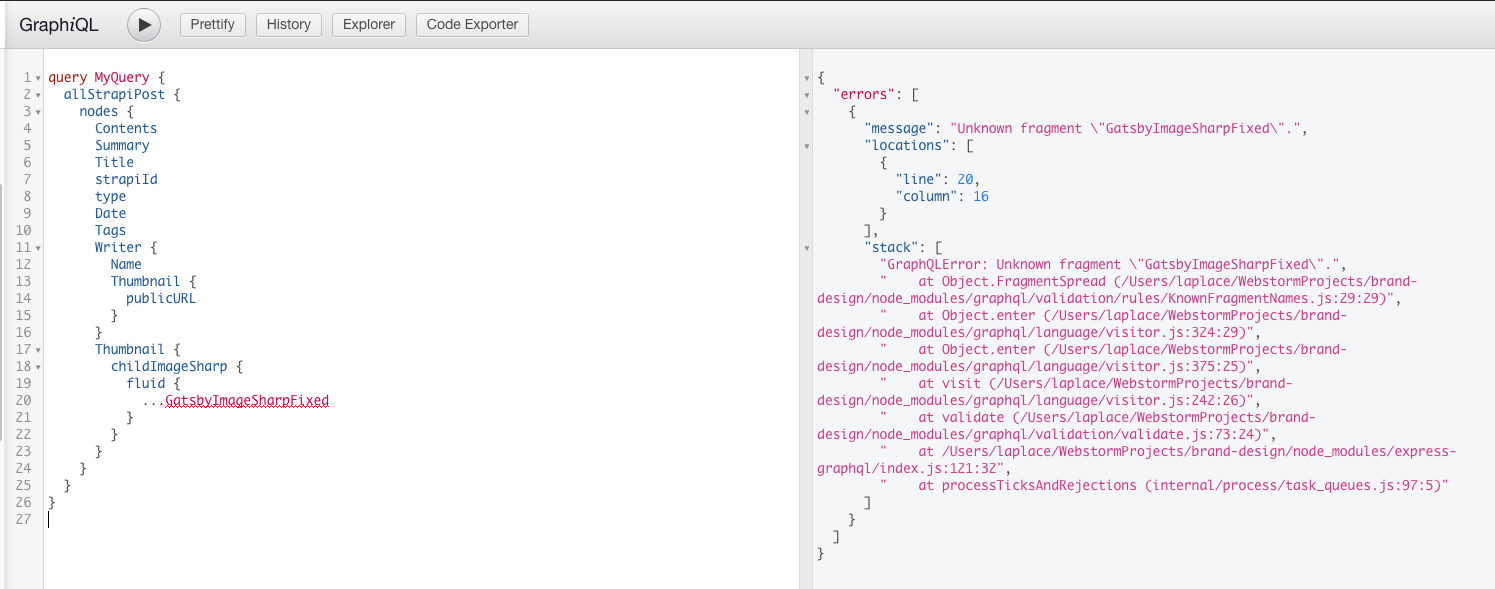
How do i use gatsby-image with gatsby-source-strapi?
File contents (if changed)
gatsby-config.js
module.exports = {
  plugins: [
    `gatsby-plugin-react-helmet`,
    {
      resolve: `gatsby-source-filesystem`,
      options: {
        name: `images`,
        path: `${__dirname}/src/assets/img`,
      },
    },
    `gatsby-transformer-sharp`,
    `gatsby-plugin-sharp`,
    {
      resolve: `gatsby-source-strapi`,
      options: {
        apiURL: `strapi-url`,
        queryLimit: 1000, // Default to 100
        contentTypes: [
          'post'
        ],
        singleTypes: [],
        // Possibility to login with a strapi user, when content types are not publically available (optional).
        loginData: {
          identifier: '',
          password: '',
        },
      },
    },
  ],
}
gatsby-node.js:
exports.createPages = async ({ actions, graphql }) => {
  const { createPage } = actions
  const result = await graphql(
    `
      query MyQuery {
        allStrapiPost {
            nodes {
              Contents
              Summary
              Title
              strapiId
              type
              Date
              Tags
              Writer {
                Name
                Thumbnail {
                  publicURL
                }
              }
              Thumbnail {
                childImageSharp {
                  fluid {
                    base64
                    tracedSVG
                    srcWebp
                    srcSetWebp
                    originalImg
                    originalName
                    src
                    srcSet
                    sizes
                    presentationWidth
                    presentationHeight
                    aspectRatio
                  }
                }
              }
            }
        }
      }
    `
  )

  result.data.allStrapiPost.nodes.forEach(node => {
    createPage({
      path: `/posts/${node.strapiId}`,
      component: require.resolve(`./src/templates/post.js`),
      context: { node },
    })
  })
}
templates/post.js
import React from 'react';
import classNames from 'classnames';
import '../assets/css/style.css';
import Header from '../components/header';
import Footer from '../components/footer';
import Image from 'gatsby-image';

const PostPage = ({ pageContext: { node } }) => {
  return (
    <div className={classNames('wrap', node.type)}>
      <Header />
      <main id="main" className="container">
        <div className="post_top_img">
          <Image src={node.Thumbnail?.childImageSharp.fluid} alt="" />
        </div>
      </main>
      <Footer />
    </div>
  );
};

export default PostPage;
 hg-pyun
All 2 comments
Hi. The immediate issue there is that you using src in gatsby-image, rather than fluid. You are also not checking whether the image exists, so if Thumbnail is undefined you will pass undefined to it. My suggestion:
const thumbnail = node.Thumbnail?.childImageSharp.fluid;
  return (
    <div className={classNames('wrap', node.type)}>
      <Header />
      <main id="main" className="container">
        <div className="post_top_img">
          { thumbnail && <Image fluid={thumbnail} alt="" /> }
        </div>
      </main>
      <Footer />
    </div>
  );
It's also not a good idea to pass all of the data through in context. It's better to pass in just an id or slug, and then use a page query. See these instructions for more information.
Finally, the reason you're having trouble with GraphiQL is because you can't use fragments there. You'll need to manually add the fields.
Let me know if this helps!
 ascorbic
on 4 Jun 2020
ascorbic
on 4 Jun 2020
@ascorbic I solved the problem. Also, your advice is very helpful. Thank you!
hg-pyun
on 5 Jun 2020
Related issues
 benstr
·
3Comments
benstr
·
3Comments
 ferMartz
·
3Comments
ferMartz
·
3Comments
 kalinchernev
·
3Comments
kalinchernev
·
3Comments
 3CordGuy
·
3Comments
3CordGuy
·
3Comments
 brandonmp
·
3Comments
brandonmp
·
3Comments
Most helpful comment
Hi. The immediate issue there is that you using
srcin gatsby-image, rather thanfluid. You are also not checking whether the image exists, so ifThumbnailis undefined you will pass undefined to it. My suggestion:It's also not a good idea to pass all of the data through in context. It's better to pass in just an id or slug, and then use a page query. See these instructions for more information.
Finally, the reason you're having trouble with GraphiQL is because you can't use fragments there. You'll need to manually add the fields.
Let me know if this helps!