Gatsby: Page rendering uses wrong useState default value
Description
In production, page rendering is partially wrong when using useState with a default value that depends on window.
Steps to reproduce
The following fork of a starter template demonstrates the bug. Check specifically index.js and index.css. It boils down to a useState getting initialised with this piece of code:
if ((typeof window) === 'undefined') { // required for build not to fail
    return NO_URL;
}

return window.location.href;
The conditional statement is there for gatsby to be able to build, because window is not defined during building.
Expected result
The following is obtained with yarn start / gatsby develop. All is well.

Actual result
This is obtained when building with rm -rf .cache public && ./node_modules/.bin/gatsby build --prefix-paths

The red text is because of a CSS class that would only be set if the initial value of the setState were NO_URL. But the shown url is obviously not NO_URL. So the colour and the text contradict each other.
Environment
  System:
    OS: Linux 5.3 Ubuntu 19.10 (Eoan Ermine)
    CPU: (8) x64 Intel(R) Core(TM) i5-8265U CPU @ 1.60GHz
    Shell: 5.0.3 - /bin/bash
  Binaries:
    Node: 12.16.1 - /tmp/yarn--1590166014711-0.6080215808640919/node
    Yarn: 1.21.1 - /tmp/yarn--1590166014711-0.6080215808640919/yarn
    npm: 6.13.4 - ~/.nvm/versions/node/v12.16.1/bin/npm
  Languages:
    Python: 2.7.17 - /usr/bin/python
  Browsers:
    Chrome: 81.0.4044.138
    Firefox: 76.0.1
  npmPackages:
    gatsby: ^2.21.37 => 2.21.37
 NeroVanbiervliet
All 8 comments
You've identified the reason correctly: that window isn't available during gatsby build process. If you're after information about the location there is a prop injected into each page that provides this.
 herecydev
on 22 May 2020
herecydev
on 22 May 2020
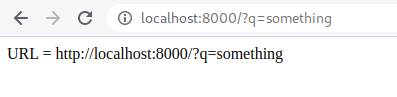
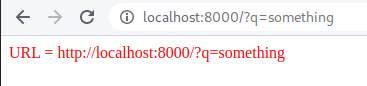
Thanks for the reply! I updated my example using the location prop. The test case slightly changed, red text now means that no url params were present. But the error persists, see these updated images:
Working as expected in dev:
Bug is there in production:
NeroVanbiervliet
on 23 May 2020
I'm able to repro the problem, and I think I have an answer but I'll preface this with the age old "I'm no expert" 😁
In the gatsby build there will be no search params so it'll render as invalid (you'll see that in the public folder), at some point on the client when it fetches the react code there will be a "hydration" from the static html to the interactive react content. Ideally you would expect the react to "take over" and rerender with the new location prop and change the DOM accordingly. _However_, the big caveat is that react expects the static html and the components to be identical (or "in sync" if you will). For performance reasons it doesn't revalidate what's there and so will skip over making changes. You can read lots more here. React "knows" that the state of the attribute is now "valid" but is also fully expecting that the DOM would have also been set to "valid" as part of SSR.
So it's not really a gatsby problem but a react hydration caveat, the same would undoubtedly apply to other SSR frameworks. Hope that helps you!
herecydev
on 23 May 2020
That's a pretty in depth answer for a non expert, thanks! :) Your explanation matches indeed with the observed behaviour. I tried the suggestion of the docs, triggering a second render on the client with useEffect. The second render is triggered, but it is still wrong after two renders... Any idea where to go from here?
NeroVanbiervliet
on 23 May 2020
If you're going to hack it with useEffect you need to make react believe it needs to change the DOM. As it has it once in state as "invalid" and the useEffect isn't changing that value, the reconciliation agains the DOM would be a no-op so it's not changing it.
I think the following would work:
  const [url, setUrl] = useState()

  useEffect(() => {
    setUrl(getUrl(location))
  }, []);
Wow, that's working! useState() without initial value seems undocumented, but it works. Updated the repo for reference. Is this something I should make an issue for over at React?
NeroVanbiervliet
on 23 May 2020
It just uses undefined, you could have also used useState(undefined), useState('foo'), etc. The trick here is for the value to be different and then react will step in and change the DOM as the value changes.
Is this something I should make an issue for over at React?
I don't think anything will change, it's a very important perf fix to not enumerate all entire DOM to check for edge cases changes. Just one to be aware of I suppose!
herecydev
on 23 May 2020
All clear, thanks a lot for your help!
NeroVanbiervliet
on 23 May 2020
Related issues
 jimfilippou
·
3Comments
jimfilippou
·
3Comments
 timbrandin
·
3Comments
timbrandin
·
3Comments
 theduke
·
3Comments
theduke
·
3Comments
 3CordGuy
·
3Comments
3CordGuy
·
3Comments
 brandonmp
·
3Comments
brandonmp
·
3Comments