Gatsby: Can't debug gatsby develop in v2.22.4
Description
Can't debug gatsby develop in VS Code.
VS Code v1.45.1
Gatsby v2.22.4
Using launch settings
{
  "version": "0.2.0",
  "configurations": [
    {
      "name": "Gatsby develop",
      "type": "node",
      "request": "launch",
      "protocol": "inspector",
      "program": "${workspaceRoot}/node_modules/gatsby/dist/bin/gatsby",
      "args": ["develop"],
      "stopOnEntry": false,
      "runtimeArgs": ["--nolazy"],
      "sourceMaps": true,
    }
  ]
}
If I downgrade Gatsby to v2.21.37 it works perfectly.
Withing the debug terminal I can execute .scripts to check which files are loaded and there is no trace of gatsby-node.js. However, gatsby-config.js is and I can set BPs in gatsby-config.js normally.
Steps to reproduce
Clone project at https://github.com/JacoboGallardo/gatsby-debug-issues and follow readme.md instructions.
Expected result
I should be able to hit the BP set in gatsby-node.js.
Actual result
Can't set any BP in gatsby-node.js.
Environment
System:
OS: Windows 10 10.0.18363
CPU: (16) x64 AMD Ryzen 7 2700X Eight-Core Processor
Binaries:
Node: 13.14.0 - C:\Program Files\nodejs\node.EXE
Yarn: 1.22.0 - C:\Program Files (x86)\Yarn\bin\yarn.CMD
npm: 6.14.4 - C:\Program Files\nodejs\npm.CMD
Languages:
Python: 3.6.8 - C:\Users\Jacobo\AppData\Local\Programs\Python\Python36\python.EXE
Browsers:
Edge: 44.18362.449.0
npmPackages:
gatsby: ^2.21.37 => 2.21.37
gatsby-image: ^2.4.4 => 2.4.4
gatsby-plugin-manifest: ^2.4.5 => 2.4.5
gatsby-plugin-offline: ^3.2.3 => 3.2.3
gatsby-plugin-react-helmet: ^3.3.1 => 3.3.1
gatsby-plugin-sharp: ^2.6.4 => 2.6.4
gatsby-source-filesystem: ^2.3.4 => 2.3.4
gatsby-transformer-sharp: ^2.5.2 => 2.5.2
 JacoboGallardo
All 10 comments
Yes, i have the same problem, when trying to debug with VS code, as it was explained in https://www.gatsbyjs.org/docs/debugging-the-build-process
VS Code shows that scripts being loaded:
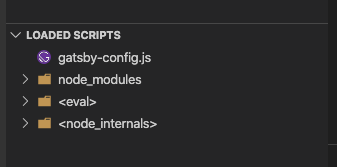
debugging gatsby-config.js is possible.
though @JacoboGallardo for info, that it works on v2.21.37 :)
 marckraw
on 24 May 2020
marckraw
on 24 May 2020
Hi, thanks for the issue!
Can you please try different versions so that we know at what version change this occurs? Then we can bisect better what the culprit was/is. Thanks!
 LekoArts
on 25 May 2020
LekoArts
on 25 May 2020
Sure!
Further tests revealed that last working version was v2.21.40.
v2.22.0 makes the debugger to throw.
v.2.22.1 doesn't throw but debugger does not load gatsby-node script. In other words, BPs don't work in gatsby-node anymore.
Hope this helps. Please let me know if I can assist in any way.
JacoboGallardo
on 25 May 2020
Hi @LekoArts , it seems that the rewrite of Gatsby Develop to use sockets in 2.22.0 (cc @mxstbr )(https://github.com/gatsbyjs/gatsby/issues/22759) is the culprit of this.
 xavivars
on 28 May 2020
xavivars
on 28 May 2020
Not ideal - but until we get this fixed / provide nicer solution - as workaround, instead of using node --inspect(-brk), "monkey-patch" gatsby/dist/commands/develop.js and change this line:
https://github.com/gatsbyjs/gatsby/blob/ad5f9af897257596069f9e8aad307215d98471af/packages/gatsby/src/commands/develop.ts#L71
to this.process = spawn(`node`, [`--inspect-brk`, tmpFileName], {, then use regular gatsby develop and use either auto attach in vscode (or if it can't find process use "attach to node process") / regular chrome dev tools way of attaching
 pieh
on 28 May 2020
pieh
on 28 May 2020
Hey @xavivars,
Does something like https://github.com/gatsbyjs/gatsby/issues/24573 help?
 wardpeet
on 28 May 2020
wardpeet
on 28 May 2020
I think this would be great :)
xavivars
on 29 May 2020
ss = spawn(`node`, [`--inspect-brk`, tmpFileName], {, then use regulargatsby developand use either auto attach in vscode (or if it can't find process use "attach to node process") / regular chrome dev tools way of attaching
Does not work for me, unfortunately.
this.process = (0, _child_process.spawn)(`node`, [`--inspect-brk`, tmpFileName], {
      env: process.env,
      stdio: [`inherit`, `inherit`, `inherit`, `ipc`]
    });
Hiya!
This issue has gone quiet. Spooky quiet. 👻
We get a lot of issues, so we currently close issues after 30 days of inactivity. It’s been at least 20 days since the last update here.
If we missed this issue or if you want to keep it open, please reply here. You can also add the label "not stale" to keep this issue open!
As a friendly reminder: the best way to see this issue, or any other, fixed is to open a Pull Request. Check out gatsby.dev/contribute for more information about opening PRs, triaging issues, and contributing!
Thanks for being a part of the Gatsby community! 💪💜
![github-actions[bot] picture](https://avatars2.githubusercontent.com/in/15368?v=4&s=40) github-actions[bot]
on 6 Jul 2020
github-actions[bot]
on 6 Jul 2020
Hey again!
It’s been 30 days since anything happened on this issue, so our friendly neighborhood robot (that’s me!) is going to close it.
Please keep in mind that I’m only a robot, so if I’ve closed this issue in error, I’m HUMAN_EMOTION_SORRY. Please feel free to reopen this issue or create a new one if you need anything else.
As a friendly reminder: the best way to see this issue, or any other, fixed is to open a Pull Request. Check out gatsby.dev/contribute for more information about opening PRs, triaging issues, and contributing!
Thanks again for being part of the Gatsby community! 💪💜
github-actions[bot]
on 16 Jul 2020
Related issues
 Oppenheimer1
·
3Comments
Oppenheimer1
·
3Comments
 brandonmp
·
3Comments
brandonmp
·
3Comments
 rossPatton
·
3Comments
rossPatton
·
3Comments
 hobochild
·
3Comments
hobochild
·
3Comments
 mikestopcontinues
·
3Comments
mikestopcontinues
·
3Comments
Most helpful comment
Not ideal - but until we get this fixed / provide nicer solution - as workaround, instead of using
node --inspect(-brk), "monkey-patch"gatsby/dist/commands/develop.jsand change this line:https://github.com/gatsbyjs/gatsby/blob/ad5f9af897257596069f9e8aad307215d98471af/packages/gatsby/src/commands/develop.ts#L71
to
this.process = spawn(`node`, [`--inspect-brk`, tmpFileName], {, then use regulargatsby developand use either auto attach in vscode (or if it can't find process use "attach to node process") / regular chrome dev tools way of attaching