Gatsby: The result of this StaticQuery could not be fetched
Description
Running gatsby develop causes "The result of this StaticQuery could not be fetched"
Steps to reproduce
Here is a repo of the code:
https://github.com/billymitchelldesign/gatsby-test
Expected result
It should pull the site metadata title into the header from the config file.
Actual result
Throws Error
Environment
System:
OS: macOS 10.15.5
CPU: (8) x64 Intel(R) Core(TM) i7-7920HQ CPU @ 3.10GHz
Shell: 5.7.1 - /bin/zsh
Binaries:
Node: 13.12.0 - /usr/local/bin/node
npm: 6.14.5 - /usr/local/bin/npm
Languages:
Python: 2.7.16 - /usr/bin/python
Browsers:
Chrome: 81.0.4044.138
Safari: 13.1.1
npmPackages:
gatsby: ^2.21.33 => 2.21.33
gatsby-plugin-sass: ^2.3.1 => 2.3.1
gatsby-plugin-styled-components: ^3.3.1 => 3.3.1
gatsby-source-graphql: ^2.5.1 => 2.5.1
gatsby-source-strapi: 0.0.12 => 0.0.12
npmGlobalPackages:
gatsby-cli: 2.12.21
 billymitchell
All 7 comments
Can you please provide steps to set this up? Looks like it expects Strapi to be installed locally (and maybe even have data)? Maybe you have an existing instance somewhere that I could use?
 vladar
on 19 May 2020
vladar
on 19 May 2020
I reinstalled this instance without the strapi source plugin and got the same problem. Here's a repo to that. I would download it and run gatsby develop.
https://github.com/billymitchelldesign/gatsby-test-no-strapi
billymitchell
on 19 May 2020
@billymitchelldesign i've picked up on your issue and i have a solution for you. Below are the steps and what is probably happening with your code.
- Cloned your latest repo (the one without strapi)
- Installed the dependencies.
- Ran
gatsby developand opened uphttp://localhost:8000and the issue presents itself. - Checking your file/folder structure, the problem lies there. It seems that the
useStaticQueryhook does not like it all and it starts throwing the error you're experiencing. - Just to confirm my suspicions, i've created a new
Headercomponent with the following path and file namesrc\components\boop-header.jswith the following content inside (leaving in only the component code itself and remove thestyled-componentspart for brevity purposes):
import React from "react"
import { useStaticQuery, graphql } from "gatsby"
import { Link } from "gatsby"
import styled from "styled-components"
const BoopHeader = () => {
  const { site } = useStaticQuery(
    graphql`
      query {
        site {
          siteMetadata {
            title
          }
        }
      }
    `
  )
  console.log(JSON.stringify(site,null,2))
  return (
    <header>
      <HeaderStyle>
        <Link className="logo" to="/">
          <h1>{site.siteMetadata.title}</h1>

        </Link>
        <ul className="menu-items">
          <li>
            <Link to="/blog" activeClassName="menu-item-active">
              Blog
            </Link>
          </li>
          <li>
            <Link to="/contact" activeClassName="menu-item-active">
              Contact Me
            </Link>
          </li>
        </ul>
      </HeaderStyle>
    </header>
  )
}
export default BoopHeader
- Updated
src\pages\index.jsto the following:
import React from "react"
import BoopHeader from "../components/boop-header"

const IndexPage = () => {
  return (
    <div>
      <BoopHeader/>
      <p>Body Copy</p>
    </div>
  )
}
export default IndexPage
- Issued
yarn developand opened uphttp://localhost:8000and i'm now presented with:
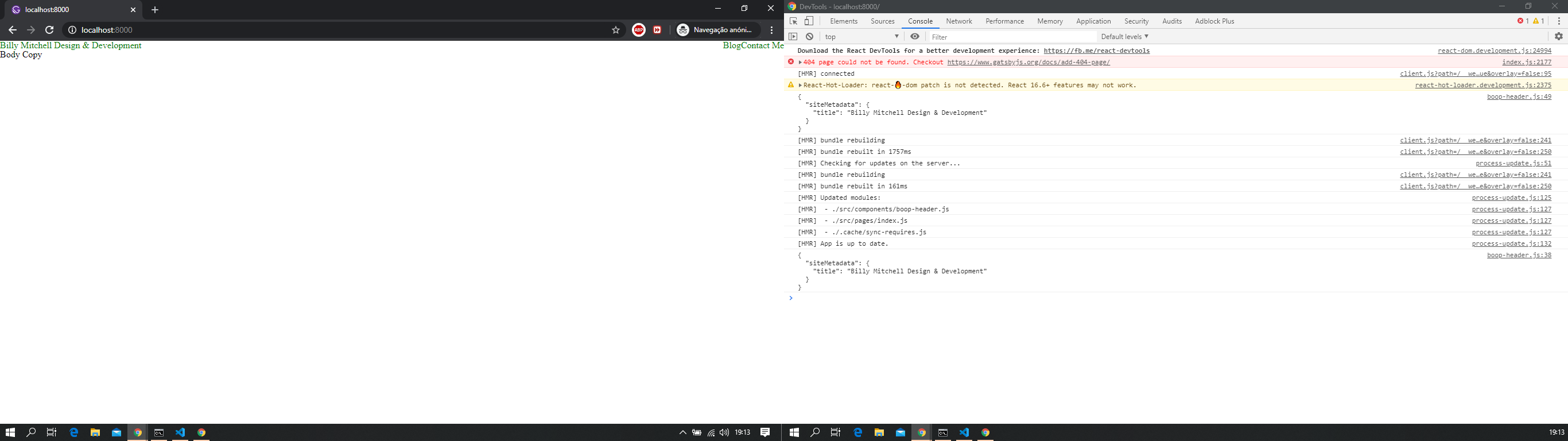
As you can see the error is gone and the data is displayed. With that, if you move the top level conponents to live under src the issue will be solved, even the original strapi issue.
Feel free to provide feedback
 jonniebigodes
on 20 May 2020
jonniebigodes
on 20 May 2020
Thank you so much! I had no idea the components folder needed to be in the source folder.
billymitchell
on 20 May 2020
@billymitchelldesign no need to thank, glad that i was able to help you with your issue.
Stay safe.
jonniebigodes
on 20 May 2020
Thank you for opening this, @billymitchelldesign
We're marking this issue as answered and closing it for now but please feel free to reopen this and comment if you would like to continue this discussion. We hope we managed to help and thank you for using Gatsby! 💜
P.S. @jonniebigodes You're the best 💪 💜
vladar
on 21 May 2020
The problems comes with Google Chrome. With Firefox, its running fine. I am not sure what could be the problem. I tried clearing browsers cache but didn't work! Now I'm stuck!
 adisher
on 6 Jul 2020
adisher
on 6 Jul 2020
Related issues
 jimfilippou
·
3Comments
jimfilippou
·
3Comments
 kalinchernev
·
3Comments
kalinchernev
·
3Comments
 3CordGuy
·
3Comments
3CordGuy
·
3Comments
 KyleAMathews
·
3Comments
KyleAMathews
·
3Comments
 benstr
·
3Comments
benstr
·
3Comments