Gatsby: ⚡️ typeface-poppins package seems to bloat my document
Summary
Hi all!
I'm using the typeface-poppins package to load a Google Font locally. https://www.npmjs.com/package/typeface-poppins
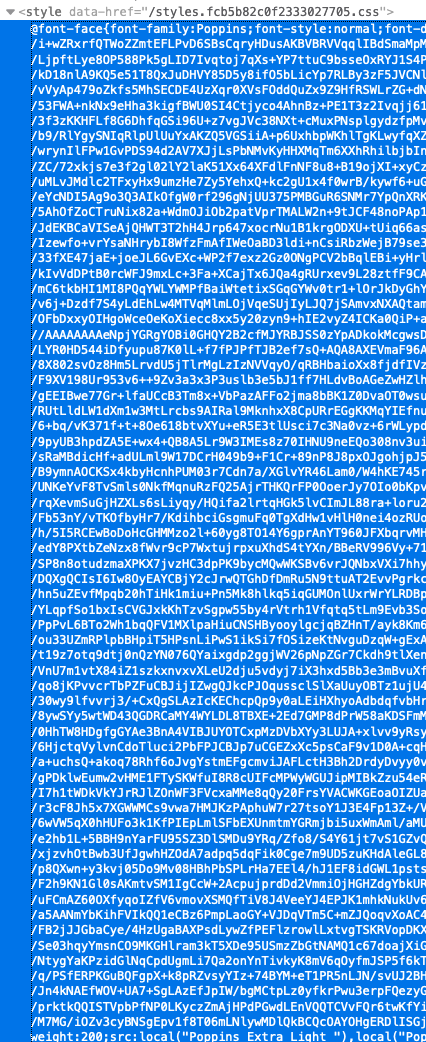
While running some Lighthouse tests, I noticed that my Document file size was ~180KB, which felt a bit too big for a simple landing page. After debugging a bit I noticed that my style tag was really big, mostly driven by the fonts from typeface-poppins.
In particular, the url() path for each font variation is a base64 string that's suuuper long, which is what's driving the file size.
Is this the expected behavior? Or perhaps I'm doing something wrong when setting things up. 🤔 Should it not simply be a path to the file like the https://gatsbyjs.org site?
👇 Fonts loaded on gatsby.org show a path to /static/... instead of a base64 string.
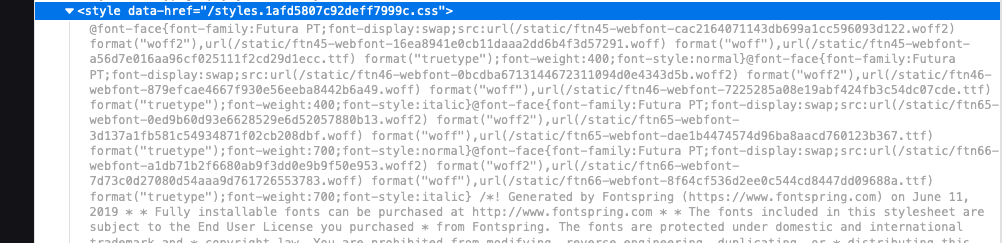
I ran a test to see the package's impact on the file size:
Before:
- Document size: 184KB
- FCP: ~2.5s
- TTI: ~3.5s
After (removing typeface-poppins)
- Document size: 27KB (more inline with other Gatsby projects that I've done/seen)
- FCP: ~1.5s
- TTI: ~ 2.8s
Relevant information
Implementation
// gatsby-browser.js

import 'typeface-poppins'
import './src/css/style.css' // my global styles
Site
- https://realestateshows.com
- Lighthouse report: https://lighthouse-metrics.com/one-time-tests/5eb4a888c8916d0007585513/runs/5eb4a888c8916d0007585515
Test branch with fonts removed
- https://5eb49e89370514000670a72d--res-www.netlify.app/
- Lighthouse report: https://lighthouse-metrics.com/one-time-tests/5eb4a8b5c8916d000758551b/runs/5eb4a8b5c8916d000758551d
The really long base64 string
 jacobarriola
All 4 comments
Even I'm facing the same issue. Loading typeface fonts locally was supposed to improve FCP, but in my case due to the bloated HTML size, the FCP has deteriorated.
 praveenweb
on 8 May 2020
praveenweb
on 8 May 2020
My guess is that it's related to webpack but I'm not sure. Perhaps @wardpeet has an idea here?
 pvdz
on 8 May 2020
pvdz
on 8 May 2020
Thanks @pvdz - I'm looking at customizing the webpack config to somehow ignore font files in the url-loader. Looks like this might be a start, although it's a bit heavy to get a sense of how to do it.
https://www.gatsbyjs.org/docs/node-apis/#onCreateWebpackConfig
Meanwhile, I may just download the Google Font files onto my project and stick them in /static in order to bypass webpack's processing, which is what seems to be causing this issue.
jacobarriola
on 10 May 2020
Ok, this seems to be working for me now. Setting the limit value to 0 seems to do the trick. I tried passing false but got an error message that a number is required.
// gatsby-node.js

exports.onCreateWebpackConfig = ({
  stage,
  rules,
  loaders,
  plugins,
  actions,
}) => {
  actions.setWebpackConfig({
    module: {
      rules: [
        {
          test: /\.woff2$/,
          use: [loaders.url({ limit: 0 })],
        },
      ],
    },
  })
}
I also ended up grabbing fonts from https://google-webfonts-helper.herokuapp.com/ instead of typeface-. The typeface package adds @font-face rules for all the variations, which is unnecessary (even though the browser only downloads the files that are used).
jacobarriola
on 10 May 2020
Related issues
 hobochild
·
3Comments
hobochild
·
3Comments
 dustinhorton
·
3Comments
dustinhorton
·
3Comments
 brandonmp
·
3Comments
brandonmp
·
3Comments
 KyleAMathews
·
3Comments
KyleAMathews
·
3Comments
 3CordGuy
·
3Comments
3CordGuy
·
3Comments
Most helpful comment
Ok, this seems to be working for me now. Setting the
limitvalue to0seems to do the trick. I tried passingfalsebut got an error message that a number is required.I also ended up grabbing fonts from https://google-webfonts-helper.herokuapp.com/ instead of
typeface-. The typeface package adds@font-facerules for all the variations, which is unnecessary (even though the browser only downloads the files that are used).