gatsby-image is requesting each image 4 times in Safari
Description
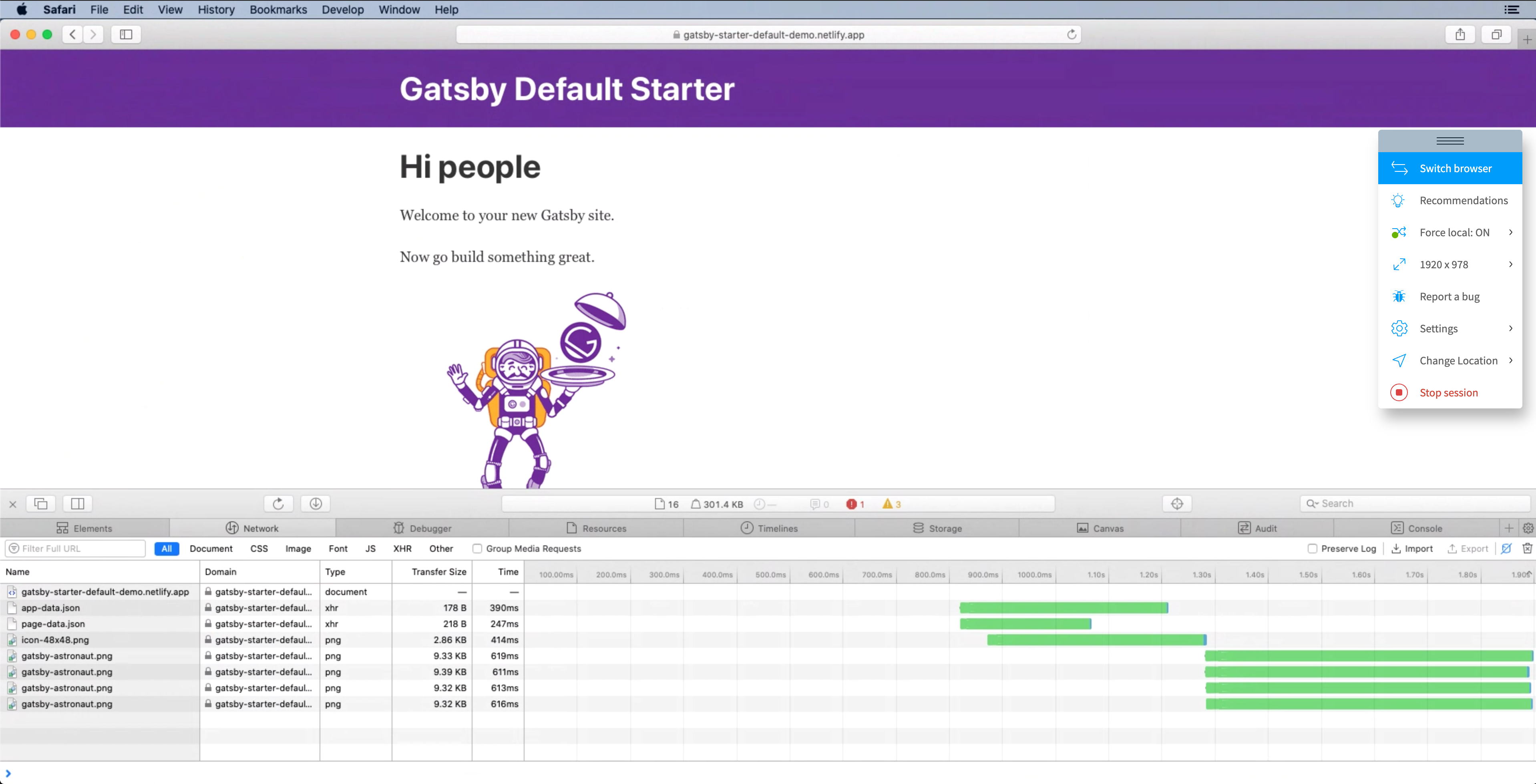
gatsby-image causes Safari (both iOS and macOS) to request the same image 4 times. To be sure that this isn't something specific to my browser and machine I also tested this in an iOS Simulator for iOS Safari, on macOS Mojave with the latest Safari and also on a clean macOS Catalina Safari via Browserstack. They all behave the same way: The same image is requested and downloaded 4 times.
Chromium-based browsers don't seem to have issues here.
Interestingly though in Firefox there is similar but indeterministic behavior: In Firefox (75, macOS 10.15.4) the same image sometimes is requested 2 times and sometimes only once. This erratic behavior in Firefox led me to believe that this might be some sort of race condition, but I couldn't find the culprit.
Steps to reproduce (for Safari)
- Create new gatsby site with the
gatsby-starter-default - Load the index page with Safari Dev Tools open and caching disabled
- Check the network tab to see that the same
gatsby-astronaut.pngis requested 4 times
Steps to reproduce (for Firefox)
- Create new gatsby site with the
gatsby-starter-default - Load the index page with Firefox Dev Tools open and caching disabled
- Check the network tab while reloading the page in quick succession to see that that the same
gatsby-astronaut.pngsometimes is requested once and sometimes twice.
Expected result
The browser should only load one image that works for the viewport.
Actual result
The browser instead loads the same image several times.
Screenshot

Environment
System:
OS: macOS 10.15.4
CPU: (12) x64 Intel(R) Core(TM) i7-8850H CPU @ 2.60GHz
Shell: 5.7.1 - /bin/zsh
Binaries:
Node: 12.16.1 - ~/.nvm/versions/node/v12.16.1/bin/node
Yarn: 1.22.4 - /usr/local/bin/yarn
npm: 6.13.4 - ~/.nvm/versions/node/v12.16.1/bin/npm
Languages:
Python: 2.7.16 - /usr/bin/python
Browsers:
Chrome: 81.0.4044.122
Firefox: 75.0
Safari: 13.1
npmPackages:
gatsby: ^2.20.25 => 2.20.25
gatsby-image: ^2.3.4 => 2.3.4
gatsby-plugin-manifest: ^2.3.5 => 2.3.5
gatsby-plugin-offline: ^3.1.4 => 3.1.4
gatsby-plugin-react-helmet: ^3.2.4 => 3.2.4
gatsby-plugin-sharp: ^2.5.6 => 2.5.6
gatsby-source-filesystem: ^2.2.4 => 2.2.4
gatsby-transformer-sharp: ^2.4.6 => 2.4.6
 saryekad
All 9 comments
Hi there @saryekad! Unfortunately I can't reproduce your issue locally or on the demo page for the starter in production https://gatsby-starter-default-demo.netlify.app/. Could you either point to a repository where you consistently see the bug or produce an example on something like codesandbox so we can help debug?
 madalynrose
on 28 Apr 2020
madalynrose
on 28 Apr 2020
Hi there, that is most strange. I checked https://gatsby-starter-default-demo.netlify.app/ as well and in my browser it still loads the astronaut image 4 times. I should point out a bit more clearer though that this actually only happens when I disable caching in Safari Dev Tools via the button on the top right corner. When caching is active the image will only be loaded once, but from memory of course.
Here is a screenshot of a test in Browserstack in the latest Safari on macOS Catalina. Only after seeing this I was sure to post the issue at all because it shouldn't be just my system or my friend's system after all.
saryekad
on 29 Apr 2020
After some digging, it seems there are known bugs (https://bugs.webkit.org/show_bug.cgi?id=177068 and https://bugs.webkit.org/show_bug.cgi?id=190031) in Safari: when creating a new picture with an image and source with JS, Safari incorrectly loads both srcset.
This probably explains the multiple calls.
https://github.com/facebook/react/issues/15215
I reproduced with this behavior outside of gatsby-image:

 kraynel
on 30 Apr 2020
kraynel
on 30 Apr 2020
Yes that makes sense. This is not gatsby-image related after all it seems. Thanks for clearing that up. Much appreciated.
Unfortunately these bugs in Safari break the user experience with the blur-up technique that gatsby-image does so nicely.
Safari will replace the image several times (when they each come in?) which will cause flickering of the image: blurred image will be replaced quickly as soon as the first high res image comes in (I think still during SSR), then when hydration happens it goes blurry again and then only after a second or so it loads in the new images and replaces the blurry image again with a high res one.
But yeah this only happens on first load basically, when the images are not cached yet.
saryekad
on 1 May 2020
Hiya!
This issue has gone quiet. Spooky quiet. 👻
We get a lot of issues, so we currently close issues after 30 days of inactivity. It’s been at least 20 days since the last update here.
If we missed this issue or if you want to keep it open, please reply here. You can also add the label "not stale" to keep this issue open!
As a friendly reminder: the best way to see this issue, or any other, fixed is to open a Pull Request. Check out gatsby.dev/contribute for more information about opening PRs, triaging issues, and contributing!
Thanks for being a part of the Gatsby community! 💪💜
![github-actions[bot] picture](https://avatars2.githubusercontent.com/in/15368?v=4&s=40) github-actions[bot]
on 21 May 2020
github-actions[bot]
on 21 May 2020
Thanks for the responses. I am going to close this one as it is not a gatsby-image problem.
saryekad
on 25 May 2020
Hey @saryekad ,
I'm experiencing the exact same problem with Safari, after reading this I know that is not a problem of gatsby-image, but just out of curiosity , what have you decided to do in this case?
Thanks.
 MartinGian
on 14 Jul 2020
MartinGian
on 14 Jul 2020
Hi there,
As far as I remember I ignored it at the time, because I was expecting Apple to fix this at some point. For me it only affects the first (ever) page load anyway, after that things were cached and the problem didn't occur. But judging from your question I guess it is still not fixed?
Back then I realized that the problems were even worse when using webP images instead of pngs. As Apple announced webP support in upcoming versions of Safari it might be interesting to see if they touched on this and fixed the bugs in the process.
saryekad
on 14 Jul 2020
Same for me, it affects the first ever page load but we suspect that it is causing some bounce rate, users don't seem to like image flickering or wait 😅 .
It seems that the only option we have at the moment is wait for a fix.
Thanks for your quick response!
MartinGian
on 14 Jul 2020
Related issues
 ferMartz
·
3Comments
ferMartz
·
3Comments
 andykais
·
3Comments
andykais
·
3Comments
 jimfilippou
·
3Comments
jimfilippou
·
3Comments
 rossPatton
·
3Comments
rossPatton
·
3Comments
 hobochild
·
3Comments
hobochild
·
3Comments
Most helpful comment
After some digging, it seems there are known bugs (https://bugs.webkit.org/show_bug.cgi?id=177068 and https://bugs.webkit.org/show_bug.cgi?id=190031) in Safari: when creating a new picture with an image and source with JS, Safari incorrectly loads both srcset.
This probably explains the multiple calls.
https://github.com/facebook/react/issues/15215
I reproduced with this behavior outside of gatsby-image:
